
The following guide covers:
How to select the best software for your nonprofit organization
Best nonprofit software: our picks
#1 Uteach - Best nonprofit LMS for employee training
Best all-in-one nonprofit platforms for fundraising
Best nonprofit CRM software for donor management
Best nonprofit platforms for events & volunteer management
Best nonprofit platforms for marketing and design
Best nonprofit software for project management and operations
Nonprofit software: frequently asked questions
Running a nonprofit means working on a lot of moving parts. You’re raising funds, managing donors, planning events, coordinating volunteers, and keeping your team organized, often with limited time and resources. The right software can make those tasks easier, while the wrong tools can slow everything down.
That’s why choosing nonprofit software deserves careful thought. In this guide, we cover 12 of the best nonprofit software options across key use cases, including fundraising, donor management, events and volunteer management, marketing and design, and operations.
How to select the best software for your nonprofit organization
Choosing nonprofit software is easier when you step back and look at how your organization actually works. The right tool should support your goals today while remaining relevant as your nonprofit grows.
Here are the key things to consider before you commit.
- Your actual needs
Start with what you truly need, not what sounds impressive. If you’re just getting started or want to streamline a bulky tech stack, an all-in-one platform that handles fundraising, donations, events, donor management, and marketing in one place can reduce complexity and save time.
However, if you already like your existing setup and only need a specific capability, such as board management or volunteer coordination, a focused tool like Boardable or Mobilize may be a better fit.
- Ease of use for your team
A powerful tool only helps if your team actually uses it. Look for nonprofit software with a clean interface and workflows that match how your team already works. If onboarding feels overwhelming, your team may struggle to adopt the product. A good donor management software should combine AI-driven insights with built-in fundraising tools, making it easier for smaller teams to get started without a steep learning curve.
- Total cost, not just the starting price
Look beyond the starting price and check for hidden or long-term costs. Some platforms charge more as your contact list grows or as you unlock advanced features. Make sure the pricing model fits your budget not just now, but six months or a year down the line.
- How well it integrates with other tools
Whether you choose an all-in-one platform or a specialized tool, integrations matter. Full-featured platforms should connect smoothly with accounting tools (QuickBooks Online, Sage Intacct), email platforms (Mailchimp, Constant Contact), social media platforms (Facebook, Instagram), and payment tools (PayPal, Stripe) to keep your workflow moving smoothly. Also, you will get an experience of an all-in-one financial platform.
Specialized tools, such as board management or design software, should also integrate seamlessly with your CRM, fundraising platform, and communication tools so data flows automatically. This saves time and reduces the errors associated with manual data entry.
- Reporting and visibility into performance
Strong reporting is especially important for fundraising platforms and nonprofit CRMs. You should be able to see what campaigns are working, which donors are most engaged, and where revenue comes from.
Clear reporting helps you make better decisions, share results with stakeholders, and plan future campaigns with confidence.
- Quality of customer support
Even the best nonprofit tools can break or feel confusing at times. Before committing, pay attention to how responsive customer support is. You can test this by reaching out to the support team during a free trial or before purchasing and seeing how quickly and clearly they respond.
- Availability of tutorials and self-help resources
Full-featured nonprofit tools often come with a learning curve. It helps when a platform offers clear documentation, a knowledge base, or video tutorials so you can learn at your own pace. Good self-help resources reduce frustration and limit how often you need to contact support.
- Ability to grow with your nonprofit
Think about where your organization is headed. The best software should support your current size while leaving room to grow, whether that means more donors, more volunteers, or more campaigns. Switching tools too often can cost time and momentum.
Best nonprofit software: our picks
Nonprofit software | Best for | Features | Pricing |
Uteach | Nonprofits that need a secure LMS for employee training | Unlimited and secure hosting, enterprise-grade security, mobile learning anytime, anywhere | Book a demo to learn more |
Givebutter | Nonprofits that need an all-in-one fundraising platform that’s easy to use | Fundraising pages, donation forms, peer-to-peer fundraising, ticketed events, auctions and raffles, recurring donations, donor-covered fees, payment processing, finance management (Wallet), mobile app | Free to use as long as optional tips are enabled. If optional tips are disabled, you’ll be charged a flat $3 platform fee plus standard processing fees that you can cover yourself, pass on to donors, or make optional. |
Salesforce Nonprofit Cloud | Large nonprofits that need deep customization | Donor and constituent management, customizable data models, gift tracking, pledge management, advanced reporting and dashboards, workflow automation, role-based permissions | Pricing starts at $60/user per month, billed annually |
GoFundMe Pro | Nonprofits that want to run digital fundraising campaigns at scale | Campaign donation pages, recurring giving tools, donor management, peer-to-peer fundraising, email outreach, analytics and reporting, payment processing, automated receipts | Pricing isn’t publicly available |
Bloomerang | Nonprofits that want to improve donor retention | Donor database, donation forms, peer-to-peer fundraising, grant management, membership management, event management, auctions, mobile app | Pricing starts at $40/month, billed annually, and you can request a custom quote for the full Bloomerang suite |
Charity Engine | Nonprofits that need a full database that includes fundraising, grants, events, and membership data | Donor management, grants management, membership management, events and auctions, built-in CMS, CRM, marketing automation, reporting and analytics | Pricing is not publicly available |
Little Green Light | Small nonprofits that want a flexible donor database without enterprise complexity | Donor and constituent profiles, relationship tracking, membership management, online donations, gift tracking, custom reports, acknowledgment letters and receipts, third-party integrations | Pricing starts at $486/year (or $45/month) for 0 to 2,500 constituents and can go up to $135/month for up to 50,000 constituents |
OneCause | Nonprofits that rely on fundraising events and auctions as a major revenue driver | Event registration and ticketing, silent and live auctions, peer-to-peer fundraising, mobile bidding, event reporting, payments | Pricing is not publicly available |
Boardable | Nonprofits that need a better structure for board meetings and committee work | Agenda builder, task managers, document storage, polls, discussion boards, voting tools, eSignatures, surveys, mobile app, reporting | Offers a 14-day free trial. Paid plans start at $20.99/user per month, billed annually. |
Mobilize | Nonprofits that need to recruit and coordinate volunteers at scale | Volunteer opportunity listings, event and shift sign-ups, automated reminders, attendance tracking, volunteer communication tools, participation analytics, engagement reporting | Pricing is not publicly available |
Canva for Nonprofits | Nonprofits that need professional-looking marketing materials without having to hire a design team | Templates for social media posts, presentations, reports, flyers, etc., Brand Kit, image and font library, animations and GIFs, unlimited folders, cloud storage | Free for nonprofits |
Asana for Nonprofits | Nonprofits that need structured project tracking across teams and programs | Task and project management, timelines and boards, task dependencies, milestones, team collaboration, file attachments, integrations, progress tracking | Free plan available. Paid plans start at $10.99/user per month. Eligible nonprofits, however, get 50% on the Starter and Advanced plans |
#1 Uteach - Best nonprofit LMS for employee training
Uteach LMS is an LMS designed for organizations that need a simple, but secure platform to deliver employee training. It helps nonprofits run an online academy for the staff, volunteers, and partners by automating the training processes.
Today, Uteach is used by more than 6,000 organizations, businesses, and individuals who run their academies on the platform with ease.
For nonprofits, Uteach’s value starts with how easily training can be created and maintained. You can use Uteach’s AI tools to generate course outlines, names, and descriptions, which is especially useful when resources and time are limited. From there, training materials can be added in any format, including videos, PDFs, presentations, links, or recorded sessions.
Uteach also supports assessment and accountability, which is often critical for compliance, donor-funded programs, or internal capacity building. Nonprofits can attach quizzes and tests throughout the training or at the end to check understanding. Certificates are issued automatically once a learner finishes the required steps, which is useful for volunteer recognition, professional development, or reporting back to partners and funders. Deadlines and drip scheduling add further control, allowing organizations to pace learning over time rather than releasing everything at once.
Beyond course creation, Uteach helps nonprofits manage people and track progress in a practical way. Staff and volunteers can be assigned different roles with different access levels, making it easy to separate administrators, instructors, and learners. Progress tracking shows who has started, who is falling behind, and who has completed training.
This is particularly helpful for organizations onboarding large volunteer groups or running recurring training cycles.
Uteach also allows nonprofits to present their training in a professional, branded environment. Organizations can create a white-label academy that reflects their mission and visual identity. Training can also be delivered through your own mobile app, making learning accessible on the go without relying on desktop access.
While donation and fundraising platforms handle money and supporter engagement, Uteach focuses on education and internal enablement, helping nonprofits train people consistently, document impact, and scale knowledge without adding operational complexity.
Book a demo to discuss how Uteach fits your workflow and how you can automate your training.
Best all-in-one nonprofit platforms for fundraising
These tools bring your core fundraising work into one place. This way, you can run donation campaigns, manage donors, and track results without juggling multiple systems. They work best if you want a single platform that supports day-to-day fundraising and long-term nonprofit growth.
#2 Givebutter
Givebutter is an all-in-one fundraising platform built for modern nonprofits that want to raise money online without stitching together multiple tools. Instead of running donations in one place, events in another, and donor records somewhere else, Givebutter brings those pieces together so every action feeds into a single system.
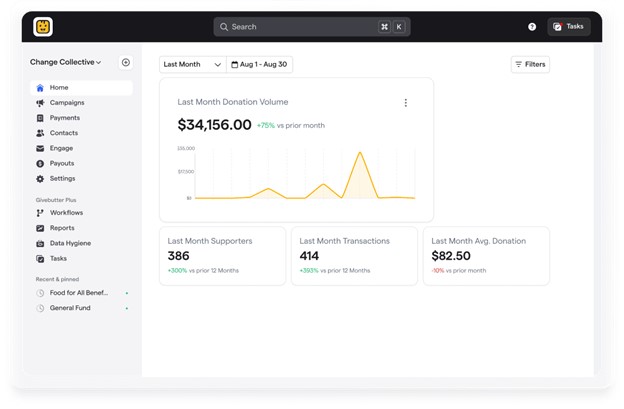
Fundraising sits at the center of everything Givebutter offers. You can create campaign pages for general donations, peer-to-peer efforts, and time-bound appeals, all with built-in sharing and mobile-friendly layouts. Donation forms are flexible and easy to embed on your website, and they support one-time gifts and recurring donations (monthly, quarterly, or annually). This makes it easier to meet supporters where they are, whether they give once or commit long term.
Givebutter also allows you to raise funds through ticketed fundraising events, livestream fundraisers, auctions, and raffles. Ticket sales, bids, and donations all flow through the same system, which means you can see how fundraising activities perform together rather than in isolation. For nonprofits that want supporters to fundraise on their behalf, peer-to-peer tools let individuals create their own pages while you track progress centrally.
Behind all of this is Givebutter’s built-in donor management. Every supporter has a profile that updates automatically as they donate, attend events, or engage with campaigns. This allows you to see patterns across campaigns, understand which activities drive repeat giving, and adjust future efforts based on real donor behavior, not assumptions.
Givebutter also handles a final step many platforms overlook: what happens after the money comes in. Donations settle into Givebutter Wallet, where nonprofits can earn 2.5% APY on their balance. Funds move into the Wallet daily, with no minimum balance and no monthly or transfer fees. The Wallet also includes FDIC pass-through insurance of up to $250,000, which provides an additional layer of protection while funds are held.
And if you’d like to connect Givebutter to your existing tech stack, the platform integrates with third-party tools like Stripe, PayPal, Mailchimp, Zapier, Google Analytics, and Meta Pixel to sync payments, email, and reporting.
Cost
Givebutter gives you access to its core fundraising features at no cost when you enable optional donor tips. This means your nonprofit pays $0 with the Givebutter Guarantee, which also covers fees donors choose not to pay.
However, if you prefer to disable tips, you’ll be charged a flat 3% platform fee across all campaign types, plus standard processing fees that you can cover yourself, pass on to donors, or make optional.
Nonprofits that want deeper reporting, automation, or advanced features can upgrade to Givebutter Plus.
- What I like about Givebutter
I appreciate how Givebutter ensures fundraising happens within a connected system rather than a set of isolated tools. Campaigns, events, donor records, and money management all work together, which saves time and reduces errors. I also like that the Wallet feature adds real financial value to nonprofits instead of simply holding funds.
- What users like about Givebutter
“I like the ability to have all my donors, partners, and contacts in one place. The ability to add financial donations from other sources (like cash or check) and to accept a variety of payments from ACH, credit card, PayPal, etc., is also great for our clients.
I appreciate that I can look at a donor or household and see how much they have given in the past and which promotions / fundraisers are most effective. And, if everything is in put correctly, GiveButter saves an enormous amount of time in January, as it can prepare my tax contribution letters in just a few minutes!”
- Melinda R., G2
- What I dislike about Givebutter
New users may need time to explore the whole platform before everything clicks. Because Givebutter offers many features and supports various fundraising formats, teams that initially need only one feature may feel there is more to learn than expected.
- What users don’t like about Givebutter
“Although I have no major complaints, I find that the platform could be more helpful for newcomers. While everything functions smoothly once you get the hang of it, the initial experience might benefit from more proactive onboarding or contextual tips. This would make it easier for new users to get started and navigate the platform with confidence.”
- Tracy, S., G2
#3 Salesforce Nonprofit Cloud
Salesforce Nonprofit Cloud is a powerful platform designed for larger nonprofits with complex processes, multiple teams, and strict reporting needs. It builds on Salesforce’s CRM, which gives you a lot of control over how you track donors and revenue.
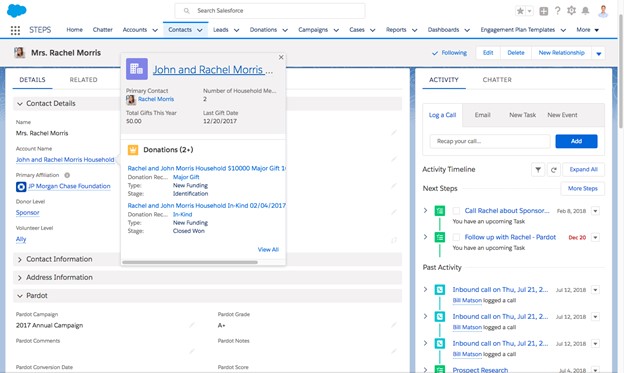
If you already use Salesforce or you have the budget for implementation support, Nonprofit Cloud can become the “source of truth” for fundraising. You can track everything from individual gifts to major gifts and grants, and model long-term commitments such as pledges and recurring donations in a structured way.
Under the hood, Salesforce leans into data design. It supports different gift types and fundraising stages, helping larger orgs maintain consistent reporting across teams. The trade-off, however, is that you’ll likely need admin time, training, and even a consultant to get the system running the way you want.
Cost
Salesforce’s Nonprofit Cloud starts at $60/user per month, billed annually. Additional plans with extra features are also available.
- What I like about Salesforce Nonprofit Cloud
I like how extensive Nonprofit Cloud is, especially for managing major gifts, pledges, and grants. If your nonprofit has complex reporting needs, Salesforce can handle them without forcing you into one fixed workflow.
- What users like about Salesforce Nonprofit Cloud
“The product allows it to be customised to your own liking. The workflows streamline our business process, making it easier for our employees to save time. It's working in its own ecosystem, which helps improve business operations.”
- Justin H., G2
- What I dislike about Salesforce Nonprofit Cloud
I dislike that Nonprofit Cloud rarely feels plug-and-play. Most nonprofits need expert support and ongoing admin work to set it up and keep it running well. For smaller teams, the time and technical support required can become a barrier to using the platform effectively.
- What users don’t like about Salesforce Nonprofit Cloud
“It does take some time to get the hang of it since it is slightly different from other [Salesforce] products.”
- Julio E. R., G2
#4 GoFundMe Pro (formerly Classy)
GoFundMe Pro (previously known as Classy) is built for nonprofits that rely heavily on online fundraising and want campaigns that convert attention into donations.
With GoFundMe Pro, you can create branded, mobile-friendly campaign pages that guide visitors to give. These pages can support both one-time and recurring donations, making it easier to turn first-time donors into long-term supporters.
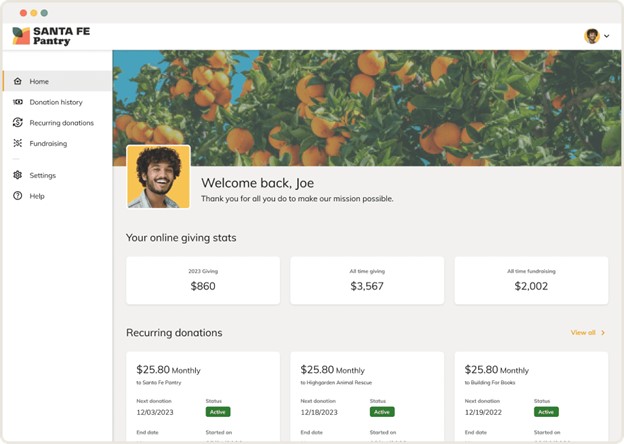
Beyond donation pages, GoFundMe Pro supports ongoing donor relationships. You can store donor data and track giving history across campaigns, which helps you see how supporters engage over time. Built-in email tools let you reach out to donors based on their behavior: whether they just gave, started a recurring donation, or participated in a peer-to-peer campaign.
GoFundMe Pro also provides performance tracking. It offers analytics that show how campaigns perform, how donors convert, and how well supporters stick around. Peer-to-peer fundraising tools let supporters create personal pages and raise money on your behalf, while you monitor progress from a central view.
Payment processing and automated receipts are handled within the platform, so donations move smoothly from checkout to confirmation.
Cost
The price of GoFundMe Pro isn’t publicly available. You have to request a demo to get a quote tailored to your organization.
- What I like about GoFundMe Pro
I like how GoFundMe Pro stays focused on online fundraising. The combination of campaign pages, recurring giving, peer-to-peer tools, and analytics makes it well-suited for nonprofits seeking to grow digital revenue and understand what drives donations.
- What users like about GoFundMe Pro
“Classy works great for us because it integrates perfectly with our CRM (Salesforce), the customer service is excellent, and the end-user experience is great and getting better. It's comforting to know Classy is always on the leading edge of innovation.”
- Brandon B., G2
- What I dislike about GoFundMe Pro
GoFundMe Pro focuses mostly on fundraising and less on broader nonprofit operations. Teams that require deeper CRM features or event management may still need additional tools alongside the CRM.
- What users don’t like about GoFundMe Pro
“The design features can be limiting, especially for those who do not have professional resources to make customized edits.”
- Leslie R., G2
Best nonprofit CRM software for donor management
Donor CRM tools help you keep track of who supports your nonprofit and how they engage with you over time. You can store contact details, donation/giving history, and notes so you know when to follow up and how to personalize outreach.
#5 Bloomerang
Bloomerang is a donor management platform designed to help nonprofits improve donor retention. It helps you track donors, understand engagement patterns, and identify supporters who are starting to drift away. This matters because replacing lapsed donors costs time and money, and you can save on those things if you’re able to convince lapsing supporters to renew their donations.
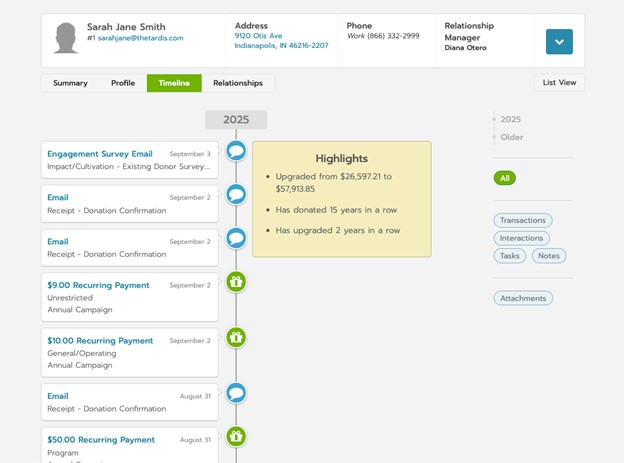
Bloomerang also provides CRM and fundraising tools, so you can manage donor records and run giving experiences in a single system. It works well for nonprofits that want clearer engagement signals and are willing to establish a consistent reporting and outreach routine.
If your team handles a lot of donor communication, Bloomerang supports this with marketing and engagement features. This helps you send the right messages to the right donors at the right time, all of which improve your retention outcomes.
Cost
Bloomerang starts at $40/month, billed annually. However, you can request a custom quote if you want the full suite of all three Bloomerang products (Fundraising, CRM, and Volunteer).
- What I like about Bloomerang
I appreciate that Bloomerang focuses on donor retention rather than just tracking gifts. If your nonprofit loses donors after a first donation, Bloomerang gives you a clearer way to measure engagement and respond earlier.
- What users like about Bloomerang
“What I like most is the intuitive nature of Bloomerang. Every new job usually requires you to learn new software, especially in the non-profit world. Learning how to effectively use Bloomerang was fairly simple and straightforward. With very little training (because there just wasn't enough time), I was able to operate the CRM and effectively provide information to our board, report to our donors, track our grant requests, and follow our plan towards meeting our goals.”
- B. Sean N., G2
- What I dislike about Bloomerang
I dislike that retention tools only work if your team uses them consistently. If you do not have a cadence for outreach and reporting, you can end up with good insights but little results.
- What users dislike about Bloomerang
“I wish it were easier to build a customized report. I feel like it takes some time and work around to get a report to be specific. For example, I can easily pull a report of donors with recurring gifts. But what about donors who give monthly but aren't set up as recurring? I should be able to easily add those specific details to the report. Instead, I have to spend valuable time figuring out a way to adjust a report to be what I need.” - Kimberly, B., G2
#6 Charity Engine
CharityEngine is a robust CRM built for nonprofits with complex fundraising operations. It combines donor management, fundraising tools, marketing automation, and payments into one system, which helps larger teams manage high volumes of data without relying on separate platforms.
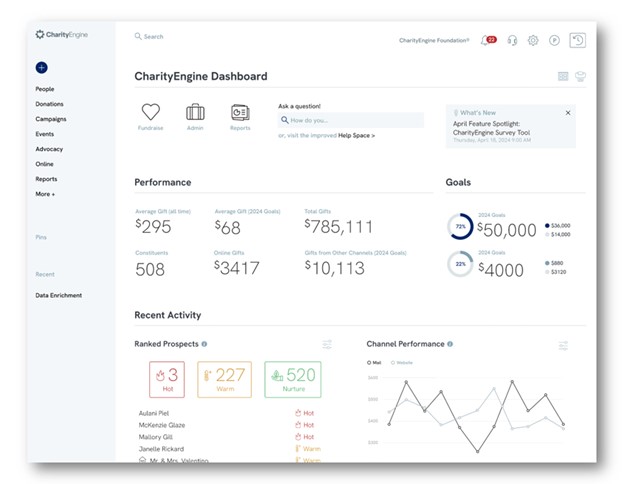
With CharityEngine, you can manage grants and track the full grant lifecycle, run membership programs, and handle fundraising events, including auctions. The platform also offers a built-in CMS and web hosting, allowing you to launch campaign sites, run fundraising initiatives, and manage your entire web presence in one place.
This type of system suits nonprofits that manage multiple moving parts simultaneously. The trade-off is that you should expect a more involved setup. The more you want CharityEngine to do, the more you need clear processes and someone who owns the system internally.
Cost
CharityEngine’s pricing isn’t publicly available. However, there are several packages to choose from depending on the features you need.
- What I like about CharityEngine
I like that this platform aims to solve the “data sprawl” problem by keeping donors, events, auctions, grants, and membership activity in one database. If your nonprofit operates several revenue streams, a unified view can save a lot of coordination time.
- What users like about CharityEngine
“CharityEngine is unique in that it has an in-CRM payment processor that is directly linked to your online donation forms and then feeds back to the donor profiles for instant transaction updates and tracking. I love the build out of the Campaigns and Initiatives, again to really track how people are finding your website, your online forms, and then following through with their donations.”
- Lynn S., G2
- What I dislike about CharityEngine
An all-in-one system can feel like a big commitment, especially if your team does not have someone to manage configuration and long-term maintenance. It can also feel like overkill if you only want a lightweight donor CRM.
- What users dislike about CharityEngine
“CharityEngine, while being a very complete system, requires substantial time to learn due to multiple ways to access information. The initial setup was more challenging than expected because of the complexity in data mapping from the previous system. A database map would have been helpful to understand where fields from the old system transitioned into the new system.” - James B.,G2
#7 Little Green Light
Little Green Light (LGL) is a donor management system built for small to mid-sized nonprofits that want flexibility without the overhead of enterprise software. It offers extensive customization options while keeping the interface straightforward and manageable for lean teams.
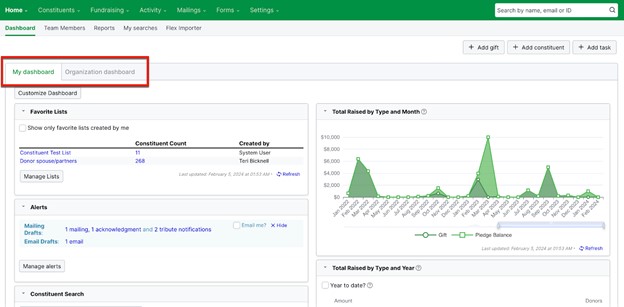
A big reason teams like LGL is flexibility. This CRM stores donor contact details, giving history, notes, and interactions in customizable records. You can track individual donors, households, and relationships, build custom fields that reflect how your nonprofit operates, and generate detailed reports for donations, donor trends, acknowledgments, and tax receipts.
Little Green Light also integrates with common tools like Stripe, PayPal, QuickBooks, Zapier, and Mailchimp, which makes it easier to use it as your donor hub while you run fundraising on a separate tool.
If your organization values clean records and solid reporting, LGL can provide this. It may not feel as “all-in-one” as newer, fundraising-first platforms (like Givebutter), but it can be a strong backbone for donor management, especially if you already like your existing donation or email tools.
Cost
Little Green Light’s pricing starts at $486/year (or $45/month) for 0 to 2,500 constituents. It can go up to $135/month for up to 50,000 constituents.
- What I like about Little Green Light
I like that LGL gives smaller teams control without overwhelming them. The integration options also help because you can connect the tools you already use while keeping donor data in one place.
- What users like about Little Green Light
“Little Green Light is a cloud-based fundraising database solution that provides a great deal of flexibility and muscle for the price. It's got just about everything most small non-profits need to track their donors, campaigns, and even grants. The online tutorials are easy to find and easy to use. Best of all, if you get stuck you can always send a question via email and get a very prompt response - usually within hours. I highly recommend it for my clients and have set it up for four organizations so far. Everyone loves it!”
- Mary H., G2
- What I dislike about Little Green Light
Teams that need a single platform that handles fundraising campaigns, events, and marketing may need additional tools alongside LGL. If you want everything in one system, LGL can feel more like the center of a stack than the whole stack.
- What users dislike about Little Green Light
“It's a deep dive into this software, and the learning curve is steep for a new donor manager. I still haven't learned all the ways to use this amazing tool. I wish I could have signed up to go to a training seminar when we began using the program.”
- Megan H., Capterra
Best nonprofit platforms for events & volunteer management
These nonprofit platforms help you plan events, register attendees, and coordinate volunteers within a single workflow. They help you manage sign-ups, schedules, and communications without relying on spreadsheets.
#8 OneCause
OneCause is built for nonprofits that run fundraising events as a core part of their revenue strategy. It focuses heavily on events like galas, charity auctions, walkathons, and peer-to-peer fundraising events, where coordination, payments, and attendee experience matter just as much as donations. Instead of treating events as a side feature, OneCause designs the platform around them.
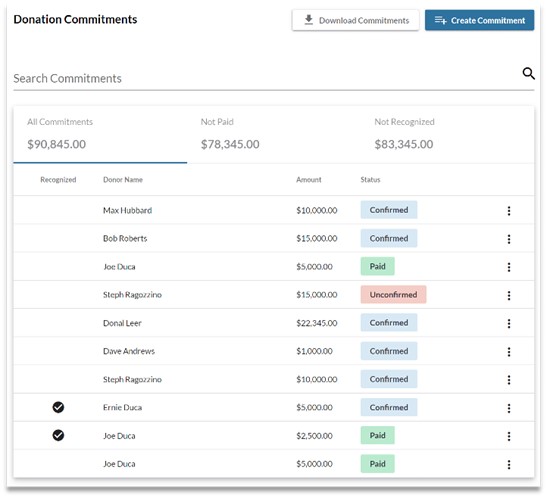
With OneCause, you can manage event registration, ticketing, and check-in from one system. You can also run silent, live, or online auctions, manage items and bids, and collect payments without switching tools. Peer-to-peer fundraising also fits naturally into the event flow, allowing participants to fundraise before, during, and after an event while you track progress in real-time.
The platform also supports donor and participant data management tied directly to events. That means ticket purchases, bids, and donations connect back to supporter/donor records, which helps your team follow up appropriately and generate reports.
Cost
Although there are three plans available, OneCause does not publicly provide the costs of those plans. However, you can request a demo for the plan you need and get a custom quote.
- What I like about OneCause
I like how deeply OneCause understands nonprofit events. The auction and event tools feel purpose-built, not bolted on, and that makes a big difference for teams running complex fundraising events.
- What users like about OneCause
“What I love most about OneCause is how genuinely easy it makes things for both our team and our supporters. We run a lot of events, and having a platform that feels simple, intuitive, and not intimidating for donors is such a gift. It takes a lot of stress off of us, especially on event days, and lets us focus on the actual people we’re serving rather than chasing down logistics.”
- Sarena C., G2
- What I dislike about OneCause
OneCause can feel event-heavy if your nonprofit only runs occasional events. Smaller teams or organizations that need broader CRM or volunteer tools may still need additional platforms alongside it.
- What users dislike about OneCause
“Some features have a learning curve at first, but once you get the hang of it, it's smooth sailing. The reporting tools are great, but it can take a little time to learn where everything is.”
- Krystle P., G2
#9 Boardable
Boardable focuses on the governance side of nonprofit operations rather than fundraising or public-facing events. It helps nonprofits manage board meetings, committees, documents, and communication more effectively. This makes it especially useful for nonprofits that work with distributed boards or multiple committees.
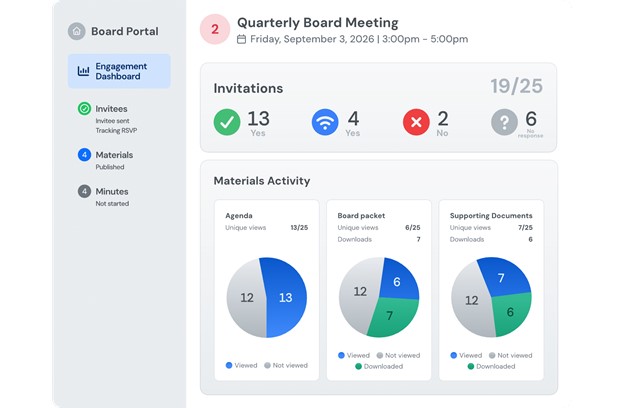
This platform brings meeting scheduling, agendas, minutes, document sharing, and eSignatures into a single hub. Board members can access materials ahead of meetings, vote on motions, and stay informed without relying on long email threads. This reduces friction and helps meetings run more smoothly.
Boardable also supports internal communication through announcements, discussion threads, and task assignments. While it’s not designed for volunteer sign-ups or public events, it plays an important role in managing leadership-level volunteers and keeping governance work on track.
Cost
Boardable offers a 14-day free trial. The paid plans start at $20.99/user per month, billed annually.
- What I like about Boardable
I like how Boardable simplifies board and committee management. It provides clarity on meetings, documents, and decisions, helping boards stay engaged without adding extra administrative work.
- What users like about Boardable
“Boardable is truly remarkable at dealing with separate, yet linked governance agencies. Each group within our national board, regional committees, and special projects each have their own virtual spaces. The distinctiveness of this reduces the chance of sharing sensitive conversations across groups, which might be embarrassing, while preserving a complete record of each individual. We are able to easily tell who has seen essential policies and when, which is priceless in our compliance structure.”
- Bogna L., G2
- What I dislike about Boardable
Boardable is focused singularly on governance. Nonprofits looking for tools to manage volunteers, events, or fundraising will need to pair it with other platforms.
- What users dislike about Boardable
“…Boardable has certain areas that are a little bit lagging behind that makes it slower when using it at a faster pace. Due to the restricted features in some regions, the work becomes more time-consuming compared to the normal time. Calendar updates do not always show immediately, so I need to check the details. All these minor problems accumulate during busy days and break my flow somewhat.” - Sachin G., G2
#10 Mobilize
Mobilize is designed to help nonprofits recruit, manage, and activate volunteers at scale. It works especially well for organizations that rely on volunteers for campaigns, community outreach, or time-based actions.
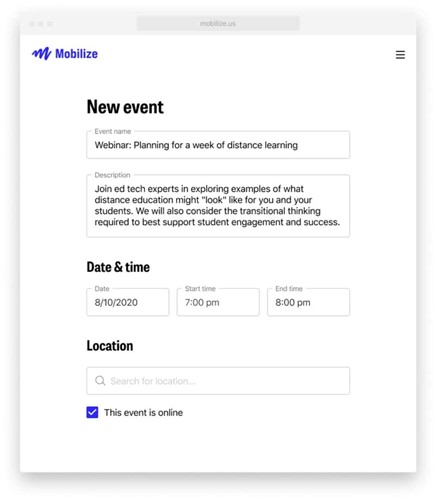
With Mobilize, nonprofits can post volunteer events, shifts, or actions, and volunteers can register in just a few clicks. The platform handles sign-ups, reminders, and attendance tracking, which reduces manual coordination. Organizers can also communicate directly with volunteers before and after events to keep them engaged.
Mobilize also collects and organizes participation data, so you can track who shows up, how often volunteers engage, and which activities drive the most involvement. This makes it easier to build long-term volunteer relationships rather than treating each event as a one-off.
Cost
Mobilize allows you to sign up for a limited starter account to manage your events and volunteers. However, the pricing plans are not publicly available, and you’ll need to request a demo to get access to the full set of features.
- What I like about Mobilize
I like how easy Mobilize makes volunteer sign-ups and coordination. It lowers the barrier for people to get involved, which is critical when you rely on volunteer energy to move your mission forward.
- What users like about Mobilize
“[I like] the ease of use from both the back-end and front-end. I love the "bring a friend" prompt and the reminders that automatically go out via text and email. Also, when someone registers, they are given the other events to register.”
- Renata S., G2
- What I dislike about Mobilize
Mobilize focuses almost entirely on volunteer engagement. If your nonprofit needs event fundraising, donor management, or board governance tools, you will need additional software to cover those areas.
- What users dislike about Mobilize
“Setting up events is easy to do, however, there is not an option to save an event in the draft stage prior to launching the event. The closest available option is to set the event to private and publish it prior to launching the event to the wider public.”
- Verified review, Capterra
Best nonprofit platforms for marketing and design
Marketing and design tools help you create social posts, emails, and visual assets that support your campaigns. They make it easier to share your message clearly and stay consistent across your distribution channels. You use them to build awareness and keep supporters engaged beyond donations.
#11 Canva for Nonprofits
Canva for Nonprofits provides nonprofits with the tools to create compelling visuals for campaigns without hiring designers or learning complex software. It supports everything from social media posts and presentations to infographics, reports, posters, flyers, signage, and even simple websites.
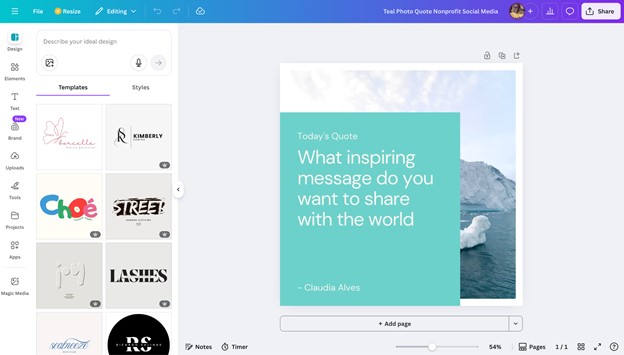
The platform includes more than 420,000 designer-made templates, over 100 million images, and 3,000+ fonts. There are also animations and GIFs, which add movement to your designs and help your content stand out on social media and in presentations.
Canva’s Brand Kit stores your logo, brand colors, fonts, and visual guidelines so every design stays on brand, even when multiple people work on content. You also get unlimited folders and 100GB of storage, helping teams keep campaigns organized over time.
Canva for Nonprofits is trusted by well-known organizations such as Amnesty International, Fistula Foundation, and Rise Against Hunger, which speaks to how well it scales across different missions and team sizes.
Cost
Canva allows nonprofits to get access to all the features in Canva Pro for free. However, you’ll need to meet the eligibility guidelines and send in an application to be considered.
- What I like about Canva
Canva makes good design accessible to nonprofits, whether they’re tech-savvy or not. The templates, brand tools, and massive asset library help nonprofits produce professional visuals quickly, even with limited time or design experience.
- What users like about Canva
“What I like most about Canva is how easy and fast it is to create clean visuals without being a designer. As a developer, I don't want to spend too much time on design, and Canva helps me quickly put together presentations, diagrams, and simple graphics. The ready-made templates, icons, and layouts save a lot of time, especially when I need something presentable on short notice.”
- Vamshi B., G2
- What I dislike about Canva
Canva focuses entirely on design, not distribution or performance. Nonprofits still need other tools to send campaigns, track engagement, or connect visuals to fundraising outcomes.
- What users dislike about Canva
“I find it challenging to redesign templates easily in the mobile application. It's very handy with a desktop, but needs improvement on mobile. Also, the integration of Artificial Intelligence needs a lot of improvement to make it more user-friendly.”
- Sai S., G2
Best nonprofit software for project management and operations
Project management and operations tools help your team plan work, assign tasks, and track progress. They keep everyone aligned, especially when you manage multiple programs at once. You can rely on these tools to turn plans into action and keep day-to-day work moving forward.
#12 Asana for Nonprofits
Asana for Nonprofits helps organizations plan, track, and manage work across projects, teams, and timelines. It allows nonprofits to split work into tasks, assign ownership, and see progress at a glance, which is especially useful when multiple people collaborate across programs or departments.
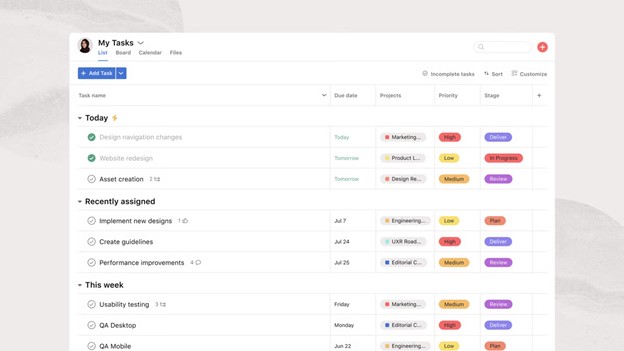
Asana supports different ways of working. You can organize tasks in lists, boards, or timelines, depending on how your team prefers to plan. Features like due dates, dependencies, and milestones help keep projects on track, while comments and file attachments keep discussions tied to the work itself.
Asana also integrates with tools like Google Drive, Slack, and Microsoft Teams, which helps it fit into existing workflows.
Cost
Asana offers a free plan, but it has limited features and is best suited for very small teams or simple projects. Paid plans start at $10.99 per user/month (billed annually). However, if your nonprofit meets Asana’s eligibility requirements, you can get a 50% discount on the Starter or Advanced plan.
- What I like about Asana
I like how clear and structured Asana feels. It does a great job of making work visible, which helps teams stay aligned and accountable across multiple projects.
- What users like about Asana
“I really enjoy using Asana because it lets me dump all my thoughts and ideas in one place and then organize them into a clear plan. It makes working with team members easy, from sharing tasks to collaborating through comments on everyone’s own timeline. I also like the flexibility around notifications, whether they come through email or directly in the app.”
- Darrell W., G2
- What I dislike about Asana
Asana focuses only on task and project management. It does not directly connect to fundraising, donor data, or communications, so nonprofits need to pair it with other platforms to fully cover operations.
- What users dislike about Asana
“I would say that I dislike that you have to add templates to projects individually. There doesn't seem to be a way to add templates to multiple projects at once, which is only a small hindrance. For larger projects/portfolios, I wish there was a way to 'assign' those things to me so they don't slip off my radar.”
- Shelby B., G2
Nonprofit software: frequently asked questions
- What features should I look for when selecting a nonprofit software?
Look for features that support how your nonprofit actually operates. For example, if you’d like to manage your main needs in a single platform, choose all-in-one tools that handle fundraising, donor management, event management, marketing, reporting, and more, all in the same place.
However, if you need a specific capability, such as design or project management, choose tools that cater solely to that capability. Strong integrations and clear reporting also matter, since they help you connect data and measure results.
- Do nonprofits need an all-in-one platform or separate tools?
It depends on your setup and goals. All-in-one platforms work well if you want fewer tools and less manual work. Separate tools make sense if you already like your tech stack or need something very specific, such as volunteer management or design, without replacing everything else.
- Is free nonprofit software good enough to start with?
Free plans work well for early-stage nonprofits or small teams, as they typically cover basic needs such as donations and contact tracking. Over time, you may need paid features for workflow automation, advanced reporting, or larger contact lists, so it helps to know what upgrades cost before you sign up for a free plan.
- How important are integrations in nonprofit software?
Integrations are very important, especially as your organization grows. Your nonprofit software should connect easily with accounting tools, email platforms, and design or analytics tools. Good integrations reduce manual data entry, lower the risk of errors, and help your team work more efficiently across systems.
- Can nonprofit software help with donor retention?
Yes, many platforms include tools that support donor retention. Features like giving history, engagement tracking, and segmented outreach help you follow up with the right donors at the right time. When donor data and communication tools work together (or live in the same system), it becomes easier to build long-term relationships instead of chasing one-time donations.
- How do I know if a nonprofit software will scale with my organization?
Check how the pricing, contact limits, and features change as you grow. Some tools charge more as your database expands or when you unlock advanced features. Reviewing what each plan entails (and what it costs) early helps you avoid surprises and ensures the software can support your nonprofit in the long run.
- Should I test nonprofit software before committing?
Yes, testing is always a good idea. Free trials, demos, or sandbox environments let you see how the software works in the real world. While testing, pay attention to ease of use, support responsiveness, and whether the platform fits your team’s daily workflow.


