
In this article, we will take a look at 10 customer training LMS solutions, including their core features and reviews by users. By the end, you will have a clearer understanding of which platform is best suited to support your customer training goals.
Best customer training LMS to consider
Here is a quick overview of the top LMS solutions for your customer training needs that we will discuss in detail.
Customer training LMS | Best for | Standout features |
Uteach | Building fully branded customer training academies with strong automation and e-commerce. | Powerful white-label website builder, AI-assisted course creation, automated branded certificates, and built-in e-commerce. |
WorkRamp | A highly customizable, AI-powered platform focused on centralizing and scaling training. | AI-generated content, strong analytics, custom learning journeys, integrates with popular tools (Salesforce, Slack). |
Talent LMS | SMBs seeking an affordable, user-friendly, and quick-to-deploy solution. | Intuitive interface, gamification, strong course authoring tools, cost-effective pricing, supports blended learning. |
Skilljar | Enterprises needing deep CRM integration and robust analytics. | White-labeling, powerful integrations (Salesforce, Zendesk), advanced reporting, training monetization, certification engine. |
LearnUpon | Businesses that need to train multiple audiences (customers, partners, employees) from a single, unified platform. | Multi-portal management, clean UX, robust reporting, strong customer support, excellent integration capabilities. |
Docebo | Large organizations using AI for personalized, scalable learning across internal and external audiences. | AI-powered content curation, multi-domain support, strong branding, extensive integration ecosystem (Workday, Salesforce, Zoom) |
Absorb LMS | Companies prioritizing an intuitive learner experience and AI-driven insights. | AI-powered recommendations (Absorb Pinpoint), sleek user interface, e-commerce functionality, observation checklists, strong reporting |
Litmos | Organizations that need fast-to-launch customer training solutions with AI-driven personalization and rich engagement channels | AI learning assistant, built-in content authoring, gamification and leaderboards, social learning tools, e-commerce for training monetization. |
360 Learning | Fostering a culture of collaborative learning and leveraging internal subject matter experts. | Collaborative course authoring tools, peer feedback features, engagement analytics, promotes knowledge sharing. |
SkyPrep | Offering intuitive, branded customer training experiences with strong automation, AI-powered content creation, and multi-tenant capabilities. | Multi-tenant LMS, workflow automation, white-label customization, enterprise-grade security. |
#1 Uteach
Uteach is a platform that lets you build a branded portal and manage your customer education from one place. It gives you tools to create courses, deliver live lessons, set up quizzes, and issue certificates.
You also get payment processing built right into the system, so customers can buy training directly. The platform includes automation for tasks like attendance tracking, notifications, and managing assignments. You can publish content in multiple formats, including videos, documents, audio files, tests, and present it within well-organized categories.
If you need a branded mobile app, Uteach supports that too, complete with push notifications and an easy experience across devices.
Key features for your organization
- Use automation for admin chores like enrollment, attendance tracking, assignment scoring, messaging, and email notifications. This helps streamline course administration and reduces manual work by up to 70 percent.
- Provide customers with certificates automatically on completion. You can choose one of the ready-made ones or design yours with a certificate builder.
- Provide your customers with a fully branded training site as Uteach provides white-label opportunities.
- Run live sessions, online or in person, that you can schedule well in advance, attach learning materials, and embed quizzes or homework.
- Encourage peer learning by creating discussion spaces where customers can share updates, post ideas, and interact.
Uteach reviews
Capterra rating: 4.7/5 stars
Users value the platform's flexibility, noting it easily scales with their needs as they grow from selling courses to offering memberships, digital products, and more. People really love how easy Uteach is to use. Many mention that they could set up their entire professional training academy without any technical or design skills.
Users also highlight that the customer support team is responsive, helpful, and made up of real people who actually solve their problems.
Also see: Uteach Review
#2 WorkRamp
WorkRamp gives you a branded academy where your customers can access training, guides, and certifications in all in one easy-to-use hub.
They claim that their customers are able to reduce churn, ramp up product adoption, and turn users into real advocates. You get a drag-and-drop editor to build learning paths and interactive modules. The platform integrates with tools like Salesforce, Zendesk, Zoom, and Slack so training fits seamlessly into your workflow.
There are built-in dashboards and analytics to measure metrics like progress, adoption, and ROI.
Key features for your organization
- Build and scale your customer programs with ease using an intuitive drag-and-drop editor that helps you design content, learning paths, and interactive modules.
- Offer learning in multiple ways, such as on-demand self-paced courses, live sessions, interactive tutorials, quizzes, events, and certification paths.
- Monitor progress and engagement with native dashboards and reporting tools. You can build custom reports and visualize metrics like adoption and ROI.
- Customize the look and feel of your academy using theming. You can add your own colors, banners, logos, CSS and JavaScript, email templates, and metadata images.
- Create structured learning journeys and recognize customer achievement with certification paths.
- Share content and tools between employee and customer LMS environments.
WorkRamp reviews
G2 rating: 4.4/5 stars
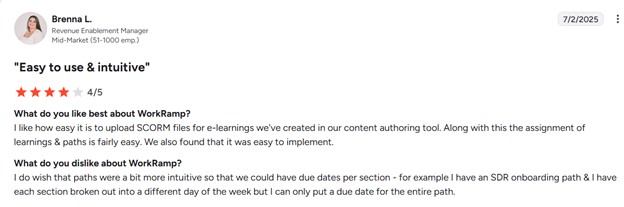
Based on an analysis of reviews on G2, WorkRamp is generally well-regarded by users for its intuitive and user-friendly interface.
The customer support team is also known for being very helpful and quick to answer questions. Many users love the detailed reports that show how well the training is working. On the downside, some people feel the software is not very flexible and wish they could customize it more for their company's look and needs.
Also, a few reviewers think the cost is a bit high, especially for smaller businesses.
#3 TalentLMS
TalentLMS is a cloud-based learning platform that lets you build a customer training hub that feels like it is part of your brand and your workflow. You can customize your own domain, logo, colors, and even language. There are 31 supported languages, so customers across the globe feel at home.
It supports blended learning styles and branches, which let you create separate training environments per product, region, or audience.
Automations tie in with over 200 systems, so tasks like creating accounts or enrolling users can happen automatically when a customer is added in your CRM. It also includes strong reporting tools so you can track usage, progress, certification, and send scheduled reports to stakeholders.
Key features for your organisation
- Mobile access and Single Sign on (SSO). Customers can learn anywhere, anytime using native iOS and Android apps. SSO makes login easy and seamless with existing credentials.
- Easier communications. Encourage interaction and community by using built-in messaging, forums, and calendar features for your customers.
- Boost engagement with gamified elements by awarding points, badges, levels, rewards, and display leaderboards.
- SCORM, xAPI, cmi5 support. Upload and deliver interactive, standard-compliant eLearning packages.
- Use AI to generate course content, images, descriptions, test questions, video captions, translate content, and enhance existing material. Features include AI content creation, TalentCraft, and an AI Coach for learners.
- TalentLMS offers enterprise-level features like SSO (LDAP, SAML2, AD, Okta), fine-grained user roles, extensible profiles, mass user actions, full API access, and GDPR-friendly controls.
Talent LMS reviews
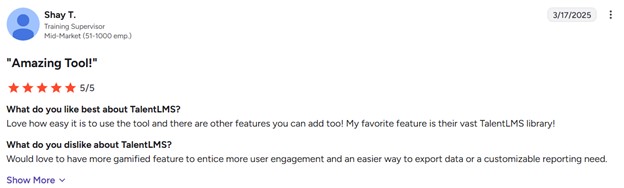
TalentLMS is widely praised for its user-friendly interface and ease of setup, making it accessible even for those with limited technical expertise. Users highlight the platform's intuitive design and quick implementation process.
The fact that it has a free option is also a big plus for many users.
On the other hand, some people feel the design cannot be customized enough to fit their brand. The reporting tools are good but could be more powerful. A few users also note that the mobile app is not as full-featured as the website and that customer support can sometimes be slow to respond.
Also see: Talent LMS Review
Compare Talent LMS with other LMS
#4 Skilljar
Skilljar lets you build branded customer academies that guide learners through onboarding, product adoption, and retention. You can offer self-registration, personalized learning paths, blended formats like on-demand and live sessions, and certificates.
It also supports e-commerce for selling or managing access to training, integrates deeply with CRM and business tools like Salesforce, Gainsight, and Stripe, and gives you dashboards and analytics that tie training performance to business outcomes like renewal rates and ROI.
Key features for your organisation
- You can tailor login screens, headers, footers, and even launch multiple branded sites or domains.
- Customers can browse a catalog and enroll themselves in courses without manual invites.
- Sell training through subscriptions, credits, promo codes, or one-off purchases. Integrated with Stripe, PayPal, and Salesforce for smooth transactions and revenue tracking.
- Get built-in dashboards and reports for enrollments, completions, and engagement. Benchmark performance against other users, export results, and merge with business metrics to prove ROI.
- Reward course completion or mastery with certificates that can be shared to LinkedIn. Certifications can include expiration and verification, and you can track them via APIs.
- Create and manage licenses for your training content. You can delegate license assignment, swapping, and tracking to external clients.
Skilljar reviews
G2 rating: 4.6/5 stars
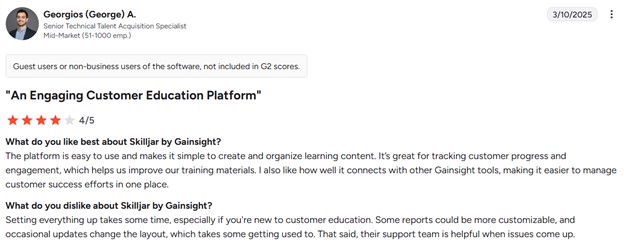
People like Skilljar because it is easy to use for making training courses. The support team is known for being very helpful.
Another major strength is its ability to integrate smoothly with other business tools like CRM systems, which helps companies track learner progress and connect training to business results easily.
However, some users feel that the reporting features could be more powerful without needing extra configuration or external tools, as creating highly customized reports can require additional work.
#5 LearnUpon
LearnUpon is another solution for customer training that helps you build a branded customer training hub to onboard, educate, and retain customers. It allows you to create and deliver on-demand training, automate administrative tasks, and integrate with your existing systems.
You can manage multiple customer portals from a single platform, each tailored to different audiences. The LMS provides access to a library of ready-made courses by 150+ providers.
Key features for your organisation
- Create unique training environments for different audiences from one place.
- Seamlessly integrate customer education directly into your product experience.
- Create exams, quizzes, and certificates that help measure customer knowledge and give recognition when training is complete.
- Training is accessible on mobile devices as well as desktops, so your customers can learn whenever and wherever it fits best.
- With features like points, badges, and leaderboards, you can keep customers motivated and make learning more engaging.
- LearnUpon allows you to deliver training in multiple languages.
LearnUpon reviews
G2 rating: 4.6/5 stars
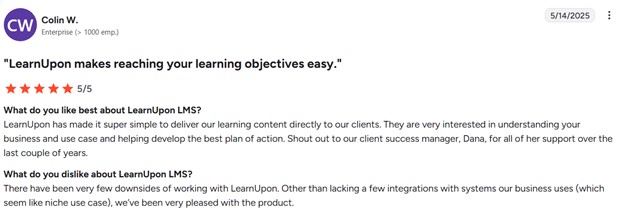
What people generally appreciate about LearnUpon is the overall UX. They find that the platform is easy to navigate both for the admins and students. Reviewers also describe the platform as flexible and highlight the learning journey and path features that help with the course management.
As for the downsides, some reviewers mentioned there are not as many integrations with their current systems as they would like to see. They think that more integrations would make the process easier.
Also see: LearnUpon Review
Compare LearnUpon with other LMS
#6 Docebo
Docebo lets you create polished, fully-branded training hubs with AI-powered personalization, seamless integrations with your CRM and customer success tools, and mobile learning through a branded app. You can automate targeted campaigns to onboard and motivate learners, and even monetize your training via e-commerce features like selling courses or subscriptions.
All of it comes with dashboards and reporting so you can prove how training is impacting metrics like customer satisfaction, loyalty, and renewal rates.
Key features for your organisation
- Docebo delivers hyper-personalized learning experiences using AI. It recommends content and adapts learning journeys based on customer segments and individual needs.
- Docebo connects smoothly with your CRM, customer success systems, knowledge bases, and other tools.
- You can turn customer education into a revenue stream by selling courses, certifications, or subscriptions.
- Docebo helps you onboard and engage customers effectively with automated campaigns and communication workflows.
- Through features like “Ask the Expert,” Docebo lets customers interact with your internal experts, nurturing knowledge-sharing.
- With reporting on metrics like product adoption, course completion, CSAT, churn, and LTV, Docebo helps you link training to business outcomes and make informed decisions.
- Docebo supports issuing credible, legally defensible certificates and integrates with credentialing or proctoring tools.
Docebo reviews
G2 rating: 4.3/ 5 stars
Many praise its user-friendly interface that is easy for both learners and administrators to navigate. The platform's automation features, like assigning courses and sending reminders, are frequently highlighted as major time-savers. Customers also report that Docebo's customer support is very responsive and helpful.
On the downside, some users feel the platform can be complex to set up initially and has a steeper learning curve for administrators. The reporting tools, while powerful, are sometimes described as needing improvement to be more intuitive.
Also see: Docebo Review
#7 Absorb LMS
Absorb LMS is a powerful, AI-driven learning platform you can use to train your customers effectively. It supports personalized learning paths, e-commerce if you want to sell courses, social learning, and gamification to keep customers engaged.
Absorb Intelligence feature uses AI to recommend training content, automate admin work, and keep learners engaged without constant manual input. You can also use Absorb Infuse to place learning directly inside your existing apps and workflow.
Key features for your organisation
- Lots of intelligent assistant tools for admins. You can type a specific description of a list and get reports based on the request.
- Collaboration tools and forums for learners to interact with peers, share insights, and ask questions.
- Mobile learning with the Absorb Learn mobile app. It works offline, syncs progress when back online, and supports various content types (SCORM, xAPI, videos, PDFs).
- A library of 500+ foundational courses in microlearning formats.
- Business intelligence dashboards offer data visualization, trend analysis, and scheduled reporting to track learning ROI, skill gaps, and training effectiveness.
- Subscriptions & e-commerce allow you to monetize training via purchase plans or recurring models
Absorb LMS reviews
G2 rating: 4.6/ 5 stars
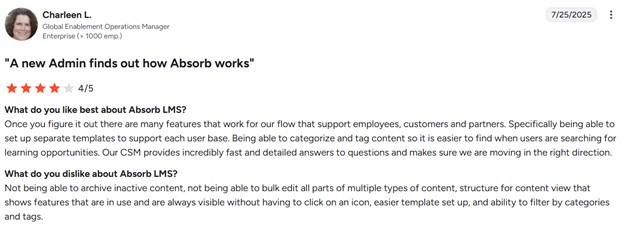
The platform is praised for being powerful and scalable, working well for businesses of all sizes, and offering helpful features like automation and in-depth reporting. On the weaker side, some users feel the platform has limitations with its e-commerce features and could offer better upsell options. Some users also reported that the mobile experience and certain administrative features could be more user-friendly.
Also see: Absorb LMS Review
Compare Absorb LMS with other LMS
#8 Litmos
Litmos is a fast-to-launch, AI-enhanced LMS built to help you scale customer training programs. It comes with a built-in AI Assistant for social learning, extensive off-the-shelf content, and an award-winning, embedded content authoring tool.
Key features for your organisation
- You can connect it with CRMs, Digital Experience Clouds, and other tools using out-of-the-box connectors.
- Litmos boosts engagement with an AI Assistant that helps learners explore more, answer questions, and stay motivated, alongside social features like discussion forums, interactive hotspots, badges, points, and leaderboards.
- You can add mobile-responsive SCORM content
- Litmos offers thousands of courses across compliance, leadership, soft skills, and more.
- Smart automation lets you assign learning paths, trigger tasks, or handle notifications.
Litmos reviews
G2 rating: 4.3/ 5 stars
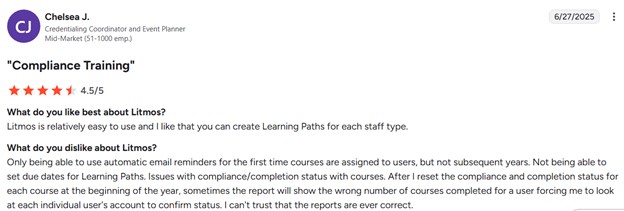
The platform is also praised for its quick implementation process, allowing organizations to launch training programs rapidly. Reviewers especially highlight the social learning opportunities, as the platform encourages interaction between users.
However, other users mention that advanced customization is really complicated and you have to pay extra for someone to assist you with it.
Also see: Litmos Review
#9 360 Learning
360Learning is a collaborative training platform that helps you launch private, branded customer academies in minutes.
You can also monetize training with built-in e-commerce, letting customers browse, purchase, and access courses easily. All of this is supported with reporting tools that let you track usage, completions, and even push data into your CRM or BI tools.
Key features for your organisation
- 360Learning scales with your business through tools like group hierarchies, magic-link registration, CSV imports, and delegated group-level admins.
- You can launch courses fast using AI-assisted features like prompt-based or document-based course creation, AI-suggested quizzes, and support for SCORM, xAPI, and more.
- You can automatically tag content with skill metadata, let learners build skills profiles, and deliver targeted training based on skills, interests, or career goals.
- Track training impact across users, groups, paths, and classrooms, complete with metrics like completion, relevance scores, attendance, and more.
- Customers can record themselves practicing skills (like pitches or tasks), submit those recordings for feedback, and engage asynchronously with coaches or internal experts.
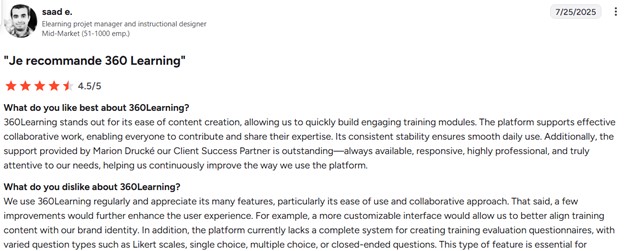
360 Learning reviews
G2 rating: 4.6/ 5 stars
Users frequently highlight its strong collaborative features, such as real-time co-editing and discussion tools, that facilitate knowledge sharing and engagement. The platform is also commended for its effective onboarding automation and multilingual support, which help reduce onboarding time.
However, some reviewers note limitations in reporting capabilities. Also, the users mention that the mobile app experience is functional but limited for admins, and that advanced features like SCORM compatibility and community tools could be improved.
Also see: 360Learning Review
Compare 360 Learning with other LMS
#10 SkyPrep
SkyPrep offers multi-tenant support, letting you set up separate portals for different customer groups.
With tools like AI-powered features, gamification, e-commerce, and a mobile app, SkyPrep helps you onboard, educate, and retain your customers with ease. You can fully brand each portal, automate routine tasks, integrate with tools like Zoom or ADP, and track learning impact through built-in dashboards.
Key features for your organisation
- You can build effective training modules using assessments, checklists, and knowledge checks.
- SkyPrep’s out-of-the-box reporting tools help you gather actionable insights on learner progress, engagement, and training impact.
- SkyPrep allows you to create separate training portals for different customer groups like partners, franchisees, or agents, all under one account.
- Automate common tasks like auto-enrollment and alerts to keep things running smoothly
- You can deliver interactive, SCORM-compliant courses and give learners mobile access.
- SkyPrep supports pre-built content libraries and e-commerce
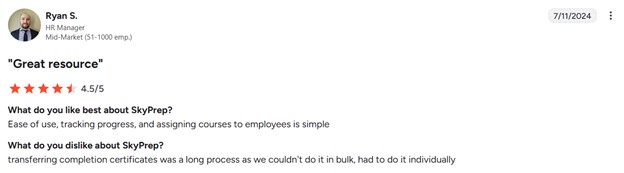
SkyPrep reviews
G2 rating: 4.6/ 5 stars
SkyPrep is highly praised for its ease of use, with users highlighting its intuitive interface that simplifies course creation. Users also appreciate its robust tracking and reporting features, which provide real-time insights into learner progress and performance. Also, customer support is frequently described as responsive.
The platform’s customization options and cost-effectiveness are also noted as key benefits.
However, a few reviewers point out that certain features, such as SCORM compliance and mobile learning, are less developed compared to other aspects of the platform.
Also see: SkyPrep Review
Compare SkyPrep with other LMS
FAQ
- How to know if you need to train your customer?
You can usually tell if customer training is needed by looking at how your customers are using your product or service. Training becomes important when you want to ensure that customers get the most value out of what you offer. A good training program helps them not only understand how to use your product but also how to apply it in ways that solve their specific problems.
There are several signs that point to the need for customer training.
- If your support team is consistently handling the same questions, it often means customers are not clear on how to use certain features.
- High product return rates or subscription cancellations can also signal that people are not experiencing the value they expected.
- Another indicator is when customers are only using basic functions of your product while advanced features remain untouched.
- If you are launching a complex product or introducing regular updates, training ensures customers keep up and continue to use your solution effectively.
- Why use a customer training LMS?
An LMS gives you a centralized platform to design, deliver, and manage training at scale. Without an LMS, you would be stuck piecing together resources across emails, documents, or video calls, which quickly becomes messy and hard to maintain. An LMS organizes all of that into one system, making it simple for customers to find the right training when they need it.
An LMS also ensures consistency. Every customer receives the same quality of training no matter when or where they join. This is especially important if your product is technical, has frequent updates, or needs proper onboarding to avoid confusion.
LMS allows you to manage the entire training lifecycle. You can enroll users, assign courses, monitor progress, and measure results in one place. This makes customer education not just an informal resource but a managed process that supports customer satisfaction and long-term success.
- How to choose the right customer training LMS?
Choosing the right customer training LMS starts with being clear about what you want to achieve. If your main goal is onboarding, you need a platform that makes it easy to guide new customers step by step. If your focus is ongoing education, you need strong content management and engagement features.
The system should be intuitive, mobile-friendly, and quick to set up. A good test is to put yourself in the shoes of your customer: would you be able to log in and start learning without needing much help?
Integration is another key point. The LMS should work well with the tools you already use, like your CRM, support desk, or communication platforms. This way, training becomes part of the overall customer journey rather than something separate.
Finally, consider scalability and support. As your customer base grows, the LMS should grow with you, handling more users and more content without slowing down.
Conclusion
Investing in a customer training LMS can transform the way you educate your customers, making onboarding faster, improving product adoption, and reducing support requests.
The platforms we reviewed—Uteach, WorkRamp, Talent LMS, Skilljar, LearnUpon, Docebo, Absorb LMS, Litmos, 360 Learning, and SkyPrep—each offer unique features to support scalable, engaging, and effective customer training programs.
Uteach combines a fully branded training website, AI-assisted content creation, automated certificates, and strong workflow automation, all designed to simplify customer education. To learn more about how Uteach can help you enhance your customer training, book a demo today and explore its capabilities firsthand.


