

The following guide covers:
How to design online course content effectively?
Online course design best practices to succeed nowadays
Checklist to create course content that’s engaging and educational
Ready to get your course rolling in?
Designing an online course requires more than just a great idea. You must transform your knowledge into a structured learning journey that leads to a specific result. Many creators make the mistake of including too much information, which leads to student burnout and low completion rates.
To get some real answers, I consulted with Mariana Pena, an instructional designer. Mariana has spent 6+ years helping course creators turn their ideas into high-end programs. She told me that the "A-Z" style of courses from a few years ago simply does not work nowadays.
In this guide on designing your online course, I am sharing the personal lessons I learned from Mariana, along with the best practices I gathered from other successful creators.
How to design online course content effectively?
Do you want to design and deliver content that keeps students engaged and helps them learn better? In that case, we need to define what makes an online course effective in the first place. Here are the key steps to designing your online course content, adapted from the practices of instructional designers.
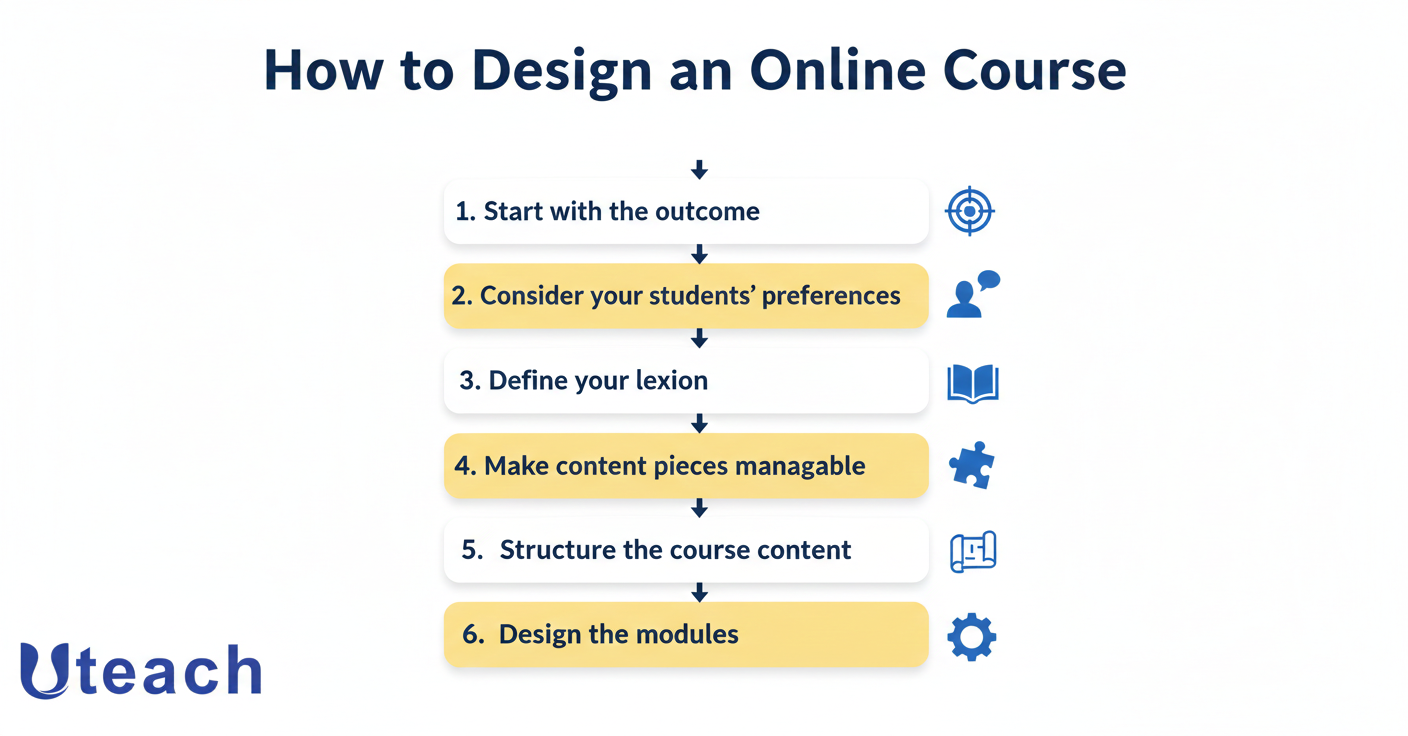
#1 Start with the outcome
When we start creating the course, the first thing that comes to mind is the content. We immediately want to put all the ideas into a comprehensive course structure.
However, that's not the best place to start. We need to start with your course outcome. You may ask why. Your outcome is going to decide all the rest—the right content formats, your approach to explaining details, the examples you will include, the learning materials you will use, etc.
Let’s say you’re designing a course on digital marketing. If your outcome is for students to create and manage ad campaigns, such as brainstorming campaign poster ideas and executing them, every piece of content in your course should support that goal. Meaning, in this case, we will not tell everything there is to know about digital marketing. Instead, we will focus on what they need to master ad creation and management. This is when it becomes a quick yes for the student.
Consequently, you will need to prioritize hands-on projects over lectures, including case studies of successful campaigns or even providing templates for campaign planning.
“What I want you to think about is actions. Think about the three specific actions that your students are going to be able to take once they have finished your course. I also want you to think about the three actions that they will NOT be able to take”.
Mariana Peña
Instructional Designer
Related: Develop Great Learning Outcomes With 5 Steps
#2 Consider your students' preferences
Focusing on the outcome also means focusing on your student’s needs. In the process, you can catch yourself wondering, “Shall I make a video episode, or better, just provide an additional PDF guide?”.
The point is if your audience is used to the video format, you will probably not go ahead and offer them your podcast, however popular this format might be. For example, if you are creating a course for young academic students, they are more likely to prefer animated videos, dynamic content, engaging visuals, diagrams, and more visual content.
Yet, if you know your students are busy professionals who will most likely listen to the course on the go rather than watch, you can focus more on the audio content.
The question is, how do you know if the materials you choose match your students' preferences? Self-assessment and student feedback are the best ways to find out. That is why you should encourage your students to share their thoughts on the format, clarity, and overall effectiveness of the materials. For example, you could use surveys or polls to ask whether they found the video tutorials helpful or if they would have preferred more written guides.
“If we're speaking about online courses, the ways we deliver the content will depend primarily on your type of audience. But no matter what we choose to deliver our content, we have to build in self-assessment. These are ways for us to get a view of whether we're doing well or not. We can also use direct feedback from the students”.
Mariana Peña
Instructional Designer
#3 Define your lexicon
If you are creating a recorded course, you can agree writing the whole script is daunting and overwhelming. We want the script to be as perfect as possible. And no matter how much energy you put, you still edit it all the time until it feels right. And this is how you spend 50% of your time and get stuck. Sounds familiar?
The thing is, you do not have to write down every single word. However, not everyone can improvise on the go and stick to the point as they hit the recording button. This is why you need to define some key phrases and terms for you. It not only saves you time but makes it easier for your students.
Especially if you are speaking to an audience that is just starting out, they can get confused easily once you use different definitions for the same term. For you, as an instructor who knows the whole material, these terms are the same. However, they sound different to your students ears who are just getting into the topic.
“Remember that the success of your learner. You can help them by reducing the friction. One way of reducing friction is not to create confusion in their heads. So if they're confused about wait, hold on. In the previous video, you defined my sales target as this, and now you're saying this. So create a glossary of the things that you're going to be repeating the most in your course, even if it is how you introduce yourself”.
Mariana Peña
Instructional Designer
This way your language remains consistent across all course materials, whether it's your videos, handouts, or quizzes.
#4 Make content pieces manageable
When you are so excited about the course, you want to share all the valuable information with the students. Does this mean all those insights make your course content efficient? Quite the contrary.
You don’t want your students to feel overwhelmed by an information overload. Including too much content into a single lesson or module leads to confusion and reduces the effectiveness of your course content.
Instead, we recommend breaking down the material into manageable, bite-sized pieces that students can easily digest and apply. For each lesson, allocate as much content as you manage to cover in no more than 10 minutes. The content information shall just be enough for the student to think, “I finished this episode; let’s now move to another one.”
# 5 Turn course content into modules
Designing the course content is not only about writing the content and preparing your materials. The most important thing is how you deliver your content so that it flows, feels logical, and delivers the transformation you promised.
What we mean by saying structure your course content is first grouping similar ideas together. This allows you to create focused, coherent sections, that each cover a specific topic.
- Identify the core themes or categories within your course content. For example, if you’re creating a course on digital photography, you can have modules on camera settings, composition techniques, lighting, and post-processing.
- Once you’ve grouped similar ideas, arrange your modules in a sequence that makes sense for your learners.
- Within each module, break down the content into individual lessons or sections. These should be short and focused. For example, let’s get back to our photography example. Within a "Lighting" module in a photography course, you can have lessons on natural light, studio lighting, and using flash.
#6 Choose course content types you need
When deciding on your course content format, here are a few common options you can consider to make your course content engaging.
- Video lectures
Video content is one of the most popular formats for online courses. Especially, if you need to explain concepts visually, demonstrate some processes, and engaging students with dynamic visuals and audio. To keep students engaged with video, you can incorporate animations, on-screen text, and real-life examples.
- Interactive quizzes
Quizzes are an excellent opportunity for students to test their knowledge and reinforce what they’ve learned. You can use them at the end of modules or lessons before moving on.
- PDFs and guides
If your students like to read and digest information at their own pace including written materials ike PDFs and guides as part of your course content would be a great idea. In these documents, you can include detailed explanations, examples, and additional resources for further reading. They’re also a great reference tool that students can revisit whenever they need to refresh their knowledge.
- Audio lessons
Podcasts and audio lessons are perfect for students who like to learn on the go. This content format works well for discussions, interviews, or speaking about topics that don’t require visual aids.
- Live sessions
Live sessions provide an opportunity for real-time interaction between you and your students. You can host Q&A sessions, group discussions, and live demonstrations.
And also do not forget to include hands-on assignments and projects to encourage students to apply what they’ve learned in a practical context. It can be a writing assignment, a mini project, or some kind of challenge.
Course content structure patterns you can use
After you choose the content formats that help you deliver the course outcome better, we can now think about the actual structure pattern of your course content.
1․ Step-by-step guide course content structure
In a step-by-step structure, each lesson builds on the previous one, creating a clear progression of skills or knowledge. It is one of the most popular choices among course creators. In this case, you basically start from foundational information, moving to more complex topics.
That’s why after brainstorming some key ideas you want to talk about, you need to organize them in a way so that they are logical and cohesive.
For example: How to Create a Successful Online Course
- Step 1: Define your course objectives
- Step 2: Research the target audience
- Step 3: Design the course outline
- Step 4: Develop the course materials
- ……
2. Topic-based course content structure
In the case of this structure, you organize content around key themes or topics instead of keeping a strict order. If you are creating an introductory course for a certain subject and not a course about a specific skill, you can choose this structure.
For example: Introduction To Art Movements
- Expressionism
- Abstract art
- Postmodernism
- …..
In this case, the particular movement you can start with is not really that important. Yet, if your course was about the development of these movements, you would keep the chronological order of which movement followed which.
3. Problem-solution course content structure
In a problem-solution structure, each module or lesson begins with a specific problem or challenge, followed by the content that provides the solution. You can follow this structure if your course is teaching a particular skill.
For example: The problem or challenge your course provides a solution for is the website traffic being low.
- Using SEO techniques to increase website visits
- Content marketing as a way to drive traffic
- Social media marketing to increase traffic
- …….
4. Modular course content structure
A modular structure is when the students can choose the modules that are most relevant to their needs. Basically, you can make this a series of mini-courses, where each course addresses a particular aspect of the same topic.
For example: Photography courses
- Lighting
- Composition
- Necessary equipment
- Photo Editing
- ….
You can sell each part separately instead of making it a comprehensive course. This way, the students can enroll in one of the topics they are interested in, and why not consider getting others as well.
5. Weekly course content structure
A weekly structure divides the course content into weekly modules, each focusing on a specific topic or skill. This format is often used in a longer course. Students can easily follow along with a set schedule, completing one module per week. For example, in a 4-week course on business management, each week could cover a different aspect, such as leadership, financial planning, marketing strategies, and so on.
Week 1: Understanding Financial Goals
- Setting short-term, medium-term, and long-term financial goals
- Identifying priorities and creating a financial vision
- Introduction to budgeting tools and techniques
Week 2: Creating and Managing a Budget
- Basics of budgeting
- Tracking income and expenses
- Tips for sticking to a budget
Online course design best practices to succeed nowadays
When actually thinking about how you should structure your course content and what to consider when designing it, there are a few tips you can follow. Below, we will discuss not only the technical aspects of online course design, but also the learning experience.
I looked at how successful creators build an online course to ensure the best experience. Here is what you can try, too.
#1 Create multi-modal content blocks
There was a time when course creators felt like they had to film everything themselves. Now, being a "content curator" is just as important as being a "content creator." Because new AI tools were introduced, you do not even have to sit in front of the camera so that you can record yourself.
All you need is your picture and a voice sample for AI to generate everything in a few seconds. Or that you now have AI tools for content creation that can generate different types of multimedia resources and repurpose your existing content.
To make the best out of it, design a mix of media types and content formats that can enrich your course further. That is what Ray Pastore considers when building his online courses.
“I have all my content, which is a combination of me typing stuff, a combination of them reading stuff... I have videos that I've created... videos someone else has created... It's a huge, huge all kinds of different media."
Ray Pastore
Course Designer, Professor of Instructional Technology
#2 Use the stepping stone curriculum methodology
If you still think more content equals more value, your online course is going to fail. Why? Because that leads to 30 module online course that no one finishes nowadays. Today, your first key to success is to keep your course content brief but practical.
By designing only the essential "stepping stones," you make the journey feel achievable. That is the example Gillian Perkins uses to explain how she is designing an online course that helps people actually get the results.
“We’re going to have these Stepping Stones that someone is going to use to walk across the river (aka get results from your course). We don't want to have too many stepping stones, because it is much easier to explain to people how they're going to get the result if there are only a few [stepping stones].”
Gillian Perkins
Course creator, Entrepreneur
#3 Shift the course focus towards more scenario-based
Traditional courses tell the students what to do and how to do it. Yet, when you design it, taking into consideration the scenario-based approach, you create something more engaging.
This is especially great if you are designing a training course, since there are more decision-making opportunities. Your course becomes like a "Choose Your Own Adventure" content where the student is the main character, making choices and experiencing consequences.
To design a course with a story-based approach, Delvin Peck recommends starting with a storyboard.
"We do use a bit of a scenario-based approach here, so it should make a fairly good example. Okay. So to start our storyboard, we need to start the story, because remember, this is a story-driven experience where there's a beginning and an end. So to start this story, we need to let the learner know who they are, right? We're going to bring them directly into the action."
Delvin Peck
Instructional Designer
#4 Use the Post-it categorization method to create the course modules
When you look at a digital list (like a Word doc), your brain tends to think linearly. When you use Post-its on a wall, you are using spatial reasoning.
If you realize a lesson in Module 4 actually needs to happen in Module 1, you physically rip it off the wall and move it. This physical action helps you "feel" the weight and flow of the course.
In one of her YouTube videos, Roberta West mentions she uses the post-it categorization method to design the online courses. Here is how.
"I recommend you get a project board, or a piece of paper, so you can keep working on it until you're completely done. You start listing each step on a separate Post-it of the same color. Those are going to become your lessons. So let's take a minute here and let's do it. And start grouping them on the board by categories... Now that you have all those lessons listed on your Post-its, I want you to move and take steps as you review the sequence until it makes perfect sense to you, and it represents the easiest and fastest way to accomplish the goal you're promising."
Roberta West
Mentor, course creator
#5 Have a non-expert review your course content and structure
Because you are also the expert of the course, your content design will naturally have "gaps" that you fill in with your own brain. Roberta's best practice is to have a "non-expert" (even a spouse or friend) review the sequence of your Post-its.
“You might know too much about the topic, so ask someone who has never done what you’re teaching to go over your Post-its in a sequence and tell you exactly what they understood, what they had questions on, and if there’s something missing.”
Roberta West
Mentor, course creator
How to design your online course with Uteach
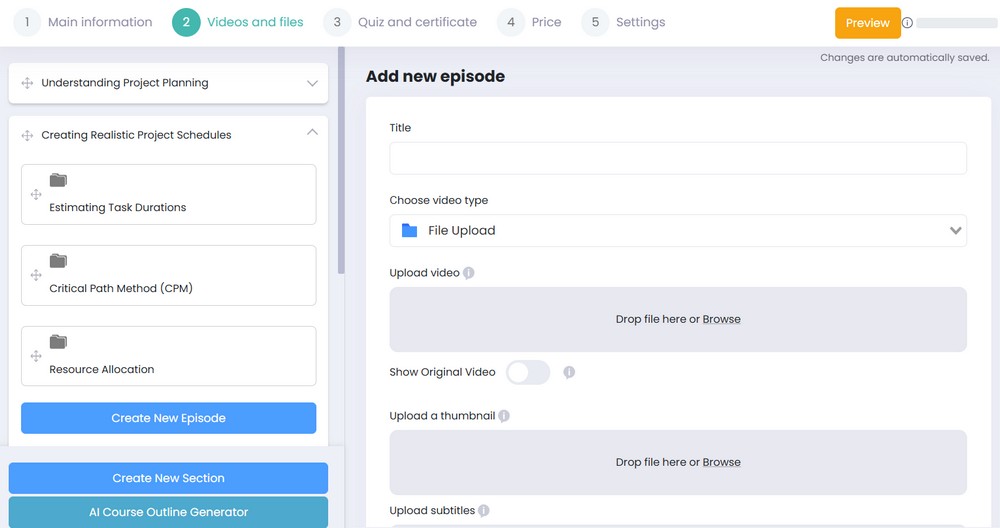
Uteach designing and building your online course easily with the course builder and AI generators. If you already have your course topic in mind, all you have to do is put the general topic in the generator bar.
The AI tool allows you to choose a specific topic and generate a complete course outline for it. You can then edit and rearrange the results to your liking, giving you a strong skeleton to build your course on. This process makes curriculum planning much faster.
Within the course builder, you can create various types of episodes to keep your students engaged. These include:
- Videos and audios for direct instruction.
- Files and text for detailed reading materials.
- Quizzes and forms to evaluate student progress.
Here is a generated example for a project management course.
Checklist to create course content that’s engaging and educational
When designing your course content, it is equally important to keep it practical and engaging. Here are some ways you can achieve it.
- First, try not to be too formal when delivering your content. If your subject allows, it is always better to maintain a conversational tone. We are not saying you should not stay professional. We mean that you should make it feel like a dialogue rather than a one-way information dump. For example, you can ask rhetorical questions, use humor or your personal stories as examples, even if that is a recorded course.
- Next, make sure you can provide a quick win. In other words, hook your students early by giving them something valuable right from the start. It can be a practical tip or an insight they can immediately apply. For example, for your social media course, you can first help them set up a social media business account.
- Make sure you provide enough flexibility when it comes to your course content materials. For example, you can have optional deep dives and additional resources. They allow students to choose how they engage with the material.
- And finally, do not be afraid to show your personality or be afraid to make mistakes while recording.
“Let yourself make mistakes. Nobody's going to judge you for that. You can make mistakes while you're recording. If you feel that you could say something in a better way, take a few breaths and go at it again”.
Mariana Peña
Instructional Designer
FAQ
How to create a training course?
To create a training course that actually works, you must move from information to transformation.
- Define your learner persona: Identify their specific pain points and current skill level.
- Set SMART learning objectives: Ensure your goals are Specific, Measurable, Achievable, Relevant, and Time-bound.
- Select an all-in-one platform: Use tools like Uteach or LearnDash that offer AI-powered course builders to speed up your technical setup.
- Produce your content: Combine video lessons, audio, and downloadable files to cater to different learning styles.
- Build a community: High completion rates are driven by social learning and peer interaction.
How to plan your online course?
Course planning is most effective when you use Reverse Design (Backward Design). Instead of starting with what you want to say, start with what the student needs to be able to do.
- Identify the outcome: What is the "Big Purpose" or primary tangible result?
- Map the milestones: Create "Big Buckets" or modules that serve as logical checkpoints on the journey.
- Use Uteach AI for outlining: Enter your general topic into an AI course generator to get a baseline skeleton.
- Validate the sequence: Review your plan with a non-expert to ensure there are no "knowledge gaps" or logical jumps that might confuse a beginner.
How to design the content of your online course?
Effective content design focuses on "Chunking" and Interactivity to prevent cognitive overload.
- Bite-sized lessons: Keep videos between 5-10 minutes. Cover one specific idea per lesson to respect the learner's time.
- Mix your formats: Use a variety of content types, including scripts, quizzes, and interactive forms.
- The 70:20:10 rule: Design your content so that 70% is experiential (learning by doing), 20% is social (learning from others), and only 10% is formal theory.
- Ruthless pruning: Review every piece of content and ask, "Does this lead directly to the promised result?" If not, cut it.
Ready to get your course rolling in?
If you're excited to bring your course ideas to life, Uteach is here to support you every step of the way.
Whether you're designing your first course or working on an existing one, our platform offers a variety of tools and features to help you create courses easily and provide an engaging learning experience for your students.
With an intuitive course-builder, website-builder, marketing, and analytics tools, you can ensure your course delivers well. Explore more of Uteach features and sign up for your 14-day free trial to get started.



