

The following guide covers:
Why do you need wikis for your organization?
A study by Forrester (commissioned by Airtable) found that employees at large organizations spend nearly 29% of their workweek (that is, about 11.6 hours) just searching for the information they need across disconnected tools.
We all try to solve this by sending documents, sharing folders, and forwarding links. But that still ends up in silos, outdated files, people asking “Is this the latest version?”, or “Where did I see that process guide?”
Wikis offer a better way. They give a single place where documents live, evolve, and are easily found. Everyone can link to them, update them, and see changes.
In this article, we discuss why your organization might need wikis, show practical examples from real company wikis, employee handbooks, and procedure documentation. We cover where wikis help most, how to build one well, tools you can use, and examples of how companies use them so that your wiki feels useful from day one.
Why do you need wikis for your organization?
A wiki makes it easier to centralize knowledge, keep it current, and give everyone a single source of truth without endless back-and-forth. They are another “tool” to make your everyday work more manageable and smooth.
A wiki is especially useful in terms of:
- Reduced dependency on individuals
What we see today with most organizations is that important know-how often lives in someone’s head. When they are sick, on holiday, or leave the company, teams scramble. A wiki documents that knowledge so it stays accessible to everyone. The company does not rely on single points of failure.
- Cross-team alignment
Different departments tend to create their own versions of documents and guidelines. A wiki reduces these silos by giving teams a shared place to update and check information. Instead of sending files around, people work from the same source.
- Real-time project visibility
For active projects, keeping everyone aligned is a challenge. A wiki allows teams to track progress, roadmaps, and meeting notes in one spot. The advantage is that no one needs to chase email threads to see the latest updates.
5 examples to use corporate wikis for
Now, to foster each aspect we listed above, you can create wikis for different purposes. Of course, everything depends on your organization’s procedures, goals, and what you need the wiki for.
Below, we discuss the key cases and goals to use corporate wikis for, as well as ideas for you to implement them in your workflow.
Onboarding and training new employees' wikis
One of the most practical ways companies use wikis is for onboarding and training. When I place myself in the shoes of a new team member who joins the team, I reckon how chaotic some onboarding experiences were.
Not even speaking about other stakeholders like the HR, who repeat the same instructions over and over, managers answer the same questions, and employees spend time searching for basic details.
A wiki solves this problem by serving as a central place where everything is collected once and then reused endlessly. And what kind of resources can your onboarding wiki include? Basically, you can consider
- company values
- policies or IT setup guides, if there is a need
- checklists for the first week
- role-specific training materials, etc.
Ideas to organize your wiki
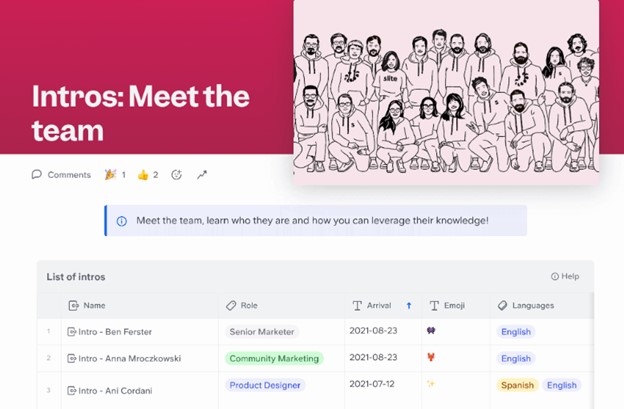
The real benefit is that the format allows you to present this information in ways that feel a little more human. Supposing you want to create the “Meet the Team” section. You could include when each person joined the company, the languages they speak, a funny hobby, or a hidden talent.
For example, at Slite, they mention the names of the team, role, arrival, favorite emoji, and languages the members speak.
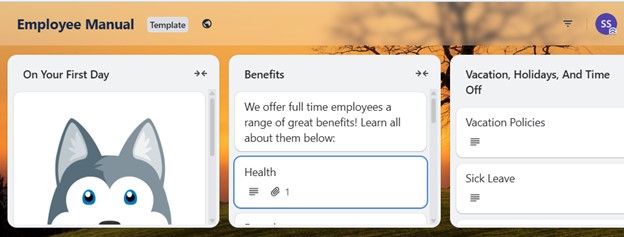
You can also organize onboarding wikis into sections that mirror the journey of a newcomer. Such as “Day One Essentials”, “How we Work”, etc. And a final section could be “Life at the Company,” which highlights office traditions, employee resource groups, or even nearby lunch spots if the team works on-site.
Here is another example from Trello.
Documenting processes and SOPs wikis
Another common case is that each department creates its own wiki based on the procedures it follows daily.
If you ask me, it is super useful to have this kind of resource because it means no one has to rely on tribal knowledge or hunt down the “one person who knows how to do this.” Instead, the steps are written once, stored centrally, and accessible to anyone who needs them.
What kind of procedures make sense to document? Here are a few everyday examples:
- Marketing teams writing down how to publish a blog post, from draft to SEO checks to final upload.
- Finance documenting how to submit and approve expenses.
- IT teams explaining how to request new hardware or reset access permissions.
- Product teams outlining how to run a release cycle, from QA testing to deployment.
- The HR team writing down their procedures and policies.
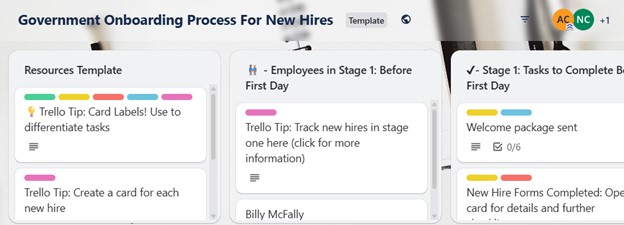
Here is an example wiki template Trello uses for managing the onboarding processes for the new hires.
Ideas to organize your wiki
A good way to think about process documentation is to design it as a set of instructions people can quickly scan and act upon.
For example, you can separate each SOP into smaller chunks, such as “Preparation,” “Execution,” and “Follow-up.” A simple table of contents at the top of each page also helps employees jump to the exact step they need.
Tip for organizing SOP wikis and handbooks
As someone who has worked with technical writing, I can say that writing or using documentation is far easier when it is structured in smaller, digestible sections rather than large chunks of text.
And the way information is presented visually matters. In the podcast episode Why Aesthetics Matter in Technical Docs, Richard Rabil, Principal Technical Writer at Oracle, explains the “deep writing theory” by Daniele Procida. In the podcast, he mentioned the following:
“True excellence elevates documentation to what he (Daniele Procida) calls deep quality, which means feeling good to use. It has flow. It fits user needs. It is beautiful to look at. It anticipates what the user is going to need next. So I think that’s such an excellent articulation. And I would argue that this is what beauty and documentation really mean. Procida stresses that you can’t have deep quality without functional quality. So you can have functional quality but not necessarily deep quality. But he says if you really want deep quality, if you really want to create beauty in documentation, it has to be clear, concise, useful, accurate, and correct, and all that stuff”.
Richard Rabil
Technical writer
Project and team collaboration wikis
Wikis are also very effective as living documents for active projects. So to speak, instead of tracking updates in email threads of project management apps, etc, everything sits in one place where the whole team can follow along.
As you can guess, in this case, there would be fewer misunderstandings and less duplication of effort.
What kind of project-related information makes sense to store in a wiki? A few examples are very common:
- Project roadmaps that outline phases, deadlines, and deliverables. Instead of a static slide deck, the roadmap can evolve as the project progresses.
- Meeting notes are collected in one spot so that decisions, action items, and responsibilities are always documented and accessible.
- Shared research gathered by team members, such as links to studies, competitor analysis, or technical background.
Ideas to organize your wiki
A practical way to structure a collaboration wiki is to build sections that mirror the lifecycle of a project. You could start with a “Project Overview” page where objectives and key contacts are listed. A “Roadmap” section can contain timelines and deliverables. A “Meetings” section can hold notes organized by date, making it easy to scan.
For shared research, a well-tagged library or simple index allows everyone to find materials quickly.
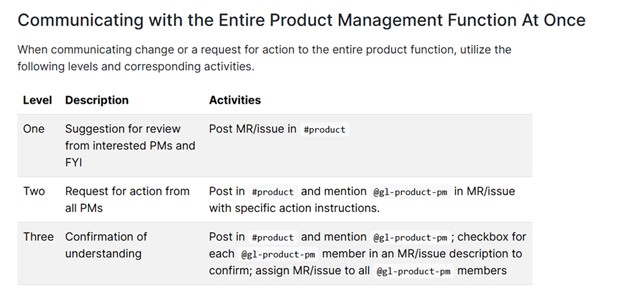
A great example comes from GitLab’s handbook, which is openly available. They document nearly every process. Below, you can see an example of communicating the product management functions.
Knowledge sharing across departments wikis
A shared wiki helps make that knowledge visible, so teams do not repeatedly reinvent solutions or repeat mistakes. When each department contributes, the company gains a broader awareness of what everyone is doing.
In this kind of wiki, you can share processes, such as
- Market research done by marketing or strategy that the product or sales could use.
- Regulatory or compliance updates that affect multiple teams.
- Tools, templates, or resources that certain departments use, etc.
Ideas to organize your wiki
You can structure the wiki to encourage useful, relevant sharing:
- Maintain a “Shared Resources Library” where reusable assets, templates, tools, and research are stored. Label them clearly by department and purpose.
- Maintain a “Lessons Learned / Incidents” section, where projects or problems are documented once across departments.
- Use tags to make content easily filterable.
Continuous improvement and collective input wikis
If your company supports continuous learning and values employee contributions, wikis are an excellent way to make that mindset practical. Instead of relying on annual surveys or top-down updates, a wiki allows employees to directly add what they know, suggest improvements, and keep resources current.
In fact, these kinds of wiki pages are more useful for smaller teams within your company, so that they can share updates. For example, they can create wikis for:
- Updating FAQs whenever employees discover new questions or better answers.
- Adding lessons learned after completing projects, launches, or experiments.
- Improving step-by-step guides when someone finds a simpler way to do a task.
- Sharing external learning, such as insights from a conference, training, or certification.
Ideas to organize your wiki
A good approach is to make contributions straightforward and rewarding. For example, you can create a “Continuous Learning” section where employees post summaries of courses or workshops they attended.
A “Lessons Learned” space can be used to capture reflections after projects. You might also dedicate an “Ideas and Improvements” area, where staff can add process suggestions and others can comment or build on them.
FAQ
- What is the difference between a corporate wiki and a knowledge base?
Many people confuse corporate wikis and knowledge bases. Are not both designed to store and share information in one central place? Yes. But the difference comes down to how they are structured, who contributes to them, and the purpose they serve.
A corporate wiki is typically collaborative and open to contributions from across the company. Anyone can add, edit, or improve content. It works like a living document that grows and changes as employees share knowledge.
For example, a product team might document how a new feature was developed, marketing might add notes on customer responses, and support might update troubleshooting steps, like we discussed above. The result is a resource that reflects how the organization learns and improves over time.
A knowledge base, on the other hand, is more structured and controlled. It is often managed by a smaller group of editors or technical writers. The goal is not collaboration but consistency and accuracy.
A knowledge base is where you would expect to find polished answers to recurring customer questions, product documentation, or official IT troubleshooting guides. Instead of many people contributing small insights, it usually contains carefully curated content with a clear voice and standard format.
Let’s compare the two to clarify it further.
Corporate Wiki | Knowledge Base | |
| Purpose | Collaboration and knowledge sharing across employees | Providing polished, accurate answers to users or customers |
| Contributors | Broad group of employees, often anyone in the company | Usually a smaller group of editors, technical writers, or support specialists |
| Content style | Dynamic, evolving, often informal | Structured, standardized, formal |
| Use case | Documenting team projects, onboarding guides, lessons learned | Publishing FAQs, customer support articles, technical product documentation |
| Updates | Continuous updates by many contributors | Periodic updates by responsible editors |
| Audience | Internal teams and employees | External users or internal employees needing official instructions |
- What are the best tools for corporate wikis?
We have talked about how you can use corporate wikis effectively, but where can you actually create them in the first place? There are several tools available, each with its own strengths. Choosing the right one depends on how your teams work and what kind of experience you want to provide.
Notion
Notion combines a wiki with databases, tasks, and documents. Its unique advantage is how flexible the blocks are: you can create nested pages, link databases to each other, and build dashboards that connect projects, tasks, and documentation in one view.
For companies that want a wiki that adapts to different use cases, Notion is a good option to consider.
Slite
Slite focuses on simplicity and team knowledge sharing. What stands out is its “Collections” feature, which organizes documents into themed spaces that are easy to navigate. It also supports lightweight templates, so onboarding guides or meeting notes can follow a consistent format.
If you prefer a tool that stays clean and user-friendly, Slite is worth considering.
Lark
Lark is actually more than a wiki. It integrates chat, meetings, and docs in a single platform. Its standout feature for wikis is how seamlessly documents connect to team communication. You can discuss a wiki page in chat without leaving the document, or embed a live calendar and task board right inside a wiki page.
For teams that want less switching between tools, Lark is a good option.
Guru
Guru positions itself as a knowledge management assistant. Its unique feature is the browser extension that surfaces relevant wiki content while employees work in other apps, like Gmail or Slack.
This means employees do not need to go looking for answers; the answers come to them. For teams that care about knowledge being accessible in the flow of work, Guru is a good choice.
DokuWiki
Unlike the other options I shared, DokuWiki is an open-source wiki that does not require a database, which makes it lightweight to install and maintain. It is easy to back up and restore. Since it is open-source, you can customize it heavily to match your exact documentation needs.
- What to include in an internal wiki?
The answer is: start with the information that saves people time and prevents repeated questions. Think of it as the place where employees go first when they need to know how something works, who to contact, or where to find a resource. If the content helps someone do their job faster or understand the company better, it deserves a spot in the wiki.
Some practical ideas to include are:
- Company policies such as HR guidelines, vacation rules, and compliance requirements
- IT setup guides for new devices, accounts, and security steps
- Onboarding checklists for new employees’ first week or month
- Team directories with contact info, roles, and maybe a touch of personality
- Project documentation with roadmaps, meeting notes, and deliverables
- Standard operating procedures that outline how recurring tasks get done
- Knowledge sharing sections like FAQs, lessons learned, or customer insights
- Cultural resources such as company values, office traditions, or recommended learning materials
The key is not to overwhelm the wiki with everything you can think of, but to focus on content that actually gets used. That way, employees will see the wiki as their go-to place rather than just another storage folder.
- How to create an internal wiki?
When you create a business wiki, you do not want your employees to think about it as just a space where you dump files, links, or information. You want them to treat it as their daily companion for work. For that to happen,
- Pick the right tool
Choose a platform that fits how your team already works. For example, if your people live in Slack, look at something with an easy Slack integration. If your team is more structured, a tool with templates and permissions might be better.
- Decide on the structure
Before adding content, outline your main categories (e.g., “HR & Policies,” “IT Guides,” “Projects”). This avoids chaos later.
- Seed it with essential content
Upload the most-requested docs first: onboarding steps, policy info, project outlines. That way, employees see instant value.
- Assign ownership
A wiki without caretakers gets outdated fast. Give responsibility to teams or individuals for keeping sections updated.
Invite contributions and make it clear that anyone can (and should) add or suggest updates.
And of course, like we discussed above, keep content short, scannable, and linked.
No one wants to dig through a wall of text. So, break it into sections, add search-friendly titles, and cross-link related pages so people can navigate easily.
Conclusion
If you are serious about setting up an internal wiki, the best next step is to actually start small. Pick one area where information like onboarding checklists, project notes, or process guidelines exists, and turn it into a living wiki.
From there, you can grow it into a central hub.
You can also take this one step further by building your wiki inside your LMS. That way, the same platform where employees train and upskill also becomes the place they go to find answers. If you are considering an LMS, Uteach is a strong option. It lets you create courses, run live training, and host resources. That means fewer tools, less switching, and easier workflows.
The easiest way to see if Uteach fits your organization is to book a demo with our specialists. They will walk you through how to turn your documentation and learning processes into a streamlined system that actually works for your team.


