
The following guide covers:
Training progress tracking methods
Employee training progress tracker
Key employee training metrics to track
Track your employee progress with Uteach
You put time, money, and effort into employee training. Now, the million-dollar question is, are they applying what they learned, or was it just another box checked off?
Tracking progress matters, but it is not always clear how to measure something like learning or behavior change. And relying only on completion numbers or one quick survey does not tell the full story.
In this article, we are going to walk through 7 practical and proven methods you can use to track employee training progress. Plus, you will get a ready-to-use template to organize and track everything in one place.
Training progress tracking methods
To be able to later track what kind of progress an employee made, one of the most important points is having the learning outcomes and the KPIs you want to focus on with the particular training. If you have already set both, you can use the combination of the following methods and measure the progress.
Method | What it measures | How to track |
Before and after KPI tracking | Performance impact, productivity gains | - Set clear KPIs tied to training goals - Measure KPIs before and after - Compare results to identify improvement |
Modular and final quizzes | Knowledge retention and understanding | - Add quizzes before, during, and after training - Use multiple question types - Analyze scores to adjust content |
Check-in surveys | Learner feedback and perceived relevance | - Run short surveys mid- and post-training - Ask about engagement and clarity - Use anonymous responses for honesty |
Manager observation with rubrics | On-the-job skill application and behavioral changes | - Create a clear evaluation rubric - Schedule observations after training - Document and compare results over time |
Skill demonstration with practical tasks | Real-world application of learned skills | - Assign practical tasks after training - Observe execution in work context - Track accuracy and efficiency |
Peer reviews | Team collaboration, soft skills, and behavioral improvements | - Set up anonymous peer review forms - Ask targeted behavior-based questions - Review patterns and trends |
Task tracking | Efficiency, speed of task execution post-training | - Create tasks related to training outcomes - Measure time spent on them - Compare time data across employees |
Before and after KPI tracking
Before and after KPI tracking means setting specific performance indicators before the training starts and measuring the same ones after, to see if the learning actually made a difference.
As Peter Drucker mentioned, “You can’t manage what you can’t measure”. But the thing is, if you choose the wrong KPIs for the employee training, your team focuses on questions that are unimportant to your business.
To find the KPIs that support your employee training goals, Jess Coles, who has 25+ years of experience in management, advises starting with the company goals. This is usually one of the first steps you establish while designing the employee training program.
“Always start with the goals. Using KPIs properly drives team behaviour and effort. Focus and attention on the important goals increase the likelihood of reaching those goals, which is obviously good for everyone”.
Jess Coles
Management skills accelerator
How does this work? Let us say your company goals are to increase customer satisfaction scores by x% and boost sales of a new product by x%.
Now, turn those into training KPIs:
- Customer service reps improve their satisfaction score by 10 points after completing communication and empathy training.
- Sales reps increase the conversion rate of product X by 15% after attending a targeted sales technique workshop.
After the training is completed, you can evaluate the difference between the results employees had before the training and 2-3 months after completing the training. Especially pay attention to the questions like
- How does the progress look for each employee?
- Did the improvement stick after a month?
- Were there side effects (like speed improving but quality dropping)
But as Jess Coles mentions, this whole process will be pointless if you do not drive corresponding behaviour and action. To build visibility and not let the employees forget about the goals your training is working toward, Jess suggests putting them on the whiteboards, holding weekly huddle meetings, and talking through the progress of those KPIs in the meeting.
Modular and final quizzes
The great thing about quizzes is that you do not need to wait until the training ends to see what is working. You can assess progress before, during, and after. And that gives you real-time insights into how the training is going and what needs adjusting.
You can use different types of assessments, such as
- Pre-training quiz. Use this at the very beginning to test what employees already know. It helps set the baseline and lets you skip what they already get.
- Knowledge checks. Add them after a short module or lesson to make sure the content is landing. This could be a few multiple-choice questions or a quick drag-and-drop task.
- Final assessment. It tests whether the main learning goals were actually met. You are looking for strong recall, clear application, and confidence in what was taught.
Some of the KPIs you can track using quizzes include quiz completion rates, quiz scores, and time spent on the quiz.
If you are using an LMS platform like Uteach, the quiz reports give a quick snapshot of the employee's performance. From the reports, you can access details such as the number of right or wrong answers, questions, duration, and status.
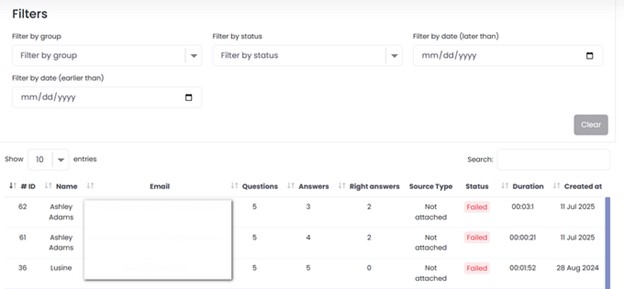
There is an opportunity to see the effectiveness of each question based on its frequency and the correctness of responses. This way, you can see the analysis not only on the employee level, but also on the question level.
Check-in surveys
Check-in surveys are a simple, low-pressure way to track how employees are feeling during and after training. They help you understand what is clicking, what is confusing, and whether the training is actually making a difference on the job.
When running these evaluations, consider a few things:
- Keep the evaluation survey short
- Avoid generic questions, like “How do you find the training?”
- Mix scale-based questions (1 to 5) with open-ended ones.
As Jeff, a learning and development expert, puts it:
“Probably the most common way people use to measure results is the evaluation form. That’s okay. But it gives me surface-level information. I’m not saying they are worthless. I do get great insight from those. Other types of results I like to get are from talking to people afterwards”.
Learning and development expert
And he is right. Evaluation surveys can tell you if someone liked the session, but they rarely tell you if that training helped them solve problems faster or make smarter decisions. But when you talk to people in focus groups afterward, it adds context to the data you collect.
Here are a few practical questions you can ask during a post-training focus group:
- Can you name one thing from the training that you have already used at work?
- Has anything changed in how you approach your daily tasks since the session? Discuss examples
- What kind of follow-up or support would help you apply this more confidently?
If you use an LMS platform like Uteach, there is no need to use external survey tools, as you have everything you need built in.
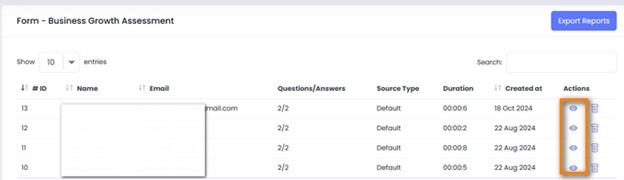
To collect responses, create forms with any type of question you need, such as multiple options, multiple choice, drop-downs, text answers, pictures, etc. Once submitted, you can track the reports and results sent by each employee.
Manager observation with rubrics
To make the employee training progress tracking even more effective, another method often used in pedagogy is rubrics. You already set the KPIs. Yet, when you have the rubric for each indicator, you are able to track not only whether the employee achieved the KPI or not. But also to what degree the training impacted the employee's performance.
A rubric is a set of measurable criteria that a supervisor uses to objectively rate an employee’s work and skills. In the rubric, you can mention the
- Performance criteria
- The rating scale
- The indicators of performance
You can use the rubric as a way of pre-assessment and post-assessment.
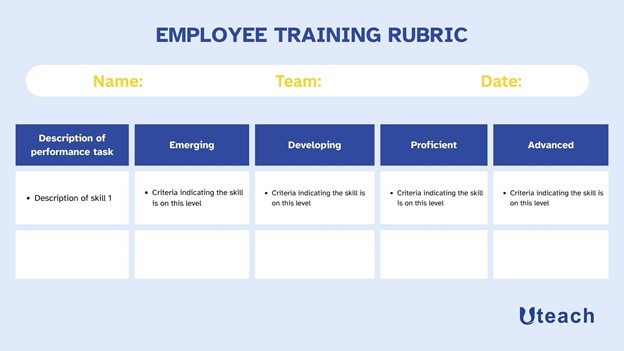
You can use the template above to create the rubric.
- Description of performance task. Here, you need to describe the exact skills you plan to train the employee on.
- Emerging, developing, proficient, and advanced are the criteria themselves. This means you need to be able to define what the practical application of that skill looks like on different levels. In our example, emerging is when the employee has not developed that particular skill yet. And advanced is the ultimate level, you need the employee to acquire the skill. All of this is based on the KPIs and learning outcomes you set for the training.
As you rate the employees before training, make sure to go through the rubric again in the next 2-3 months and identify how the employee progressed through the set of criteria.
Skill demonstration or practical tasks
The next method to track the employee's training progress is when you observe the application of that particular skill in everyday tasks. You can run a workshop, a live scenario, or even assign a real task that reflects what the training covered.
For this assessment, you will need to combine a few assessment methods, such as
- The rubrics we created in the step above
- Peer reviews
- Employee self-evaluation
All of those provide a 360-degree view of whether the skill was improved. After you collect and synthesize the data, you will be able to see the real progress.
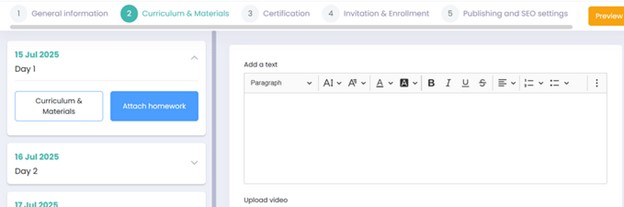
With an LMS like Uteach, you can automate the assignments as well. If you offer online training to employees, there is an opportunity to attach assignments as well. Once the employee finishes the assignment, it will be ready for review and for the manager to write down the feedback.
Peer reviews
Peer reviews are one of the most useful ways to track training progress on a behavioral level․
Especially for soft skills like communication, collaboration, leadership, or conflict resolution. To organize peer reviews, make sure you communicate the process clearly with the employees involved and select the right peer for evaluation.
- Decide what you want to evaluate. This can be any hard skill that the employee applies in team projects or soft skills.
- Create a short survey. Here you need to decide if you want the survey to be anonymous or include the evaluator’s name. As for the questions, use rating scales, as well as open-ended questions.
- Choose the peers, as they need to be the people (usually 2-3) who actually work with the employee regularly.
Time on task tracking
If one of your training goals is to improve efficiency or productivity, then tracking the time employees spend on actual project tasks is a solid way to measure progress. But to make this work, you need to first reflect back on the outcomes you set for the training.
Based on the outcomes, create a task project, which you can include in the training course itself as a final assessment. It needs to be something measurable and relevant to the employee’s actual role. For example, a marketing team member runs an email campaign using the updated process.
Now, compare it to previous tasks of similar scope done before the training, focusing on the efficiency. But the goal is not just to track the time because time tracking only works if paired with output quality. If the two conditions are present, you are able to track the progress and see the training impact.
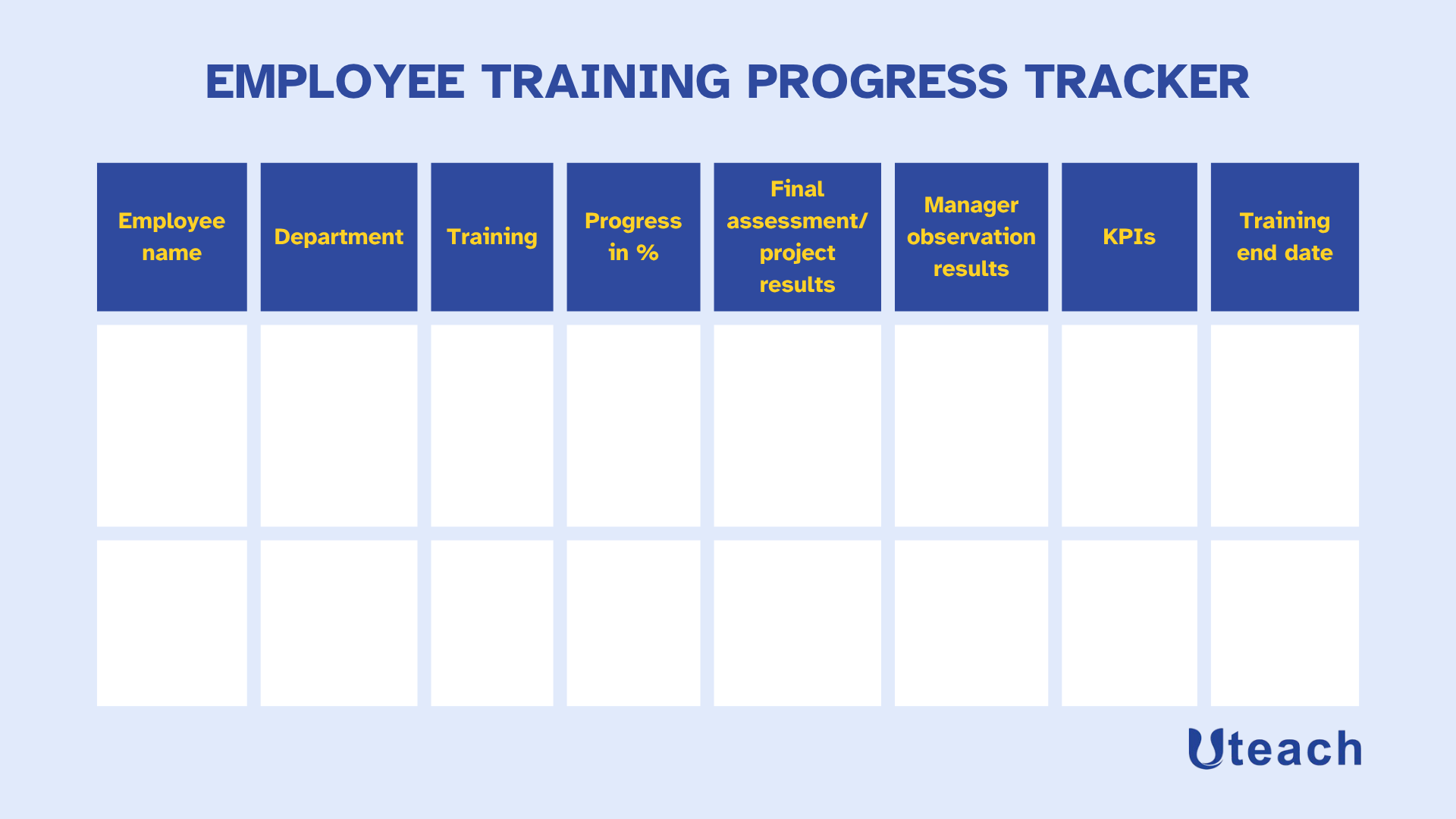
Employee training progress tracker
Depending on the assessment methods you choose or the results you want to focus on, you can adapt the tracker to reflect your organization’s needs.
Key employee training metrics to track
If you want to track the impact of the training on the employee's progress, there are a few metrics you should pay attention to. In the methods above, we already touched on these criteria.
But if we were to summarize what you need to focus on, regardless of the method used, the process will look like this.
- Training completion rate
Training Completion Rate (%) = (Number of Employees Who Finished the Training ÷ Number of Employees Assigned the Training) × 100
Training Completion Rate measures the percentage of participants who finish a training course out of those assigned or enrolled.
Industry data shows average completion rates for
- Compliance courses - 75%-90%
- Onboarding programs - 70% – 85%
- Soft skill development - 60% – 80%
- Optional training - 50% – 70%
You can look at completion rates by department, by training type (mandatory vs elective), or by delivery method (self‑paced vs instructor-led). This way, you have the opportunity to see which groups are dropping off.
- Quiz scores
Quiz Scores measure learners’ performance on assessments and can include average scores, pass rates, and improvements.
The quiz pass score in most cases is 70%-80%. But if you have scores higher than that, it does not always indicate great performance in tests. If quiz questions are not closely tied to your training goals or the question levels are not exactly set, high scores are misleading.
To track the quiz scores, it is best to compare pre‑training quizzes to post‑training quizzes. Otherwise, if you just consider the final assessment results, the real progress on the level of each employee is not truly visible.
- Manager evaluation scores
Manager Evaluation Scores measure how well employees’ direct supervisors believe someone is applying what they learned from training. Many organizations use 360-degree feedback instruments or direct manager ratings on a 5‑point scale.
If you have created the rubrics we mentioned in the tracking methods above, the managers can rate based on the specific behaviour you set on a scale of 1-5. Also, check scores at intervals, such as 1 month and 3 months after the training, so you can see whether the behavior sticks or fades.
- Behaviour change metrics
Behavior Change Metrics measure how consistently and effectively employees apply new behaviors or habits in their daily work after training.
You evaluate this through multiple methods, such as repeated 360‑degree feedback, observational data, and performance logs. According to the McKinsey report, only 30% organizations measure behaviour, mindset, and business impact together.
You should also tie the identified behavior to the learning outcomes. For example, if training is aimed at reducing errors or speeding up a process, link the behavior change metrics to error logs, productivity reports, or quality outcomes.
Track your employee progress with Uteach
As you can see, there are multiple ways to track the employee training progress and make sure the training delivers the impact you intended. For that purpose, you can track KPIs, use manager feedback, peer reviews, check-in surveys, modular tests, and projects after the training.
Yet, to make the tracking process easier and more efficient, it is better when you have all the data you need in one place. Having Uteach as your LMS, you have the perfect opportunity to keep all the aspects of progress tracking manageable.
With Uteach, you get access to advanced reports and analytics that make tracking effortless. From your dashboard, you can monitor
- Quiz results,
- Certified employees
- Course completion rates,
- Learning time,
- Training per employee,
- Form responses and more from one place.
Book a demo with one of our experts to get a guided walkthrough of how Uteach helps companies like yours drive employee growth.


