Canvas LMS vs. Moodle Cloud - Which is Worth The Hype?
You are looking at Canvas LMS and MoodleCloud and wondering which one is right for you.
Here is the deal: both platforms have their strengths, but they are built for different kinds of users. So, instead of getting lost in the noise, I tested both, dug through what other users are saying in reviews, and broke down everything you need to know before making your choice.
By the end of this page, you will have a clear understanding of which platform is the best fit for your needs. Who knows? It might be you need a whole different LMS solution.
Here is a quick breakdown.
| Canvas LMS | MoodleCloud |
|---|---|
| Modern, clean, and user-friendly interface | Not-polished interface and little customization |
| Easy-to-use course builder with drag-and-drop functionality | Simple course builder and feels more manual |
| Comprehensive analytics and reporting features | Analytics mainly focused on logs |
Canvas LMS at a glance
Canvas LMS is a learning management system built to help schools, universities, and even businesses manage online learning. It gives you a space to create courses, organize assignments, and interact with students through discussions, video calls, and messages. You can track grades and get detailed reports on student performance. It works well for large-scale learning environments where you need structure and customization.
Why may teachers love working on Canvas LMS?
- Opportunities for teachers to annotate, grade, and provide feedback directly on student submissions with rubrics and comments.
- Allows staying in touch with students via discussion boards, messaging systems, and group workspaces
- Has extensive integrations through learning tools interoperability (LTI)
Does Canvas LMS cover all the needs?
- Data in the tool and third-party apps does not always sync, and users report other types of technical issues
- It is not very customizable and market-driven as compared to other LMS solutions
- Canvas is not transparent about its pricing, but users believe it is an expensive solution
Course building functionality
Before building the course itself, Canvas LMS suggests configuring the settings. So you can set up how the students can interact with the course and all the activities (for example, topics, discussions, announcements) related to it.
Once you set up the course, you can create the modules, discussions, rubrics, outcomes, quizzes, and assignments separately. As part of the module content, you can add different media, such as
- Documents,
- Audio materials
- Videos
- Images
With Canvas, there is an opportunity to set the deadlines for the course. By saying deadlines, I mean that you can mention when the course starts and ends. And then limit the access once the student reaches the end date.
One of the most important things is that you can assign specific outcomes. So when the students progress through the course, you can track how much percent of the outcomes were already covered. What is great is that you can link the outcomes to the rubrics you create. Everything is interlinked to each other so that when you grade the students, you refer to your rubric, which is outcome-based.
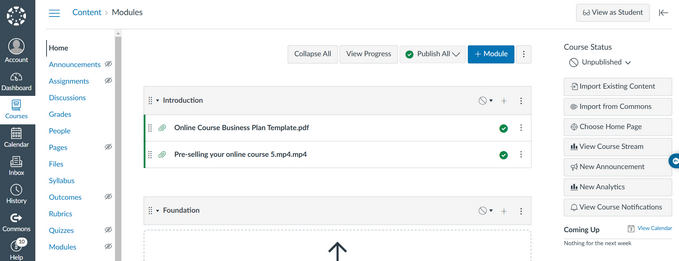
As for the quizzes, there are extensive options to make them varied and interesting. You can use 12 types of questions, from multiple-choice to text answers.
Key marketing functionality
For standalone teachers using a teacher account, Canvas offers limited customization options.
You can personalize individual course pages, add banners, and create engaging announcements, but you do not have access to full branding capabilities like custom URLs, logos, or theme editing. Additionally, there are no built-in marketing tools, so you cannot promote or sell your courses directly within Canvas.
This does not suggest that schools and organizations have vast opportunities when it comes to marketing. You can just tweak the appearance of dashboards, navigation menus, and buttons to match your school’s brand style. You also have the chance to customize course pages and announcements. You can add personalized headers, banners, or even video welcome messages to engage students.
When comparing Canvas LMS to other platforms focused on independent course creators, it is less customizable and not a market-driven LMS.
Payment options and integrations
Canvas LMS does not have native payment processing or built-in tools for pricing and selling courses. So, as I mentioned, you cannot sell a course and collect payments.
However, canvas has another solution called Canvas Catalog. You will need to purchase that to list courses and accept payments.
As for other integrations, Canvas offers 500+ learning and management apps you can connect to and use. However, the integrations are mainly done using APIs and LTI standards.
Read more: Canvas LMS Review 2025։ Alternatives, Pricing, Pros, Cons & More
All about Moodle Cloud
MoodleCloud is a plug-and-play version of Moodle, built for people who want an LMS without the hassle of hosting or maintenance. It gives you a ready-made learning space where you can create courses, add quizzes, track progress, and even hold live classes with BigBlueButton. You can also sell courses directly using PayPal or Stripe.
What makes MoodleCloud popular?
- Flexible course structure (weekly, single activity, social discussions)
- Supports live video classes
- Completion conditions and lots of course regulations
Is MoodleCloud actually worth it?
- No tools to promote or market your courses
- Difficult to navigate and takes lots of manual setups
- No opportunity to have a professional course website (It looks more like a catalog)
Course-building functionality
Creating courses on MoodleCloud feels more like adding content for learning rather than creating a learning experience. However, it does let you manage how the students can interact with the course. For example, you can limit the end date, set completion conditions or manage which student group can see which content.
As part of your course content, you can upload any type of media, such as videos, images, PDFs, audio files, etc. Besides adding the main content for the course, you can also add content to the content bank. This serves as content you can later include in the course.
MoodleCloud allows you to create courses in different formats:
- Custom sections to divide the content into sections
- Weekly sections, so each section is intended for one week
- Single activity, when you upload just one resource
- Social, to add content for forums

Key marketing functionality
MoodleCloud generally acts as a repository for your course content. Yet, it does not offer many options to easily monetize them. You do not get a legit website with ready-made landing pages and builders.
The only thing you can do is add your logo to the website. For everything else, you have to use plugins or use the code.

Payment options and integrations
When it comes to payments, MoodleCloud only supports PayPal. You have to enable it from the plugins.
It offers other plugins for certificates, quizzes, forums, and other activities.

Check also: MoodleCloud Review 2025: Alternatives, Pricing, Pros, Cons & More
Users’ take on MoodleCloud and Canvas LMS
So far, we have discussed the functionality and opportunities these two solutions offer. Yet, to provide you with a 360 degree view of how MoodleCloud and Canvas LMS help their users achieve their goals, we will also check some reviews.
Users describe Canvas LMS as user-friendly, powerful, and a great solution for students and schools. They like how easy it is to create and manage courses, as the backend work is simple. Also, reviewers appreciate that they can set up pre-requisites, so that the students can complete the course in a definite order.
However, the administrators also mention that setting up modules takes time.

As for MoodleCloud, it is not yet submitted for review on review platforms. I could only find users sharing their experiences on Moodle. That is why I checked for the discussion forums. Judging from the reviewer’s experience, they only used Moodle just because their school or university used it as their LMS.
One of the reviewers described it as a good solution for organizations. Yet, it is not suitable for anyone who also wants to monetize the courses there.

Which solution is better for your needs?
As you can see, Canvas LMS and MoodleCloud are different not only in the functionality they provide but also in the learning experience they allow you to create. That is why the platform you choose comes to what you need.
You can choose Canvas LMS if you
- are running a university, school, or structured training program with lots of students.
- need strong grading, analytics, and tracking tools to monitor student progress.
- want a polished and modern interface that is easy for students and teachers to use.
- need deep integrations with other learning tools
At the same time, you may like MoodleCloud better if you
- need a simple, hosted version of Moodle and do not want to deal with hosting
- do not need much when it comes to customization
- deed a repository for your course content
Essentially, one of the key differences is that Canvas LMS is more structured in terms of delivering your course content. MoodleCloud is looser on this unless you enable lots of plugins for every feature you need.
Yet, if you need something easier to start and with more opportunities to manage your course, you can consider Uteach. No matter whether you are an individual creator or a school that also needs more content monetization opportunities, Uteach helps you manage all the administrative and teaching work.
Canvas LMS vs MoodleCloud: Detailed comparison
Still cannot choose between Canvas LMS and MoodleCloud? Let’s have a side-by-side comparison on their functionality and options
Usage & Limitations
Some platforms put limitations on their main features. Is this the case with Canvas LMS & MoodleCloud? Here is a rundown of what you can find.
| Unlimited Courses | Unlimited Courses |
| Unlimited Students | Up to 750 Students |
| Unlimited Storage | Up to 50 GB Storage |
As you noted MoodleCloud has limitations on the number of users you can have in each plan. Uteach, on the other hand, gives you the freedom to expand with unlimited students, courses, storage, and products. No limitations are based on the Uteach plan you are using.
Plus, Uteach provides unlimited website pages, landing pages, and blog pages so that you can customize your website and use it to attract more students.
Builder Opportunities
Whether your business is going to run on a Canvas LMS website or a MoodleCloud website, their website builders will decide for you. The website-building functionalities these platforms offer include the following:
| Ready-made templates | Ready-made templates |
| Responsive design | Responsive design |
| White-Labeling | White-Labeling |
With Canvas LMS and MoodleCloud, you do not have many options to customize the website to your brand.
On the other hand, with Uteach, you can have a 100% white-label experience. Uteach's ready-made templates are not just generic designs. They are made specifically for course creators and coaches.
Whether you’re teaching yoga, coding, or business, Uteach offers templates tailored to your niche, making it easier to hit the ground running.
Courses & Learning Products
The platform choice between Canvas LMS & MoodleCloud largely depends on what products you will be offering. Which platform allows you to better deliver your online courses, quizzes, webinars, digital downloads, and more?
| Free courses | Free courses |
| Drip Feed Courses | - |
| Private Courses | Private Courses |
Sure, Canvas LMS and MoodleCloud allow you to build and deliver courses. Yet, if you decide to monetize, there are not really any options.
With Uteach, you can offer other kinds of digital products besides courses. For example, you can create and sell eBooks and physical products and run automated live sessions. What is more important is that you do not need to set up additional plugins like you do with MoodleCloud.
Announcing the winner
LMS solutions usually love putting limits on what you can do. How many courses can you sell? How many students can join? Uteach does NOT do that. You want to launch five courses at once? Go for it. A thousand students sign up overnight? No problem. You grow as big as you want without hitting a paywall.
And let’s talk about price. It is actually affordable without cutting out features. Some platforms make you pay more just to have things that should be standard. With Uteach, you are not constantly upgrading just to get the basics.
Now for the fun part. Your course does not have to be just videos and PDFs. You can add quizzes, assignments, and live lessons. Keep things interactive. Keep students engaged. Give them a real learning experience instead of just dropping content and hoping for the best.
Money-wise, Uteach gives you options. More payment gateways. More ways to set up pricing. Subscriptions, one-time purchases, bundles. You decide how to sell, not the platform.
And the best part? You do not have to spend hours on admin work. Uteach handles things like enrollments, scheduling, and certificates automatically. Less time clicking buttons, more time actually creating.
Uteach is a winner for everyone who wants to grow without jumping through hoops. Claim YOUR free demo now, and let our expert walk you through all the steps of growing your business!
![{"id":4,"user_id":5487,"slug":"sona-hoveyan","full_name":"Sona Hoveyan","position":"Edu-Centric Content Writer","tagline":"Edu-Centric Content Writer","image":"uteach\/authors\/FHMfpw6mwKolEA5nrK7s-1743576925\/1689750055996.jpg","short_text":"I\u2019m Sona, a curious writer who never posted about \u201c Why AI cannot come for your writing job.\u201d After one year of teaching, I realized that the idea of informal education appealed to me more. \r\n\r\nNow, I specialize in helping coaches, educators, and course creators grow their businesses through actionable content. From blog posts and interviews with creators to guides and engaging newsletters, I focus on delivering various perspectives and experiences in a single piece of writing. \r\n\r\nEssentially, I either write content that keeps you on your toes or touch my toes and stretch. Because flexibility is a life skill, whether on the yoga mat or in education.","education":"<ul><li>Bachelor\u2019s in Teaching English as a Second\/Foreign Language Language Instructor, GSU<\/li><li>Bachelor\u2019s in Modern Languages, UCAM Universidad Cat\u00f3lica San Antonio de Murcia<\/li><\/ul>","experience":"<ul><li>SEO Content Specialist at Uteach\u00a0<\/li><li>English as a Foreign Language Teacher at Armenian Caritas<\/li><\/ul>","social_insta":null,"social_fb":null,"social_twitter":null,"social_linkedin":"https:\/\/www.linkedin.com\/in\/sonahoveyan","meta_title":"Sona Hoveyan | Uteach Authors","meta_keywords":null,"meta_description":null,"json_ld":"{\r\n \"@context\": \"https:\/\/schema.org\",\r\n \"@type\": \"Person\",\r\n \"name\": \"Sona Hoveyan\",\r\n \"jobTitle\": \"SEO Content Specialist\",\r\n \"worksFor\": {\r\n \"@type\": \"Organization\",\r\n \"name\": \"Uteach\",\r\n \"url\": \"https:\/\/uteach.io\"\r\n },\r\n \"alumniOf\": [\r\n {\r\n \"@type\": \"EducationalOrganization\",\r\n \"name\": \"GSU\"\r\n },\r\n {\r\n \"@type\": \"EducationalOrganization\",\r\n \"name\": \"Universidad Cat\u00f3lica San Antonio de Murcia\"\r\n }\r\n ],\r\n \"knowsAbout\": [\r\n \"Content Writing\",\r\n \"Educational Content Strategy\",\r\n \"Coaching and Course Creation\",\r\n \"SEO for Educators\",\r\n \"Informal Education\"\r\n ],\r\n \"sameAs\": [\r\n \"https:\/\/www.linkedin.com\/in\/sonahoveyan\"\r\n ]\r\n}","created_at":"2025-01-27T12:34:55.000000Z","updated_at":"2025-05-09T15:04:05.000000Z"}](https://d35v9chtr4gec.cloudfront.net/uteach/authors/FHMfpw6mwKolEA5nrK7s-1743576925/1689750055996.jpg)
![{"id":6,"user_id":13522,"slug":"hrayr-shahbazyan","full_name":"Hrayr Shahbazyan","position":"CEO and Founder of Uteach","tagline":"CEO and Founder of Uteach","image":"uteach\/authors\/vpJWbY8ECtuq8xvK0ylM-1743576841\/1686578142045.jpg","short_text":"I\u2019m Hrayr, a growth-driven entrepreneur. Wait, scratch that. I\u2019m a techpreneur. \r\n\r\nWith a background as a developer and a track record of founding multiple startups, my passion lies in creating strategic, impactful change in the edtech space. My journey in education and technology led me to a bigger mission: making education accessible for everyone.\r\n\r\nLet\u2019s just say I like to think always a few steps ahead. So, I strategize my next move over the board of an enjoyable chess game. And then I bring the same careful thought to my startups.","education":"<ul><li>Bachelor\u2019s in State Engineering University of Armenia\u00a0<\/li><li>Master\u2019s in State Engineering University of Armenia\u00a0<\/li><li>Fundamentals of Entrepreneurship at Leadership School<\/li><\/ul>","experience":"<ul><li>CEO and Founder at Uteach\u00a0<\/li><li>CEO and Founder of Munich Ventures\u00a0<\/li><li>CTO and Co-Founder at WallyList\u00a0<\/li><li>CTO and Co-Founder at ChessMood\u00a0<\/li><li>CTO at LetsGo2Class\u00a0<\/li><li>Founder at WooChess\u00a0<\/li><li>CEO and Founder at Chess.am<\/li><\/ul>","social_insta":null,"social_fb":null,"social_twitter":null,"social_linkedin":"https:\/\/www.linkedin.com\/in\/shahbazyan","meta_title":"Hrayr Shahybazyan | Uteach Authors","meta_keywords":null,"meta_description":null,"json_ld":"{\r\n \"@context\": \"https:\/\/schema.org\",\r\n \"@type\": \"Person\",\r\n \"name\": \"Hrayr Shahbazyan\",\r\n \"jobTitle\": \"CEO and Founder\",\r\n \"worksFor\": {\r\n \"@type\": \"Organization\",\r\n \"name\": \"Uteach\",\r\n \"url\": \"https:\/\/uteach.io\"\r\n },\r\n \"alumniOf\": [\r\n {\r\n \"@type\": \"EducationalOrganization\",\r\n \"name\": \"State Engineering University of Armenia\"\r\n },\r\n {\r\n \"@type\": \"EducationalOrganization\",\r\n \"name\": \"Leadership School\"\r\n }\r\n ],\r\n \"knowsAbout\": [\r\n \"Entrepreneurship\",\r\n \"EdTech\",\r\n \"Startup Strategy\",\r\n \"Software Development\",\r\n \"Technology in Education\",\r\n \"Chess and Strategic Thinking\"\r\n ],\r\n \"sameAs\": [\r\n \"https:\/\/www.linkedin.com\/in\/shahbazyan\/\"\r\n ]\r\n}","created_at":"2025-01-27T13:07:47.000000Z","updated_at":"2025-04-24T22:55:40.000000Z"}](https://d35v9chtr4gec.cloudfront.net/uteach/authors/vpJWbY8ECtuq8xvK0ylM-1743576841/1686578142045.jpg)

Happy customers everywhere

Angel Rodriguez CPP
Owner - Alliance Training & Testing
If you are looking for a great platform to launch your course then Uteach will meet all your needs. It comes with great templates that are highly customizable. Everything is laid out logically and the white-label is truly white-label. The advanced SEO capability is a major plus.I cannot say enough good things about the Uteach platform and how happy I am that I made the change.

Bekah Bottone
English Coach/Motivator
Thank you Uteach, for creating a platform that motivated me to set up a new webpage for my new businesses. I love how everything is included, that I can offer live sessions and also have a way to sell my workbooks. I will be launching my new website soon! The best part about working with Uteach is that they get back to me within a day with exactly what I need to know anytime I have a question.

Ivan Bayross
Sales Funnel Creation Consultant, Digital Marketing Strategy Specialist
Uteach, is intuitive, and easy to use. I've been asking Uteach support a ton of detailed questions. I've got perfect, easy to understand / implement answers to all my questions.

Luca Madonia
Coach
Uteach is absolutely insane. Everything about this tool is right down to the smallest detail. Whit labeling is all available and can be set up completely within a few minutes. I am an absolute FAN of Uteach.

Mark Dickenson
Coach
Finally found the perfect LMS ? I have tried a bunch of LMS and so far this is the best. What I love about Uteach is their templates, I am not stuck with just the standard look for my site and I can customize it easily. Also having unlimited students and no commission fee is great. They have very good support that answers quickly. So far im loving it, easy.

Miroslav Sázovský
Author, lecturer and coach
After 15 years of coaching and mentoring people, we've tried a lot of similar apps and platforms, but this one is truly made for creators. Everything is intuitive, simple and beautiful at the same time.