Teachable vs. Udemy: Where to Sell Your Courses
Do you go with Udemy, where millions of students are already searching for courses, or Teachable, where you get to build your own brand and set your own prices?
Each platform has its strengths, but also some frustrating limitations that could hold you back. To make this review as unbiased as possible I analyzed real user experiences, scrolled through discussion forums where course creators vented about what works and what does not, and took a close look at what these platforms actually deliver. If you want the full picture before making your decision, keep reading. And if you want to compare where you have better chances to succed, skip to our detailed comparison table.
Who knows, maybe you can find a whole different platform that can fit all your business needs. Here is a quick rundown.
| Teachable | Udemy |
|---|---|
| Full control over branding, pricing, and student data | With limited control, Udemy owns the audience |
| Multiple income streams (subscriptions, bundles, upsells) | One-time purchases, limited upsells |
| Full customization (website, branding) | Huge marketplace with a vast audience |
Inside Teachable
If you are particularly looking to create online courses, coaching, digital downloads, memberships, and community, you can do all that with Teachable. To help you grow your business, the platform offers subscriptions, app integrations, order bumps, and upsells. It positions itself as a solution for enterprise users as well. So you can get all the basics you need for employee onboarding and internal training.
What creators find great about Teachable
- Handles taxes automatically
- Offers lots of third-party integrations
- Provides flexible payments options, including Buy Now, Pay Later
Why users do not choose Teachable
- Limited website building and customization opportunities
- No opportunity for live session, only webinars
- No white-label mobile app available
Course-building
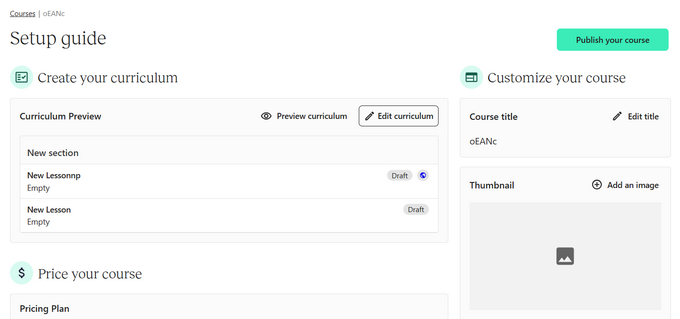
Before taking to the course builder, Teachable suggests getting started with an AI course outline generator or starting from scratch. If you decide to start from scratch, you will need to first create a section, and later add multiple lessons. As you add each lesson, you can immediately select whether you want it to be published immediately or drip-schedule. The content for the lesson can be text-based, video, PDF, audio, image, resource, or even a code snippet. The greatest thing is that the platform saves you time by allowing bulk-upload.
Key marketing and sales functionalities
One of the defined functionalities when it comes to marketing is the Upsell funnel. You can automatically add order bumps, so that the students add additional products before completing the order. Besides, you can also create post purchase offers, thank you page upsells and course lesson upsells.
Teachable has pre-made email marketing templates. So, you can run email marketing campaigns or set automated emails, such as abandoned cart emails.
Payment options and integrations
Teachable has two native payment gateways. They include teachable:pay and the Monthly Payment Gateway. However, they do not support all the countries. You will need to use their Pro plan and higher to be able to choose a custom payment gateway.
As for the integrations, the platform integrates well with more than 25 popular marketing, sales and automation tools.
All about Udemy
Udemy is another popular marketplace to sell online courses. Here, you set the price for the courses, and Udemy handles the sales and marketing through its platform. Instructors can offer additional content like quizzes, assignments, and downloadable resources.
However, you cannot sell courses elsewhere for a lower price, as Udemy requires exclusivity for courses listed in their marketplace.
Why do creators join Udemy?
- Access to a large learner base.
- Flexibility in pricing your course
- Opportunities to create and award certificates
Is Udemy everything you need?
- No control over your branding and marketing
- High competition
- High commissions from your sales (takes 63% if the purchase was not made with your referral link)
Marketing and selling courses
As an instructor on Udemy, again, you have no control over how your courses are handled, promoted, and sold. There are no marketing tools for you to promote your course on the platforms.
You can also create coupons and offer discounts on the course. But the platform can impose its own discounts and you have no say in there.
Creating and uploading courses
Before you create and upload a course on Udemy, you need to make sure it fits the standards.
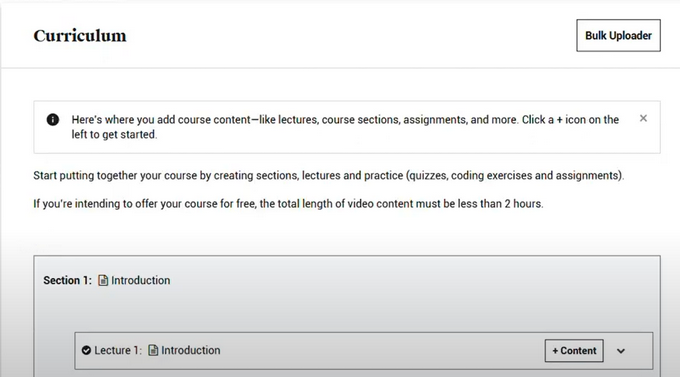
Udemy requires that your course should be at least 30 minutes long. To create a course, you provide a title, description, learning objectives, and other relevant information about the course.
You can upload videos in bulk, and Udemy offers a drag-and-drop interface. After you submit your course, Udemy’s team will review it for quality and compliance with their guidelines.
Your content on Udemy includes lectures, quizzes, and Q&As.
Payment methods
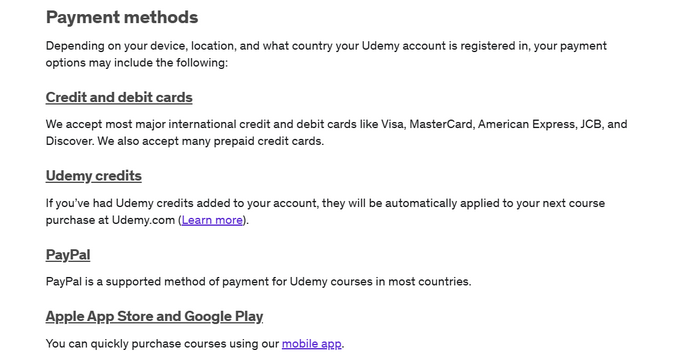
The way instructors receive payments with Udemy depends on the location and registered country. Generally, you can get paid via
- Credit cards
- PayPal
- Google Pay and Apple Pay
Read more: Udemy Review 2025: Alternatives, Pricing, Pros, Cons & More
User’s take on Teachable vs. Udemy
The best way to know which course platform you should use? It is by asking other people who used both solutions. Some favor Teachable because they can self-host their courses. Others prefer to sell on Udemy, as it is a reputable marketplace.
And there is a whole third group of reviewers who think that you can always use Udemy and Teachable at the same time. They highlight that Udemy is great if you want to test the course creation business. Yet, if you want to scale more easily, Teachable is a smarter choice.
Here is an opinion on Udemy vs. Teachable from a Quora discussion.

Teachable is a well-known platform for launching and selling online courses, and many users appreciate how simple it is to use. Especially if you are not tech-savvy. It is often recommended as a beginner-friendly option that helps creators get started without a steep learning curve.
However, when it comes to customization, it falls short in a few key areas. Designing pages can be frustrating, particularly if you want a polished, professional-looking website. The course creation process also feels somewhat restrictive. Quizzes, for example, only allow multiple-choice questions, which limits engagement options.

As for Udemy, you can find reviews from both perspectives, students and instructors.
For course creators, Udemy serves as an easy entry point for those wanting to turn their expertise into income. However, one common concern is the platform’s control over pricing. Its frequent discounts and promotions often leave instructors earning less than expected. Here is what one instructor had to say about their experience.

When to sell courses on Teachable and when on Udemy
If you are debating between Teachable and Udemy for your online courses, it really comes down to what you want.
Go for Udemy if you just want to get your course out there without worrying about marketing or setting up a website. They already have a huge audience, so people can find your course without you having to do much. The downside? Udemy controls pricing, runs discounts all the time, and takes a cut, so you will not make as much per sale. It is great for getting exposure but not ideal if you want full control over your brand and earnings.
Teachable, on the other hand, is better if you want to build your own thing. You have your brand, your pricing, and your audience. It gives you way more control, and you can make more money per student since there is no platform-wide discounting. But you will also need to bring in your own audience.
So, if you want quick visibility and do not mind lower payouts, Udemy works. But if you are serious about building a long-term business and keeping full control, Teachable is the better bet.
Maybe you want full control over your online school (unlike Udemy) but also need something more budget-friendly (unlike Teachable).
In that case, Uteach could be the perfect fit. If you are curious about why it is worth considering, let’s dive into a detailed comparison of all three platforms to see how they compare.
Teachable vs Udemy: Detailed comparison
Still cannot choose between Teachable and Udemy? Let’s have a side-by-side comparison on their functionality and options
Usage & Limitations
Some platforms put limitations on their main features. Is this the case with Teachable & Udemy? Here is a rundown of what you can find.
| Unlimited Students | Unlimited Students |
| Up to 25 published products | - |
| Storage up to 1TB | - |
Udemy does not let you build your own website. It is their marketplace, their rules. Thinkific gives you more control, but only if you are willing to pay for it. Their features depend on the plan you choose, so things like products, lessons, and communities are limited unless you upgrade.
With Uteach, it is simple. You get everything in every plan. Unlimited courses, storage, and website pages. All features are included on all paid plans.
Builder Opportunities
Whether your business is going to run on a Teachable website or a Udemy website, their website builders will decide for you. The website-building functionalities these platforms offer include the following:
| Ready-made templates | Ready-made templates |
| Responsive design | Responsive design |
| White-Labeling | - |
Udemy, as a marketplace, does not offer a branded experience. It is their branding, you just get a spot on their website. Teachable allows for a more personalized touch. Features like white-labeling, and code editing are in their pricier tiers.
Uteach, on the other hand, has no limits and no hidden costs. You get full website customization, white-labeling, custom domains, and even a code editor, all included in the paid plans.
Courses & Learning Products
The platform choice between Teachable & Udemy largely depends on what products you will be offering. Which platform allows you to better deliver your online courses, quizzes, webinars, digital downloads, and more?
| Free courses | Free courses |
| Drip Feed Courses | Drip Feed Courses |
| Private Courses | Private Courses |
When it comes to courses and learning products, Udemy keeps things pretty basic. You can offer standard courses, quizzes, and certifications, but that is about it. Teachable gives you more flexibility with features like drip-feed and private courses, but again, advanced features depend on your plan.
With Uteach, not only do you have no limitations on how much of what to sell, but you can sell physical products as well. So, if you have books, templates, and hands-on activities, Uteach can cover all that.
What is the best solution for your course business?
If you want the best platform to grow your course business your way, Uteach is hands down the best choice.
Unlike Udemy, you are in full control. No random discounts, no platform deciding how much you should charge. You set the prices, you keep the profits. Compared to Teachable, Uteach lets you sell as many products as you want, no matter which plan you are on. No limits, no extra fees, just pure freedom to scale your business.
And here is where it gets even better. Teachable lets you build a branded website, but Uteach gives you something even more powerful. You get your own branded app, so your students can access your courses anytime with your name front and center. Plus, Uteach has built-in communities, meaning you are not just selling courses, you are creating an engaged learning space. Neither Udemy nor Teachable offer that.
On top of all that, Uteach gives you more payment options, so your students have flexible ways to pay. No restrictions, no headaches, just a smooth experience for you and them.
If you want full control, unlimited growth, and a platform that actually works for you, Uteach is the way to go. Claim YOUR free demo now, and let our expert walk you through all the steps of growing your business!
![{"id":4,"user_id":5487,"slug":"sona-hoveyan","full_name":"Sona Hoveyan","position":"Edu-Centric Content Writer","tagline":"Edu-Centric Content Writer","image":"uteach\/authors\/FHMfpw6mwKolEA5nrK7s-1743576925\/1689750055996.jpg","short_text":"I\u2019m Sona, a curious writer who never posted about \u201c Why AI cannot come for your writing job.\u201d After one year of teaching, I realized that the idea of informal education appealed to me more. \r\n\r\nNow, I specialize in helping coaches, educators, and course creators grow their businesses through actionable content. From blog posts and interviews with creators to guides and engaging newsletters, I focus on delivering various perspectives and experiences in a single piece of writing. \r\n\r\nEssentially, I either write content that keeps you on your toes or touch my toes and stretch. Because flexibility is a life skill, whether on the yoga mat or in education.","education":"<ul><li>Bachelor\u2019s in Teaching English as a Second\/Foreign Language Language Instructor, GSU<\/li><li>Bachelor\u2019s in Modern Languages, UCAM Universidad Cat\u00f3lica San Antonio de Murcia<\/li><\/ul>","experience":"<ul><li>SEO Content Specialist at Uteach\u00a0<\/li><li>English as a Foreign Language Teacher at Armenian Caritas<\/li><\/ul>","social_insta":null,"social_fb":null,"social_twitter":null,"social_linkedin":"https:\/\/www.linkedin.com\/in\/sonahoveyan","meta_title":"Sona Hoveyan | Uteach Authors","meta_keywords":null,"meta_description":null,"json_ld":"{\r\n \"@context\": \"https:\/\/schema.org\",\r\n \"@type\": \"Person\",\r\n \"name\": \"Sona Hoveyan\",\r\n \"jobTitle\": \"SEO Content Specialist\",\r\n \"worksFor\": {\r\n \"@type\": \"Organization\",\r\n \"name\": \"Uteach\",\r\n \"url\": \"https:\/\/uteach.io\"\r\n },\r\n \"alumniOf\": [\r\n {\r\n \"@type\": \"EducationalOrganization\",\r\n \"name\": \"GSU\"\r\n },\r\n {\r\n \"@type\": \"EducationalOrganization\",\r\n \"name\": \"Universidad Cat\u00f3lica San Antonio de Murcia\"\r\n }\r\n ],\r\n \"knowsAbout\": [\r\n \"Content Writing\",\r\n \"Educational Content Strategy\",\r\n \"Coaching and Course Creation\",\r\n \"SEO for Educators\",\r\n \"Informal Education\"\r\n ],\r\n \"sameAs\": [\r\n \"https:\/\/www.linkedin.com\/in\/sonahoveyan\"\r\n ]\r\n}","created_at":"2025-01-27T12:34:55.000000Z","updated_at":"2025-05-09T15:04:05.000000Z"}](https://d35v9chtr4gec.cloudfront.net/uteach/authors/FHMfpw6mwKolEA5nrK7s-1743576925/1689750055996.jpg)
![{"id":1,"user_id":30,"slug":"shushanik-shahbazyan","full_name":"Shushanik Shahbazyan","position":"Co-Founder & COO ay Uteach | Digital Creator","tagline":"Co-Founder & COO ay Uteach | Digital Creator","image":"uteach\/authors\/2yVbsFhoRDQGeHgLoP3B-1743577010\/shush-1.png","short_text":"I\u2019m Shushan, a creative marketer, edupreneur, and entrepreneur passionate about building meaningful solutions for educators. \r\n\r\nMy journey began as a content SEO specialist in software development, eventually leading me to become a digital marketing strategist. But I\u2019ve always felt like education is where I belong, inspiring me to launch my own course and help other creators succeed with theirs. Now, as the COO and co-founder of Uteach, I make sure coaches and educators have everything to build a successful e-business. \r\n\r\nI like the idea of staying flexible, both literally and figuratively. So, while you were reading this, I may have posted a dance or two on TikTok with my daughters.","education":"<ul><li><span>Bachelor's degree in Russian Philology, Yerevan State University<\/span><\/li><li><span>Online course in \u201cLeadership and Team Management - Developing People Skills\u201d<\/span><\/li><li><span>Online course in \u201cTask Management from A to Z\u2018<\/span><\/li><\/ul>","experience":"<ul><li><span>Founder of Let\u2019s Launch a Course<\/span><\/li><li><span>COO and Co-Founder at Uteach<\/span><\/li><li><span>Digital Marketing Manager at Aist Global<\/span><\/li><li><span>SEO specialist at AIST Global<\/span><\/li><\/ul>","social_insta":null,"social_fb":null,"social_twitter":null,"social_linkedin":"https:\/\/www.linkedin.com\/in\/shushanik-shahbazyan","meta_title":"Shushan Shahbazyan | Uteach Authors","meta_keywords":null,"meta_description":null,"json_ld":"{\r\n \"@context\": \"https:\/\/schema.org\",\r\n \"@type\": \"Person\",\r\n \"name\": \"Shushanik Shahbazyan\",\r\n \"url\": \"https:\/\/uteach.io\/authors\/shushanik-shahbazyan\",\r\n \"image\": \"https:\/\/uteach.io\/path-to-author-image.jpg\",\r\n \"jobTitle\": \"COO and Co-Founder\",\r\n \"worksFor\": {\r\n \"@type\": \"Organization\",\r\n \"name\": \"Uteach\",\r\n \"url\": \"https:\/\/uteach.io\"\r\n },\r\n \"alumniOf\": {\r\n \"@type\": \"EducationalOrganization\",\r\n \"name\": \"Yerevan State University\",\r\n \"sameAs\": \"https:\/\/www.ysu.am\"\r\n },\r\n \"sameAs\": [\r\n \"https:\/\/www.linkedin.com\/in\/shushanik-shahbazyan\"\r\n ]\r\n}","created_at":"2025-01-20T10:08:51.000000Z","updated_at":"2025-04-24T22:39:29.000000Z"}](https://d35v9chtr4gec.cloudfront.net/uteach/authors/2yVbsFhoRDQGeHgLoP3B-1743577010/shush-1.png)

Happy customers everywhere

Angel Rodriguez CPP
Owner - Alliance Training & Testing
If you are looking for a great platform to launch your course then Uteach will meet all your needs. It comes with great templates that are highly customizable. Everything is laid out logically and the white-label is truly white-label. The advanced SEO capability is a major plus.I cannot say enough good things about the Uteach platform and how happy I am that I made the change.

Bekah Bottone
English Coach/Motivator
Thank you Uteach, for creating a platform that motivated me to set up a new webpage for my new businesses. I love how everything is included, that I can offer live sessions and also have a way to sell my workbooks. I will be launching my new website soon! The best part about working with Uteach is that they get back to me within a day with exactly what I need to know anytime I have a question.

Ivan Bayross
Sales Funnel Creation Consultant, Digital Marketing Strategy Specialist
Uteach, is intuitive, and easy to use. I've been asking Uteach support a ton of detailed questions. I've got perfect, easy to understand / implement answers to all my questions.

Luca Madonia
Coach
Uteach is absolutely insane. Everything about this tool is right down to the smallest detail. Whit labeling is all available and can be set up completely within a few minutes. I am an absolute FAN of Uteach.

Mark Dickenson
Coach
Finally found the perfect LMS ? I have tried a bunch of LMS and so far this is the best. What I love about Uteach is their templates, I am not stuck with just the standard look for my site and I can customize it easily. Also having unlimited students and no commission fee is great. They have very good support that answers quickly. So far im loving it, easy.

Miroslav Sázovský
Author, lecturer and coach
After 15 years of coaching and mentoring people, we've tried a lot of similar apps and platforms, but this one is truly made for creators. Everything is intuitive, simple and beautiful at the same time.