

The following guide covers:
#1 Uteach for training, onboarding, and monetized education
#2 Creatio for CRM and workflow platform
#3 CloudTalk - AI voice agents and power dialer that save your team hours
#4 Zapier - the glue for your stack
#5 ActiveCampaign - personalized marketing on autopilot
#6 Hotjar - see what users feel
# 7 FLOWii - see what users feel
#8 Asana - project automation for teams
#9 Make - visual automation for complex flows
#10 Airtable - databases with built-in automations
#11 Slack - workflows where people already talk
#12 n8n - open source workflow automation
#13 Helix – AI skills intelligence that automatically tracks workforce capabilities
#14 Featurebase: customer support and feedback automation
#15 HeyReach.io: LinkedIn outreach automation
#16 Alloy.ai: retail and supply chain automation
#17 esign.co.uk: electronic signature automation
In 2024, the global e-learning market reached about 300B USD and is projected to hit 842B USD by 2030 (Grand View Research). That is a strong signal that digital systems are no fad. They are how modern companies scale and standardize what works.
If you are still relying on spreadsheets and heroic effort, growth will stall. The fix is a lean stack that automates the repetitive, centralizes the important, and gives you clear performance visibility. Below are 10 proven tools with why they matter, what they do best, and where they fit. Use them to reduce busywork, improve customer experience, and create room for the work only you can do.
#1 Uteach - training, onboarding, and monetized education
Training is a growth lever. Use an LMS to onboard customers consistently, certify partners, and upskill staff without spinning up manual sessions every time.
Key features
- All-in-one academy builder: website, course hosting, live sessions, quizzes, certificates, payments
- Automations: enrollment triggers, reminders, progress tracking, completion certificates
- Monetization: course bundles, subscriptions, memberships, plus digital or physical add-ons
- Engagement: communities, comments, and analytics to see where learners drop off
Best for
- Customer onboarding playbooks that cut support tickets and churn
- Employee training for SOPs, product knowledge, compliance
- Creator and agency academies that generate a new revenue stream
Pricing:
You can request pricing tailored to your needs to get started easily.
#2 Creatio- agentic CRM and workflow platform
Once leads and conversations multiply, a CRM becomes your command center. It aligns sales, marketing, and service in one place so you can track, forecast, and automate the journey from first touch to renewal. For that, you can try Creatio.
Key features
- Embedded AI agents automate tasks and adapt to business context.
- No-code tools let users build workflows and UIs without developers.
- Unified data model delivers a 360° customer view across sales, marketing, and service.
Best for
- Automate lead routing and scoring to cut speed-to-lead time.
- Streamline sales and onboarding with AI-driven forecasts.
- Design omnichannel service workflows to boost CSAT.
- Build dashboards linking pipeline, conversion, and revenue.
Pricing:
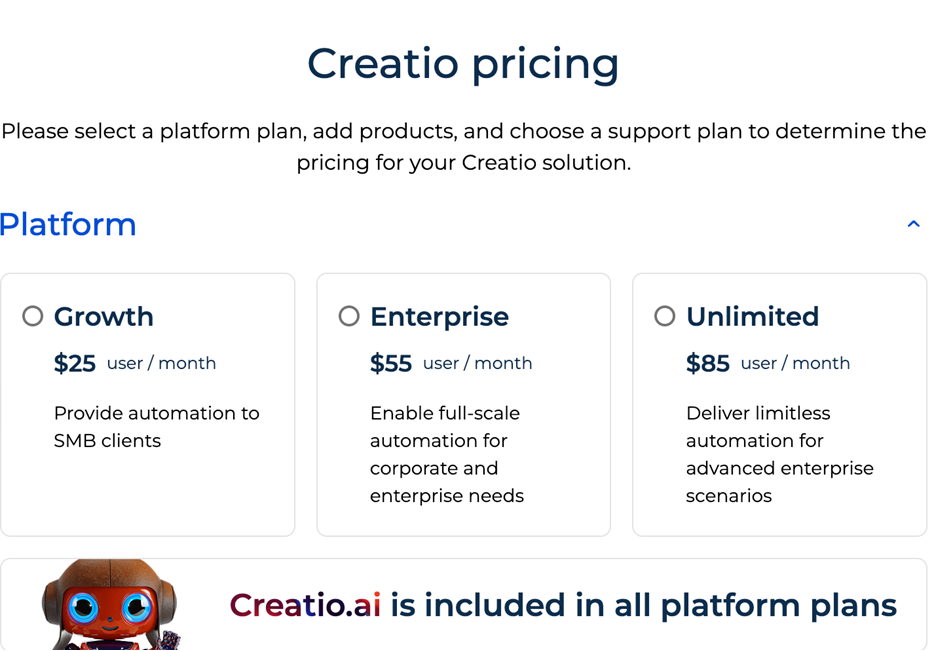
Tiered plans for SMBs and enterprise.
#3 CloudTalk- AI voice agents and power dialer that save your team hours
CloudTalk is a cloud-based business phone system with AI voice agents built in, designed to save SMB sales and support teams hours every day by automating the repetitive parts of phone work. AI voice agents handle inbound calls 24/7 so no opportunity slips through after hours, qualify leads, answer routine FAQs, and route complex cases to human agents with full context attached.
The built-in power dialer runs outbound campaigns sequentially while automatic call logging, recording, and transcription sync every interaction to Salesforce, HubSpot, Pipedrive, and 30+ other CRMs, eliminating the manual data entry that eats a rep's day. Growing SMB sales and support teams use it to scale inbound and outbound calling capacity without expanding headcount
Key features
- AI voice agents that handle inbound calls 24/7 and run outbound qualification campaigns autonomously
- Power dialer for sequential outbound calling with automatic call logging
- Smart call routing (IVR, skills-based, time-based) driven by CRM data
- Automatic call recording, transcription, and two-way sync to Salesforce, HubSpot, Pipedrive, and 30+ other tools
- International numbers in 160+ countries for distributed teams
Best for
- Growing SMB sales teams running phone-heavy inbound and outbound motions
- Support teams that need 24/7 coverage without overnight staffing
- Revenue teams replacing manual call logging with automatic CRM sync
- Companies scaling calling capacity without expanding headcount
Pricing
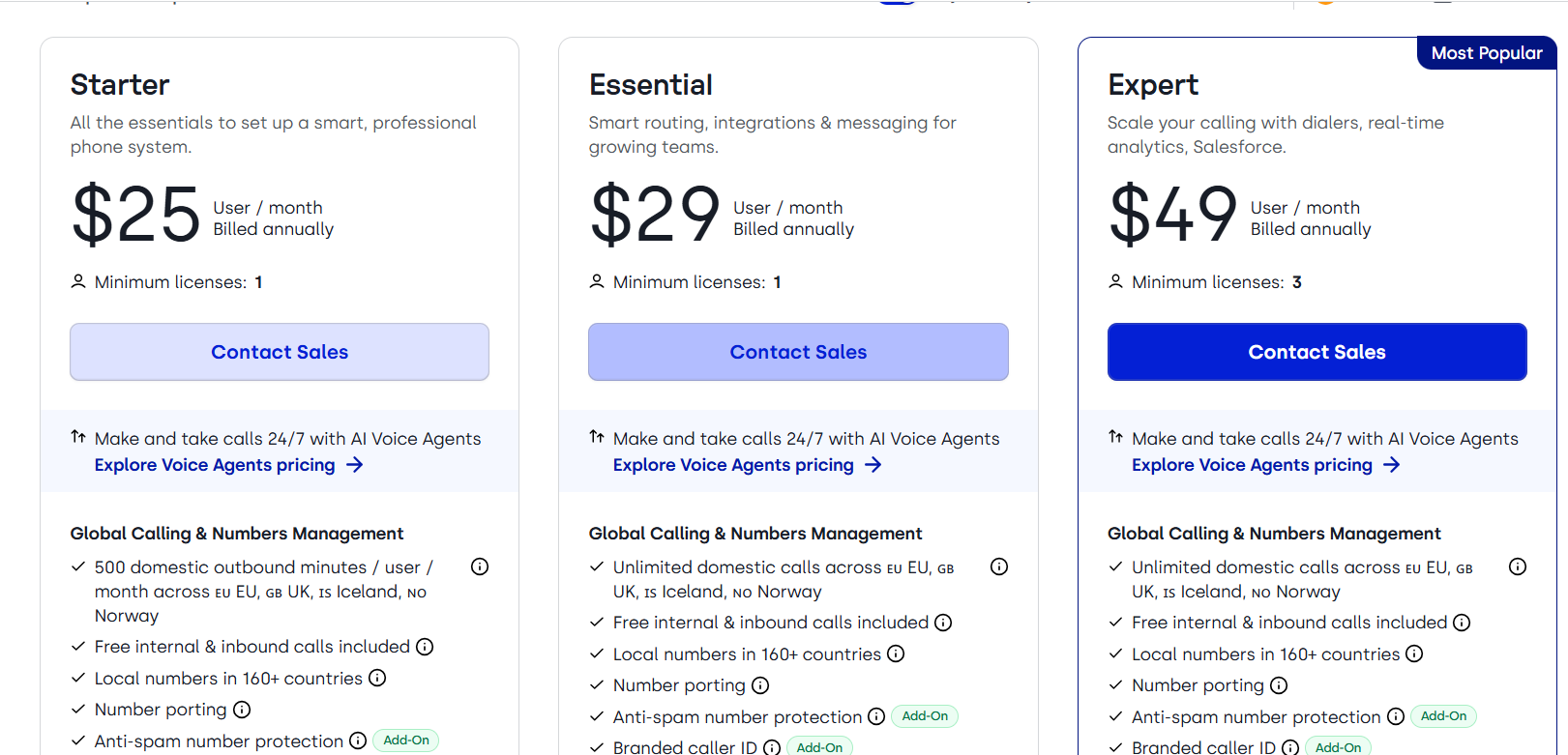
Plans start at $25/user/mo , with Essential at $29 and Expert at $49.
#4 Zapier - the glue for your stack
Your stack is strongest when your tools talk to each other. Zapier moves data automatically so your team stops copy-pasting and starts shipping.
Key features
- No code automations across thousands of apps
- Multi-step Zaps with filters, paths, and delays
- Webhooks and native integrations for advanced logic
- Task history and error handling for reliability
Best for
- Fast wins that eliminate manual copy paste
- Marketing, sales, and CS teams connecting everyday tools
- Founders and solos who need automation without engineering
- Any team starting an automation program
Pricing:
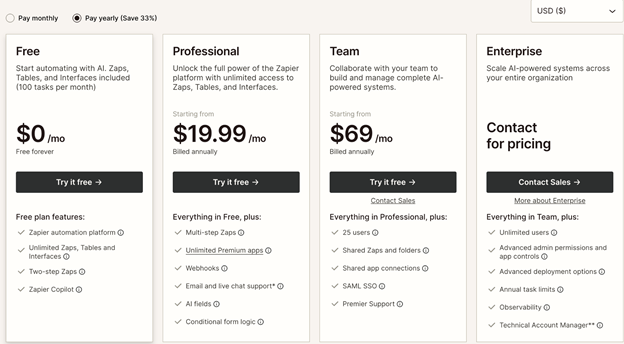
Free tier plus paid plans as volume grows.
#5 ActiveCampaign - personalized marketing on autopilot
Consistency wins. ActiveCampaign turns behavior data into timely, relevant messages that nurture leads, recover revenue, and keep customers engaged.
Key features
- Visual automation builder for email and SMS
- Event-based triggers, tags, and dynamic content
- Lead scoring, attribution, and basic CRM actions
- Integrations for e-commerce, webinars, and forms
Campaigns that convert
- Lifecycle and behavior-based marketing programs
- E-commerce brands running recovery and win back flows
- B2B teams nurturing trials and demos
- Marketers who want personalization without heavy code
Pricing:
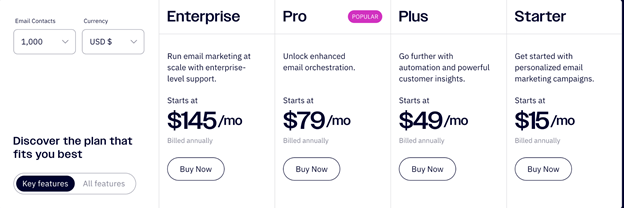
Tiered by contacts and features.
#6 Hotjar - see what users feel
Turn drop-offs into UX fixes this week. Watch sessions to spot friction, then validate changes with GA4. Use on-page surveys to capture the exact words customers use for better copy and onboarding.
Key features
- Heatmaps for click, move, and scroll behavior
- Session recordings with filters to find friction
- On-page surveys and feedback widgets
- Funnels to pinpoint high drop steps
Best for
- Product and design teams fixing UX blockers fast
- Marketers validating copy and page structure
- CRO programs pairing qualitative and quantitative data
- Teams without heavy engineering resources
Pricing:
Free and paid plans.
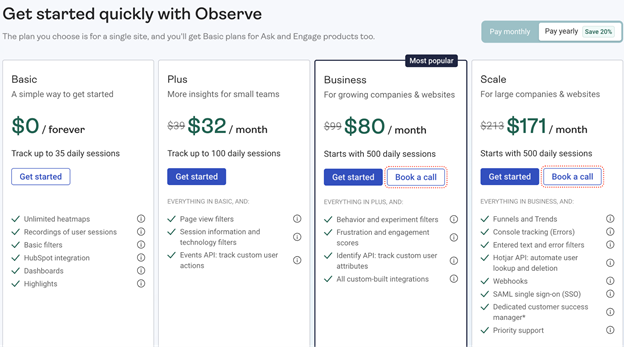
#7 FLOWii - CRM, ERP, and Process Automation
FLOWii is an all-in-one business management system that allows companies to manage sales, customers, projects, invoices, tasks, and internal processes in one place. It replaces scattered spreadsheets, emails, and tools with one clear business overview, saving time, reducing manual work, and improving team communication. You can try FLOWii with a 30-day free trial.
Key features
- CRM for managing customers, leads, sales opportunities, and communication history
- Project and task management for better team coordination and accountability
- Invoicing, quotes, and orders to simplify business administration
- Time tracking and work reports to monitor productivity and project profitability
- Automation of repetitive processes to save time and reduce errors
- Centralized business data for better visibility and decision-making
Best for
- Small and medium-sized businesses replacing spreadsheets
- Sales teams managing leads, deals, and customers
- Service companies handling projects, tasks, and invoices
- Managers who need a clear business overview
- Companies looking for a simple CRM and ERP tool
Pricing
FLOWii offers a 30-day free trial and flexible pricing based on selected modules and the number of users.
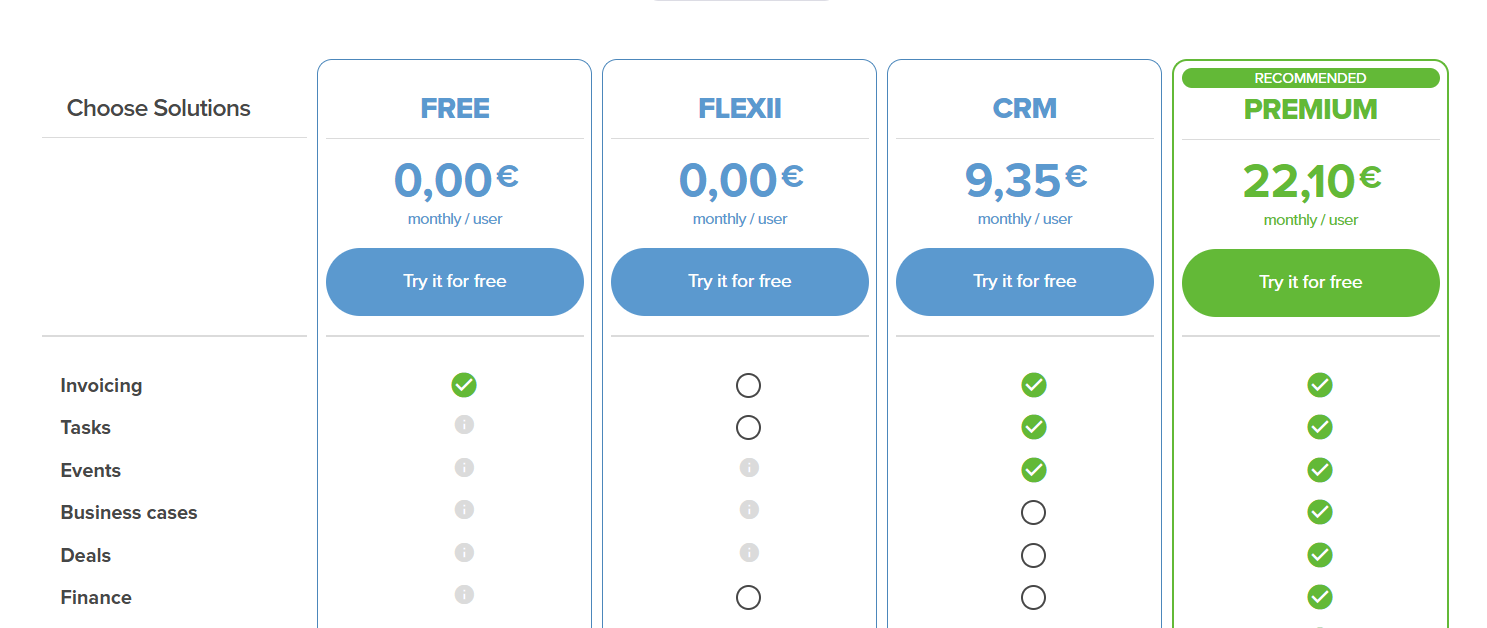
#8 Asana - project automation for teams
Keep projects moving without status chasing. Standardize workflows for campaigns, product launches, and onboarding. Automate assignments and due dates so work lands with the right owner at the right time.
Key features
- Rules based automations for assignments, dates, and status
- Templates, timelines, and dependencies for planning
- Forms for intake and standardized requests
- Portfolios and dashboards for cross project visibility
Best for
- Cross functional teams coordinating launches and campaigns
- Agencies and ops teams that need predictable delivery
- Managers replacing status meetings with live views
- Teams maturing from ad hoc to repeatable workflows
Pricing
Free basic plan, premium and business tiers.
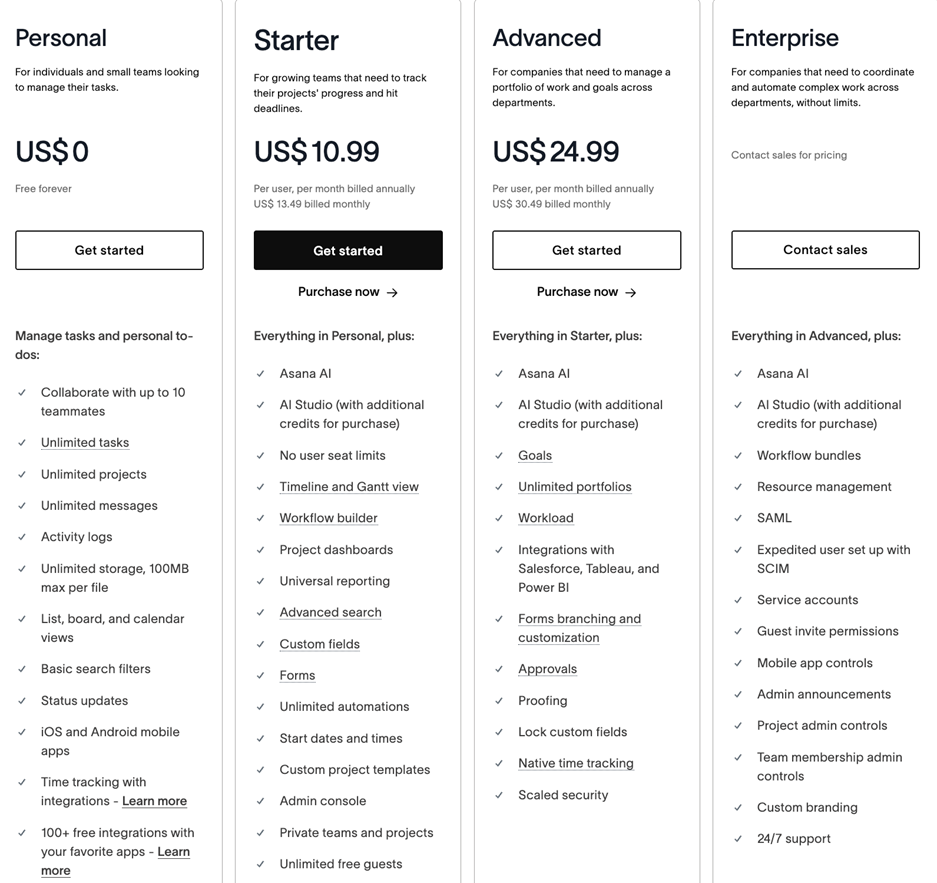
#9 Make - Visual Automation for Complex Flows
Build sophisticated multi-app workflows without code. Perfect for data syncing, enrichment, and custom logic that goes beyond simple triggers.
Key features
- Visual scenario builder with routers, iterators, and error handlers
- Hundreds of connectors plus HTTP and API modules
- Data transformations and scheduling options
- Detailed run logs for debugging complex flows
Best for
- Ops and data-savvy teams needing granular control
- Advanced multi-app processes and data syncing
- Startups replacing custom scripts with maintainable flows
- Anyone who has outgrown simple trigger-action tools
Pricing:
Generous free tier with paid plans for higher operations.
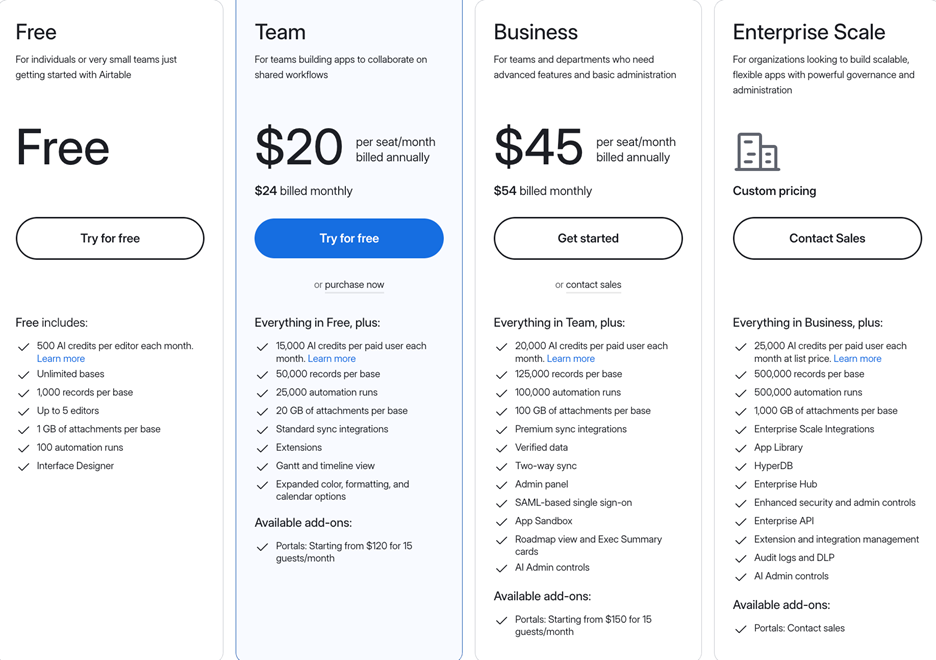
#10 Airtable - databases with built-in automations
Run lightweight systems without engineering. Build CRMs, content calendars, inventory trackers, and applicant pipelines with forms and views that anyone can use.
Key features
- Relational tables with forms, views, and interfaces
- Native automations for notifications and record updates
- Extensions, scripts, and permissions for scale
- Powerful filtering and grouping for everyday ops
Best for
- Building lightweight CRMs, content calendars, and trackers
- Teams that want a database with a friendly front end
- Ops replacing spreadsheets with structured data
- Rapid internal tooling without engineering backlogs
Pricing
Free tier plus paid plans per seat and feature set.
#11 Slack - workflows where people already talk
Automate the moments between people. Turn messages into tracked requests, triage issues with forms, and post real-time alerts from your tools so nothing slips.
Key features
- Workflow Builder for approvals, forms, and message routing
- Deep integrations with calendars, CRMs, and helpdesks
- Channel-based alerts from your stack in real time
- Search, huddles, and clips to speed decisions
Best for
- Teams that live in chat and want fewer tabs
- Support, sales, and engineering triage
- Incident and request workflows between people
- Organizations improving response time and follow-through
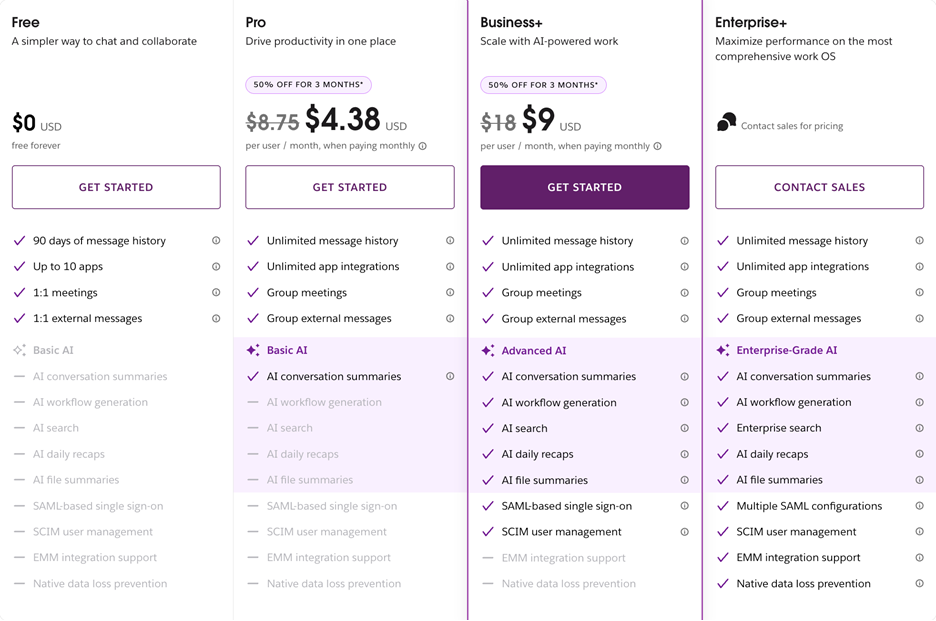
Pricing
Free tier with paid plans for larger teams and compliance.
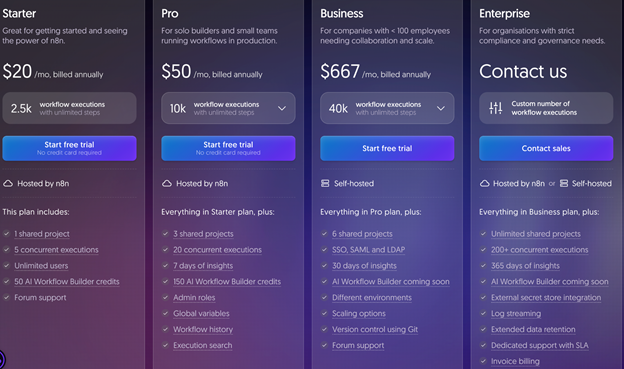
#12 n8n - open source workflow automation
N8n Automate complex, multi-app workflows with full control over data and deployment. Replace one-off scripts with visual, versioned flows that handle webhooks, retries, branching, and JavaScript when needed. Use it for lead routing, enrichment, lifecycle handoffs, scheduled reports, and bi-directional data syncs across your stack.
Key features
- Visual, node-based workflows with 400+ integrations plus HTTP nodes for any API
- Self-hosted or cloud, with environment variables, secrets, and credential management
- Code nodes for JavaScript, branching, loops, webhooks, schedulers, and concurrency controls
- Versioning, execution logs, retry logic, and error handling for reliable ops
Best for
- Teams that need privacy, control, and on-premises deployment
- Ops and engineers who want low-code speed with the option to drop into code
- High volume automation, where per-task pricing would be expensive
Pricing
Free tier with paid plans for larger teams and compliance.
#13 Helix – AI skills intelligence that automatically tracks workforce capabilities
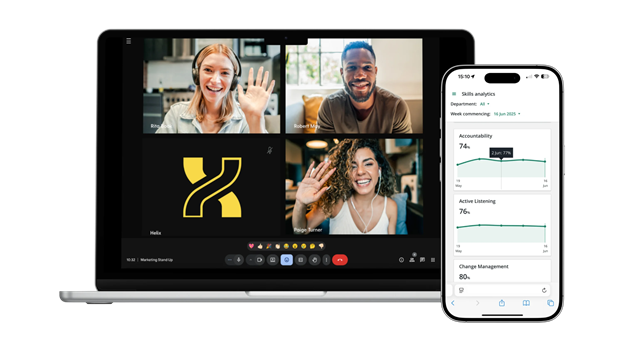
Helix is the AI skills intelligence platform from 5app that helps organizations automate skills tracking in the flow of normal work. Instead of relying on manual assessments, surveys, or manager observations, Helix continuously analyses workplace interactions to measure soft skills like communication, change management, and strategic vision.
By automating skills tracking and workforce analysis, Helix gives HR, L&D, and people leaders real-time visibility into organizational capability gaps without creating additional work for employees or managers. The platform surfaces actionable insights that support talent development, succession planning, leadership programs, and internal mobility initiatives.
For organizations looking to build a more skills-based workforce, Helix removes the administrative burden of traditional skills assessments while providing richer and more objective data on employee development.
Key features
- AI-powered soft skills measurement embedded into everyday work activities
- Automated tracking of communication, leadership, collaboration, adaptability and other critical human skills
- Real-time skills intelligence and workforce capability insights
- Skills gap analysis to support talent development and workforce planning
- Dashboards and reporting for HR, L&D and people leaders
Best for
- Organisations building a skills-based talent strategy
- HR and L&D teams looking to automate skills assessment and reporting
- Businesses that want better visibility into workforce capabilities and development needs
- Companies investing in leadership development, succession planning, and internal mobility
Pricing
Custom pricing available on request. Free trial is available.
#14 Featurebase: customer support and feedback automation
Featurebase combines customer support and product feedback in one platform. Teams can manage conversations, collect feature requests, publish product updates, and automate recurring support tasks without splitting customer information across several tools.
Key features
- Unified inbox for customer conversations across chat, email, Slack, Discord, and other channels
- Fibi support agent for automatically resolving common customer questions
- Feedback management with feature requests, voting, prioritization, and public roadmaps
- Workflows for ticket routing, service level agreements, assignments, and customer updates
Best for
- SaaS companies that want support and product feedback in one platform
- Product teams that use customer requests to guide development priorities
- Support teams managing conversations across several customer channels
- Startups that need a help desk alongside feedback management and a help center
Pricing
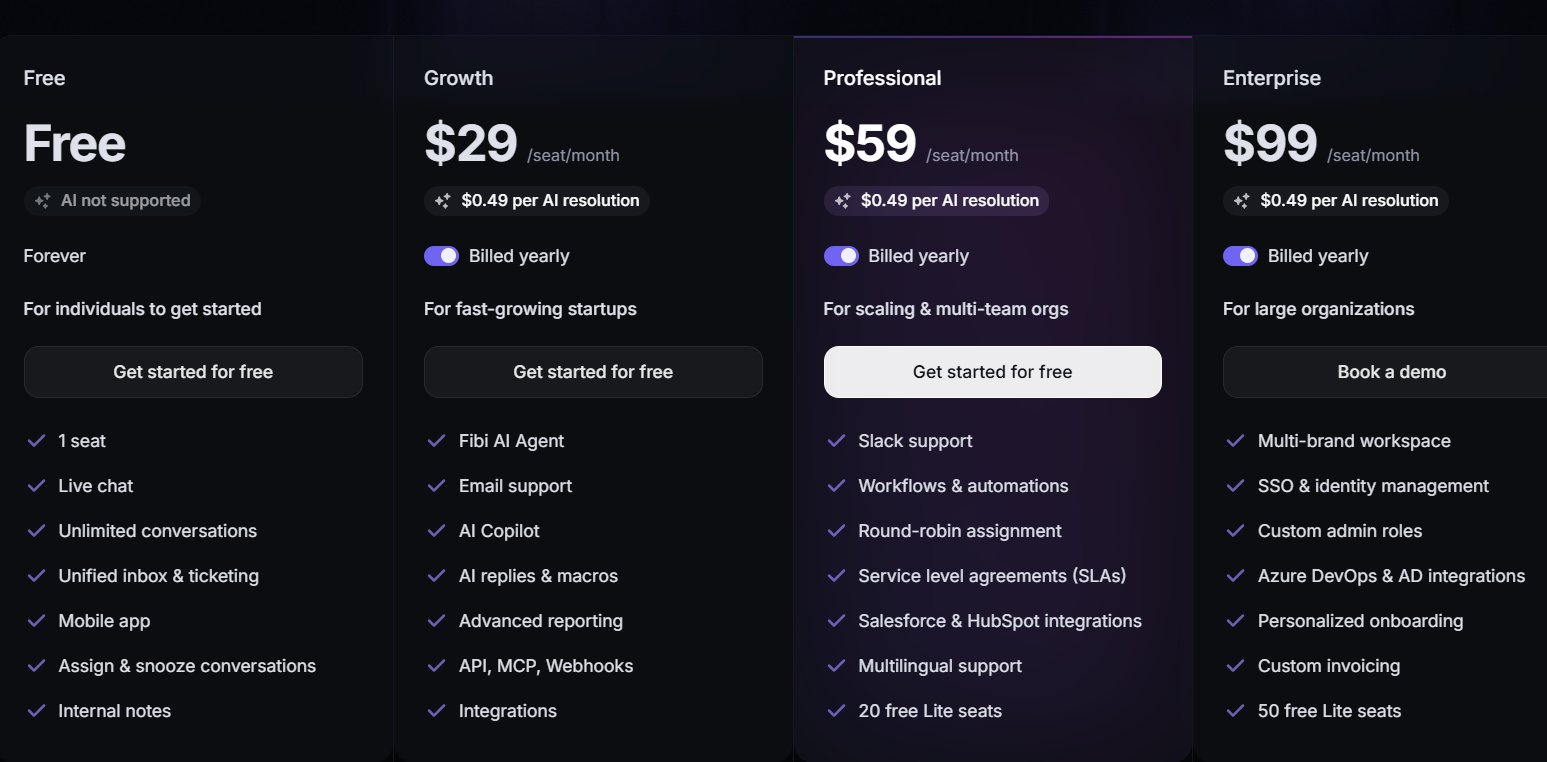
Featurebase has a free plan for one seat. The Growth plan starts at $29 per seat per month when billed annually, while the Professional plan starts at $59 per seat per month. Fibi resolutions cost $0.49 each.
#15 HeyReach.io: LinkedIn outreach automation
HeyReach.io automates LinkedIn outreach for sales teams and agencies. Users can create campaigns, rotate LinkedIn sender accounts, manage replies from a shared inbox, and connect LinkedIn activity with other sales tools.
Key features
- Automated LinkedIn connection requests, messages, voice notes, and profile visits
- Sender rotation across multiple LinkedIn accounts
- Unified inbox for managing messages from every connected sender
- Integrations with Clay, HubSpot, Make, Zapier, Instantly, Smartlead, and other sales tools
Best for
- Sales teams that use LinkedIn for outbound prospecting
- Agencies managing LinkedIn campaigns for multiple clients
- GTM teams connecting prospect data with LinkedIn outreach
- Companies running campaigns from several LinkedIn sender accounts
Pricing
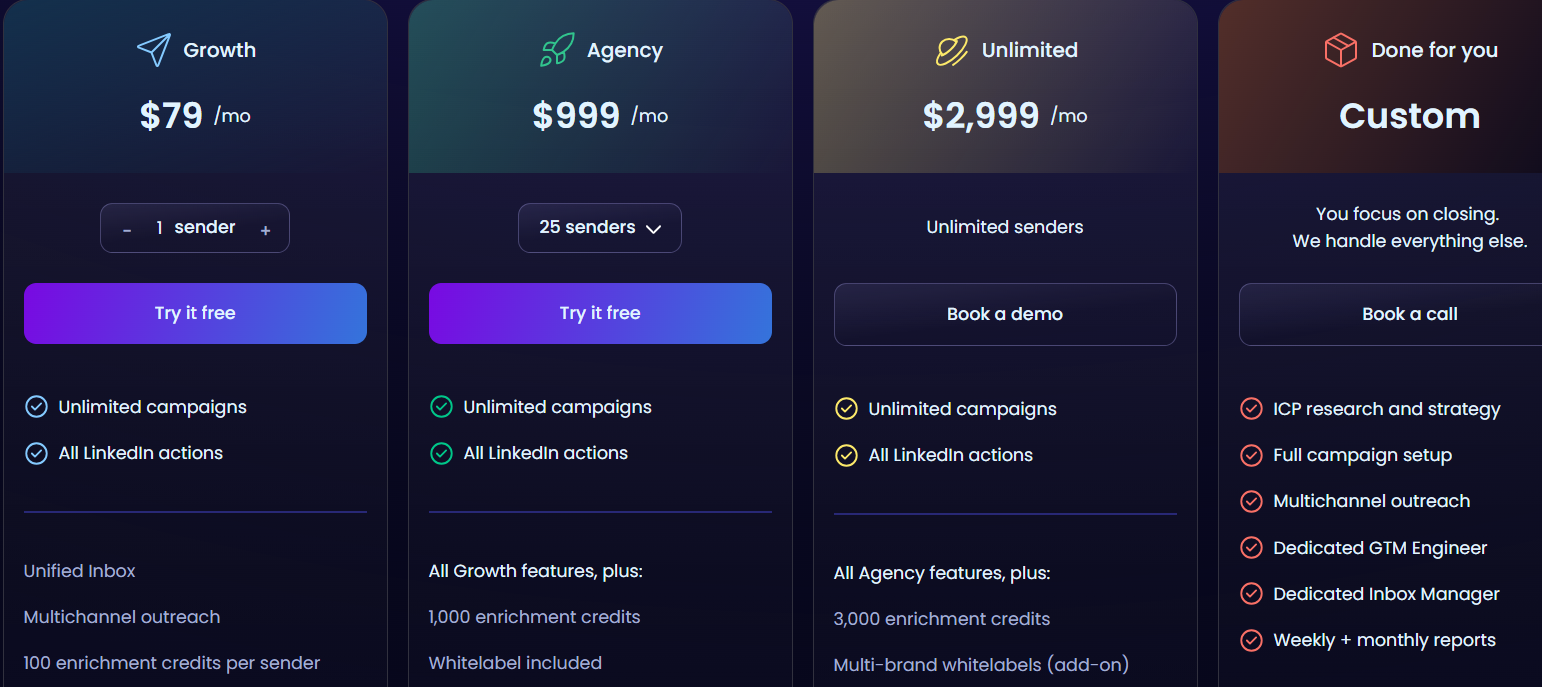
The Growth plan starts at $79 per sender per month with monthly billing. Annual billing brings the price down to $63 per sender per month for teams with fewer than 10 senders. HeyReach.io also offers Agency, Unlimited, and custom options.
#16 Alloy.ai: retail and supply chain automation
Alloy.ai is a retail and supply chain platform built for consumer goods brands. It brings together POS, inventory, ecommerce, distributor, and internal business data so teams can monitor demand and respond to inventory issues from one system.
Key features
- Automatic data collection from hundreds of retailer and ecommerce partners
- Unified POS, inventory, shipment, and ERP data
- Retail analytics for tracking demand and inventory at the SKU and store level
- Supply chain tools for replenishment, forecasting, and inventory planning
Best for
- Consumer goods brands selling through several retail partners
- Supply chain teams that need store level inventory visibility
- Sales teams monitoring retailer performance and product availability
- Brands that need retailer data connected with internal planning systems
Pricing
Alloy.ai does not publish standard pricing. Companies can book a demo and receive custom pricing based on their requirements.
#17 esign.co.uk: electronic signature automation
esign.co.uk helps businesses send, sign, and manage legally binding documents online. Teams can create reusable templates, set up signing workflows, verify signers, and keep a record of completed agreements in one platform.
Key features
- Advanced Electronic Signatures with digital certificates and audit trails
- Reusable document templates and signing workflows
- SMS signer verification and electronic seals
- Integrations with Salesforce, HubSpot, Microsoft, Google, Zapier, and other business tools
Best for
- Organizations that need legally binding electronic signatures
- Legal teams handling contracts and formal agreements
- Businesses processing recurring documents and approval workflows
- Regulated organizations that need signer verification and detailed audit records
Pricing
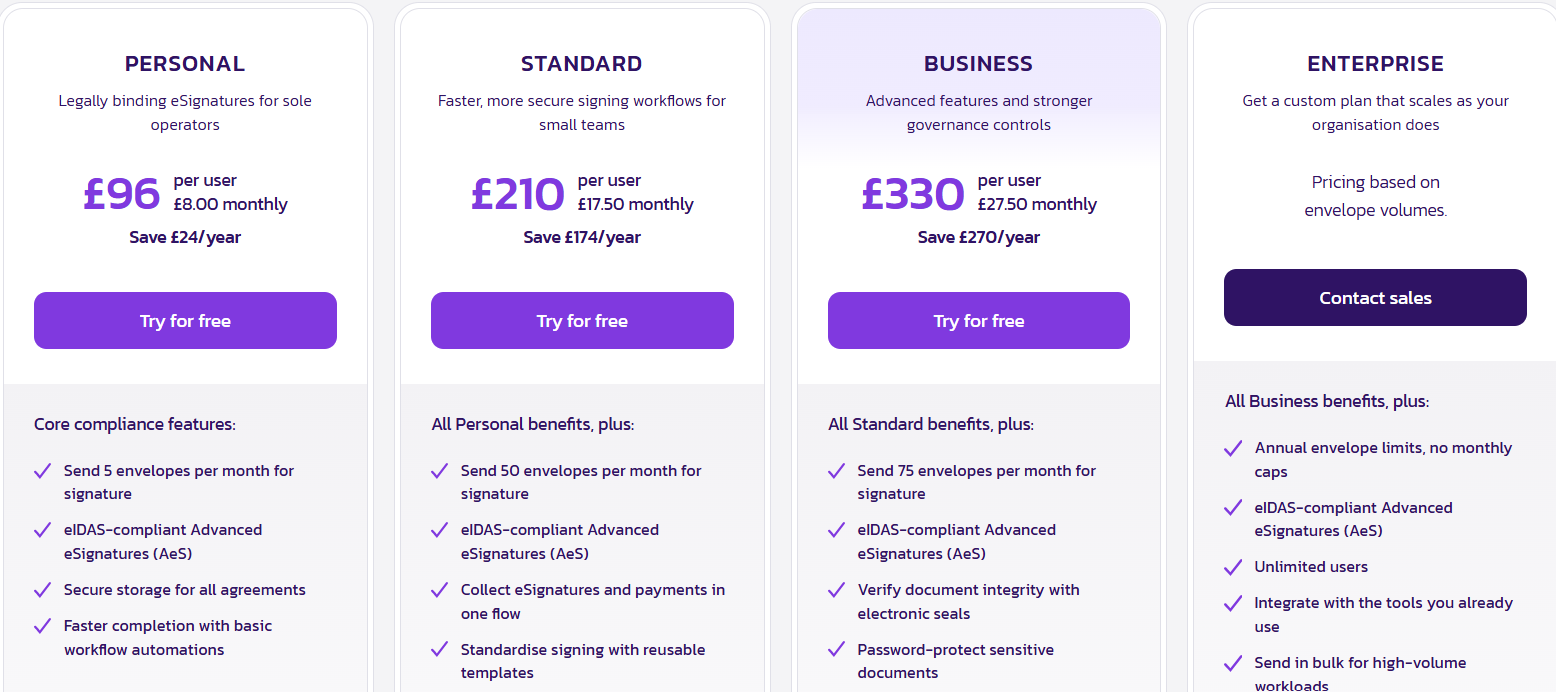
esign.co.uk offers a free trial. The Personal plan starts at £10 per user per month with monthly billing, or £8 per user per month when billed annually. Standard, Business, and Enterprise plans are also available.
How to choose your stack without overbuying
Start with the biggest bottleneck. Is it onboarding, pipeline hygiene, campaign consistency, or visibility? Pick one and fix it first. Prove value in 14 days with a simple KPI like less time to do X or more Y achieved. Prioritize integration so data flows without manual effort. If a tool does not connect to your core systems, keep looking.
Document a one-page operating playbook for each tool that lists its purpose, owner, key automations, and metrics. Measure the right outcomes. For Uteach, track time to onboard, course completion, and time saved. For Creatio, measure lead response time, deal win rate, sales cycle length, and customer satisfaction (CSAT). For Zapier, track hours saved and error reduction. For ActiveCampaign, track revenue per subscriber and lifecycle conversions. For Hotjar, track conversion lift after UX fixes.
Conclusion
Scaling is not about working more hours. It is about building smarter systems that run while you sleep.
If you are looking for a platform to automate your employee training and onboarding, consider Uteach. With Uteach, you can build structured onboarding programs, create interactive training modules, track employee progress, and even attach quizzes and certificates to measure learning outcomes. You can host all your learning materials, live sessions, and internal knowledge hubs in one place, saving hours of manual coordination.
Book a demo with our team to see how Uteach automates your training and onboarding and turns them into smooth, measurable, and efficient experiences for both your HR team and employees.


