The following guide covers:
How an LMS like Uteach makes onboarding more productive
How to automate onboarding with Uteach
Ready to see all that in action?
They say you never get a second chance to make a first impression, and nowhere is that more true than in employee onboarding. According to Gallup, only 12% of employees strongly agree that their organization does a great job of onboarding.
All this while other organizations with a structured onboarding process can improve new hire retention by more than 80% and productivity by over 70%. If you were also wondering how you could improve employee retention and engagement, too, implementing an LMS into your onboarding process is a great start.
An employee onboarding LMS is a digital platform designed to create, deliver, and track training programs for new employees. It ensures that learning paths are consistent, organized, and measurable, making the entire process smoother and more effective.
So, how can you stop reinventing the wheel with every new hire? In this article, we will explore how to make onboarding smarter and far less of a headache using Uteach as your employee onboarding LMS.
How an LMS like Uteach makes onboarding more productive
Research by the Association for Talent Development found that 83% of organizations have already implemented an LMS platform for employee training. With an LMS system in place, you are able to make onboarding centralized, consistent, and effective.
How so?
- Consistency in training
An LMS ensures that every new hire receives the same structured onboarding program. You have different managers, trainers, and onboarding specialists, and each of them has their own ways to lead the onboarding process. But with the LMS, where everything is already set up, you can expect new hires to receive the onboarding experience you initially designed. So it will not depend on who leads their training.
- Engaging training content
Long documents, presentations, or in-person lectures are what we see as new hires. Which are usually hard to follow and easy to forget. That kind of one-dimensional training usually fails to keep employees motivated.
Instead, an LMS makes it easy to provide training in multiple formats such as video, quizzes, and interactive modules. This keeps new hires engaged and helps them retain the information better.
- Automated tracking and reporting
LMS platforms automatically track progress, course completion, and assessment results. This gives HR and managers clear visibility into how each employee is advancing. Without an LMS, tracking becomes manual and time-consuming. So you have to keep chasing updates through emails or spreadsheets. That makes it difficult to identify gaps or step in before problems arise.
- Mobile access and flexibility
LMS platforms allow employees to complete training on their phones or laptops, wherever they are. This flexibility helps new hires fit onboarding into their schedule and reduces delays. Without mobile access, training is tied to office sessions or desktops, which can slow down progress for remote or hybrid workers.
- Scalability and efficiency
And, most importantly, an LMS makes it easy to onboard larger groups of employees without increasing HR workload. Once the content and courses are created, they can be reused and updated as needed. Without an LMS, every new hire requires repeated manual effort from HR or managers.
Apart from that, you are able to connect all the HR and work tools into one single system, and the automation, in its turn, helps to ease the workload.
How to automate onboarding with Uteach
With Uteach, the onboarding experience you offer for employees is no longer boring. The interactive content, easy accessibility, and engagement options keep new hires motivated.
Especially if you highlight the importance of mobile, collaborative, and social learning in your company culture, Uteach will help to bring all that into the onboarding process.
Let’s discuss how.
Assign courses
- Add your new hires
The first step is getting your new employees into the system. With Uteach, you have a few options. You can add each hire manually if you are onboarding just a handful of people. If you are welcoming a larger group, you can import them in bulk with a simple CSV file upload.
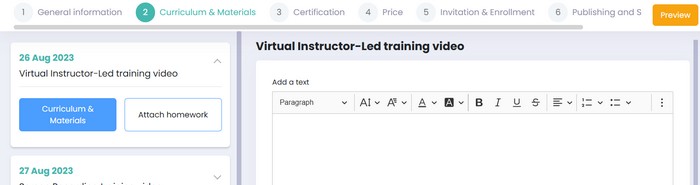
Uteach also has flexible role management. You can assign different roles such as admin, author, manager, or student. Each role comes with its own access level, which makes it easier to manage responsibilities. For example, admins can manage the entire system, managers can track the progress of their teams, authors can create content, and students can focus only on their learning.
- Group and enroll hires into corresponding courses
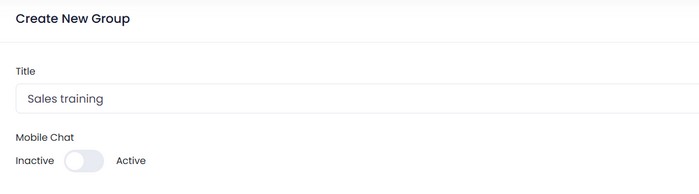
Once your hires are added, you can create groups. Groups are especially helpful when you want to separate employees by department, role, or location. For example, sales hires can be grouped together and assigned sales-specific onboarding courses, while technical hires are enrolled in their own training path. Instead of enrolling employees one by one, you can simply assign the right course to the entire group.
- Filter and manage employee data
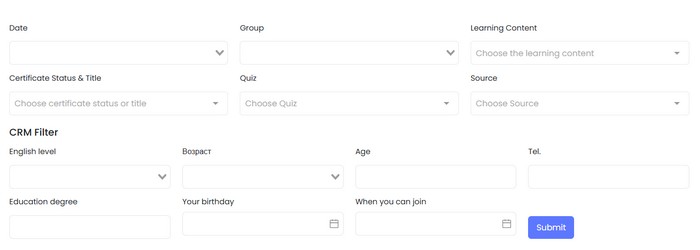
Managing employee onboarding is not just about assigning courses but also about knowing how everyone is progressing. Uteach makes this easier with advanced filtering options. You can filter users by their group, enrollment status, learning content, progress level, the source, and so much more.
This level of filtering means you can quickly identify who has completed their specific learning material, who is still in progress, who is already certified, etc. Once filtered, you can export this data for individual reports or for sharing with managers.
- Provide mobile access
In today’s workplace, mobile access is not a luxury. It is a necessity. According to LinkedIn’s Workplace Learning Report, more than 50 percent of employees prefer learning on mobile devices because it fits better into their daily routines. Onboarding is far more effective when employees can go through lessons, videos, or quizzes anytime without being tied to their desks.
With Uteach, you get your own branded mobile app for your company. Having a branded app also strengthens your company’s professional image and gives new hires a smooth first impression. It ensures that onboarding is flexible, accessible, and aligned with modern work habits.
Create content and engagement opportunities
- Online courses
With Uteach, you can build courses using a drag-and-drop course builder. Uteach comes with an AI assistant, so in case you do not have ready-made courses to upload, you can get started quickly.
The AI assistant helps with generating the course outline, description, and name, which you can edit.
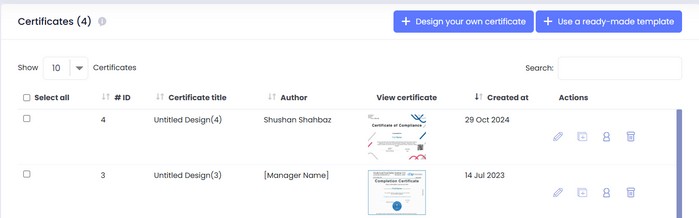
You can include videos, documents, quizzes, and assignments, and so much more in the lessons. You can also set up drip content, which means lessons unlock gradually over time instead of overwhelming new hires with everything at once. At the end of the course, you can attach a final quiz to check knowledge and ensure they grasped the key information. Once employees pass, Uteach allows you to issue a certificate of completion.
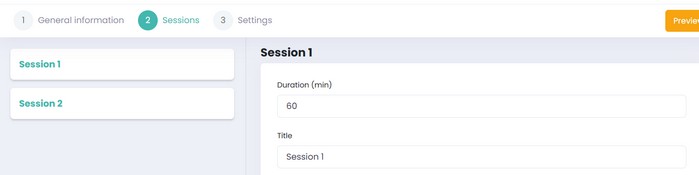
- Live sessions
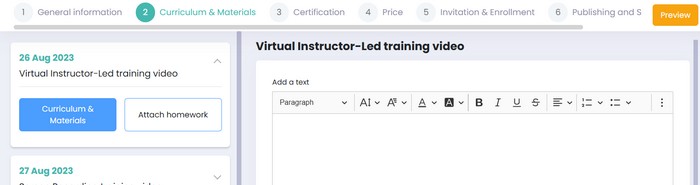
Uteach supports hosting live lessons or webinars directly through the platform, with the help of videoconferencing tools. You can schedule onboarding Q&A sessions, team welcomes, or culture deep dives, and everyone gets automatically notified.
If there are any resources you want the employees to check out, attach them to the live sessions so the employees can complete the assignment after the session. The managers, in their turn, can share written feedback on the assignment and auto-check it if the live session contains a quiz.
- Digital and physical products
If your company provides onboarding materials like welcome kits, handbooks, or branded merchandise, Uteach lets you list both digital and physical products alongside your courses. You can package a compliance handbook as a downloadable PDF or include a physical desk kit with branded notebooks. This unifies learning and resources in one place.
- Coaching
Coaching helps employees build skills, improve performance, and reach their potential and goals. With Uteach, you can set up coaching sessions for the employees in both online and offline formats.
Once you connect the Google account of the coach or the manager, you can automatically generate the URL of online sessions. Coaches can set their available hours and let the employees book a session at a suitable time. In their turn, coaches can manage the sessions by accepting or rejecting.
This saves a lot of time on communicating the schedules, goals, and setting up meetings separately on other video conferencing apps.
- Communities
The core purpose of your whole training program is to make new hires integrate with the team and familiarize them with the company culture. And what is a better way to achieve all that, along with educating the new hires, than setting up communities?
Communities are spaces where your new hires can join discussions around the courses and more, learn from their peers, interact in the threads and posts, and exchange experiences.
What is great is that the employees can also use the chatting options on your mobile app and have discussions with groups and peers.
Measure success to improve onboarding
If your goal is to foster a more productive and retained workforce, then having a great onboarding program is not enough. You also need to measure the success to understand what works and what you can improve.
In this regard, your LMS presents the analytics and reports on the new hire engagement, progress, knowledge retention, and overall performance. More specifically, you can check for the
- Program completion rates, which will give you an idea of whether there are any bottlenecks and challenges in the onboarding modules.
- Time spent on learning to see the amount of engagement with the learning content and identify the points of disengagement
- Test scores. With Uteach, you get detailed quiz reports on the employee’s performance, including the number of right and wrong answers, status, test duration, and much more.
All key metrics are reflected in your analytics dashboard, and you can access the reports based on the course level and each employee level.
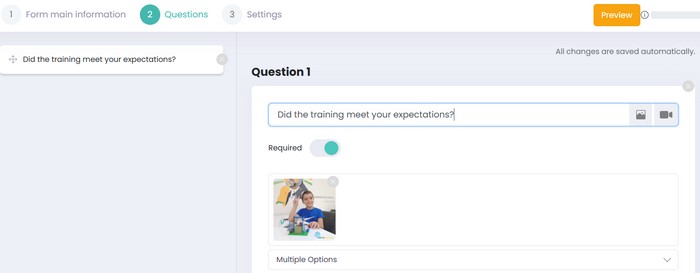
After the program is complete, design surveys to identify the employee satisfaction level as well. Uteach comes with built-in form tools, and you can make the survey results show in your CRM.
Customize your onboarding academy
- White Label Academy
A good onboarding experience is not only about content but also about how it feels. With Uteach, you can create a fully white label academy that looks and feels like part of your company. You can set your logo, colors, domain, and messaging, while removing Uteach’s branding completely. For employees, this creates a unified experience.
This helps strengthen company identity and makes onboarding feel professional.
- Automated emails and notifications
Communication during onboarding is critical, and Uteach makes it easy with ready-to-use email templates and push notifications. You can activate automated emails for different scenarios: course enrollment, course completion, quiz results, certificate issuance, or reminders for unfinished lessons.
Each template can be edited to match your tone of voice, so messages feel consistent with your internal communication style. Push notifications through the branded app keep employees on track without HR manually sending reminders. This ensures that no one misses important steps
Ready to see all that in action?
As the old saying goes, it is better to see once than to read a thousand times. Onboarding is not simply about welcoming employees. It is about shaping their first impression of your company, building their confidence, and setting them up for success.
Without the right system, HR is left with spreadsheets, chasing reminders, and watching new hires slip through the cracks before they ever settle into their roles. The cost of that is not just lost time, but lost talent.
With Uteach, you get a complete employee onboarding LMS. From assigning courses and engaging with live sessions and communities to automating emails and tracking progress. You can build a branded academy that reflects your company, automate the routine work, and finally focus on what really matters: supporting your people.
Now is the moment to stop struggling with fragmented onboarding and to see how smooth the process can truly be. Book your free demo to see Uteach in action.