
The following guide covers:
What to look for in a social learning platform?
Best social learning LMS to consider
The best social learning platform for your needs
Social learning platforms help learners connect, share knowledge, and collaborate in real time or asynchronously as part of their learning process. This approach is important because it fosters engagement, increases knowledge retention, and builds a sense of community among learners.
The Uteach team has tested dozens of platforms and learning management systems, and for today's list, we have selected the best social learning LMS options to consider. To help you with the choice, we will particularly discuss their social learning opportunities, what other users experience, and what we liked most about the LMS.
What to look for in a social learning platform?
All the platforms I tested approach social learning a little differently.
Some keep it simple with discussion boards inside the course, while others create more dedicated social spaces where learners can talk, share ideas, or even work together. Our team went through dozens of LMS platforms to see how well they support social learning. After all that digging, we came up with the list of the best.
When choosing a platform that supports social learning needs, you can especially pay attention to the following:
- Community spaces. A good platform gives people a space outside the lessons to share ideas or tips, just like a virtual break room.
- Group-based learning. Opportunities that let learners work together on projects or assignments help turn the course into a shared experience.
- Mobile-friendly experience. Social learning should happen on the go, too, so the app or site needs to work well on phones and tablets.
- Support for content in different formats. You should be able to have your content in live, recorded, or interactive formats, depending on the training needs.
- Analytics and reporting for group activities. Since social learning happens in collaboration with others, you should be able to track the progress of a specific group.
Best social learning LMS to consider
Before we get into details, here is a quick look at the best social learning LMS we will discuss today.
| Social learning platform | Rating on Capterra | Key social learning opportunities |
| Uteach | 4.7/5 | _Built-in community _Cohort-based learning with automated live sessions. _Mobile learning with an app _Advanced quizzing options |
| 360Learning | 4.7/5 | _Collaborative learning and crowdsourcing need _Peer feedback and threaded Q&As _AI‑Driven Recommendations _Mobile learning with the application |
| SkyPrep | 4.7/5 | _Webinar and virtual classroom integration _Content sharing and collective learning _Gamification to encourage all kinds of interactions _Mobile learning with the app |
| TalentLMS | 4.6/5 | _Peer recognition _Discussion forums _Gamification to encourage participation _Blended learning options |
| Moodle Workplace | 4.3/5 | _Wikis and discussion groups _Integrated virtual classrooms _Gamification and collaboration _Mobile learning with a branded app |
| iSpring Learn | 4.7/5 | _Built-in messaging and likes _Social interactions in the portal _Live virtual sessions _Mobile learning with the app |
| Paradiso LMS | 4.2/5 | _Group workspaces _Chat rooms _Gamification and engagement _Mobile learning with the application |
Uteach
Uteach is a social learning-friendly LMS that lets you build your own branded training hub for your organization. You can deliver training in live sessions, pre-recorded formats, or blended learning. With automation and AI tools, it is easy to create structured, collaborative learning experiences.
- Built-in community.
The community is a great place for connection, discussion, and support among peers. You can have both paid and free communities around different course topics. Decide who gets access, whether it is everyone or only specific groups. Inside the community, learners can ask questions, reply in threads, and have ongoing conversations with peers.
- Cohort-based learning with automated live sessions.
You can run cohort-based courses in any format. Those include live sessions, coaching for the employees, pre-recorded videos, or even a mix of both with blended learning. For each lesson, you can add videos, audio, PDFs, quizzes, and more, giving you full flexibility. The content drip opportunity allows for controlling when learners get access to each lesson.
- Mobile learning with an app
Your employees can access everything through Uteach’s native mobile app, and you can even get one branded for your organization. That means your team or students can learn on the go, watch videos, read materials, or take quizzes right from their phone. They also get access to mobile chat, where they can join group discussions or message each other privately. It keeps learning connected, no matter where they are.
- Advanced quizzing options
The detailed assessment helps to understand whether the employee has already mastered the necessary skill or is ready for the certification. When the test does not contain a text answer, the employees receive the assessment feedback instantly. They can also view the explanation to the right answer if they gave the wrong answer initially.
What I like about Uteach
You can fully brand the learning environment to match your organization. Uteach also supports SSO (Single Sign-On),so your team can log in using existing company credentials. It provides smoother onboarding and stronger security.
Uteach is a solid fit if you want to centralize training and build a strong internal learning culture.
Users’ take on the platform
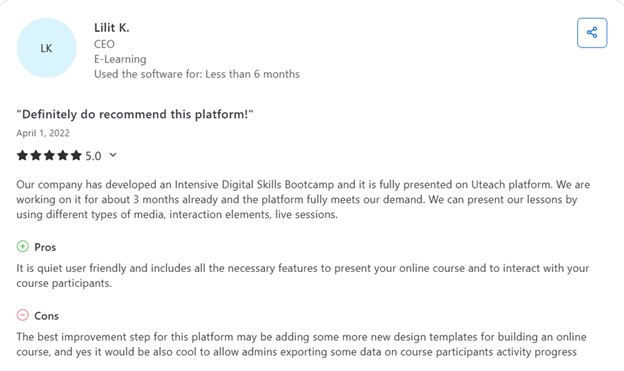
Users describe Uteach as exceptionally easy to use with an intuitive interface and fast setup. They praise its customizable, professional-looking templates and white-label opportunities. Others emphasize that they like how they can track learner progress, the support for both on-demand and live training, and handling quizzes in different styles.
Also see: Uteach Review
360Learning
360Learning is an LMS that supports collaborative learning and has a high focus on AI to help with course creation and management. For example, it recommends courses to the employees based on the skills they have.
Key social learning opportunities for your organization
- Collaborative learning and crowdsourcing need
Your team has an opportunity to declare learning needs in real time and upvote what matters most, so L&D efforts align with actual demand. That crowdsourced needs approach ensures you build training that resonates across roles and skill levels. On their turn, SMEs can collaborate and provide feedback to each other.
- Peer feedback and threaded Q&As
During and after content, the employees leave comments, upvote feedback, and ask questions in threaded Q&A formats. You can iteratively refine courses based on their reactions and relevance‑scoring metrics, so content stays current and useful for your team.
- AI‑Driven Recommendations
Once training needs and skills are tagged and identified, the platform uses AI to match learners with relevant courses or internal experts. Your people get recommendations tailored to their jobs, skills profile, and career goals.
- Mobile learning with the application
The platform has a mobile app available for Android and iOS, so the learners can access all the learning content directly from the app. The gamification, forums, and reactions are more comfortable to use in the app. You can enable the challenge mode if you want to bring in competition and encourage the employees to achieve higher scores.
What I like about 360Learning
You can launch branded learning academies for different teams or markets, with custom domains, group layouts, and notification templates.
What is also great is that you receive useful feedback on practically anything, and make the course management even easier. With the reactions when learners share their experience, the newsfeed is where learners can ask questions and connect.
Users’ take on the platform
Users often praise the platform for being very intuitive and easy to use. Many highlight how quickly one can build and launch training, and appreciate that subject‑matter experts in their own teams can create content without needing to be instructional designers.
Most reviews also highlight collaboration features like comments, peer reactions, and feedback built right into courses. On the other hand, reporting and analytic capabilities are often described as too basic or rigid.
Also see: 360Learning Review
Compare 360 Learning with other LMS
SkyPrep
Skyprep is another great platform to use in employee onboarding, development, and customer training. Here, you can run both live and recorded training sessions. What is great is that the platform is pretty simple and does not come with too many bells and whistles that would be hard to manage.
Key social learning opportunities for your organization
- Webinar and virtual classroom integration
You can host live training directly through integrated tools like Zoom, Microsoft Teams, Webex, GoToMeeting, and ClickMeeting. Learners can engage via interactive whiteboards, breakout rooms, and on‑demand recordings, which encourage real-time collaboration and deeper discussion. Attendance at such events is tracked automatically.
- Content sharing and collective learning
SkyPrep’s content library allows you to upload materials once, such as videos, PPTs, PDFs, SCORM, and more, and make them available to multiple courses or groups. The LMS offers a knowledge-sharing platform, BoostHQ. You can centralize and discuss workplace knowledge, contributing to collective learning.
- Gamification to encourage all kinds of interactions
Gamification features reward not just course completions and quizzes, but also social actions like participating in forums or engaging with peers. You can use points, badges, and leaderboards to keep the motivation and make all the learners involved.
- Mobile learning with the app
SkyPrep offers a mobile app that supports full offline access and push notifications. Learners can continue conversations, share files or questions, and interact socially directly from the app.
What I like about SkyPrep
The platform comes with a number of AI features to help with content generation and management, such as questions, assessments, and images. What is great is that it also includes a role play with AI, so that the employees can practice the training skill based on the AI role.
Besides, Sky Prep has quite a clean dashboard with easy navigation both from the point of view of the admins and for the students.
Users’ take on the platform.
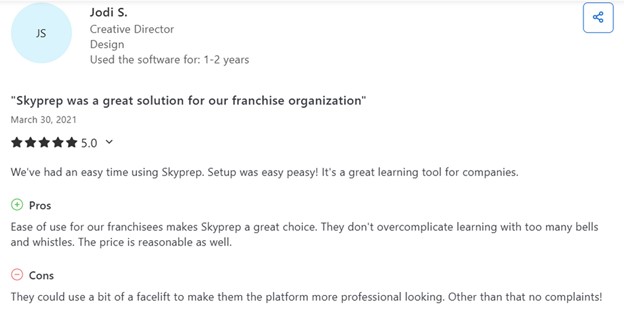
People really love how easy and intuitive the platform is to use. They say it has a clean interface and is quick to set up. Reviewers also mention convenient features like SSO integration, modular course building, and smooth content organization.
With that being said, some users find that reporting could be more advanced, especially for detailed or bulk data exports. Others mention that awarding the certificates is more of a manual process.
Also see: SkyPrep Review
Compare SkyPrep with other LMS
Talent LMS
Talent LMS is known for its ease of use, particularly its intuitive interface for both learners and administrators. What is great is that it has a number of useful integrations with HRIS, CRM, SSO, e-commerce, calendar, and other tools.
Key social learning opportunities for your organization
- Peer recognition
You can enable learners to set up their own profiles with avatars and bios, which helps colleagues understand each other’s backgrounds and expertise. Learners can share certificates, badges, and achievements with external networks such as LinkedIn.
- Discussion forums
TalentLMS offers discussion boards and threaded forums that let your team post threads, comment on topics, and ask questions in free‑form spaces not tied directly to courses. These conversations foster peer connection and shared problem‑solving.
- Gamification to encourage participation
You can activate points, badges, levels, and leaderboards to gamify learning and social interaction. Points are awarded for discussion contributions, upvotes, course completions, and more, and learners can view rankings and progress on their dashboards.
- Blended learning options
TalentLMS integrates with webinar tools like Zoom, Microsoft Teams, Webex, and BigBlueButton. You can run live virtual classrooms where learners engage together in real time, then carry discussions back into forums or follow‑up threads.
What I like about TalentLMS
The platform supports over 40 languages and is great for enterprises that need to train across different regions. Plus, it has ready-made courses of different skills, including hard and soft skills.
On top of that, many users confirm that the platform is easy to use and is intuitive in terms of the UI. From the admin point of view, uploading and managing courses is easy as well.
Users’ take on the platform
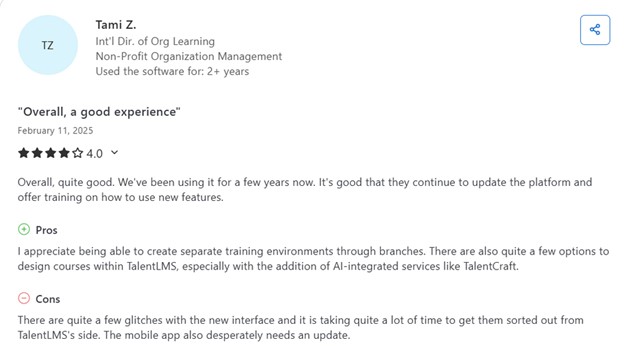
Users see Talent LMS as an affordable and scalable solution, especially for small to mid‑size organizations. The paid features reviewers find efficient and highlight in the reviews include multilingual support, drag‑and‑drop course creation, learning branches, SCORM compliance, and basic learning paths.
On the other hand, some users find that the reporting is limited and the mobile app needs improvements.
Also see: Talent LMS Review
Compare Talent LMS with other LMS
Moodle Workplace
Moodle Workplace is a version of Moodle built specifically for corporate training and professional development. It includes features like learning paths, compliance tracking, certifications, and automation tools tailored for business use. It helps organizations train employees, assign role-based learning, and track progress across departments or teams.
Key social learning opportunities for your organization
- Wikis and discussion groups
Moodle Workplace supports discussion forums, wikis, and group assignments that let your teams interact, co-create, and reflect together synchronously or asynchronously. Learners can post ideas, ask questions, and engage in threaded discussions directly within the platform. As for the wikis, they allow collaborative document creation and editing.
- Integrated virtual classrooms
Moodle Workplace integrates with tools like BigBlueButton, Zoom, and Microsoft Teams to run live sessions within the platform. Learners can interact via video, chat, polls, breakout rooms, and shared whiteboards during class.
- Gamification and collaboration
You can add points, badges, and leaderboards to reward not only course completion but also engagement behaviors like forum participation or peer feedback. The platform also supports automated workflows and messaging to keep learners engaged, send deadline reminders, or create conversations.
- Mobile learning with a branded app
You can run training from your dedicated mobile app and provide learners with easier access to the content. On their turn, the learners can find and enroll in courses that fit their roles or interests. But automation is possible too, when you segment the audiences based on department, role, or skill level.
What I like about Moodle Workplace
What I really find great about Moodle Workplace is the reporting opportunities it provides. With the Report Builder, you can create customized reports based on the insights you want to see in the learner’s performance.
The administrative part is well-handled, as the managers can access the reports regularly and manage the performance of their teams.
Users’ take on the platform
Reviewers who use Moodle for company or organizational training appreciate that it is highly customizable and flexible, thanks to its open‑source core and vast library of plugins.
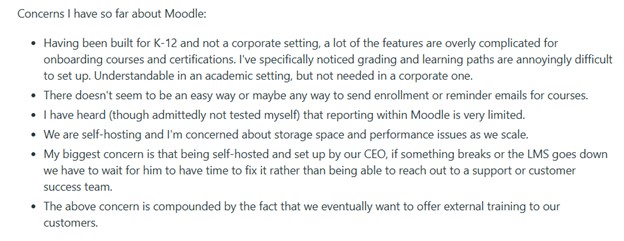
However, discussion on Reddit points out that Moodle’s interface and course setup process were originally designed for academics. That is why it feels clunky for corporate onboarding.
iSpring Learn
Key social learning opportunities for your organization
- Built-in messaging and likes
The employees can participate in a built‑in newsfeed, post comments, and engage in course discussions using likes, ratings, and direct messaging. They can message instructors or peers to ask questions or share ideas.
- Social interactions in the portal
iSpring Learn’s learner portal is structured to feel like an internal community hub. You can send notifications about new team members, birthdays, upcoming events, and maintain ongoing awareness across the organization.
- Live virtual sessions
You can host live sessions through Zoom or Microsoft Teams directly within the LMS. Learners can engage in real time via chat, polls, or breakout rooms. The training supports gamification, so there is an opportunity for managing the leaderboards, badges, points, and certificates.
- Mobile learning with the app
Through iSpring Learn’s native mobile apps (iOS and Android),the learners can access courses offline, receive push notifications, complete content, and stay connected via messaging or comments.
What I like about iSpringLearn
iSpring Learn integrates with the full iSpring Suite, meaning that you can also access the course authoring tools. If you prefer the blended learning approach to employee training, iSpring Learn combines online modules with live training sessions and detailed reporting tools for tracking learner progress.
Users’ take on the platform
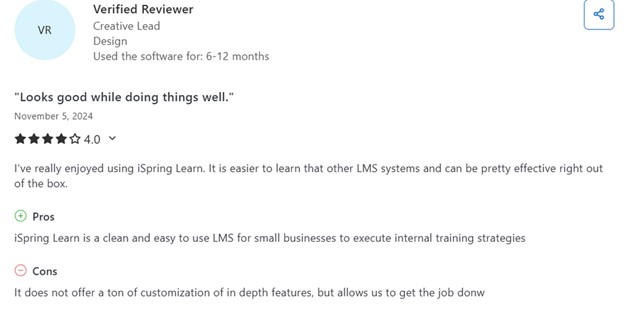
Corporate users praise iSpring Learn for offering a clean, user‑friendly platform that centralizes learning materials into one tool. They highlight features such as on‑the‑job training documentation, 360º feedback, and an internal knowledge base.
On the flip side, some report that integrations with tools like Slack or more advanced HRIS systems are missing.
Also see: iSpring Learn Review
Compare iSpring Learn with other LMS
Paradiso LMS
Paradiso LMS claims to be an AI-first platform for employee training. It offers a wide range of features, including course authoring, gamification, social learning, and integrations with over 100 third-party tools.
Key social learning opportunities for your organization
- Group workspaces
Paradiso LMS offers discussion forums and social media–style feeds where employees can post questions, comments, and insights. It provides opportunities to mirror true workplace dynamics with the workspaces. You can set up dedicated group workspaces for teams to collaborate on assignments, projects, and training tasks.
- Chat rooms
Another great opportunity for social learning is using the chat rooms. Here, learners can interact, join Google Hangouts, comment on each other’s videos, etc. The experience becomes similar to that of YouTube.
- Gamification and engagement
The game options on Paradiso are similar to the actual learning games or even include a mix of the game approaches, such as Hangman-who wants to be a millionaire. The learners can share their badges and awards on their social media profiles, participate in the competitions, and appear on the leaderboard.
- Mobile learning with the application
With the mobile app, the learners can access the learning content anytime and download the materials to view offline later. The platform integrates with various HR software, content libraries, and e-commerce platforms, and you can access the integrations from your mobile as well.
What I like about Paradiso LMS
The platform comes with an online course generator tool, which helps with the course content. What is great about it is that you can use AI to make the same course fit different learner groups and departments. It also generates voiceovers, translates the course, and creates the course assessment.
Users’ take on the platform
Reviewers value Paradiso LMS for its comprehensive corporate features, including multi‑tenant support, compliance tracking, certification management, AI‑powered course authoring, interactive video, blended‑learning support, gamification, and multilingual capabilities.
However, other reports indicate that the integrations do not always work as expected, and the interface seems cluttered.
Also see: Paradiso Review
Compare Paradiso with other LMS
The best social learning platform for your needs
To sum up, we reviewed the top social learning LMS platforms and what makes each of them stand out. 360Learning is great for collaborative course creation, Uteach blends live sessions with discussions, iSpring Learn is perfect for corporate training with social elements, and Paradiso LMS supports gamified and multilingual social learning. TalentLMS, SkyPrep, and Moodle Workplace all offer flexible collaboration tools and integrations that enhance peer learning experiences.
If you are still unsure which platform to go with, our specialists are here to help you choose the LMS that fits your organization’s unique needs. All you need to do is answer a few quick questions to get started. Book a demo with our specialists today and find the right solution faster.


