
The following guide covers:
How did I evaluate the learning management systems for enterprises?
What is an enterprise learning LMS?
10 Best enterprise learning management systems reviewed
What features should you look for in an enterprise LMS?
72% of organizations use an LMS. But only a fraction of those tools are actually built to handle enterprise-scale training.
An enterprise LMS is a training platform built to manage learning at scale across large organizations, handling thousands of users, deep integrations with HR and CRM systems, advanced compliance automation, and enterprise-grade security, all in one system. Meanwhile, a standard LMS runs out of room fast once you add multiple departments, regulated industries, or external audiences like partners and customers.
I evaluated 10 enterprise LMS platforms against criteria like scalability, security, integrations, compliance automation, deployment speed, and pricing transparency. Based on that evaluation, we will break down the best options below. To give you a complete picture, I also included real user reviews, current pricing, and honest trade-offs for each platform, so you can see what actually works before you commit.
Note that the sequence in which the platforms appear in the review is random and not a ranking.
How did I evaluate the learning management systems for enterprises?
At Uteach, we have a database of more than 60 LMS reviews, so I compared the platforms we have already researched and narrowed the list down based on the following criteria:
- Audience scope: Can the LMS handle employees, customers, partners, different departments, or multiple training portals without making management complicated?
- Scalability and user management: I looked at bulk user actions, groups, roles, permissions, multi-tenancy, and whether the system is built to manage large numbers of learners.
- AI capabilities: I checked how useful the AI actually is. Can it help create courses, assessments, learning paths, recommendations, or automate repetitive training tasks?
- Integration stack: Enterprise LMS software rarely works alone. I looked at integrations with HR systems, CRMs, communication tools, analytics platforms, SSO, APIs, and other business software.
- Real user experience: Finally, I checked G2 reviews and independent YouTube reviews. Product pages show what a platform promises. User reviews are much better at showing what happens after implementation, including usability issues, support quality, limitations, and features that look better on paper than they work in practice
So let’s see the shortlist based on how well each system can support the actual complexity of enterprise training.
What is an enterprise learning LMS?
An enterprise LMS is a training platform built for large organizations that need to manage learning at scale.
It helps companies train employees, partners, and customers in one centralized system. An enterprise LMS is designed to handle thousands of users, automate tasks like enrollments and reporting, and integrate with business tools like HR software (such as Rippling's HR software) and CRMs (such as Salesforce and HubSpot). It also offers advanced security, compliance tracking, and customization so that the learning experience matches your company’s brand.
10 Best enterprise learning management systems reviewed
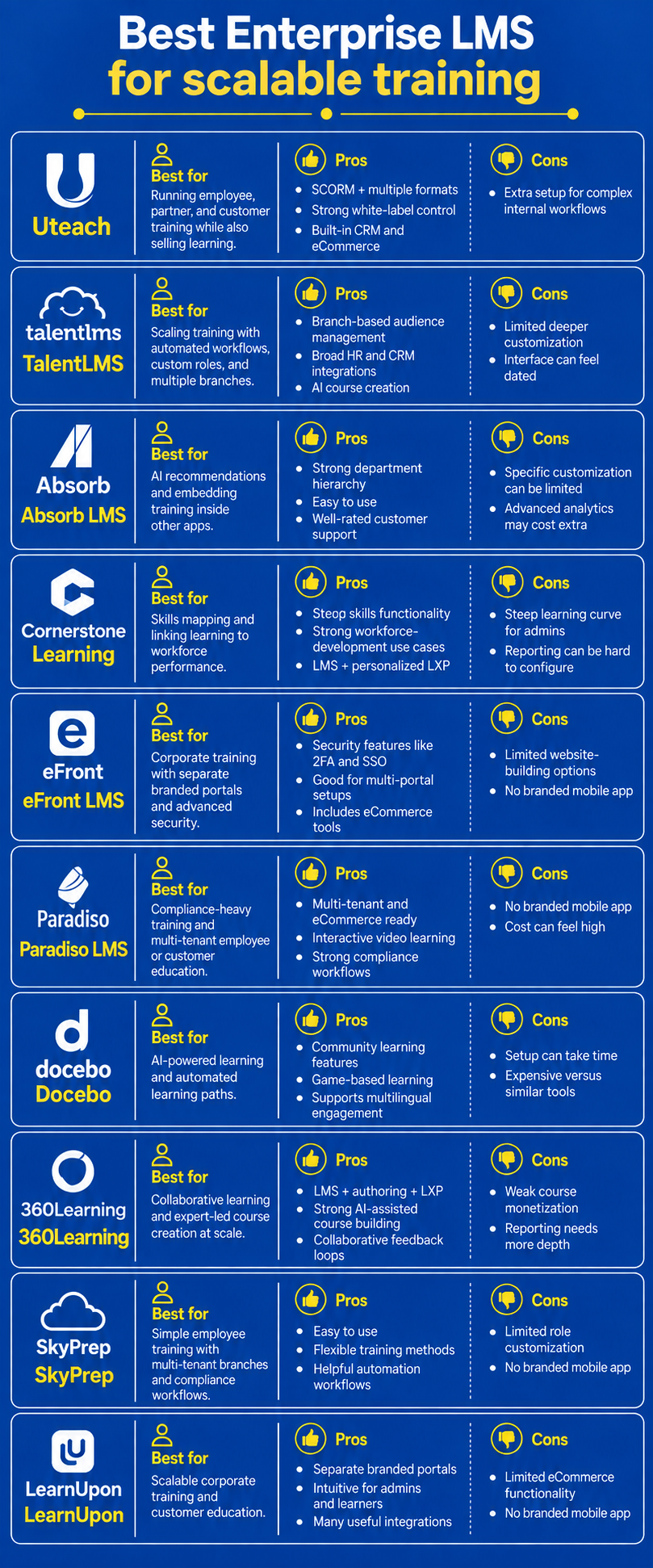
Here are the top enterprise-ready AI-driven learning management systems at a glance.
| Enterprise LMS | Best for | Free trial availability | Starting price |
| Uteach | Automating training delivery and selling training to customers and partners | Available | Custom quote |
| Talent LMS | Scaling training via automated workflows, custom user roles, gamification | Available | From $149/month up to 40 users |
| Absorb LMS | Getting AI-driven recommendations, Absorb Infuse to add the training into other apps | Available | Custom quote |
| Cornerstone OnDemand | Getting AI-driven skill mapping, linking learning outcomes directly to performance metrics | Not available | Custom quote |
| eFront LMS | Corporate training, splitting your portal into independent, branded "branches | Not available | From $720 month for 300 users |
| Paradiso | Blended learning and multi-industry training, automating workflows for compliance management | Available | Custom quote |
| Docebo | AI-powered learning, automated learning paths | Available | Custom quote |
| 360 Learning | Collaborative and peer-driven learning, multimodal AI content builder, adaptive coaching | Available | Custom pricing |
| SkyPrep | Simple and user-friendly employee training, managing separate training environments for distinct branches | Available | Custom pricing |
| LearnUpon | Scalable corporate training and customer education | Not available | Custom pricing |
Uteach
Uteach is a learning management system for organizations that want to manage employee, partner, or customer training from one branded platform. It combines course delivery, learner management, assessments, reporting, automation, communities, and mobile learning, while giving organizations strong control over how their training environment looks and operates.
Why I chose Uteach for this review?
I picked Uteach because it is built to let a single team run both the training delivery and the commercial side (like customer/partner portals and revenue tracking) without needing a separate e-commerce system.
Our partner Ameriabank built role-based assessments in Uteach to screen candidates, measure job-relevant knowledge, and bring consistency to a previously manual process. The banks running their training with Uteach LMS saw:
- Onboarding time reduced by 65%
- HR administrative workload cut by 40%
- Learner engagement and course completion rates increased by 45%
Training management opportunities
Uteach supports several training formats, including self-paced courses, live sessions, training resources, coaching sessions, assessments, and community-based learning.
Your organization can structure courses into categories and control how learners progress through the content. Assessments include different question formats, passing scores, and detailed quiz reports.
Certificates are issued automatically once learners meet the completion requirements. And if there is a need for recertification, the system will send automated notifications and reminders to proceed.
For companies running multiple training initiatives, learners can be organized into groups, while user roles help control how different people interact with and manage the platform.
Uteach offers an AI assistant that saves your admins time by generating necessary reports and helping the training department create quizzes and other content.
Customization options
You can customize how different users access and interact with the platform through roles, groups, and learner segmentation. You can organize employees by department, team, or training program, control permissions, and manage different learner groups separately. Reporting can also be filtered and exported based on the data your organization needs to track.
Key features for enterprises
- SSO and API access
- Social learning with communities
- Bulk employee and course content management
- Detailed reporting for individual learners, groups, and course performance
- Custom reports with filtering and export options
- User roles, permissions, groups, and learner management
- Branded mobile app for mobile learning
- Automated certification and recertification
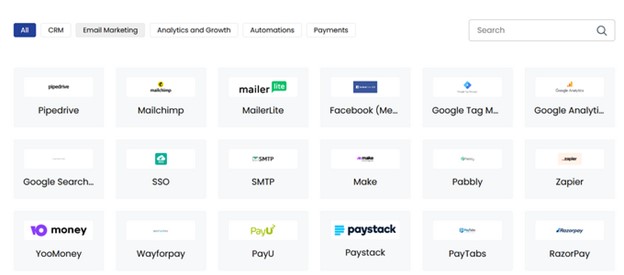
- Integrations with analytics, HRM, CRM, and automation tools
User reviews and feedback
Uteach has a rating of 4.7 stars on review platforms like Capterra.
Pros
- Supports SCORM content and multiple training formats
- Strong white-label flexibility for enterprise learning branded environments
- Combines LMS functionality with built-in CRM and eCommerce tools
Cons
- Requires additional setup for organizations with complex or individual internal workflows
Also see: Uteach Review
Compare Uteach with other enterprise LMS
Talent LMS
TalentLMS is a learning management system for companies that want to manage employee, partner, and customer training from one platform. It is particularly suitable when your organization needs to manage different training audiences, automate repetitive admin tasks, and connect training with the HR and business tools already in use.
Why I chose TalentLMS for this review?
I picked TalentLMS because its branch management and automation rules let a tiny admin team run training at a scale that would normally require a much larger operation, with enrollments, reminders, and portal segmentation all run without manual work.
Deliveroo, a global enterprise food-delivery platform, used TalentLMS to onboard and train restaurant partners across multiple markets. Deliveroo reported:
- Restaurant sign-up time reduced by 30%
- Faster onboarding of new partners across regions
- Centralized training and compliance tracking for thousands of restaurant users
Training management opportunities
TalentLMS supports self-paced courses, instructor-led training, assessments, learning paths, gamification, and mobile learning. Your organization can also upload existing SCORM 1.2, xAPI, and cmi5 content and track learner activity and results within the platform.
For managing larger learner bases, your organization can organize employees into groups, assign training in bulk, create custom user roles and permissions, and automate actions based on course completion, certificate expiration, or learner inactivity. Learning Paths let you connect several courses into structured programs for onboarding, compliance, upskilling, or department-specific training.
TalentLMS also provides AI-powered course creation through TalentCraft. Your training team can generate course pages, assessments, flashcards, images, videos, summaries, and other content.
Customization options
TalentLMS provides multi-audience management through Branches. Your organization can create separate training environments for departments, locations, customers, or partners while managing them from the same platform. Each branch can have its own learners, admins, courses, reports, language, and SSO configuration.
Key features for enterprises
- SSO with SAML 2.0, LDAP, and OpenID Connect
- REST API for custom integrations and workflows
- Groups, custom roles, permissions, and bulk actions
- Multi-tenancy with separate Branches for different audiences
- Custom and scheduled reporting
- Training matrix and compliance tracking
- Automated actions based on learner activity and course status
- Learning Paths and course prerequisites
- Integrations with BambooHR, ADP Workforce Now, Salesforce, Microsoft Teams, Zoom, and other business tools
- Native iOS and Android mobile apps
- GDPR compliance and ISO/IEC 27001:2022 certification
User reviews and feedback
TalentLMS has a 4.6-star rating on G2. Users frequently mention that the platform is easy to set up and that course creation does not require much technical knowledge. They also tend to be positive about customer support and the variety of content types available for training.
On the other hand, G2 feedback also points to limitations in deeper customization. Some users find the interface dated, while others mention that reporting can become less straightforward when they need more specific or complex reports.
Pros
- Strong support for different training audiences through Branches
- Broad integration stack for HR, CRM, communication, and automation tools
- AI tools significantly reduce the manual work involved in course creation
Cons
- Users report limited customization for more specific workflows and use cases
- Some G2 reviewers find the interface dated or less intuitive
Also see: Talent LMS review
Absorb LMS
Absorb LMS is built around centralized learner administration, structured departments and groups, reporting, integrations, and role-based access. It is suitable for organizations managing training across larger or more complex teams.
Why I chose Absorb LMS for this review?
I picked Absorb LMS because of Absorb Infuse, the ability to embed the actual learning experience (course catalog, progress tracking, content) directly inside another application, rather than sending learners to a separate portal. Boomi, an enterprise iPaaS provider with 15,000+ global customers, used Absorb Infuse to build “Boomiverse,” a custom-branded certification hub embedded in their product ecosystem. Boomi reported:
- 284% increase in learner session duration
- 29% month-over-month growth in certification completion rate
- Higher engagement and certification rates across their global customer base
Training management opportunities
Absorb supports self-paced courses, instructor-led training, tests, and third-party training content. Your organization can upload SCORM 1.2, SCORM 2004, xAPI, and AICC content, so existing course libraries can be managed inside the platform.
For larger learner bases, your organization can structure users into hierarchical departments and additional groups. Departments can follow your company structure, while groups can bring together learners across different departments based on criteria such as role or training needs.
Absorb includes AI functionality through Absorb Intelligence. For admins, Intelligent Assist can respond to natural-language requests to perform LMS tasks or retrieve reports. Absorb also provides AI-assisted content editing and content-generation functionality.
Customization options
Your organization can customize how users and administrators interact with the LMS through departments, groups, custom roles, permissions, and department-specific learner experiences. Departments can have their own learner dashboards, training availability, administrators, and even different portal experiences.
Key features for enterprises
- Hierarchical departments and flexible user groups
- Custom admin roles and permissions
- Bulk user and enrollment management
- SCORM 1.2, SCORM 2004, xAPI, and AICC support
- Instructor-led and self-paced training
- Customizable, exportable, and scheduled reports
- REST API and data import/export options
- HRIS integrations, including ADP and BambooHR
- Salesforce integration
- AI-assisted administration and content creation
- Department-specific learner dashboards and training access
User reviews and feedback
Absorb LMS currently has a 4.6 out of 5 rating on G2, based on more than 900 reviews. G2 reviewers frequently mention ease of use and customer support as strengths.
Some users mention that specific administrative or customization requirements are harder to achieve. Others report that reporting requires additional manual work.
Pros
- Strong department hierarchy for managing complex organizational structures
- Reviewers frequently highlight ease of use and customer support
Cons
- G2 users report limitations when they need highly specific customization
- Several advanced capabilities, including enhanced analytics, are separate add-ons rather than part of the core LMS
Cornerstone Learning
Cornerstone Learning is an enterprise learning platform built for organizations with complex training, compliance, and workforce development needs. It combines traditional learning management with learning experience functionality, skills intelligence, and AI-driven personalization.
Why I chose Cornerstone Learning for this review?
I picked Cornerstone OnDemand because its skills intelligence engine ties learning content directly to workforce capability data at scale.
Tricentis, an enterprise software testing and quality assurance provider, used Cornerstone OnDemand to scale certifications and learning across its customer and partner ecosystem. Tricentis reported:
- 290% increase in Tricentis Tosca certifications within 18 months
- 35,920 new subscribers enrolled in courses
Training management opportunities
Cornerstone is particularly strong for regulated organizations where training is tied to certifications, recertification, and compliance requirements. Your organization can automate certification workflows, track completion and renewal requirements
Cornerstone's Skills Engine takes this further by creating employee skill profiles and connecting learning content to specific skills. Its skills taxonomy includes more than 45,000 skills across 35 languages, and learning content can be automatically tagged to relevant skills.
Customization options
The platform can use workforce data through the Cornerstone People Graph and Skills Engine to personalize recommendations and learning paths based on what employees do, what skills they have, and what capabilities they need next.
Key features for enterprises
- Automated certification and recertification workflows
- Audit-ready compliance tracking and reporting
- Role and skill-based learning paths
- AI-powered learning and content recommendations
- Cornerstone People Graph for connecting workforce and learning data
- Personalized content, career path, and mentor recommendations
- Centralized content management with version control
- Open APIs and integrations with business systems
- Support for global and regulated organizations
User reviews and feedback
Cornerstone Learning has a 4.0-star rating on G2, with 530 reviews currently listed for the product. G2 data also shows that 73% of reviewers using Cornerstone Learning come from large organizations.
Users frequently highlight the depth of the LMS functionality, reporting capabilities, and its ability to support complex enterprise training. At the same time, reviewers often mention that the system requires a significant learning curve for configuration.
Pros
- Deep skills functionality connects learning with workforce development and internal mobility
- Combines structured LMS training with personalized LXP experiences
Cons
- G2 reviewers frequently mention a steep learning curve for administrators
- Some reviewers report that advanced reporting is difficult to configur
eFront
eFront LMS is a corporate learning management system for enterprises that are looking for advanced security and extensive customization. The platform allows you to streamline employee development, regulatory training, and workforce upskilling.
Why I chose eFront LMS for this review?
I picked eFront because of its ability to split one LMS instance into fully independent, separately-branded portals for different customer or partner organizations, without needing separate installs. Schneider Electric, a global energy and automation enterprise with 400,000+ employees, transitioned from a legacy LMS to eFront to centralize and scale training worldwide. Schneider Electric reported:
- Zero downtime during global rollout across all regions
- Training operations scaled to support hundreds of thousands of learners on one platform
Training management opportunities
In terms of training, eFront covers a variety of cases, such as employee training, onboarding, extended enterprise training, customer training, and more.
To help enterprises make course creation easy, the platform offers generative AI tools. For example, you can generate course content for specific learning paths and generate visual materials and quizzes for assessment. What is great is that if you need to create documentation or guides that you want employees to follow, you can use AI.
As for the formats, you can make the training engaging by adding video, audio, and web content. The platform supports SCORM and xAPI files, so you can make learning more interactive.
Customization opportunities
What is great about eFront is that it allows you to brand your learning portals. You can set your branding by adding your logo, connecting a custom domain, and accessing the code for further customization.
The platform also offers a native app, and you can make your training available offline via the app. Unlike many enterprise learning management systems, eFront focuses on eCommerce tools so that you can sell the training as well.
Key features for enterprises
- Secure portal that supports 2-factor authentication, IP whitelisting, and single sign-on
- Advanced reports that also show the audit logs and activities of every user
- Supports bulk actions
- Opportunities to classify users based on their functions and permissions
- Opportunities to create sub-portals due to multi-tenancy functionality
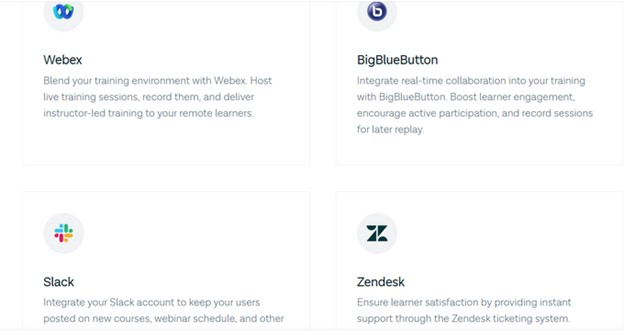
- Useful integrations via API, including videoconferencing and e-commerce tools.
User reviews and feedback
As for now, eFront has a rating of 4.5 stars on G2 and 2.7 stars on Capterra.
What customers usually like about eFront is that it has an intuitive user interface and almost everything is customizable. They found the platform flexible. Most of the reviewers were happy with the tech support received, and they also mentioned that the detailed documentation helped them a lot with implementation.
However, some of the users found the implementation difficult.
Pros
- Provides security with 2FA, SSO, audit logs, etc.
- Has a focus on eCommerce tools
Cons
- Limited website-building opportunities
- Users report the implementation is not as easy as they expected
- No branded mobile app available
Also see: eFront LMS Review
Compare eFront LMS with other enterprise LMS
Paradiso LMS
Paradiso LMS is a feature-rich learning management system for enterprises, providing AI-powered learning, multi-tenancy, eCommerce integration, and advanced analytics to support corporate training, employee development, and extended enterprise learning.
Why I chose Paradiso LMS for this review?
I picked Paradiso because its compliance workflow automation (audit trails, certification tracking, and automated reminders) is built specifically to handle the regulatory overhead.
Training management opportunities
Paradiso is perfect for enterprises that offer both internal training for their employees and external training for customers and external companies.
To make the training effective for the learners, the LMS solution focuses on competency-based learning. That means the learners follow specific frameworks and learning plans. The instructors can set the learning paths for all the learners so that the employees meet the required competencies and earn a certification.
Paradiso also supports blended learning experiences and interactive learning. So, there is an opportunity for the learners to interact with the video content, including hotspots, data inputs, quizzes, etc.
As for course content creation, Paradiso LMS comes with authoring tools as well, including AI functionality. It helps to generate spokesperson videos, assessments, and videos. You can also publish the course in SCORM format.
Customization opportunities
The platform provides solid opportunities for customization as well. You can set up the organization logo, colors, and other branding elements and add a custom domain.
Analytics and reports are customizable as well, as you can track the performance of each learner. There is also an opportunity to automate the reports so employees can receive them based on the time you schedule.
Key features for enterprises
- Single sign-on to switch between platforms
- Multi-tenant functionality
- Social learning with discussion forums and polls
- Learning paths and prerequisites
- 100.000+ SCORM and AICC-compliant ready-made courses
- Gamification elements like points, badges, and leaderboards
- SCORM-compliant and SCORM reporting
- Advanced reports for courses, users, system, and performance
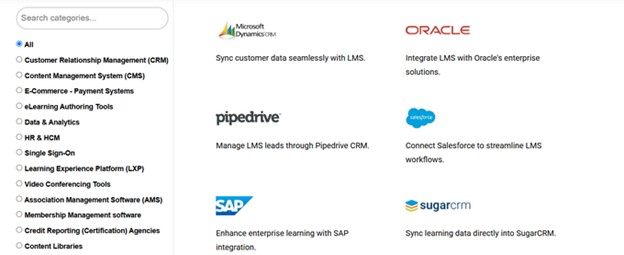
- Integrations with HR, eLearning authoring, eCommerce, and many other tools
User reviews and feedback
Paradiso LMS has a 4.2-star rating on Capterra and a 4.1-star rating on G2.
What reviewers like most about Paradiso is that they have an opportunity to manage everything, from building courses with an interface featuring the company identity. They are happy they can track the learner’s performance with objectives, assessments, and detailed reports.
On the flip side, they do not seem to be happy with the UI. Here is feedback from one of the reviewers.
Pros
- Interactive video learning experience
- Virtual classroom experience
Cons
- No branded mobile app available
- Users report the costs are high for the functionality they expect
Also see: Paradiso Review
Compare Paradiso with other enterprise LMS
Docebo
Docebo is an AI-powered enterprise learning LMS platform that offers personalized learning experiences, automation, and integrations with business tools to enhance employee training, partner enablement, and customer education at scale.
Why I chose Docebo for this review?
I picked Docebo because its automated learning paths remove manual enrollment entirely — rules based on role, region, or Salesforce data assign the right training.
PowerDMS, an enterprise policy and procedure management provider, used Docebo to automate customer onboarding and training. PowerDMS reported:
- 30% reduction in customer onboarding time
- 5,420+ training hours saved annually
- Approximately $150,000 in training cost savings
Training management functionality
With Docebo, you can create personalized courses and train partners, customers, and members. The best thing about this platform is that it is highly focused on AI functionality. It allows the creation of interactive assessments, learning activities, and content for courses.
Besides helping with course creation, AI models recommend content and manage automation processes. Yet, what makes the learning experience really interesting on Docebo is the gamification opportunities. The platform has templates for popular games like Jeopardy, Wheel of Fortune, etc. Plus, Docebo is a social learning platform, so you can create and manage communities and boos employee engagement.
Customization options
Doecebo allows 100% white-label opportunities, so you can establish your organization’s branding and set it under your workflows and learning needs. You can customize the user interface with their logos, colors, and domain.
The platform also supports flexible learning paths, custom dashboards, and AI-driven recommendations to personalize training.
Key features for enterprises
- Enterprise-grade security standards
- AI-powered learning management
- Content marketplace ready-made courses for different
- Headless learning with the opportunity to embed any content from Docebo to other applications
- Analytics, tracking the enrolled users, completion rates, time spent on learning, assessment results, etc.
- 11 pre-made games with interactive templates
- Reporting tools to track training and productivity metrics, performance metrics, partner & employee development metrics
User reviews and feedback
Docebo has a solid 4.3 and 4.2-star rating on G2 and Capterra, respectively.
Users on Capterra have shared their experiences with Docebo, highlighting several strengths and areas for improvement. Many appreciate the platform's intuitive design. The customizable nature of Docebo is also praised.
However, some users have expressed concerns about response times, mentioning occasional slowness and less than satisfactory customer support experiences.
Pros
- Community learning opportunities
- Games based learning with popular games like Trivia, Detective, Wheel of Fortune, and opportunity to translate games in 21 languages
Cons
- People on discussion forums claim Docebo requires much time to set up
- Expensive compared to solutions with similar functionality
Also see: Docebo Review
Compare Docebowith other enterprise LMS
360 Learning
360Learning is a collaborative learning platform that helps organizations create, share, and scale training programs by giving employees the opportunity to contribute their expertise. It is great for upskilling teams, onboarding new hires, and fostering a culture of continuous learning with easy-to-use course creation, AI-driven recommendations, and peer-driven learning features.
Why I chose 360 Learning for this review?
I picked 360Learning because its collaborative course-creation model lets any employee turn expertise into a published course in hours, different from a typical top-down authoring workflow.
Michelin, a global manufacturing enterprise with 132,000 employees, used 360Learning to enable internal experts to create and publish courses at scale. Michelin reported:
- 530 internal course-creating “champions” established across the organization
- 6× more digital training courses completed in 2022 compared to 2019
Training management opportunities
360 Learning takes a whole different approach when it comes to organizing training and upskilling employees. The solution is built around a collaborative approach, where everyone can learn from each other, no matter whether it is the instructors or peers.
The platform offers varied opportunities for upskilling. For example, employees can self-assess their skills, while managers can track and validate their skills and assessments. Managers can map the required skills in advance so that the employees can see exactly what steps they should take to meet the new requirements.
To assist with creating training fast, 360 Learning offers an AI assistant to handle the authoring work. For example, you can convert documents into training or write prompts for AI to suggest the course outline, description, and key takeaways.
What is great is that the platform helps to deliver training that matches the learners' needs. For example, there is an opportunity to create learning needs, then vote for the options and prioritize everything based on the results.
Customization opportunities
Though not advanced, 360Learning offers customization options for the academies you create in your portal. For example, you can customize the colors and add your organization’s logo. When it comes to customizing the training experience, there are far more opportunities. It makes personalizing emails possible, too.
The platform allows customizing the reports, getting the learner’s feedback with reactions, and customizing the groups.
Key features for enterprises
- Support for SCORM courses
- Setting skills profiles
- Custom reports
- Learning & Development AI certification
- Resource library for courses
- Task management with deadlines
- Data synchronization with different analytics tools
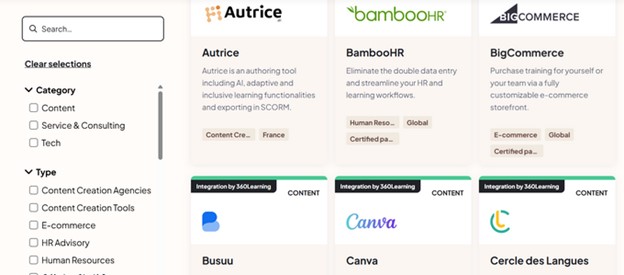
- Integrations with eComerce, sales, learning, design, and HR tools.
User feedback and reviews
Users are very happy with their experience with 360 Learning, as the platform has a 4.6 and 4.7-star rating on Capterra and G2, respectively.
Here is a user review from Capterra, who has tried other popular enterprise learning management systems, highlighting its pros and cons.
People really like that 360Learning is easy to use and makes course creation easy. Its user-friendly design and interactive, collaborative features help teams learn together efficiently.
Users also appreciate the responsive customer support and the frequent updates, which keep the platform fresh and continually improving. However, some reviewers mentioned that certain features could use more depth, like advanced reporting tools and content customization options.
Pros
- It is a course-authoring tool, LMS, and LXP all at the same time
- Has a heavy focus on AI to help with building courses, creating and saving prompts, and recommending courses
- Offers opportunities for collaborative learning with feedback loops, reactions, relevance scores, etc.
Cons
- Little focus on course monetization, with only one e-commerce integration
- Needs better reporting functionalities reported by user
- The features seem cluttered and need some “getting used to.”
Also see: 360 Learning Review
Compare 360 Learning with other enterprise LMS
SkyPrep
SkyPrep is an LMS designed for businesses that need easy employee training, customer training, compliance tracking, and certification management. It stands out with its simple course builder, automated grading, and built-in reporting to train teams, onboard new hires, and ensure regulatory compliance.
Why I chose SkyPrep for this review?
I picked SkyPrep because its multi-tenant branch structure lets one account run fully separate training environments for different clients, brands, or franchise locations. Lynden Door, an enterprise manufacturing company, used SkyPrep’s tracking and automation features to improve onboarding and compliance training across its workforce. Lynden Door reported:
- Onboarding attendance increased from 60% to 100%
- Automated reminders and progress tracking eliminated manual follow-ups
Training management opportunities
With SkyPrep, you can create engaging training with a course-builder supporting various types of media files. The platform also supports SCORM files. There is an opportunity to gamify the learning experience with points, badges, and competition. You can build checklists to make sure that the training content matches the skills learners need to improve. The checklists are also there to create workflows and manage course completion.
The platform also offers AI functionality to create assessments and generate questions and images. But what is great is that there is also an opportunity for employees to role-play with AI to test their knowledge in specific scenarios.
Customization options
As for customization, SkyPrep provides all the basic features to establish your branding in your portals. You can upload the company’s logo or favicon, and customize the colors. It also allows customizing the emails and issuing branded certificates.
There is an opportunity to customize the reports' look and to set what information to show and what to hide. Besides, you can schedule and automate reports by scheduling them.
Key features for enterprises
- SOC 2 Type II compliant and enterprise-grade security
- Multi-tenant LMS with opportunities to customize each portal
- Automation workflows with user information updates
- Bulk actions for repetitive tasks
- User roles and permissions
- AI tools for assessment building, image generation, and scenario-creating
- Library of 20.000+ ready-made courses
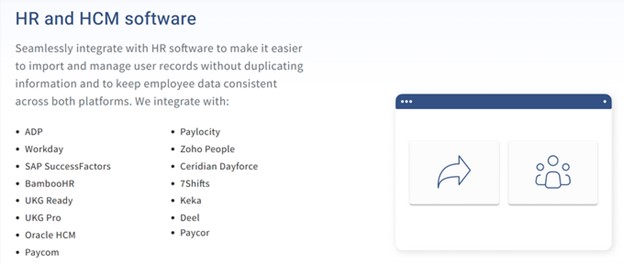
- Integrations with HR and HCM software
User reviews and feedback
SkyPrep has 4.6 and 4.8-star reviews on platforms like G2 and Capterra.
In the hundreds of reviews on these platforms, SkyPrep stands out for its clean and easy interface. Particularly, they mention the ease of getting started with the platform, which helps speed up training rollouts.
On the flip side, some reviewers feel that SkyPrep could benefit from more advanced features, particularly when it comes to detailed reporting and customization options.
Here is feedback from one of the users.
Pros
- Easy and user-friendly for both the trainers and employees.
- Allows multiple ways to hold training, like checklists, videos, adding learning paths, etc.
Cons
- User role customization is not advanced according to the users
- No branded mobile app experience
Also see: SkyPrep Review
Compare SkyPrep with other enterprise LMS
LearnUpon
LearnUpon is another LMS that helps organizations deliver training to employees, partners, and customers by creating and managing courses, tracking progress, and automating tasks like enrollment and notifications.
Why I chose LearnUpon for this review?
I picked LearnUpon because its Learning Portals feature lets one account run fully separate, branded academies for different audiences — employees, customers, and partners.
ChargePoint, a leading enterprise EV charging network, used LearnUpon to train and certify external partners at scale. ChargePoint reported:
- 89% reduction in partner support calls
- $200,000 in actual and projected cost savings
Training management opportunities
With LearnUpon, you can provide training that is engaging, gamified, and collaborative.
It lets you assess the employee's performance with tools like exams, assignments, knowledge checks within modules, and surveys. You can customize the learning for everyone by creating learning paths. There is also an option for learners to set their own training progress, while instructors can set the criteria for how the learning should progress.
To make learning more engaging, LearnUpon offers discussion forums for learners to work together and gamification opportunities to motivate them.
As for its AI functionalities, you can send notifications, generate modules and course summaries and assessments, and provide automated feedback.
Customization options
To make the platform fit your organization brand, LearnUpon allows setting the branding for each portal within the platform. You can customize each portal for different features and content. As for the content, there is an opportunity to easily use the same content between learning portals.
Similar to other solutions, here, you can also customize the reports and automate them.
Key features for enterprises
- AI-driven learning
- Multi-tenancy with different portals
- Access to training history
- Automation in nrollments, course creation, and learner management
- User segmentation in different groups
- User roles, including admin, manager, instructor, and learner
- Embeding LearUpon code in other apps and platforms
- Structured training programs with learning paths
- Resource center for documents
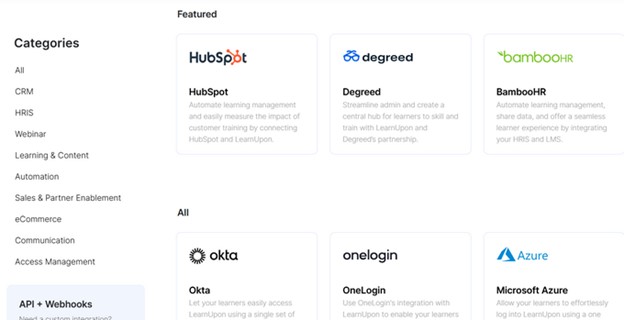
- Interations with popular learning, sales, business, communication, CRM, and other tools.
User reviews and feedback
LearnUpon has a 4.6-star rating on G2.
Reviewers usually find it to be a user-friendly and easy solution.
Many users highlight its clean interface, quick onboarding process, and solid integration with tools like Zoom and Teams.
The platform is especially appreciated for corporate training, compliance education, and employee onboarding. However, some users mention occasional quirks, such as difficulty diagnosing integration issues and certain missing features that require workarounds.
While most reviews are highly positive, a few users note minor frustrations, like limited customization options.
Pros
- Intuitive interface for both admins and learners
- Lots of helpful integrations
Cons
- Limited eCommerce functionality
- No branded mobile app available
Also see: LearnUpon Review
Compare SkyPrep with other enterprise LMS
What features should you look for in an enterprise LMS?
If you are looking for an enterprise LMS, you need more than just course creation and tracking. You need a system that scales, integrates, and keeps your data secure.
What you want to pay attention to is:
- Scalability. Look for a system that supports multiple departments, locations, and training programs. It should let you manage users in bulk, set up automated workflows, and adapt as your organization grows.
- Customization. Advanced options include tailored user dashboards, personalized learning paths, and adaptive training content.
- Integrations with business tools. It must connect with your HR software, payroll software, CRM, and other business systems. Look for integrations with platforms like Workday, SAP, Salesforce, and Microsoft Teams. Single sign-on (SSO) and API access are also must-haves for seamless user management. SSO and API access with proper authentication methods are also must-haves for seamless user management.
- Compliance and certification management. Your LMS should help automate certification tracking, send reminders for renewal, and generate compliance reports. Audit trails and secure data storage are also important for passing regulatory checks.
- Advanced reporting. Look for customizable reports, real-time dashboards, and performance analytics for each user.
- Multi-tenant and role-based access. Role-based access ensures that the right people see the right content, whether they are executives, managers, or trainees.
- Security and data protection. Ensure the LMS offers encryption, access control, GDPR compliance, and regular security updates. Effective Windows patch management can help keep systems updated with the latest security fixes. Look for features like two-factor authentication and single sign-on (SSO) for safer logins.
FAQ
- What is an enterprise LMS?
An enterprise LMS is a learning management system built to manage training across large or complex organizations, including employees, departments, locations, customers, and partners from one system.
What makes an LMS “enterprise” is not simply the number of users. A company with 1,000 employees may not need an enterprise LMS if its training setup is simple. But a smaller organization might need one if it manages multiple audiences, compliance programs, regions, or business systems.
An enterprise LMS typically adds capabilities that basic LMS platforms may not handle well at scale, such as role-based permissions, user groups and hierarchies, bulk user management, SSO, API and HRIS integrations, advanced reporting, compliance and certification tracking, automation, and multi-tenant or separate learning environments. The goal is not just to deliver courses, but to reduce the administrative work required to manage training across the organization.
- What is the difference between standard and enterprise LMS?
A standard LMS mainly manages course delivery for one learner population, while an enterprise LMS is designed to manage multiple audiences, organizational structures, permissions, and business systems from one platform.
The practical differences are:
- User structure: A standard LMS may have admins and learners. An enterprise LMS typically supports departments, groups, locations, managers, custom roles, and different permission levels.
- Separate learning environments: Enterprise LMS platforms can support different portals or tenants for employees, customers, partners, franchises, or regional teams while keeping administration centralized.
- User provisioning: Instead of manually creating accounts, enterprise LMS platforms can use SSO, SCIM, HRIS integrations, APIs, or automated rules to create, update, group, and deactivate users.
- Training automation: Enterprise systems can automatically enroll employees based on department or role, issue and renew certificates, send compliance reminders, and trigger actions when learner status changes.
- Reporting: A standard LMS usually reports course completion and assessment results. Enterprise systems add reporting by department, group, role, location, certification status, and other organizational criteria.
- Integrations: Enterprise LMS platforms are expected to connect with systems such as HRIS, CRM, identity providers, collaboration tools, and business intelligence software.
The difference is not simply the number of learners. A company with 500 employees and several countries, compliance programs, and partner portals may need an enterprise LMS, while a company with several thousand learners following the same simple training program may not need the same level of enterprise functionality.
- What are the benefits of an enterprise LMS?
The main benefit of an enterprise LMS is that it lets your organization scale learning without scaling the same amount of manual administration. But the business value is easier to see when you look at what structured workplace learning is associated with.
- Lower training costs: LMS-based training can reduce overall training expenses by up to 30% by replacing repeated instructor-led sessions, travel, manual coordination, and fragmented training tools with centralized digital delivery.
- Less administrative work: LMS adoption can reduce training workload by up to 10,000 hours annually, mainly through automated enrollment, tracking, reporting, reminders, and certification management.
- Faster onboarding: Structured LMS-based onboarding removes delays caused by scheduled sessions, repeated manager explanations, and scattered documentation. For example, our clients reduced onboarding time by 65% and HR workload by 40%.
- Faster time to productivity: Conventional onboarding can take 8 to 12 months before a new hire reaches full productivity. An LMS helps shorten that period by making role-specific learning available immediately and removing dependence on manager-led knowledge transfer.
- Stronger ROI from training: Reported LMS ROI can exceed 200% over three years, because the return is not limited to course completion. It comes from recovered employee time, lower delivery costs, faster onboarding, and reduced administrative effort.
Related: LMS Benefits: Is It a Strategic Pillar for Your Organization?
- What type of enterprise LMS deployment do you need?
Enterprise LMS deployment usually comes down to cloud SaaS, private cloud, or on-premises. The right choice depends less on company size and more on how much control your IT team needs over infrastructure, updates, data residency, and security.
- Cloud SaaS. The LMS is hosted and maintained by the vendor. Your organization does not manage servers, updates, backups, or infrastructure. This is the most practical option when you want faster implementation, easier scaling, and less IT overhead. From the platforms in this list, TalentLMS, Absorb LMS, Cornerstone, and Uteach follow the cloud-based model.
- Private cloud. Your LMS still runs in the cloud, but the environment is dedicated rather than shared with other customers. Consider this when your organization needs tighter infrastructure isolation, specific data residency requirements, or more control than standard SaaS provides without maintaining servers internally. eFront offers a fully managed private-cloud deployment.
- On-premise. The LMS is installed on infrastructure controlled by your organization, usually behind your own firewall. This is worth considering when training data cannot leave your environment, when you operate on restricted or air-gapped networks, or when internal IT and compliance teams require direct control over the system. eFront Uteach and Paradiso LMS offer on-premises deployment.
Related: Types of LMS, How to Choose | With Examples
- What enterprise LMS offers the best value for the price?
Based on the LMS platforms covered in this guide, TalentLMS and Uteach stand out most clearly for value for money in G2 reviews. Reviewers repeatedly describe it as cost-effective, affordable at scale, and competitive with LMS platforms that cost considerably more.
eFront also gets positive feedback for pricing and scalability, including enterprise reviewers describing it as well-priced for larger deployments.
Absorb LMS scores strongly overall, and reviewers value its reporting, multitenancy, and enterprise deployment capabilities, but its value proposition is more about feature depth than low pricing.
For more specialized enterprise requirements, platforms such as Cornerstone and Docebo can justify a higher investment when your organization needs deeper skills management
So, if your priority is getting a broad enterprise feature set without the enterprise pricing, TalentLMS and Uteach have the strongest value-for-money.
Book a demo with our specialist and see how Uteach can help your training delivery, management, and tracking become even more efficient.


