![Hosted LMS [Types, Differences, Best Solutions’ Reviews]](https://d35v9chtr4gec.cloudfront.net/uteach/articles/GEM1JHSbqoSetAgTNKre-1757576637/hosted-lms.png)

There is a wrong belief that by saying hosted LMS, we mean only the cloud-based solutions. To instantly clear up all the confusion, both self-hosted and cloud-LMS solutions ARE hosted. We just use the term hosted to refer to the way these LMS solutions handle data and infrastructure.
Let’s break down what each type entails and how you would know if you need a self-hosted or a cloud solution. Once I help you decide between the two types, I will also review the best solutions for you to consider.
Self-hosted LMS vs Cloud-based LMS
As we have already established, self-hosted and cloud-based LMS have different ways to store the data. Yet, it is just one key difference between the two. Instead of a thousand words, here is a simple table outlining the key differences between the two.
What to pay attention to | Cloud-based LMS solutions | Self-hosted LMS solutions |
Getting started | - Ready to use after signing up - No installation required - You can start creating courses immediately | - Needs to be installed on your own servers - Setup takes time before you can start teaching - Requires extra preparation before launch |
Where you work from | - Access your LMS anywhere with internet - Works on different devices without setup - Ideal for remote or hybrid teams | - Usually tied to your organization’s network - May need special access for remote users - Works best for on-site teams |
Ongoing care | - All updates are done for you automatically - No interruptions to your classes - You can focus on teaching instead of system upkeep | - You are in charge of updates and fixes - May need downtime for maintenance - Part of your team’s time goes to system management |
Costs | - Pay as you go with a monthly or yearly fee - No large upfront payment - Easier to budget for smaller teams | - Higher starting cost for setup - Pay for equipment, hosting, and upkeep - Costs are more predictable long term |
Flexibility | - Customization depends on what the provider offers - Most allow branding and layout changes - Faster to adjust settings without technical help | - Full control over features and look - Can add or change anything to fit your needs - May need technical help for changes |
Scaling | - Grows with your audience automatically - No limits on learners without extra setup | - Growth depends on your equipment capacity - Needs upgrades to handle more learners |
So, the choice really depends on what you need and your business goals. Let’s see what each one has to offer and how you can know if that is right for your organization.
What is a cloud-based LMS
A cloud-based learning management system is a platform hosted on the provider’s servers and accessed through the internet. It does not require installation on your organization’s computers or local servers.
Instead, you log in through a web browser and have immediate access to all features, courses, and user data. These systems are also known as web-based LMS or SaaS (Software as a Service) LMS.
Many organizations choose a cloud-based LMS because it removes the need for in-house infrastructure and ongoing technical maintenance. The provider manages updates, security, and system performance. So to speak, you only focus on delivering the training.
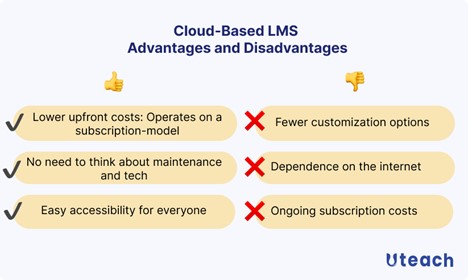
- Cloud-based LMS advantages
There are a few other advantages to choosing a cloud-based LMS solution.
From a cost perspective, a cloud-based LMS typically operates on a subscription model. You do not need large upfront investments in hardware or software licenses. Then you are also able to spread expenses evenly over time. For many teams, this makes budgeting easier and allows them to align costs with usage as the number of learners changes.
Maintenance is also simplified. Since the system is hosted and managed externally, updates, bug fixes, and new feature rollouts happen automatically. This means your team does not need to allocate internal resources for technical upkeep.
The accessibility of a cloud-based LMS supports today’s distributed and hybrid work environments. As we have discussed, it is web-based. This flexibility allows employees, contractors, and partners to complete training on their own schedule.
But what I think is really important is that the integrations with the popular tools are already there, and you do not have to integrate all the business systems yourself.
- Cloud-based LMS disadvantages
Generally speaking, you have fewer options for customization with a cloud-based LMS. And that is not for the branding or the integrations. Mainly because the workflows depend on the provider’s roadmap and the way they initially designed the platform. That is why you need to choose a solution that aligns with your business needs and processes.
Another consideration is ongoing dependence on internet connectivity. A stable connection is essential for both administrators and learners to access the platform.
How do you know you need a cloud-based LMS?
- Do you want your team to access training from any location without additional setup?
- Would you prefer not to manage software updates or system maintenance internally?
- Is it important for you to launch training programs quickly without lengthy installation processes?
- Do you need a platform that can grow with your organization without requiring new hardware?
- Is predictable, subscription-based pricing a better fit for your budget planning?
- Do you want built-in analytics to track learner progress in real time?
- Is mobile access important so learners can train on any device?
Now, if the answer to all, or most of these questions, is yes, then you should choose a cloud-based platform.
What is a self-hosted LMS?
A self-hosted learning management system is a platform that is installed and run on your organization’s own servers or hosting environment. Instead of being managed entirely by an external provider, you are responsible for installation, configuration, maintenance, and security.
So to speak, you have complete ownership and control over the system’s setup, features, and data storage.
Self-hosted LMS platforms can be open-source or proprietary. Open-source options allow full access to the system’s code, enabling extensive customization, while proprietary solutions may offer vendor support with hosting still managed internally.
In both cases, the technical responsibility lies primarily with your team or your chosen IT partner.
Organizations that go with a self-hosted LMS require strict data security measures, specific compliance with local regulations, or deep customization that is not possible in a cloud-based system.
- Self-hosted LMS advantages
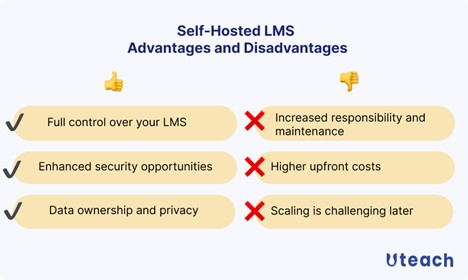
One of the main advantages of a self-hosted LMS is full control over the platform. Your organization decides how the system is configured, which features are enabled, and how workflows are structured. This level of control allows you to tailor the LMS to meet specific business processes, compliance requirements, or unique training needs.
Security is another key benefit. Because the system and data are hosted internally. Your organization can define and enforce its own security protocols and make sure information stays within your regulatory requirements.
Also, if you are using an open-source option, you can modify the code and implement your business’ workflow into the platform. Since the system is hosted internally, it can perform consistently without the internet.
- Self-hosted LMS disadvantages
If you decide on a self-hosted option, be ready for the technical responsibility it places on your organization. Meaning, you need a team to handle installation, configuration, updates, and ongoing maintenance. Security is also fully your responsibility.
Obviously, costs are higher upfront compared to cloud-based solutions. Because setting up servers, purchasing licenses, and investing in technical infrastructure requires a larger initial investment.
If you have learners outside your organization, that would be a true challenge. Self-hosted solutions usually require additional network setup, VPNs (for example, Mullvad, ExplorerVPN), and internal policies to allow learners outside the organization to connect.
You should also note that adding new learners, courses, or features depends on server capacity and technical adjustments.
How do you know you need a self-hosted LMS?
- Do you require full control over the platform’s configuration, features, and workflows?
- Is it critical for your organization to host training data internally to meet security or compliance requirements?
- Do you need the ability to customize the system extensively, including integrations with internal software or unique functionality?
- Are you prepared to dedicate internal IT resources to manage maintenance, updates, and technical support?
- Do you have stable training programs with predictable growth that justify an upfront investment in infrastructure?
- Is consistent access within your internal network more important than immediate remote accessibility for all learners?
If those are your priorities, you should look for an LMS solution that is self-hosted.
Best cloud-based LMS to consider
There are about 73.8 million users of LMS, of which only 13% prefer self-hosted LMS solutions.
As we discussed above, cloud-based LMS platforms are easier to set up, require no maintenance on your end, and give you the flexibility to train employees, students, or clients from anywhere.
Uteach
Uteach is an all-in-one solution for educators, coaches, organizations, and businesses that want to create, sell, and manage courses without needing technical expertise.
It provides tools for building a branded e-learning website, hosting live classes, and automating administrative tasks like enrollments and payments. With Uteach, users can create various types of content, including video lessons, quizzes, assignments, and downloadable materials. The platform also supports self-paced, live, and blended learning formats.
Unlike other cloud-based LMS solutions on this list, Uteach has a strong focus on e-commerce. So you can also sell memberships, subscriptions, and courses to other organizations.
Key functionality
- Course management, so you can offer courses, live and coaching sessions, and digital and physical products. You can set up modules with quizzes, homework, and certificates.
- Website-builder. Uteach offers a drag-and-drop website builder with customizable templates and makes your academy site 100% branded.
- Automation and bulk-actions. Automates administrative tasks, such as sending automated messages and notifications via email and a mobile app, as well as attendance tracking and bulk actions
- Communities, to monetize and set them as free and engage learners in your course-focused communities
- Certifications, to automatically award learners with certificates once they successfully complete the course or the quiz.
- Marketing tools to offer course bundles, bulk selling, coupons, and discounts
- Branded mobile app for on-the-go learning opportunities.
- Analytics and reporting functionalities to track the students’ performance and the school’s results
What users think
Reviewers describe Uteach as a simple and reliable platform for course creation, valuing its straightforward approach. Many appreciate that “Uteach houses everything in one location,” making it convenient for both creators and students. The platform’s design and user experience received positive feedback, with users considering it an easy-to-use solution that delivers good value.
People often choose Uteach over other popular options for several reasons, including:
- A cost-effective solution with more features
- White-label website design and customization options
- The freedom to create without restrictions
Absorb LMS
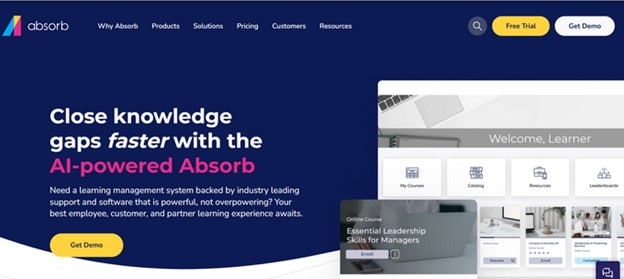
If you are looking for an LMS solution that offers a heavy focus on AI tools, you can find that with Absorb LMS. Absorb is best for different kinds of mandatory and employee training, such as onboarding, upskilling, and training teams and partners.
The platform offers AI tools to design the course, structure it, and generate quizzes on the course content. Besides, it has an intelligent assistant to help administrators manage the data easily. What makes starting easy is that there is a library of about 20.000 courses for different skills and industries.
Key functionality
With Absorb LMS, you can create game-based courses, track the results with advanced reporting tools, and embed any piece into other applications.
- Custom reporting to gain insights into the impact of the program you offer. It has separate reporting capabilities for HR. So they can track and save employee records for future compliance audits.
- Absorb Infuse. This allows taking any content from the platform and embedding it in your other business apps or the apps the learners use.
- Personalized learning paths. AI tools suggest learning paths for employees based on what they are interested in and what skills they need to improve.
- Course authoring tools to build courses in a shared environment and assign tasks to other members.
What users think
Most reviewers say Absorb LMS is easy to use and works well for corporate training. They appreciate its simple navigation for both students and admins and like the customization options, even though the design is pretty basic.
That said, they also point out that it involves a lot of manual work. It takes time to explore the features and get through all the clicks.
Also see: Absorb LMS Review
Compare Absorb LMS to other cloud-based LMS solutions
Docebo LMS
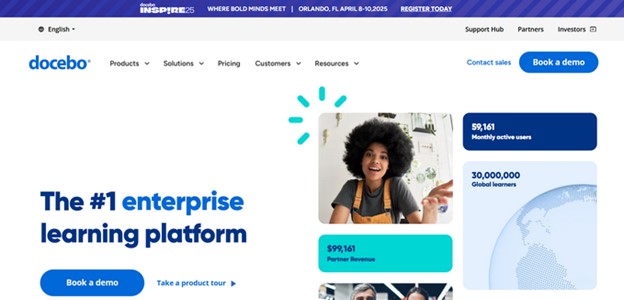
Dovebo LMS is best for companies scaling employee training, customer education, or partner onboarding. It is a headless solution, so you can integrate it into your website and other learning environments. You can use Docebo for employee onboarding, talent development, and other training, such as compliance, sales, and customer training.
What is great is that Docebo supports gamified learning and community learning.
Key functionality
Besides the main functionality, Docebo offers extensions for processes like certifications, automation, gamification, or adding a custom domain. With Docebo, you can have
- AI and automation capabilities. You can automate processes like enrollments, certifications, suggesting new courses, sending notifications, etc.
- Communities for the users to connect and for you to manage content access
- Content creation and management tools to offer courses in different formats, quizzes, and assessments for the learners.
- Content marketplace with microlearning, immersive and hands-on courses, and 250 different providers.
- E-commerce tools so that you can sell your courses and subscriptions through platforms like Shopify, Jumla, Drupal, and WordPress.
What users think
As I was checking reviews for Docebo, most users had a positive experience with the platform. They see it as a flexible and scalable training solution that meets modern needs. Most reviewers find it user-friendly, with customizable learning plans and the integrations that training businesses rely on. On the flip side, some users are not happy with the notification system and feel the mobile experience could be better.
Also see: Docebo LMS Review
Compare Docebo to other cloud-based LMS solutions
Canvas LMS
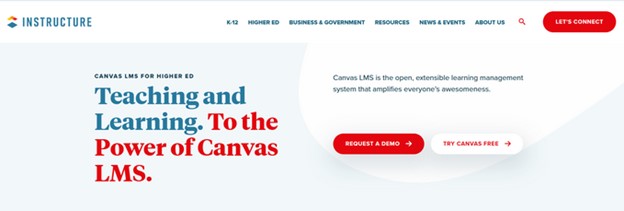
Canvas LMS is a learning management system best suited for schools, universities, and businesses running online courses.
You can create lessons, upload videos, give quizzes, and track student progress all in one place. It also lets students submit assignments, join discussions, and get feedback.
Besides the LMS, Canvas offers the Canvas Catalog, which helps to organize the educational programs and offer them in a marketplace. There is also Canvas Studio to stream videos and provide an engaging video learning experience for the learners.
The greatest thing about Canvas is the large number of integrations. You can access 500+ learning and management apps and connect with your school.
Key functionality
Most Canvas features are for K-12 education and businesses. You can find:
- Course management to upload learning materials, share announcements, create discussion boards, and manage student enrollment.
- Assessment. You can create varied assessments, including quizzes, exams, and assignments, and use detailed grading tools and rubrics for consistent assessment.
- Analytics and reporting to track student progress and engagement
- Mobile accessibility, for students to access course materials, submit assignments, and participate in discussions from the mobile app
- Support of LLI, which allows third-party tools to be easily integrated and used within Canvas.
What users think
Users see Canvas LMS as a strong and reliable platform for both students and schools. They find it easy to navigate and appreciate how simple it is to create and manage courses. Many highlight the intuitive backend, which makes organizing content and tracking progress easy.
Another feature reviewers value is the ability to set up prerequisites, allowing students to follow a structured learning path rather than jumping ahead. However, admins mention that setting up the modules can be time-consuming.
Also see: Canvas LMS Review
Compare Canvas LMS to other cloud-based LMS solutions
iSpring Learn
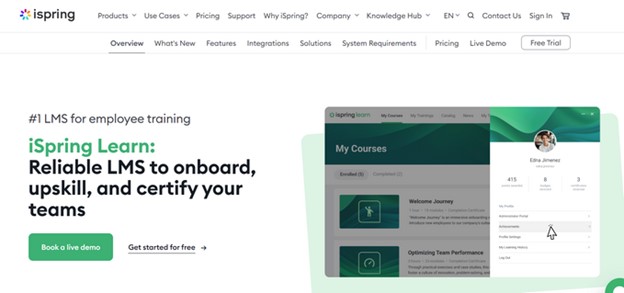
iSpring Learn is an online learning management system designed for businesses to train employees. You can create courses, upload presentations, add quizzes, and track everyone's progress. It supports videos, interactive content, and even certifications for completed training. Managers can set deadlines, automate assignments, and see reports on who is learning what.
It is best for compliance training, on-the-job training, sales, and partner training. The platform is also great if you want to offer micro-courses and mobile learning experiences.
Key functionality
- Course management tools, where you can create courses and articles based on the PowerPoint tools. You can design your courses and quizzes using PowerPoint and upload them to the portal.
- User management, where you can set user roles, create groups for individual tasks, and assign and manage training to departments.
- Reporting and analysing, where you can track progress on every course with the Performance Summary and Course Details. You can see the detailed reports of assessment as well, such as average scores, answer breakdown, etc.
- Learner portals, for learners to collect gamification achievements and feedback from managers and experts.
- A mobile app that is accessible for both iOS and Android devices.
- Integrations via APIs and Single sign-on.
What users think
Reviewers see iSpring Learn as a flexible and worthwhile solution, appreciating its simplicity and easy course management. Many users find the ability to control learners' skill levels particularly helpful.
However, not everyone is satisfied with its analytics and reporting features. Tracking progress can be challenging, especially when a course includes multiple types of learning materials.
Also see: iSpring Learn Review
Compare iSpring Learn to other cloud-based LMS solutions
FAQ
- What is the difference between a self-hosted LMS and an SaaS LMS?
The main difference between a self-hosted LMS and a SaaS (cloud-based) LMS is where the platform is managed and maintained. A self-hosted LMS is installed on your organization’s own servers, which means your IT team is responsible for setup, updates, security, and performance. You have full control over the system, including customization, integrations, and how data is stored, but this also requires technical expertise and internal resources to keep the platform running smoothly.
A SaaS LMS, on the other hand, is hosted and maintained by the provider in the cloud. You access it through a web browser without worrying about installation or system maintenance. While SaaS LMS platforms may offer fewer customization options, they are faster to implement, easier to access remotely, and generally require lower upfront costs
- Is self-hosted the same as on-premise?
Yes, a self-hosted LMS is often referred to as an on-premise LMS, but there can be subtle differences depending on context. The term on-premise specifically emphasizes that the system is physically located within your organization’s facilities, while self-hosted can also include private hosting in a data center you control.
- Is an LMS a SaaS?
An LMS can be a SaaS, but not all LMS platforms are SaaS. SaaS, or Software as a Service, refers to software that is hosted and managed by a provider in the cloud and accessed through a web browser. Many modern LMS platforms are offered as SaaS, which means the provider handles updates, security, and maintenance while your team focuses on creating and delivering training.
- What solution shall you choose for your cloud-based LMS?
If you are looking to start on an LMS that is easy to use, consider Uteach. Uteach supports various content types, including videos, quizzes, live lessons, and automatic certificates. You can automate processes like enrollments and certifications, saving time and effort.
It also offers seamless integrations, a mobile-friendly experience, and customization options to match your brand. Try everything risk-free with a 14-day free trial so you can see if it fits your needs before making a commitment.


