
The following guide covers:
1. Why online academies are a target
2. The challenge of a shared platform
3. How Uteach keeps your academy as secure as possible
4. Keeping your academy safe, not just online
There is an uncomfortable truth that we all have to accept. No platform on the internet can promise that nobody will ever attack it. Not Microsoft, not your bank, not us.
On the morning of 30 July 2024, people around the world opened the Azure portal and parts of Microsoft 365 and got errors instead. For almost eight hours, a range of Microsoft cloud services were unreachable or crawling. In the US, Starbucks had to switch off mobile ordering for several hours.
The cause was A DDoS attack, a flood of fake traffic designed to overwhelm servers until real users can't get through. And Microsoft later admitted that an error in how its own defenses kicked in made the impact worse, not better.
These companies had one of the best-funded security teams on the planet, and the service still went down.
Now picture the same thing on the launch day of your academy. You've spent weeks on the program, the emails are out, the countdown hits zero, the ads are running, and your students cannot even log in to your academy website.
In this article, we will discuss how our infrastructure minimizes the risk of such attacks and what you can do on your site to avoid any issues.
1. Why online academies are a target
DDoS attacks have already become the background noise. In the third quarter of 2026 alone, Cloudflare mitigated 18.2 million network-layer DDoS attacks, roughly 8,200 every hour and 208% more than a year earlier.
Two details from that report matter for you:
- Most attacks are short. 96% of network-layer attacks ended in under 10 minutes. But ten minutes is plenty if it lands in the middle of a live class or a checkout.
- They are cheap. In our day and age, it no longer takes a skilled hacker to knock a site over, just a small payment.
And attackers watch the calendar. On 2 September 2026, the first day of the school year, security firm Servicepipe recorded waves of attacks on online education services in Russia, one peaking at around 139,000 requests per minute. Enrollment season, exam season, launch day: the moments that matter most to you are exactly when an attack does the most damage.
It's not only DDoS
In May 2026, Canvas, one of the most widely used learning platforms in the world, went offline right before final exams. This time the cause was a data breach, not a flood of traffic, and the attackers claimed nearly 9,000 schools were affected. Some universities had to postpone exams.
What an outage costs an online academy
For a university, an outage is painful. For an online academy, it is equally painful, because you have
- Refund requests from students who couldn't access what they paid for
- A flooded inbox right when you should be running your launch
- Lost trust. Some students simply don't come back
2. The challenge of a shared platform
Uteach is a multi-tenant platform. Every academy has its own website, content and student data, kept separate from every other academy at the application level. Underneath, the infrastructure is shared. Think of an apartment building: every flat has its own lock, but they all share the foundation and the water pipes.
That shared foundation is what makes a professional platform affordable, whether your academy has 50 students or 50,000.
But it comes with a well-known weak spot, often called the "noisy neighbor" problem. If someone floods one academy with fake traffic and nothing stops it at the door, that flood reaches the same servers that host everyone else.
We have seen attempts like this aimed at individual academies. So we redesigned how traffic reaches our platform around one rule: an attack on one academy should never become every academy's problem.
We built this together with our AWS consulting partner, Aland Cloud. If you want the technical details, Aland Cloud has published the full story: how Uteach mitigates DDoS attacks with AWS.
3. How Uteach keeps your academy as secure as possible
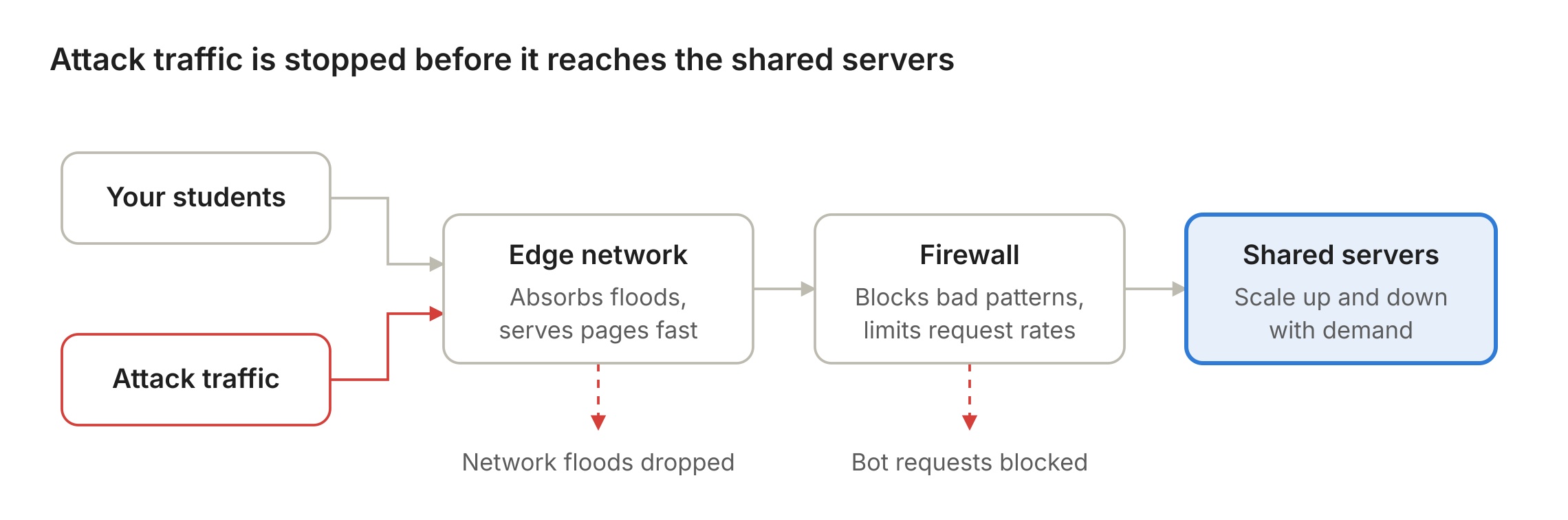
Every visit to your academy passes through three layers of protection before it reaches the servers. Think of a busy concert venue: one team keeps the crowd outside orderly, security at the gate checks tickets, and more doors open when the crowd grows.
Real students pass straight through. Attack traffic is dropped at the edge or at the firewall, before it reaches the servers every academy shares.
- Layer 1: A global edge network in front of every academy
Every Uteach academy, including those on a custom domain, sits behind a global content delivery network. It serves pages and files from locations close to your students, which makes your academy faster, and it soaks up a large share of junk traffic before it gets anywhere near our servers.
Underneath, our platform runs on AWS, which adds built-in protection against network-level floods: the brute-force kind of attack that tries to clog the pipes with sheer volume.
- Layer 2: A firewall that checks every request
Smarter attacks don't look like a flood. They look like thousands of "visitors" opening the same page again and again. So every request to the platform is inspected by a web application firewall (AWS WAF) before it reaches our servers.
The firewall blocks traffic that matches known attack patterns and limits how many requests a single source can send in a short window. A student clicking through a lesson never comes close to that limit. A bot hammering one page thousands of times hits it fast and gets cut off.
This is the layer that solves the noisy-neighbor problem. An attack aimed at one academy is filtered out at the door, before it can touch the shared servers everyone else relies on.
- Layer 3: Capacity that grows on demand
Sometimes a spike is good news: a launch that takes off, a webinar that goes viral. Our infrastructure adds server capacity automatically when load rises and releases it when things calm down. So a sudden surge, wanted or not, no longer means a slow or broken academy.
The result
Since 2020, Uteach has run at 99.99% availability. That is less than an hour of downtime across a whole year. In that time, no DDoS attempt has caused platform-wide disruption, and our engineers spend far less time firefighting and far more time building for you.
And you don't have to configure any of it. No servers, no firewall rules, no scaling settings. It is simply part of every Uteach plan.
4. Keeping your academy safe, not just online
Staying online is half the job. The other half is making sure everything inside your academy, from lessons to student data to payments, is protected. Here is what is in place:
- Encrypted connections everywhere. Every academy is served over HTTPS. If you connect your own domain, Uteach issues the SSL certificate for you, usually within an hour. No certificates to buy or renew.
- Payments through trusted providers. Your students pay through established gateways such as Stripe and PayPal, connected to your own account. Card details are handled by the payment provider, not stored on your academy [confirm].
- Separate academies. Your content, students, and settings are isolated from every other academy on the platform. Other academies have no access to them.
- Data protection and GDPR. Your data is hosted on AWS infrastructure. For GDPR purposes, Uteach acts as a data processor for your academy, and the data processing terms are available on our GDPR page.
- Backups. Your academy's data is backed up daily.
- Monitoring and response. Our team monitors the platform around the clock and is alerted the moment something looks wrong.
5. What you can do on your side
We handle the infrastructure. But a few habits on your side make your academy even more resilient, whatever platform you use:
- Keep a second way to reach your students. Export your student list regularly and keep an email list or community channel you can use if anything goes wrong.
- Prepare a short "we're on it" message.
- Protect your admin login. Use a strong, unique password, and give every team member their own access instead of sharing one account.
- Secure your domain. If you use a custom domain, turn on two-factor authentication at your domain registrar. A hijacked domain can take your academy offline without anyone touching Uteach.
- Warn students about phishing. In the Canvas incident, attackers took over login screens. Remind students to log in only through your academy's real address.
- Rehearse your launch. Big moments deserve a dry run. Test your checkout and your live-session link a day before a launch, so the only surprise on the day is how many students show up.
FAQ
- Should I self-host my LMS or use a cloud platform?
Self-hosting means installing learning software, usually open-source like Moodle, on a server you rent or own. It gives you full control, and it can make sense if you have strict data-residency rules and an in-house IT team.
But you also take on every job a platform normally does for you:
- Security patches. The LMS, every plugin, the operating system, PHP and the database all need updating, and fast: once a vulnerability is public, exploitation often follows quickly.
- DDoS protection. A single server has no edge network or firewall in front of it unless you buy, configure and maintain them yourself.
- Capacity. If your launch brings ten times the usual traffic, that one server has to cope, or it falls over.
- Backups, SSL renewals and monitoring. Including the alert that goes off at 3 a.m.
- Hidden costs. The software may be free, but hosting, maintenance, updates and support are where the real spend sits.
Cheap shared hosting doesn't escape the noisy-neighbor problem either. One university's Moodle host told its clients that DDoS attacks on some clients had caused outages for others sharing the same connection. Unless you have a dedicated team for all of the above, a cloud platform is usually the safer and cheaper choice.
- Can any platform guarantee it will never be hit by a DDoS attack?
No, and you should be wary of anyone who promises that. As the Microsoft outage showed, even the largest companies get hit. What a good platform can promise is that it absorbs and filters attacks so your students don't feel them. That is what our layered setup is built to do.
- Is my students' data safe on Uteach?
Your academy runs on AWS infrastructure, every connection is encrypted, each academy's data is kept separate, and payments go through providers like Stripe and PayPal. Uteach acts as a GDPR data processor for your academy, with the terms on our GDPR page.
- Why should I trust Uteach with my academy?
Because we treat reliability as part of the product, not an add-on. Specifically:
- Proven infrastructure. Your academy runs on AWS, behind a global edge network and a web application firewall, with capacity that scales on demand.
- A track record you can measure. 99.99% availability since 2020.
- Protection by default. Every plan gets the same protection. There is no "security tier" to upgrade to.
- Your data stays yours. Your academy's data is separated from everyone else's, handled under GDPR.
- Honesty about limits. We won't promise you the impossible. We will tell you what we have built, what you can do on your side, and what happens if something goes wrong.