
The following guide covers:
What are the responsibilities of an LMS administrator?
Key tasks an LMS administrator handles
What skills does an LMS administrator need to have?
The role of an LMS admin may sound technical, but it is much more than system setup. An administrator is the person who connects learners, instructors, and leadership, making sure the LMS supports both training goals and daily operations. They balance responsibilities that range from compliance and reporting to user support and process optimization.
In this article, we will look at what an LMS administrator is responsible for, explore examples of the tasks they handle in practice, and cover the skills and qualifications needed to step into the role.
What are the responsibilities of an LMS administrator?
If we were to summarize the key responsibilities of the LMS administrator, they would address questions regarding:
- Stakeholder alignment
- Compliance and reporting
- User support
- Process workflow automation
- Continuous improvements
Let’s discuss each in more detail.
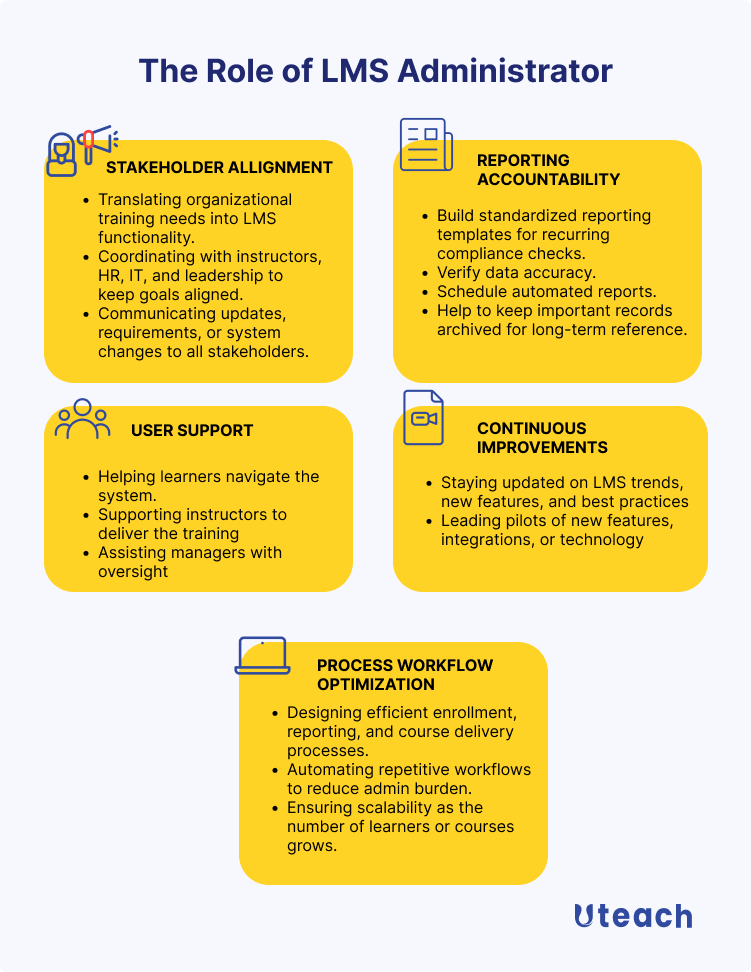
Stakeholder alignment
For me, there are two words that communicate the role of an admin in its full essence. And it is the liaison role. In other words, the admin is the one who serves the needs of the people connected to it, such as the learners, instructors, managers, and leadership.
And if the administrator does not keep everyone aligned, the LMS turns into just another tool with mismatched expectations and duplicated work. In this regard, the admin should make sure that the learning experience is consistent across all fronts.
How can you make sure of that?
- Translating organizational training needs into LMS functionality
Let’s suppose an HR rolls out a new compliance program that everyone in the company must complete within 30 days. The LMS administrator should make sure that the LMS platform has the necessary functionality to support that goal. And if it does, find ways to implement it.
- Map training objectives to specific LMS features (modules, learning paths, certifications).
- Configure different learning paths for roles or departments.
- Ensure tracking and reporting capture exactly what HR or leadership needs.
- Test the setup before rollout to avoid mismatched expectations.
- Coordinating with instructors, HR, IT, and leadership to keep goals aligned
This often happens when multiple teams are involved in launching a new training initiative. For example, leadership defines the vision, HR handles policies, instructors create the content, and IT ensures integrations. The LMS administrator connects the dots, so all these moving pieces work together in the platform.
So the admin needs to:
- Gather requirements from each department before setting up courses.
- Check that course design supports both instructional quality and system limits.
- Ensure IT integrations (single sign-on, HRIS links, payment systems) match project needs.
- Confirm that deadlines and workflows fit organizational schedules.
- Keep a single source of truth for all training-related configuration
- Communicating updates, requirements, or system changes to all stakeholders
A common situation is when the LMS provider pushes a major update that changes how users log in or view courses. If the administrator does not communicate clearly, learners may get locked out or instructors may lose time figuring out new workflows. The administrator takes the lead in keeping everyone informed before, during, and after such changes.
- Share update notes in simple, role-specific language for learners, instructors, and managers.
- Notify teams in advance of downtime or expected disruptions.
- Provide quick-reference guides or short walkthroughs after major changes.
- Collect feedback on issues after updates and escalate them if needed.
- Maintain a communication log for transparency and accountability.
Compliance and reporting accountability
Also, the administrator is the person who makes sure the organization can prove that learning has actually happened. From audits to certifications, leadership depends on the LMS data being accurate. And most of the time, stakeholders ask the admin for this kind of information.
The main role here is that the admin shall have the reports ready whenever needed. What does this entail?
- Providing leadership with accurate reporting
If you operate in a highly-regulated industry, a situation here could be an external auditor requesting proof that all employees have completed a mandatory workplace safety course.
Or even, you need to measure the course effectiveness, run performance reviews, and check the performance reports are an inevitable part of those processes. The admin should
- Build standardized reporting templates for recurring compliance checks.
- Verify data accuracy before sharing with leadership or auditors.
- Schedule automated reports to reduce last-minute scrambling.
- Help to keep important records archived for long-term reference.
User support
The administrator is usually the one who has to know about all the bells and whistles of the LMS platform. Or to say the least, about the features and opportunities that the stakeholders use for the employee training initiatives and more.
Consequently, supporting the users through all this is one of the key responsibilities of an LMS administrator.
But the idea here is not just answering questions. Admins also make sure learners, instructors, and managers can actually do what they came to the platform to do.
- Helping learners navigate the system
- Set up default dashboards that guide learners to required courses.
- Adjust permissions so learners see only what is relevant.
- Troubleshoot technical access issues specific to learner accounts.
- Supporting instructors to deliver the training
- Provide instructors with correct upload settings and file formats.
- Resolve permission conflicts when instructors cannot access their own courses.
- Test course features (quizzes, assignments, live sessions) before instructors use them.
- Assisting managers with oversight
- Configure manager-level dashboards with the right visibility.
- Grant role-based permissions for performance tracking.
- Train managers on pulling the reports they need without an extra step
Process workflow optimization
The role of the administrator is not only to configure the processes inside the LMS. The admin should also design the system so that it works smoothly today and still holds up when the organization grows tomorrow. Because when your organization scales, you should still be able to maintain efficiency.
How do admins achieve this?
- Designing efficient enrollment, reporting, and course delivery processes
Let’s say that you have to do a large batch of new employees. If enrollment is handled manually, it will take days and cause mistakes. The administrator ensures that processes like this are designed in a way that saves time and reduces errors.
- Configure bulk enrollment rules for groups or departments.
- Set up standardized templates for reporting.
- Automate course structures and enrollments so delivery steps are predictable.
- Automating repetitive workflows to reduce admin burden
Without automation, the administrator would spend hours sending emails and updating spreadsheets, and doing other manual tasks that can be automated. But if the admin sets the right workflows, this becomes a background process that runs on its own.
Such automation processes include:
- Schedule automated notifications for learners and managers.
- Create rules for recurring course assignments.
- Configure auto-generation of certificates or completion records, etc.
- Ensuring scalability as the number of learners or courses grows
The processes that work with 200 users, per se, will definitely not work as efficiently for 2000 users if there is not a definite system in place. So, the admin is also the one to make sure the system can handle growth. More specifically,
- Organize course libraries with categories and tagging for easy navigation.
- Standardize workflows so they can be replicated at scale
Continuous improvements
The admin’s work does not stop once all the setups are done. Because the LMS evolves, user needs change, and new features appear. The admin is responsible for keeping the system from becoming outdated and making sure the organization takes advantage of improvements.
- Staying updated on LMS trends, new features, and best practices
By keeping up with changes, the admin ensures the system grows in value. That is why the admins also need to:
- Monitor vendor release notes and product updates.
- Participate in professional forums or user groups.
- Review internal processes regularly against best practices.
- Leading pilots of new features, integrations, or technology
Think about testing a new integration with a video-conferencing tool. If the pilot is successful, it saves instructors time and improves the learning experience. The administrator leads these small-scale experiments to see what works before rolling it out to everyone.
- Set up pilot groups with selected learners or instructors.
- Measure impact with feedback and usage data.
- Document the setup and results
Key tasks an LMS administrator handles
- Set up and configure the LMS
This task includes everything needed to make the LMS ready for actual use. The administrator adjusts system settings, defines roles and permissions, organizes course structures, and ensures integrations like single sign-on or HR systems are working. It is essentially turning the LMS from an empty shell into a system that fits the organization’s needs.
For example, when a company launches a new LMS for onboarding, the administrator will configure default dashboards so new hires see their required courses immediately
- Manage the user accounts and roles
This task covers creating, updating, and maintaining user accounts while making sure each person has the correct level of access. The administrator defines roles such as learner, instructor, or manager, and sets permissions so that people see only what they need.
For example, when a new department manager joins the company, the administrator sets up their account with reporting rights, allowing them to track their team’s training progress without giving access to unrelated data.
- Manage the learning content
Here, the administrator ensures that courses, modules, and assessments are properly uploaded, organized, and kept up to date. It is not just about uploading files but making sure content is structured logically and works as intended in the LMS.
For example, when a product update requires new training, the administrator uploads the course materials, assigns them to the right group of learners, and archives outdated content so there is no confusion.
- Track reports on the learner’s performance
As we have already discussed, this task involves collecting and analyzing data on how learners progress through training. The administrator sets up the reports that help leadership and managers see who is on track, who is falling behind, and how effective the courses are.
For example, when leadership requests a quarterly report on compliance training, the administrator generates a performance summary that highlights completion rates by department and flags overdue learners for follow-up.
- Address the users’ questions
The LMS admin also provides direct support to learners, instructors, and managers when they face challenges with the LMS. It is not about general IT help, but specifically about making sure people can navigate the system and use its features effectively.
For example, when an instructor struggles to publish a quiz, the administrator guides them through the correct steps and checks the course settings so the quiz is visible to learners.
What skills does an LMS administrator need to have?
As we mentioned at the beginning of this guide, the LMS admin has a liaison role. Which also means that they need to have not only technical, but also organizational and even instructional skills.
- Technical skills
An administrator needs to understand how the LMS works behind the scenes, from configuring settings to handling integrations. They should be able to troubleshoot issues, test new features, and make sure the system is reliable.
- Organizational and time management skills
With multiple courses, user groups, and deadlines to oversee, staying organized is non-negotiable. The administrator must prioritize tasks, manage requests from different stakeholders, and keep workflows efficient.
- Communication skills
Since the administrator often explains technical processes to non-technical people, clear communication is essential. They need to simplify instructions, document processes, and keep stakeholders informed about changes.
- Collaboration and teamwork
The LMS touches different parts of the organization, from HR to IT to instructors. The administrator must work with each group to align goals and processes. Strong collaboration ensures the system supports everyone’s needs.
- Customer service
At its core, the role is about supporting learners and instructors. The administrator should be approachable, responsive, and patient when solving problems.
FAQ
What background does an LMS administrator need to have?
There is no single background that every LMS administrator must come from, but a mix of education, technology, and training experience helps a lot. Many administrators have studied fields like education, instructional design, human resources, or information technology.
What matters most is an understanding of both how people learn and how systems support that learning. For example, someone with a teaching background may already know how courses should be structured, while someone from IT may bring strong technical troubleshooting skills.
How much salary does an LMS administrator get?
In the United States, the average salary for an LMS administrator is around $6,462 per month, according to ZipRecruiter. This amount is not fixed, and it can vary quite a bit. Factors such as years of experience, the industry they work in, the size of the organization, and the complexity of the LMS all play a role.
How to become an LMS administrator?
The path to becoming an LMS administrator often starts with related roles such as training coordinator, e-learning specialist, or IT support.
From there, gaining hands-on experience with an LMS is key. Learning how to configure the system, manage users, and generate reports gives the practical foundation needed.
Professional development also helps, whether through vendor training, certification programs, or online courses on instructional technology. The best way to grow into the role is by practicing directly inside an LMS, experimenting with its features, and gradually taking on more responsibility for keeping the system running.


