
Logging into five different tools to manage training is nobody’s idea of efficiency. You check one system for attendance, another for creating video conferences, and then shuffle between HR and communication platforms to fill in the gaps. The process is slow and leaves plenty of room for mistakes.
That is why you need LMS integrations. They bring all these systems together so data flows smoothly, logins are simplified, and administration takes less effort.
In this article, we will look at the benefits of integrating your LMS with other systems and share practical examples of integrations you can connect for easier management of employee training.
How LMS integrations make your workflow easier?
Integrations connect the tools you already use with your LMS so you do not have to log in to multiple platforms or manage separate dashboards. Everything comes together in one place, which saves time and reduces the chance of errors.
When you integrate tools into your LMS, your win in several ways:
- Centralized access – all users log in to the LMS and from there reach training content, live sessions, analytics, or communication tools without switching between platforms.
- Less manual work – the LMS connects directly with other systems, so course enrollments, progress updates, or reminders happen automatically instead of being entered by hand.
- Faster onboarding – new employees can be added once in the HR system and appear in the LMS with the right training assignments already set up.
- Clearer reporting – analytics and HR data flow into the LMS, giving managers one dashboard to review training progress, participation, and performance.
- More secure access management – with SSO integrations, the LMS uses the company’s identity provider, making account control and permission management consistent.
- Easier administration – eCommerce, payment and other integrations let you manage everything directly inside the LMS without external tools.
- Better employee engagement – when the LMS is connected to video conferencing, automation, and communication tools, training feels like a natural part of the workday rather than an extra task.
Examples of LMS integrations
#1 Single sign-on (SSO) integration
If there is one thing people dislike more than filling out forms, it is remembering endless usernames and passwords. That is why you can integrate Single sign-on tools to manage that.
So to speak, instead of using multiple credentials for different platforms, your learners can log in once and get access to everything they need. It saves time, cuts down on frustration, and reduces the risk of forgotten passwords.
SSO integrations also give you better control. You can manage who has access and what permissions they have from one central place. It means security is tighter, and you spend less effort on account management.
Examples
Some popular tools that enable SSO are
- Okta, allows centralized identity management so your team can control access in one dashboard
- OneLogin, makes it simple to connect different apps into one login flow
- Azure Active Directory, ties everything neatly into the Microsoft ecosystem, which many businesses already rely on
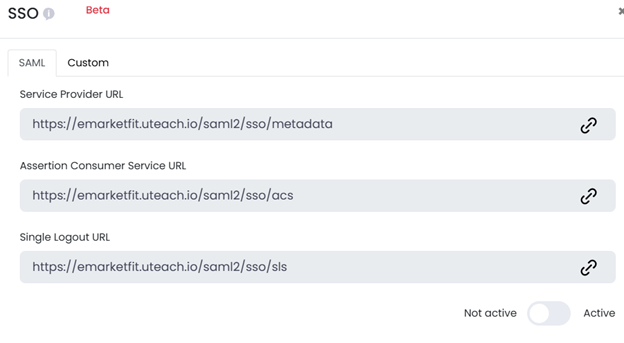
Uteach LMS comes with SSO integrations. Once you connect, you will be able to
- Give students the opportunity to access your Uteach academy and other connected applications with a single set of credentials.
- Simplify the login process, reducing the need for multiple usernames and passwords.
- Manage user access and permissions through your identity provider.
#2 Analytics integrations
Without tracking the training results, you run the training, but you have no clear idea of what is working and what is not.
Analytics integrations give you visibility. They show how employees interact with your academy, where they spend the most time, and what content does not get attention. With that knowledge, you can adjust training programs and make them more effective.
These integrations are particularly useful if you sell your training to external audiences or run partner training. You can see how others discover your academy website, how they move through lessons, and whether they complete them. It makes it easier to spot knowledge gaps and measure the return on your training investment.
Examples
Some popular tools here are
- Google Analytics, gives insights into user activity on your training portal.
- Google Tag Manager, simplifies adding and managing tracking codes
- Meta Pixel, tracks and optimizes internal communication or awareness campaigns on social platforms
- Google Search Console, helps ensure your internal academy site is properly indexed and discoverable when people search for it and discover potential issues.
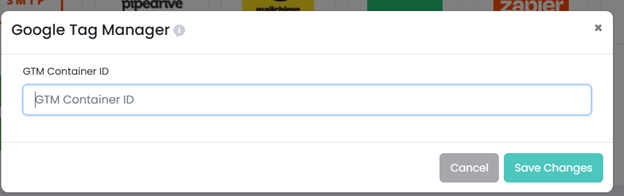
Uteach integrates with all of these. With that, you can track how your learners engage with training content, measure the effectiveness of campaigns, and keep an eye on visibility in search. Your admins can also add or adjust tracking tags quickly without needing developers.
Connect Uteach to analytics integrations.
#3 Video conferencing integrations
Almost every business today uses some kind of video conferencing software. These tools are the backbone of virtual classrooms, workshops, and team learning. They let you bring employees together no matter where they are, keep communication face-to-face, and make training more interactive than just sending over a slide deck.
Some popular video conferencing apps are:
- Zoom – widely used for its breakout rooms that make group activities easy.
- Microsoft Teams – strong integration with the Office ecosystem, ideal if you already use Microsoft tools.
- Google Meet – lightweight and accessible directly from a browser, no software install needed.
- Jitsi – open-source and free, with flexible customization options.
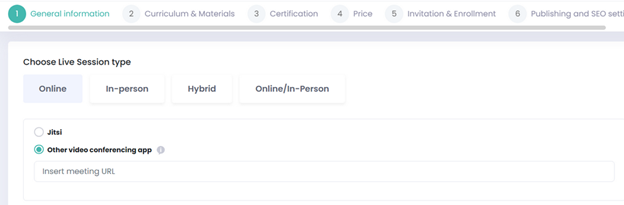
With Uteach, you can run live training sessions through any video conferencing app you prefer. Whether it is Zoom, Jitsi, or something else, you simply paste the meeting URL, and the session becomes part of your academy. This way, employees join training directly from the LMS without extra steps.
#4 eCommerce integrations
Once you have eCommerce integrations within your LMS, you can sell courses, manage payments, and handle subscriptions in a professional way.
Most LMS come with eCommerce integrations, such as
- Shopify – known for its easy-to-build online stores and extensive plugin marketplace.
- WooCommerce – a flexible option that works directly on WordPress sites.
- Stripe – popular for its smooth checkout experience and advanced payment security.
- PayPal – trusted worldwide and convenient for international transactions.
Uteach integrates with more than 30 payment providers. This allows you to sell training programs, workshops, or certification courses directly from your academy.
So to speak, if you are setting up a professional development course for external learners, you can handle the entire payment process securely inside Uteach.
Once you choose the respective country, you will be able to see all the accessible payment providers for your region.
Connect Uteach with your payment provider
#5 Automation integrations
Every repetitive task eats up time that could be spent on real work. Automation integrations are built to handle those repetitive tasks for you. They connect different tools you already use and set up workflows that run in the background.
So to speak, there is no need to manually move data, send reminders, or copy information from one place to another.
For example, you can connect your LMS with your email platform so that whenever a new learner joins a course, they automatically receive a welcome message or follow-up reminders. You can also link training completions to your HR system, so certificates or performance data are updated instantly.
Such integrations include tools like:
- Zapier – connects thousands of apps with simple “if this, then that” workflows.
- Make – allows you to design more complex workflows with a visual editor.
- Pabbly – a cost-effective option for automating data transfers and repetitive tasks.
Uteach integrates with Zapier, Make, and Pabbly. This means you can automate almost any task you want, as you connect your Uteach academy to the necessary tool. Once you set it up, the processes run automatically, making your operations smooth.
Connect Uteach to automation integrations
#6 CRM integrations
Keeping track of learners, clients, or even partners in a spreadsheet only works until it does not.
That is why you want to make sure you track the necessary data with your CRM.
CRM integrations provide you with one system to manage relationships, follow progress, and keep a clear view of communication history. For example, you can track who joined which training, who finished, and how these activities connect with business goals. For instance, exalate is a bidirectional integration platform that connects your CRM with the other tools your teams already work in. It runs integrations across teams, systems, and companies, giving you clear visibility and precise control over sync rules, data flow, and changes
CRM also makes it easier to follow up with clients and learners at the right time. Understanding which CRM features to look for is essential to finding the right fit for your business.
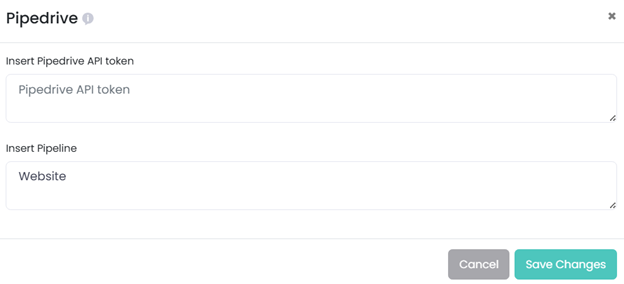
If you are using Uteach as your LMS, you can integrate with Pipedrive as your CRM.
This way, you can track training participants just like you track leads or customers. You can see who has completed programs, who still needs a nudge, and even attach notes or reminders for follow-up.
At the same time, Uteach has a built-in CRM. If you do not need the full complexity of an external CRM, you can still track learner data, progress, and interactions directly inside the platform.
# 7 HRIS integrations
HRIS (Human Resource Information Systems) stores everything from job roles to performance data. When these systems work separately from your training platform, you end up doubling work.
With HRIS integrations, the flow becomes much smoother as the employee data is synced automatically. For example, when they complete the course and receive the certification, that would be reflected in their records.
In this way, you make fewer manual entries. So to speak, HRIS integrations save time for administrators and ensure accuracy. Employees see only the training relevant to their role, and managers get a clear view of progress without jumping between their HR tool and the LMS platform.
FAQ
- What are API integrations?
API integrations are the way different software systems communicate and share information with each other. An API, which stands for Application Programming Interface, is like a set of rules that tells two applications how to talk to one another. When you connect tools through API integrations, data flows automatically between them instead of being moved manually.
An example is an LMS connected to a CRM system through API. When a client purchases a training package, the CRM captures the sale. At the same time, the LMS receives the data through the integration and enrolls the client in the right course immediately. This saves time, avoids errors, and ensures the client can start training without delay.
API integrations are valuable because they remove the silos between systems. They create one connected workflow where data moves smoothly, employees or clients get faster access, and administrators spend less time on repetitive tasks.
- What is an LMS API?
An LMS API is the interface that allows your learning management system to connect with other applications and exchange data in real time. It acts as a bridge between the LMS and the external tools you use, whether those are HR platforms, CRMs, payment gateways, or communication apps. With an LMS API, you do not need to move data manually or keep multiple systems updated separately.
For example, if your LMS has an API that connects with a video conferencing tool, the integration can automatically create meeting links inside the LMS whenever you schedule a live training session.
- What is a compatible LMS integration?
A compatible LMS integration is when the LMS and an external tool can connect smoothly without technical issues or extra customization. Compatibility means the systems are designed to work together, exchange data reliably, and keep features running as intended. If the integration is not compatible, you might face errors, missing information, or functions that do not behave the way they should.
For example, if your LMS integrates with a CRM like Pipedrive, a compatible integration will allow you to track learners’ training progress directly within the CRM pipeline. The data moves correctly between the two systems, so managers can see updates without needing to cross-check. If the integration were incompatible, the CRM might not receive accurate data or updates could lag behind.
Conclusion
Integrations are no longer optional. They are necessary if you want training to run smoothly without wasting time on manual updates or switching between multiple platforms. With the right LMS integrations, you can connect video conferencing tools, analytics, eCommerce systems, automation platforms, CRMs, and even HRIS solutions. This makes the LMS the central place where learning, data, and communication come together.
Uteach comes with more than 20 integrations designed to make workflow management easier. From SSO and analytics to payment providers and automation tools, everything works in sync. Book a demo with our specialists to see how Uteach can create a unified workflow for all your processes and turn your academy into an inseparable part of your business operations.


