
The following guide covers:
Challenges of training remote employees
Remote employee training best practices
Remote employee training is easier with Uteach
In the US alone, around 22% of the workforce is working remotely. Many believe this is a post-COVID effect. Others argue that remote work would become popular even without it. Whichever is the case, the thing is there are 3 times more remote positions than there were in 2020.
Yet, it does not mean you can simply translate the traditional employee training methods into the remote environment and expect it to work just as well. Remote working comes with its own challenges, which sometimes hinder the success of the training unless you notice and address them.
In this article, we will discuss how you can overcome these challenges and what you should consider when planning and executing training for your remote workforce.
Challenges of training remote employees
The way training works in a brick-and-mortar classroom is far different from having to train employees who work remotely. Managers and professionals involved in such training shared their experience on Quora and Reddit. Some of them faced difficulties with replicating the job-shadowing practice, others mentioned low engagement, challenging onboarding, and managing the remote team.
Yet, all this comes to the following commonly mentioned challenges.
- The feeling of social isolation
The feeling of social isolation is one of the most frequently occurring situations among remote workers, which hinders effective training. Especially if you run the training one-on-one.
So, if you run the type of training where there is a lack of interaction, dynamics, active communication, and no community support, you cannot expect a high participation level from the employee.
- No peer learning, unless you set it
It is evident that in-person training naturally creates moments where people help each other, chat during breaks, or ask quick questions. With remote training, you have to replicate that natural environment with communities or spaces where employees can interact with their colleagues and learn from peers.
- Time zone differences
If live training is the only delivery method you consider in your organization, organizing it across different time zones will indeed be a challenge. What I have seen companies do in this case is record the live demonstration and keep it in the video library for consistent use.
Remote employee training best practices
The challenges mentioned above have easy ways to navigate through. Here is how you can make sure the training for your remote employees runs smoothly, is engaging, and proves to be effective.
Have clear communication channels
You know when you set your remote training to fail? When you do not set communication ways straight away. Communication is the baseline for all the other key considerations we will cover in this guide, and it is the most challenging aspect of running training for your remote employees.
In fact, a Buffer study found that 20 % of remote workers mentioned that communication and collaboration were their top struggles.
To ease that struggle, create and share the protocols for the communication channels and ways. So to speak, what software do you want your remote employees to use in each case? If they have a quick question about the training, do they use the Slack channels, emails, the LMS platform boards, or the chat for the videoconferencing app?
Another big source of frustration for remote workers is silence. As a newly joined remote worker, when I asked a question on a current project I was being trained on, and heard nothing back for a few hours, it created uncertainty. To overcome that communication barrier, it is always great when employees can expect a reply. For example, thirty minutes for a Slack message, or a day for an email when asking questions on the training content overall.
And if you know you cannot be available for the employees during the training, there should be some ready resource of FAQ, so that they do not wait 4 hours for a response.
Make sure the training is self-navigable
If your team works across multiple time zones, you clearly cannot have live sessions, live shadow training, or employee cross-training for everyone. That is why you need to consider multiple delivery methods for the training.
- Live sessions work better if the employees need shadow training on a certain process, for example, one involving a client. Various discussions on Reddit state that live training was indeed effective in their organization’s remote training practices. People also mentioned that recording the process was a valuable addition to their video training library.
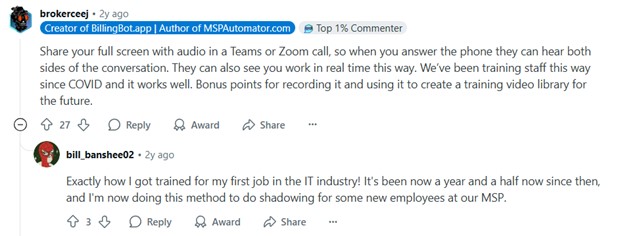
But if you cannot provide live training and the process does not require one, pre-recorded courses are a popular format. This way, the employees can access the training program anytime. If this is the case, add clear instructions, checklists, and short videos that guide employees through the training on their own.
With Uteach, you can organize both synchronous, asynchronous, blended training and coaching. When creating a live session
- You no longer have to schedule Zoom meetings separately and share the link every time, as the employees access the training directly from the academy website.
- Employees automatically get the schedule inside their platform and access the calendar when they have a training on which topic. This keeps the process smooth and organized.
- Employees receive automatic notifications before the session, and you do not have to do it manually.
- You can track the attendance automatically if it is a group session.
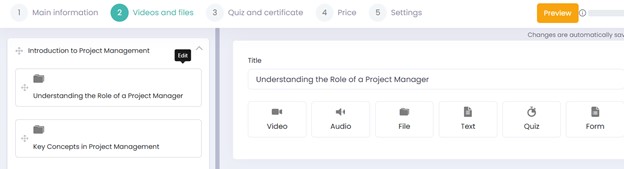
As for the pre-recorded courses, there is an opportunity to create a multi-media-rich and engaging course with quizzes as checkpoints and exams.
Make the training collaborative
Remote employees do not have the luxury of truly bonding with their colleagues through spontaneous chats in the halls. And it sometimes leads to feelings of loneliness and isolation.
In this regard, group-based training assignments are an excellent way to help them feel a complete member of the team and foster a naturall connection. In fact, a survey by Gusto showed that 84% of employers agreed that having a sense of community was important to their employees.
Training is an excellent opportunity to introduce remote employees to your team culture and foster collaboration. For that reason,
- Assign group tasks during the training that remote employees can work on with each other in breakout rooms.
- Use a community platform where remote workers can learn together, ask each other questions, and hold discussions. Or you can use employee portals for announcements and news feeds.
You can also assign rotating group leads for exercises or let teammates present mini-takeaways at the end of a session. These small moments make remote employees feel involved, and not just muted participants on a Zoom screen.
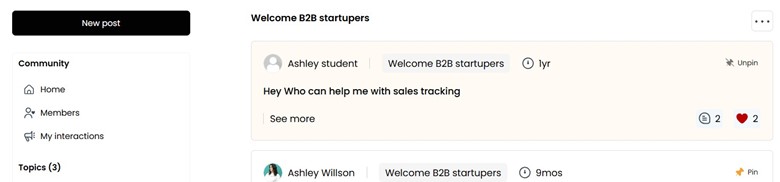
If you run your remote employee training on an LMS like Uteach, you will not have to use additional channels or platforms. Here, you can create communities around specific training, set the access of who can access the community, and share updates. In their turn, the employees can post, leave comments, and interact with the posted discussions.
Discuss the remote training goals with the employees
A clear sense of purpose helps employees see how their daily activities contribute to larger organizational goals, which increases focus and prioritization. According to Gallup, employees who feel connected to their company's purpose are 3x more likely to be engaged at work compared to those who do not feel this connection.
So, be specific about what you expect them to learn, how it applies to their role, and how it supports the larger goals of the team. You can do this in a short kickoff call, through a written overview, or a short video.
Tip: When setting outcomes, make sure they are specific and measurable. For example, instead of saying “Understand how the new project tool works”, phrase it like “Create a project task board using the new tool”.
Provide easy access to the training
When employees have to check one place for the video, another for the quiz, and then hunt down the PDF in their inbox, they lose focus. Yet, with an LMS platform, you are able to keep everything in one place and remove that friction. With an LMS solution like Uteach, you can
- Create a searchable knowledge base inside your academy or link to it. Add quick guides, short how-to videos, or blog articles that answer common questions.
- Enable course-based discussions where employees can leave their questions directly under the training content. It is fast, contextual, and easier to follow than separate chat threads.
- Add community discussion spaces for broader conversations or tips that might help others.
- Use automated notifications to remind employees of deadlines, encourage them to pick up where they left off, or let them know when someone replied to their question.
- Access reporting.
If your team includes people who do hands-on work, having a mobile app is key. It lets them access the training in short bursts, during breaks, or on the go.
Have the employees fill a post-training evaluation form
When you run remote training for the first time, many issues will only appear during or after the session. Because you simply cannot anticipate all the challenges and have answers for all the bells and whistles.
“Feedback is the compass for greatness; it tells you what to avoid, what to learn, and where to excel”.
Henrik Cedar
Chief Product Officer at Netigate
To improve the next training or the modules themselves, ask the people who experienced it.
- Use a short evaluation form with Google Forms or Typeform. Ask what was helpful, what was unclear, where they got stuck, and what could be better. Include a mix of rating questions and short open-ended ones.
- Offer an option for a short call or message if someone prefers to give feedback verbally.
Once you have the feedback, look for common issues. Even if 1% of remote workers mentioned one difficulty or issue, it is worth focusing on and considering for other training sessions.
If you use an LMS platform like Uteach, you already have the survey functionality built in. The form includes different ways to answer, such as pictures, texts, multiple choice, open-ended answers, etc. You can set whether you want the response to be compulsory or not. After the employees complete the form, the reports will be accessible in the admin dashboard.
This way, you would be able to evaluate the effectiveness of the training at a glance, without using multiple tools to collect answers and create reports.

Remote employee training is easier with Uteach
Training remote employees comes with its own set of challenges. They include scattered communication, low engagement, time zone conflicts, and a lack of visibility into progress. To make it work, you need to have a clear training plan. Set up defined communication channels, make the training self-navigable, support collaboration, and manage everything through one platform. Set clear goals, explain the purpose of the training, and always collect feedback to improve.
And remember, a proper LMS helps you bring all of this together. If you are looking for a platform that makes remote employee training smooth, structured, and scalable, book a free demo with our specialist and see how Uteach can support your team.


