The following guide covers:
According to Training Industry's 2025 Training Industry Report, small companies now spend an average of $1,091 per learner on training, and the total training budget at the average small company actually fell.
A learning platform should not be the reason your training budget runs dry before the year is. And no organization wants to overpay for software, or underpay and end up with a tool nobody uses. So in this guide, we will review the affordable LMS platforms that function just as great as their pricier alternatives.
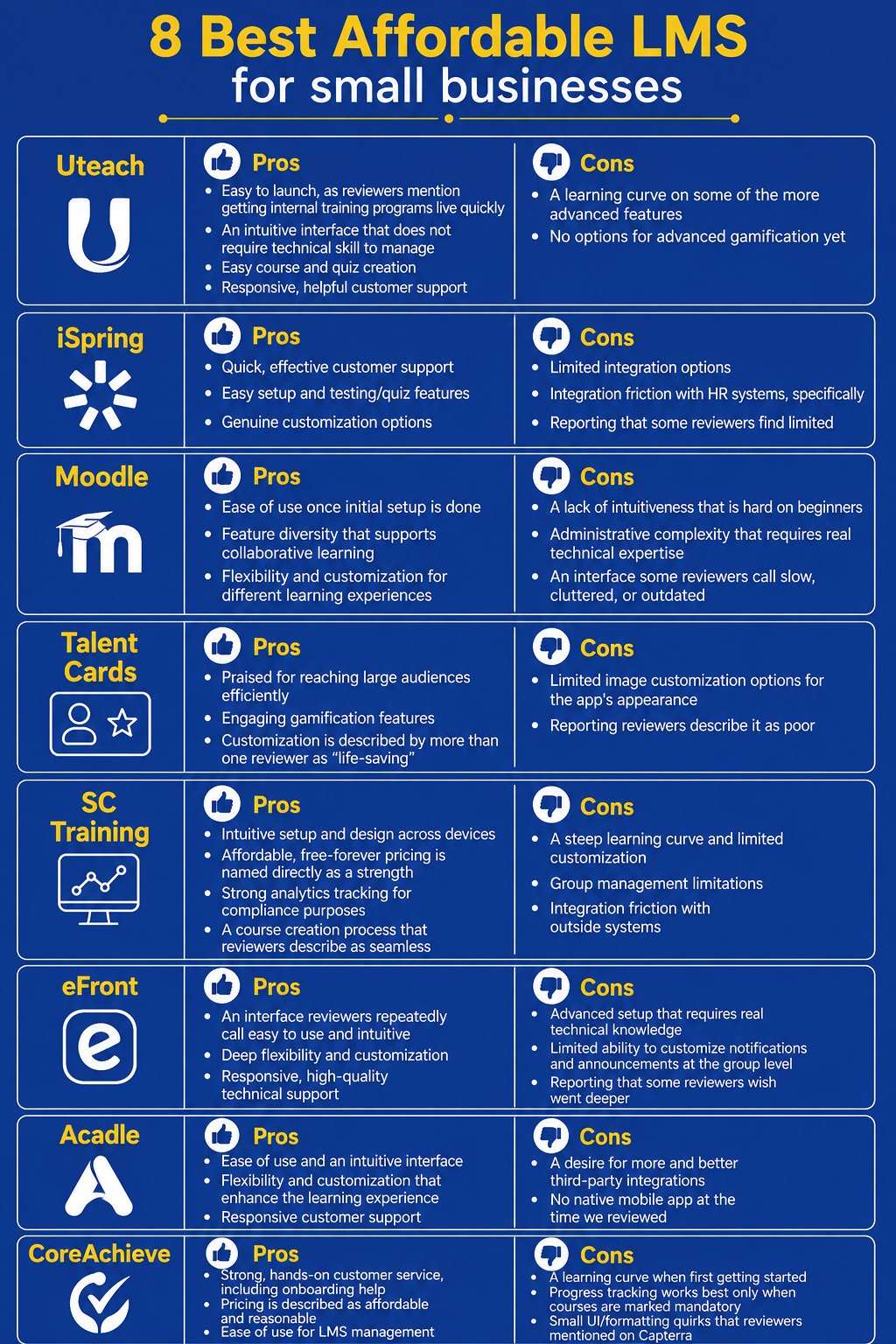
Together, we will review Uteach, iSpring LMS, Moodle (MoodleCloud), TalentCards, SC Training, eFront, Acadle, and CoreAchieve. You will learn which affordable LMS actually fits, and who it does not.
For each platform, I analyzed how their pricing works, what you shall pay attention to, what comes with a separate cost, and whether that platform would be affordable for you. Please note that the pricing is only true to the moment of updating this article.
In case the pricing you see confuses you more than the platforms themselves do, our LMS pricing guide breaks down the common billing models before you read the review.
Why I chose these LMS for the review
It probably will not come as a surprise if I tell you that sometimes the pricing you see on LMS websites is not exactly what it costs you.
When putting together this review, I noticed many LMS with an affordable price. And then you look deeper and realize you need to pay for the setup, or integrations, or the mobile app. That is why I recommend you consider all that when looking for an affordable LMS, rather than just looking at the price tag. You can check our guide on the LMS hidden and actual costs to make a more informed decision.
As for today’s list, I screened it against a specific set of questions:
- Does the entry-level pricing actually fit a small team's budget, not just a "starting at" figure that only applies once you commit to hundreds of users?
- Is the pricing model transparent?
- Does the platform have enough reviews to judge honestly?
- Does the platform reflect how small businesses actually train people (desk-based teams, frontline and deskless teams, nonprofits, and technically comfortable teams willing to self-host, not just one narrow use case)
Comparison table
| Platform | Best for | Free trial available | Starting price |
| Uteach | A branded, all-in-one training academy for small businesses | Yes — 14 days, no card required | Custom quote |
| iSpring LMS | Compliance and onboarding training with almost no IT setup | Yes — 30 days | 100 users $6.91/user/month or $8,286/year. |
| Moodle / MoodleCloud | Budget-conscious teams comfortable with open-source tools | Yes — 28 days on the Starter plan; self-hosted is free indefinitely | Free self-hosted; MoodleCloud from 50 users $3.40/user/year approx. $170/year. |
| TalentCards | Mobile microlearning for deskless and frontline teams | Yes — free plan for up to 5 users, no time limit | Standard: $9.60/user/year, $0.80/user/month |
| SC Training | Frontline teams that want free-forever microlearning | Yes — free plan for up to 10 learners | $60/learner/year, plus $288/year per administrator |
| eFront | Small teams that need enterprise-grade security | No | $720/month for 300 registered users = $8,640/year |
| Acadle | No-code, branded academies for customers and employees | Yes — 7 days on paid plans | $399/month for 1,000 users $4,788 annualized |
| CoreAchieve | Nonprofits and small teams that want flat, predictable pricing | Yes — free plan for up to 5 users, no time limit | $175/month for 50 active users = $2,100 annualized |
LMS pricing models explained
You cannot really judge LMS pricing at a glance, because "starting price" means something different on almost every platform in this review. Broadly, the eight platforms here fall into a few pricing models, and knowing which one you are looking at changes what "affordable" actually means for you.
- Per-active-user pricing charges you only for people who actually log in during the billing period. Uteach and iSpring LMS work this way, and so does SC Training's Premium tier. This is the most forgiving model if your headcount changes, since a dormant account costs you nothing.
But do not assume the headline per-user rate is what you will pay. iSpring's $3.58 figure is its best rate, only unlocked at a 1,000-user commitment. At the real entry point of 300 users, the rate is $4.46 per user, which works out to roughly $16,050 a year, a serious floor for a genuinely small team if you ask me.
- Per-registered-user or tiered-by-user-cap pricing charges you a flat rate for a maximum number of accounts, whether or not those people ever log in. It is easy to budget with, but you pay the same amount whether your team is fully engaged.
- Freemium pricing gives you a genuinely usable, permanent free tier below a certain headcount.
In short
If your headcount moves around a lot month to month, look hardest at per-active-user or freemium models. If your headcount is stable and you would rather know your bill in advance, a flat tiered plan is usually the less stressful choice.
#1 Uteach
Uteach is a white-label, all-in-one training platform that lets a small business build its own branded academy. Named industries on its site include financial services, retail, and hospitality, and it is built around employee onboarding, upskilling, and skill evaluation.
What I like about Uteach
- AI course creation. You can move from an idea to a structured program with an AI assistant, which saves real time.
- AI assistant. You can ask the AI assistant to pull out and analyze the data for your reports, or perform actions like adding a quiz, enrolling employees, etc.
- Automated certification. Certificates are branded and issued automatically once a learner meets your requirements, with no manual work on your end.
- Live sessions and communities. You can combine live workshops, coaching, and self-paced modules inside a single learning journey, which fits how small teams actually mix training formats.
- Branded mobile apps. iOS and Android apps carry your own branding, which matters if part of your team is not sitting at a desk.
Pros
- Easy to launch, as reviewers mention getting internal training programs live quickly
- An intuitive interface that does not require technical skill to manage
- Easy course and quiz creation
- Responsive, helpful customer support
Cons
- A learning curve on some of the more advanced features
- No options for advanced gamification yet
What other users think
On G2, Uteach holds a 4.2 out of 5 rating. When I looked at the reviews, most of the reviewers were happy with the easy start and experience. However, they also mentioned exlroing all the features took some time.
"We started using Uteach at Munich Ventures for onboarding and employee training and it exceeded our expectations. The platform makes it incredibly easy to create structured learning paths, upload resources, and track progress. I love that it combines everything in one place: website builder, course management, live sessions, quizzes, certificates, and even automation. It saved us huge amounts of time that we would have otherwise spent juggling multiple tools".
Tigran M.
G2 Reviewer
Pricing
Uteach’s pricing is flexible and convenient for small as well as mid-sized businesses. If you want to learn the pricing for your organization specifically, you can request the quote here. What is important is that Uteach does not charge hidden or additional fees. The plan is created based on your needs and requirements, so that you do not need to pay for add-ons or additional features.
#2 iSpring LMS
The next LMS I find quite affordable in comparison to its features is iSpring. iSpring is marketed around a simple promise: usable in one day, with zero IT required. The platform is suitable for small businesses with a focus on construction, IT services, and professional training among its most represented industries.
What I like about iSpring LMS
- AI course creation. Upload files or describe a topic, and the AI drafts a full course with quizzes in any language.
- On-the-job training checklists. Managers can build personalized task checklists and track real, on-the-job progress rather than just quiz scores.
- Offline-capable mobile apps. The native apps average 4.7 out of 5 across app stores, with over 575,000 downloads recorded in a single year.
- Fast support. iSpring states that 83 percent of support tickets are resolved within the first hour.
Pros
If you go through iSpring reviews, most users describe it as user-friendly and intuitive, with quick course creation and management.
- Quick, effective customer support
- Easy setup and testing/quiz features
- Genuine customization options
Cons
- Limited integration options
- Integration friction with HR systems, specifically
- Reporting that some reviewers find limited
What other users think
iSpring LMS holds a 4.5 out of 5 rating on G2 from 160 reviews. Bobby P., Head of Learning and Development at a Financial Services company (Mid-Market), gave it 5 out of 5 and wrote:
" iSpring lets us quickly ramp up new hires, train our managers, and create helpful assessments to see how employees are performing. Plus, we've gotten great service from their team along the way."
Other reviewers commented on reporting features, mentioning that tracking and filtering options for specific departments or individual history lack depth.
"I don't like that there is no option to get learner feedback without it being graded or their answers marked as 'incorrect'. Most training professionals are looking for feedback from their learners, and this is really missing in this LMS."
Pricing
iSpring LMS bills per active user, meaning you only pay for people who actually log in that month, not your full employee roster.
The Business plan is sold in tiers:
- 300, 500, or 1,000 active users, and the per-user rate improves as you commit to more volume: $4.46 per user per month at the 300-user entry point (about $16,050 a year), down to $3.58 per user per month if you commit to 1,000 users.
Where I recommend paying more attention
| What you shall know | Separate or additional pricing | Conclusion |
The pricing is per active user, so the bill would be unpredictable. You pay annually. | iSpring Learn (the LMS) is separate from iSpring Suite (the authoring toolkit for building courses). Buying both requires separate licenses | Affordable for rotating learner groups and organizations consistently using at least 100 seats. |
#3 Moodle (MoodleCloud)
Moodle is the open-source LMS most people in education already recognize, and MoodleCloud is its official, fully hosted version. Moodle scales to even a 200,000-student university. If setting up your own server sounds like more trouble than it is worth, our MoodleCloud review covers the platform in more depth.
What I like about Moodle
- Genuinely free core software. Self-hosted Moodle carries no licensing fee at all, under its open-source license.
- A massive plugin ecosystem. Self-hosted installs can choose from 2,000-plus plugins and certified integrations.
- A free premium mobile app. MoodleCloud includes Moodle's Premium Mobile App.
- Deep customization: Adjust course design, branding, user roles, and workflows to fit company needs.
Pros
- Ease of use once initial setup is done
- Feature diversity that supports collaborative learning
- Flexibility and customization for different learning experiences
Cons
Moodle has an interface many reviewers describe as not user-friendly, with complex settings and a steep learning curve.
- A lack of intuitiveness that is hard on beginners
- Administrative complexity that requires real technical expertise
- An interface some reviewers call slow
What other users think
Moodle holds a 4.1 out of 5 rating on G2 from 448 reviews. Ryan S., a Training Manager at an Enterprise company, gave it 5 out of 5 and wrote:
"Having the ability to use off-the-shelf standard training and create our own has been a perfect blend to meet our employee needs. We can roll out a basic fire safety training and then supplement with customized and targeted training to different departments and locations. Their helpdesk has been super quick to answer all of my questions".
Yet, many other reviews were about the complexity of the setup.
"Setting up the platform is complex, as implementing new changes requires you to navigate through many menus and sub-menus and even more hidden sub-sub-sub-menus where a single toggle can be the difference between proper access and frustration for end users. Documentation of these features is frequently lacking and often outdated, referencing past versions that have received significant updates since.”
Pricing
Self-hosted Moodle is free software, but you supply and maintain your own server, so the real cost is your own time or a developer's. As for MoodleCloud, they have a flat annual plan based on the maximum number of user accounts.
Starter at $170 USD for 50 users, Mini at $270 for 100 users, Small at $490 for 200 users (adds Stripe and PayPal course-selling), Medium at $1,200 for 500 users, and Standard at $2,110 for 750 users. A 28-day free trial is available on the Starter plan, with no credit card required.
Where I recommend paying more attention
| What you shall know | Separate or additional pricing | Conclusion |
|
| Extremely affordable when its exact limits fit the project. Less attractive when storage, selling functionality or a custom domain forces purchase of a larger user tier. |
#4 TalentCards
TalentCards is a mobile-first microlearning app, not a traditional desktop LMS, built for "deskless" workers․ Learners are invited by phone number and trained through flashcard-style lessons on native iOS and Android apps, aimed at manufacturing, food and beverage, retail, healthcare, and similar frontline-heavy industries.
What I like about TalentCards
- Offline mode. Learners can download content in advance and complete it without an internet connection.
- QR codes at the point of work. Attach training directly to equipment or workstations, so learners scan and train exactly where they need the information.
- Spaced repetition. Adaptive quizzes reinforce material over time instead of treating training as a one-and-done event.
- AI-powered translation. Content can be translated into over 100 languages for a multilingual frontline workforce.
Pros
- Praised for reaching large audiences efficiently
- Engaging gamification features
- Customization is described by more than one reviewer as "life-saving"
Cons
- Limited image customization options for the app's appearance
- Reporting reviewers describe it as poor
What other users think
TalentCards holds a 4.8 out of 5 rating on G2 from 26 reviews.
Alli D., an Internal Engagement Associate (Mid-Market), gave it 5 out of 5 and wrote:
" The platform allows you to bulk upload images. In this case, we used headshots, and that saved us a lot of time. We were also able to create a flashcard set that allowed our users to assess their own progress. This has proved incredibly helpful in the memorization process. In addition, learning these features was incredibly easy with the help of [their team], who went above and beyond to teach us how to use the platforms, and gave us incredibly detailed and timely responses whenever we needed help or had additional questions."
Other reviewers highlight that they would like to see better UX and more advanced reporting.
"I would not say there was anything I particularly disliked. I would expect this platform to grow. I would like to see a slightly richer experience in the future: richer reporting, slightly richer UX (content layout, likes, social element, user-generated content, anything along those lines)."
Pricing
The Free plan covers up to 5 users with unlimited courses, learning paths, QR codes, and custom branding, and requires no credit card. Beyond that, pricing jumps in blocks:
- Standard starts at $0.80 per user per month, sold from 50 users upward (roughly $40 a month minimum), and Premium runs $1.20 per user per month, also from 50 users. That means a team of, say, 12 people has no middle ground: you either stay on the free plan or buy capacity for 50 seats.
- Enterprise is custom-quoted for 2,000-plus users. Annual billing saves 20 percent, and nonprofits get an additional 20 percent off.
Where I recommend paying more attention
| What you shall know | Separate or additional pricing | Conclusion |
|
| Highly affordable for mobile and deskless training programs with at least 50 learners. It is especially economical when users can be rotated within the purchased capacity. The 50-user blocks make it less efficient for organizations whose learner count is only slightly above a tier boundary. |
#5 SC Training
SC Training is the rebrand of EdApp, now part of SafetyCulture, built the same way TalentCards is: mobile-first microlearning for frontline teams, delivered in lessons under five minutes. It covers a wide range of industries, from manufacturing and construction to healthcare, hospitality, and franchises.
What I like about SC Training
- A genuinely free-forever tier. Up to 10 learners can use the full platform, including AI-generated lessons and a 1,000-plus course library, at no cost.
- An editable course library. Most of the 1,000-plus ready-made courses across 25-plus industries can be edited rather than used as-is.
- Create with AI. PDFs, PowerPoint files, or Word documents can be converted directly into a course, with AI narration and translation into over 100 languages.
- Practical, in-person assessments. Blended and group training includes attendance tracking, not just online completion.
Pros
- Intuitive setup and design across devices
- Affordable, free-forever pricing is named directly as a strength
- Strong analytics tracking for compliance purposes
- A course creation process that reviewers describe as seamless
Cons
- A steep learning curve and limited customization
- Group management limitations
- Integration friction with outside systems
What other users think
Listed as "SC Training (Formerly EdApp)" on G2, it holds a 4.7 out of 5 rating from 221 reviews, with about half from small businesses.
Charles D., Senior Manager of Operations Training (Enterprise), gave it 5 out of 5 and wrote:
"Having an all-in-one LMS and authoring tool is very desirable. I especially like how easy it is to author a course. Having a course library is very helpful too. It is editable and growing all the time!"
On the other hand, a Verified User in Oil & Energy (Mid-Market) gave it 2.5 out of 5 and wrote:
"The app is only good if you are willing to do things the way THEY think you should do them... No diagrams in quizzes. Can't require a correct answer before moving on in a presentation. There is a steep learning curve to get real functionality out of the program”
Pricing
Free covers up to 10 learners with unlimited shareable courses, AI-generated lessons, the full course library, and custom branding. Once you outgrow that, Premium is $5 per learner per month, billed annually, plus a required minimum of one admin seat at $24 per month, so a small team of 10 paid learners would run roughly $74 a month once you add the mandatory admin seat.
Enterprise is custom-quoted for 500-plus users. One thing worth knowing upfront: the 30-day trial of Premium requires a credit card, and it auto-downgrades you to the free tier if you do not convert.
I suggest we do a little math for 100 users:
For example, 100 learners and one administrator would cost approximately:
($5 × 100 learners + $24 × 1 administrator) × 12 = $6,288 per year.
Meaning, for 100 learners, you would need to pay $6,288 per year.
| What you shall know | Separate or additional pricing | Conclusion |
|
| Reasonably priced for organizations that will actively use its editable course library, compliance tools and mobile training features. It becomes expensive for large learner populations that only need occasional or basic training, because every learner seat carries a recurring charge. |
#6 eFront
eFront, also from Epignosis, describes itself on its own site as an "enterprise-grade training platform" for medium to large organizations with strict security needs. You can consider eFront as an affordable LMS solution for you if you are a small business, particularly in finance, healthcare, or government-adjacent work. Yet, if you need more scale, you can check our enterprise LMS guide.
What I like about eFront
- AI-powered course generator. Courses, guides, images, and assessments can be created directly from prompts or uploaded files.
- Enterprise-grade security as standard. Two-factor authentication, IP whitelisting, SAML SSO, and ISO 27001 certification are included, not sold as an add-on.
- Multi-tenancy and branching. Run separate, branded portals for different departments or client groups from one account.
- On-premises or private cloud hosting. Choose exactly where your data lives, which matters for regulated industries.
Pros
- An interface reviewers repeatedly call easy to use and intuitive
- Deep flexibility and customization
- Responsive, high-quality technical support
Cons
- Advanced setup that requires real technical knowledge
- Limited ability to customize notifications and announcements at the group level
- Reporting that some reviewers wish went deeper
What other users think
eFront holds a 4.5 out of 5 rating on G2 from 25 reviews.
Teresa G., Director of Strategic Developments (Enterprise), gave it 5 out of 5 and wrote:
"Efront met our needs and the organizations we were supporting. It is a flexible system. Most importantly was the technical assistance received, the knowledge-based documentation and the timely responses to questions. They are extremely helpful and engage at various levels in problem-solving and solutions."
But other reviews highlight the limitations of the platform in terms of customization.
Pricing
eFront offers three enterprise pricing models rather than conventional feature tiers: Registered, Active, and On-premises. The Registered model starts at $720 per month for 300 registered users, while the Active model starts at $1,600 per month for 100 simultaneously active users. Both are billed annually, creating minimum annual commitments of $8,640 and $19,200, respectively. On-premises deployment is custom-priced.
| What you shall know | Separate or additional pricing | Conclusion |
|
| Not very affordable compared to other LMS we discussed in this article. It financially makes sense for multi-tenant training organizations with thousands of registered external learners. |
#7 Acadle
Acadle is a no-code, white-labeled LMS built for employee training, customer onboarding, and course delivery, marketed around a "plug and play in 2 hours" promise that requires no technical skills. It serves customers in over 100 countries.
What I like about Acadle
- True white-labeling. Your custom domain, fonts, and styling are supported even on the entry-level plan.
- Live courses at scale. The Advanced plan supports up to 1,000 simultaneous live viewers with live closed captions.
- A built-in community. Learners can discuss lessons inside the platform rather than being routed elsewhere.
- Flat monthly pricing. You know your exact cost upfront, without per-user math to run first.
Pros
- Ease of use and an intuitive interface
- Flexibility and customization that enhance the learning experience
- Responsive customer support
Cons:
- A desire for more and better third-party integrations
- No native mobile app at the time we reviewed
What other users think
Acadle holds a 4.7 out of 5 rating on G2 from 96 reviews. And notably, none of its 96 reviews land at 2 or 3 stars.
Suraj M., a Laravel Developer (Mid-Market), gave it 5 out of 5 and wrote:
"In the market, there are a lot of LMS, but Acadle has very low prices, so small businesses or companies can easily afford and have no hassle in teaching. With all the features like leaderboards, certification, live classes, etc., which actually make the learning experience very good and easy, it keeps the user engaged with their learning".
The lower rate reviews mostly mention glitches occasionally.
Pricing
Acadle has four business plans: Basic, Essential, Advanced and Enterprise. Basic costs a flat $39 per month for up to 200 users, Essential costs $99 per month for up to 500 users, and Advanced costs $399 per month for up to 1,000 users. Enterprise pricing is custom. Unlike per-user systems, Acadle charges per workspace and includes a fixed user allowance.
| What you shall know | Separate or additional pricing | Conclusion |
|
| The most affordable flat-rate option in this group for up to 500 users. However, affordability drops sharply when a company needs SCORM, SSO or learning paths, because it must move from the $99 Essential plan to the $399 Advanced plan. |
#8 CoreAchieve
CoreAchieve, built by CorePartners, is a cloud-based LMS for both self-paced and instructor-led training. They market the platform around "no contracts, no hidden costs, no locked features." Its stated use cases include compliance training, association and member training, customer training, and employee onboarding.
What I like about CoreAchieve
- Every plan includes every feature. Nothing is gated behind a higher tier; you only pay more as your active user count grows.
- A genuinely free tier. Up to 5 active users can use the full platform at no cost, indefinitely, not just during a trial window.
- Active-user billing. You pay only for users who actually log in and engage with content that month.
- AI course generation and 24/7 AI support are included as standard, not a paid add-on.
Pros
- Strong, hands-on customer service, including onboarding help
- Pricing is described as affordable and reasonable
- Ease of use for LMS management
Cons
- A learning curve when first getting started
- Progress tracking works best only when courses are marked mandatory
- Small UI/formatting quirks that reviewers mentioned on Capterra
What other users think
On Capterra, it holds a 4.8 out of 5 rating from 4 reviews. Lara L., Credential Program Director at a small nonprofit run by volunteers, gave it 5 out of 5 and wrote:
"We are a small non-profit run entirely by volunteers, but I feel like I get the same level of service that a large for-profit company with paid staff would get. We picked CoreAchieve because they have a product that I could learn to use with support from the CoreAchieve staff and their resources without extensive experience or training with other products... "
Pricing
CoreAchieve has two business deployment models. Its shared-cloud SaaS model has three paid tiers: Starter at $175/month for 50 active users, Basic at $299/month for 100, and Standard at $798/month for 300. Its dedicated-instance PaaS model has four tiers: Basic at $419/month for 100 active users, Standard at $948 for 300, Premium at $1,495 for 500, and Enterprise at $2,470 for 1,000.
| What you shall know | Separate or additional pricing | Conclusion |
| CoreAchieve charges according to monthly active users, not total registered accounts. | Cloud hosting, support, maintenance, updates and upgrades are included in both SaaS and PaaS pricing. Additional ready-made course libraries cost $1 per library multiplied by the minimum active-user allowance of the plan. | Affordable for organisations with rotating learner groups or large registered populations but relatively few monthly active learners. |
FAQ
- What counts as an affordable LMS for a small business?
For an affordable LMS, you shall pay no more than about 6000 dollars per year. And if we take per employee, it shall be around $3-$9 per user. Uteach, TalentCards, SC Training, Acadle, and CoreAchieve all fit that description.
Another important thing is to look at whether they charge separately for additional services if you want to judge whether the LMS is affordable for your organization.
- How much does LMS pricing typically cost?
It depends entirely on the pricing model. Freemium platforms like TalentCards, SC Training, and CoreAchieve cost nothing below a small user threshold. Flat-tier platforms like Acadle start around $39 to $175 a month. Per-active-user platforms like Uteach and iSpring LMS can run from roughly $1,300 a month at their minimum commitment. Enterprise-leaning platforms like eFront start at $720.
- Is a free, open-source LMS like Moodle actually cheaper than a paid platform?
Only if you already have someone who can set up and maintain a server. Moodle's software carries no license fee, but self-hosting still costs real time and, often, real infrastructure spend. MoodleCloud removes that burden for a modest annual fee, though it comes with less customization than self-hosting.
- Which of these platforms works best for a mobile, deskless workforce?
Uteach, TalentCards and SC Training are better suited for mobile microlearning for frontline and deskless teams.
Conclusion
As you can see, there is no single best affordable LMS for every small business, because affordability depends entirely on your headcount, how it fluctuates, and how your pricing model treats that fluctuation.
If you are a small business that wants one branded academy covering onboarding, live sessions, and self-paced learning without per-seat pricing anxiety, Uteach is the strongest overall fit. For frontline and deskless teams, TalentCards and SC Training are purpose-built and genuinely hard to beat below their free-tier thresholds. For a technically capable team willing to trade convenience for full control, Moodle remains the lowest true cost. Acadle and CoreAchieve suit small teams that want flat, predictable LMS pricing they can budget around. eFront is capable, but its pricing puts it closer to a mid-market decision than a genuinely small-business one.
Before you commit to any platform, you can consider your LMS requirements checklist against your own team size, budget, and training goals, since the right fit changes considerably from one small business to the next.
If you want a single, branded home for onboarding, live training, and self-paced learning, with no commission on sales and a 14-day free trial to test it yourself, book a demo with our team and see if Uteach fits your expectations of an affordable LMS.