
The following guide covers:
How to understand YOUR requirements from the LMS
Course authoring and management
Years ago, before I started writing reviews of different LMS solutions, comparing them and analysing their core functionality and unique angles, I could not even imagine the amount of bells and whistles most of them offer.
And I would not exactly be breaking new ground if I said there is not a single checklist of LMS requirements that applies to all.
Because what one might call extra in that list is the bare minimum for another. So, the question is whether you have already listed the requirements for your organization’s learning and development needs.
In this article, we will look deeper into how you could know what kind of LMS is right for your organization, and what you should look for in them.
How to understand YOUR requirements from the LMS
Let’s find answers to a few questions that will help you compare your requirements to the ones the LMS you are considering offers.
Those questions refer to:
- What are your goals with the LMS
- What administrative tasks you need help with
- How do you imagine the learning ecosystem within your organization
- What workflows you want your LMS to support
Now, let’s get into each one in more detail.
What are your goals with the LMS?
This is mainly why you decided you needed an LMS in the first place. For example, the main process you need help with is onboarding, compliance, partner training, or mainly employee upskilling.
It might be that you decide to sell courses to other organizations as well, so the e-commerce functionality becomes a priority for you.
Being clear on your goals will help you in two ways. First, you will be able to communicate your needs to the LMS vendor without getting lost in generic feature lists. Second, you will avoid spending your budget on features that sound impressive but have little relevance to your situation.
So, think about the current pain points in your organization’s learning process.
Is it that new hires take too long to become productive? Are compliance requirements getting more complex to manage? Do your teams need continuous skill development to keep up with industry changes? When you identify the exact problems you want the LMS to solve, you will have a better filter for evaluating what is worth your investment.
What administrative tasks you need help with
While most people think about the learner experience first, the reality is that the day-to-day work of an LMS often sits with your administrators.
Different LMS solutions handle administration in different ways. Some keep it minimal, others offer a wide range of customization features. And you need to implement all your existing workflows into the LMS.
When you think about your administrative needs, consider not only the present workload but also how these processes might grow as your organization changes. For example, if you need automations or detailed reporting tools.
Here are a few questions to help you decide your administrative priorities:
- What types of reports does your team need to present, and how often?
- Who will be responsible for managing the LMS on a daily basis, and how familiar are they with the LMS in general?
- How important is automation for tasks?
- Do you need to assign different roles and permissions for multiple administrators?
- How will you track compliance, certification renewals, or mandatory training deadlines?
- What integrations with HR systems or other software will reduce manual work?
How do you imagine the learning ecosystem within your organization
And finally, this is when you consider the type of learning and how you integrate that ecosystem into your LMS.
Your LMS will be most effective when it supports the types of learning your teams already use and the formats you plan to introduce.
Start with your existing content. If you already have interactive materials, videos, or assessments hosted elsewhere, you will need an LMS that can import and deliver them without losing quality or functionality. If you plan to create new content, decide whether your internal team will handle production or if you will outsource it. In some cases, built-in tools or AI-assisted content creation in the LMS can speed up the process.
Consider the delivery formats that will work best. Will training be primarily online and self-paced, or will you run live virtual sessions? Do you need blended learning that combines online modules with in-person activities? If your employees are often in the field or traveling, mobile access and a dedicated app may be essential.
Also, think about your learning culture. Does your organization value collaborative, social learning where employees share insights and resources? Do you encourage continuous learning beyond formal training programs?
Your LMS should provide opportunities for interaction, discussion, and knowledge sharing if that aligns with your culture.
Business requirements
While the following points are important from the business perspective, there are still great LMS solutions that do not support all of them.
Generally, you can pay attention to the following:
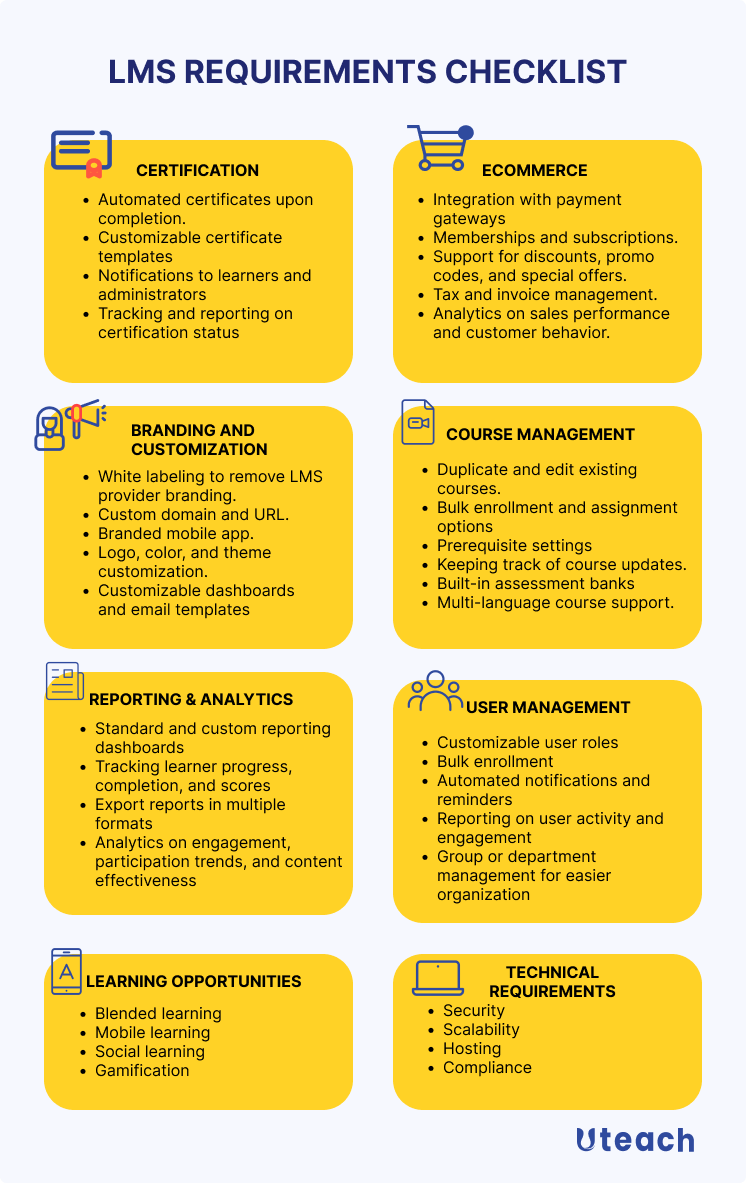
Certification
Certification features in an LMS are essential when training needs to result in formal proof of completion. This is common in industries where compliance is regulated, such as healthcare, finance, or manufacturing, or when your organization wants to recognize skills for internal advancement.
The way certifications are handled varies between platforms. In some LMS solutions, you can choose from pre-made templates and have certificates issued automatically once a course is completed. This works well if you want a fast, consistent process without much customization. In other cases, the LMS may allow you to create certificates from scratch, adding your branding, personalized fields, and specific achievement details.
- Automated certificates upon course or program completion.
- Customizable certificate templates with branding, colors, and signatures.
- Ability to set certification expiry dates and renewal requirements.
- Notifications to learners and administrators when a certification is nearing expiry.
- Tracking and reporting on certification status across teams or departments.
Ecommerce
If you plan to sell your training courses externally, eCommerce capabilities in your LMS are essential.
The LMS should connect with trusted providers that support multiple payment methods. Beyond simple transactions, the system should allow you to offer flexible buying options such as memberships, subscriptions, and course bundles.
Key eCommerce features to consider include:
- Integration with multiple payment gateways for global reach.
- Integration with other eCommerce tools.
- Ability to set up memberships and subscription plans.
- Options to bundle courses or sell them individually.
- Support for discounts, promo codes, and special offers.
- Secure checkout process with tax and invoice management.
- Analytics on sales performance and customer behavior.
Branding and customization
If you want to create a learning academy under your organization’s brand, look for an LMS that supports white labeling. This will allow you to remove the vendor’s branding and include your branding elements, including logos, colors, and custom domain.
Some LMS solutions, such as Uteach also offer a branded mobile app. So, you can look for:
- White labeling to remove LMS provider branding.
- Custom domain and URL.
- Branded mobile app.
- Logo, color, and theme customization.
- Customizable dashboards and email templates
Course authoring and management
When it comes to the course management itself, consider your learning culture and training goals to understand what requirements to look for.
Course creation and management
If your team has in-house instructional designers and access to authoring tools, you will mainly need an LMS that integrates well with the formats you already produce.
If you do not have dedicated tools, you may prefer a platform with built-in course creation capabilities, including AI assistance for structuring courses or generating assessments. If we evaluate the pros and cons of AI in instructional design, we can see that automation significantly accelerates content delivery.
Multimedia support is another priority. Video, audio, interactive elements, and documents all play a role in keeping training engaging and effective. A drag-and-drop interface can make creation more intuitive, reducing the learning curve for your administrators.
The ability to categorize content and use filters will help learners find the right materials quickly, especially as your course library grows. Drip scheduling allows you to release lessons gradually, which can help maintain engagement and prevent learners from feeling overwhelmed.
Here are some more specific requirements you might want to consider:
- Ability to duplicate and edit existing courses for new audiences.
- Bulk enrollment and assignment options for large groups.
- Prerequisite settings to control the order in which learners take courses.
- Version control for keeping track of course updates.
- Built-in assessment banks or question libraries for reuse across courses.
- Multi-language course support.
Also see: 10 Best Course Authoring Tools
Learning opportunity requirements
Different approaches can improve engagement, retention, and overall effectiveness depending on your organization’s culture and learner needs.
Blended learning combines online and offline training. This approach is useful when some skills require hands-on practice or in-person sessions alongside digital content. In fact, 56% of employees say they want training that mixes in-person and remote learning.
- Schedule and automation for calendars
- Integrate offline and online progress in reporting
Also see: 7 Best Blended Learning LMS for Your Organization Reviewed
Social learning encourages interaction between learners, fostering collaboration and knowledge sharing. This is necessary for building community and encouraging continuous learning.
- Discussion boards and forums
- Group projects and peer collaboration tools
- Peer feedback and recognition options
Also see: Social Learning. How Does it Work in the Workplace?
Mobile learning ensures that employees can access training anytime, anywhere, which is crucial for teams that are remote, traveling, or field-based.
Make sure you get:
- Push notifications and reminders
- Dedicated mobile app
- Mobile-responsive course content opportunities
Also see: Best 7 LMS for Mobile Learning with Apps Reviewed
Gamified learning uses game elements like points, badges, and leaderboards to increase motivation and engagement. This can make mandatory or repetitive training more enjoyable. For game-based learning, you can check for features like:
- Points, badges, and leaderboards
- Progress tracking and achievement rewards
- Challenges, quizzes, and interactive tasks for engagement
User management requirements
As your organization grows, you need tools that make it easy to organize learners, assign content, and keep everyone informed without adding unnecessary manual work.
Your LMS should allow you to define different levels of access for admins, instructors, managers, and learners. This ensures the right people have access to what they need.
And when you need to enroll hundreds of employees in a course or update permissions for a department, being able to perform these in bulk and group actions will save you time. On the other hand, automated emails and notifications help keep learners on track and reduce administrative follow-ups.
Thus, the key features include:
- Customizable user roles with different permissions
- Bulk enrollment, assignment, and updates
- Automated notifications and reminders for learners and admins
- Self-registration options for new employees
- Reporting on user activity and engagement
- Group or department management for easier organization
Reporting and analytics requirements
You should be able to create reports that match your organization’s unique needs, whether it is tracking completion rates, assessment scores, or course engagement. This allows you to make data-driven decisions and demonstrate the impact of your learning initiatives.
Key features to consider include:
- Standard and custom reporting dashboards
- Tracking learner progress, completion, and scores
- Export reports in multiple formats (PDF, Excel, CSV)
- Scheduled automated report delivery
- Filtering and segmentation for departments, roles, or locations
- Analytics on engagement, participation trends, and content effectiveness
Technical requirements
When choosing an LMS, the technical side is just as important as features and business needs. The system must be secure, scalable, reliable, and compliant with relevant regulations to support your organization effectively.
Security is essential to protect sensitive learner and organizational data. Look for LMS solutions that offer encryption, strong authentication methods, and granular access control to ensure only the right people can view or edit information.
Scalability allows your LMS to grow with your organization. As the number of users, courses, and content increases, the system should maintain performance without slowing down or causing errors.
Compliance is critical if your organization operates under regulations such as GDPR, HIPAA, or industry-specific standards. The LMS should provide tools and workflows that make it easier to meet these requirements and maintain audit-ready records.
Hosting affects accessibility and control. Cloud-based LMS solutions reduce IT overhead and provide automatic updates, while open-source platforms offer flexibility and self-hosting options if you need full control over data and customization.
Conclusion
Choosing the right LMS starts with understanding your organization’s requirements, from administrative needs and business goals to technical capabilities and learning opportunities. Defining these clearly will help you focus on the features that matter most, avoid unnecessary complexity, and ensure the platform supports your team.
However, the range of options available can make the decision challenging, and sometimes all you need is someone to guide you through the possibilities and help you see what will work best for your situation. To make that process easier, book a demo with our specialist and get a free consultation.


