
The following guide covers:
I searched G2 for LMS platforms, and do you know how many popped up? There were 10000 results, and it is difficult to analyze them all and find what suits you best.
But the Uteach team narrowed down that list to 60 to analyze. If you want the full review for all of them or need to compare, check our comparison list here.
But for today's article, I picked the best eCommerce you can consider for partner or client training. We will cover the key eCommerce features each of them has to offer, the pros and cons, as well as reviews from users to see the full picture.
Why I chose these eCommerce LMS as the best
When putting together this list, there were a few factors I paid attention to, and I recommend you also look into to evaluate your LMS.
- Pricing model flexibility. Are you planning to sell training programs on different models, such as subscription-based, packages, memberships, etc.? Then you need to make sure your eCommerce LMS supports those, which we will analyze further in the article for each LMS. Not every platform on this list supports all of them, so you need to pick one offering more flexibility.
- Payment gateways. Most LMS do support Stripe and PayPal at a minimum. But if you need local payment gateways, you should check the integrations with the LMS.
- Tax and multi-currency handling. Whether sales tax or VAT is calculated automatically based on the buyer's region, and whether you can price and charge in more than one currency, also matters a lot. If you plan to sell with different currencies, make sure your LMS supports that too.
- Bulk and corporate seat sales. How a company actually buys multiple seats at once, and how much admin work is needed, also tells a lot about whether the LMS can be considered best for eCommerce.
- Promotions and growth tools. You may already know that coupon codes, limited-time discounts, and a built-in affiliate program help you actually sell more. So I also paid attention to the marketing features when evaluating.
- Integrations that touch revenue. I also checked for CRM and marketing integrations that connect a purchase to your LMS dashboard.
Related: LMS Requirements Checklist | Choose What's Right For You
Here is an overview of the best eCommerce LMS we will analyze, and what i liked about them.
| Platform | Best for | One thing I especially like |
| Uteach | For companies who prioritize local payment-gateway coverage and flexible marketing opportunities. | Native support for regional gateways like RazorPay, Paystack, Flutterwave, and more. |
| Skilljar | B2B and SaaS companies selling certification to external customers and partners | The bulk selling option. Buyers get a single link they can share with others, and the team members claim their purchased accounts on their own. |
| LearnUpon | Companies selling training to partners, resellers, or association members | A genuine Purchase Order checkout built into the storefront. |
| Thought Industries | Enterprises licensing training to multiple external audiences at once | Native Avalara tax automation with real address validation at checkout |
| LearnWorlds | Companies who want a full monetization stack in one tool | Supports installment/payment-plan billing. |
| Absorb LMS | Companies already running training on Absorb that want to sell a slice of it, commission-free | Zero commission on every sale made through its eCommerce module |
| TalentLMS | Teams that want simple course selling layered on top of training they already run | Bundles are built straight from Groups or Categories you likely already created |
#1 Uteach
Best for: Building a branded academy with the widest native payment-gateway coverage in this list, all inside one platform.
Uteach is a white-label, all-in-one platform where you build your own storefront and sell courses, bundles, live sessions, coaching, memberships, digital products, and more. It pairs content with a built-in CRM. What is great is that you can also create an affiliate program to support your sales.
Main feature analysis
I like that Uteach does not lock you into one pricing plan. You get one-time purchases, recurring memberships (monthly, quarterly, or yearly), course bundles, and even a "build your own bundle" option. In this case, the learners pick any program they like within the price range you set. You can run bulk actions like generating coupons for early-bird campaigns.
Checkout and payment operations
Uteach supports a wide list of native gateways. And if you still cannot find the one you need in the list, the team is open to integrating per request. Especially if your buyers are outside the US and EU, that provides you with a real advantage.
The only thing is that Uteach does not calculate sales tax or VAT automatically by buyer region.
Integrations
The LMS integrates with lots of marketing, automation, and analytics tools, such as Pipedrive, Mailchimp, MailerLite, Zapier, Make, Pabbly, etc. For other tools, you can integrate via API. And if you need integrations with more tools ot specific HR stack, the team reviews requests.
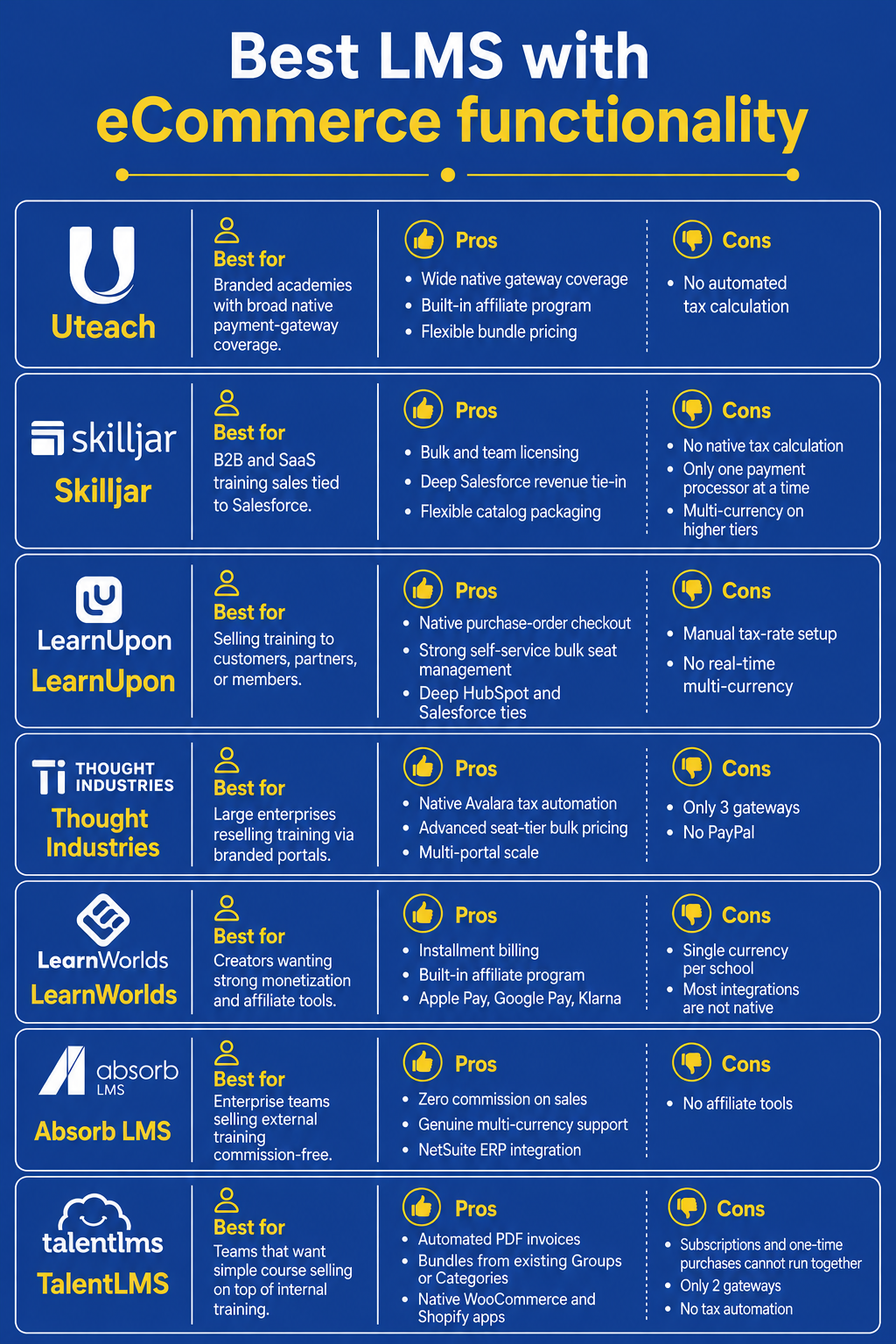
Pros: Widest native gateway coverage, built-in affiliate program, flexible bundle pricing.
Cons: No automated tax calculation.
What do users think?
Uteach has a 4.2-star rating on G2. The reviewers describe the LMS as simple, yet powerful. For most of the reviews, you can see users commenting on how intuitive the LMS is. However, some users note that it takes time to master all the features.
"Uteach has made it much easier for STEM Primary School of the NPUA Foundation to organize and manage STEM learning for a large number of students and teachers in one place. We use it to structure courses, share learning materials, and track student progress across different classes and levels.
The platform is intuitive and does not require strong technical skills, which is very important in a school environment where teachers have different levels of digital experience."
Karen G.
G2 Reviewer
#2 Skilljar
Best for: B2B and SaaS companies selling paid training or certification to external customers and partners, especially ones that need training revenue tied directly into Salesforce.
Skilljar is built around external, customer-facing training. The commerce tools Skilljar provides are created for team buying and not the individual checkout.
Main selling features
For Skilljar, I liked the bulk license purchasing. That way the buyer selects a seat quantity, pays once, and gets a shareable link so teammates can redeem their own seat without having to go through any payment forms. If you use their Training Credit option, you can set an expiration date for the codes, too.
The thing is, if you want to run bulk discounts, you need to create the promo codes manually.
Checkout and payment operations
The main gateways Skilljar supports are Stripe or PayPal. And you can only activate one processor. I do like the two-way Salesforce integration that adds purchased training seats directly to Salesforce contracts for revenue recognition.
However, Skilljar does not handle your taxes. You need a specific gateway (Merchant eSolutions) or custom API work to actually collect tax. And if you need to sell in multiple currencies, you will need to be on their higher tier.
Integrations
The LMS supports integrations with Salesforce (deep, native), Marketo, Eloqua, Intercom, and Zapier on the Premium tier, plus a paid Data Connector for BI tools.
Pros: Purpose-built bulk/team licensing, deep Salesforce revenue-recognition tie-in, flexible catalog packaging.
Cons: No native tax calculation, one payment processor at a time; multi-currency locked to higher tiers.
What do users think?
Skilljar has a 4.6-star rating on G2. The reviewers describe the LMS as easy to use, and most of them are satisfied with the support they get. The users also mention it is easy to roll out training programs. But on the flip side, most of them would prefer to have better reporting capabilities.
"What I like best about Skilljar is how intuitive and flexible it is for creating scalable learning experiences. It makes it easy to organize and deliver enterprise customer education, track engagement and completion, and create a more structured learning journey intentionally orchestrtaed with our client lifecycle. I also appreciate how well it supports our broader goals around self-service, product adoption and customer enablement".
Sarah O.
G2 reviewer
#3 LearnUpon
Best for: Selling training to external customers, partners, or association members as an extension of account management.
LearnUpon's checkout tools are built around procurement-style buying. That includes bulk seats, purchase orders, and membership-tiered pricing. Currently, they are migrating its storefront to a new Spree-powered eCommerce engine.
Main selling features
LearnUpon is really flexible when it comes to bulk purchases. A buyer can invite learners, reassign unused seats, buy more, and even transfer the whole order to someone else at their company. The LMS also supports subscriptions, tiered membership pricing, and bundles.
Checkout and payment operations
As for the checkout, LearnUpon offers a built-in Purchase Order checkout. It has an invoice-and-pay-later flow, so that you can provide the opportunity to pay later.
Integrations
Some of the best-known LearnUpon integrations include HubSpot (deep), Salesforce, Planhat, Zapier, Shopify (for storefront display, not payment processing), and Impact.com for partner access.
Pros: Native Purchase Order checkout, strong self-service bulk seat management, deep HubSpot/Salesforce ties.
Cons: Manual tax-rate setup required, no real-time multi-currency
What do users think?
LearnUpon has a 4.6-star rating on G2. Most users agree that it simplifies course management. Although they find the interface intuitive, they also think the reporting and analytics tools have room for improvement.
"We use it for both customer training and internal onboarding from a single portal, which has been really valuable. The HubSpot integration is best-in-class and the AI-powered course authoring tool has dramatically cut down the time it takes us to build and update content. The automation capabilities mean the platform largely runs itself once set up — customers are enrolled in the right courses based on their role, language, and lifecycle stage without any manual effort".
Lizzie C.
G2 reviewer
#4 Thought Industries
Best for: Large enterprises wanting to license or resell training to multiple external audiences at once, through separately branded portals.
If there is something clear about Thought Industries, it is built for scale. They have the Panorama feature that gives the opportunity to create multiple branded environments for groups and departments. So managing the portals becomes easier.
Main selling features
For bulk options, Thought Industries has seat-tier bulk purchasing. That means that you can set actual price breaks depending on the quantity. For example, 1 to 9 seats at $20, 20-plus at $17.
As for bundles, they are called collections. The LMS supports the build-your-own bundles option.
Checkout and payment operations
The LMS has native Avalara AvaTax integration. Which means that you can calculate taxes automatically.
However, they only support three main payment gateways, including Stripe, Worldpay, and CyberSource. The multicurrency opportunity supports 30 currencies.
Integrations
Some of the well-known Thought Industries integrations include Salesforce, HubSpot, Marketo, Microsoft Dynamics 365, Zapier, plus a dedicated iPaaS (TI Connect) and a native BI Connector for Tableau, Power BI, and Looker.
Pros: Native Avalara tax automation, advanced seat-tier bulk pricing
Cons: Only 3 gateways, no PayPal.
What do users think?
Let's now look at the reviews. Thought Industries has a 4.1-star rating on G2. The reviewers especially praise the customer support. They also highlight the Panorama feature, which helps them map the learning journey of the learners.
"TI provides a wide range of functionality for a high-level LMS.. Using TI, we're able to provide a robust, and easy to use learning experience for our customers.TI also provides advanced capabilities such as setting up exclusvie, branded campuses for our customers, multilingual support, SCORM support, ecommerce and multicurrency support, learning paths, integration with Salesforce, and a highly customizable user interface."
Adrian D,
G2 reviewer
#5 LearnWorlds
Best for: Course creators who want a full monetization stack like subscriptions, bundles, installments, and a built-in affiliate program without stitching together separate tools.
LearnWorlds and Uteach are two of the few platforms on this list that treat selling as a first-class feature. Let's see what opportunities you get.
Main selling features
With LearnWorlds, you can create bundles and provide tiered access to the programs. To set up the payment experience, you can customize the payment sections and create different checkout pages for the programs.
Checkout and payment operations
LearnWorlds supports Apple Pay, Google Pay, and buy-now-pay-later options like Klarna, alongside several regional payment methods.
However, each academy is set up with a single designated currency. The tax automation is not built in and works via Quaderno.
Integrations
Some of the best LearnWorlds integrations include HubSpot natively, Salesforce, Zapier, Make and other key marketing tools.
Pros: Native installment billing; built-in affiliate program; modern checkout with Apple Pay, Google Pay, Klarna.
Cons: Single currency per school, most integrations are not native.
What do users think?
LearnWorlds has a 4.7-star rating on G2. Most of the reviewers like the layouts and consider it easy to navigate. As for the course management and delivery, users especially highlight the interactive video opportunities. However, most users also mention there is a steep learning curve.
"I think LearnWorlds is easy to navigate. I like the tools available, just the layout, and how it helps me work out the courses. The AI support and interactive video capabilities are exciting. The platform itself is quite rich with features, including statistics and reports, making it very robust. It's great for marketing and communication, and I appreciate the inclusion of blogs"
Paul C
G2 reviewer
#6 Absorb LMS
Best for: Mid-market to enterprise companies that already run internal training on Absorb and want to sell a subset of that same content externally, commission-free.
Absorb pairs its core enterprise LMS with a built-in, PCI-compliant eCommerce module. The LMS supports discounts, customized pricing, tax setup, and marketing tools to promote the programs.
Main selling features
The great thing is that Absorb charges zero commission on sales made through its eCommerce module. You can create bundles, coupon codes, and set segment-based custom pricing (charging members less than non-members, for example). However, there is no opportunity to crate your own affiliate program.
Checkout and payment operations
Absorb claims support for "over 70 different payment gateways," which sounds impressive. The LMS also supports multi-currency selling. It promises a "simple tax setup" for sales tax and VAT.
Integrations
Absorb LMS integrations include Salesforce (dedicated connector), HubSpot CRM, Zendesk Sell, Marketo, and a NetSuite ERP connector for syncing sales and financial data.
Pros: Zero commission on sales, genuine multi-currency support, NetSuite ERP integration.
Cons: No affiliate tools
What do users think?
Absorb LMS has a 4.7-star rating on G2. The reviewers think the LMS is intuitive for both the admins and the learners. They also like that the platform offers video tutorials to help them master the platform. However, most of them mentioned reporting features could be improved.
"What I like best about Absorb LMS is how easy it is to use. The interface is intuitive, making it simple for both admins and learners to navigate. I also appreciate the strong reporting tools and automation features that help streamline training management, save time, and create a better overall learning experience. Additionally, the customer service we receive is outstanding."
Jason L.
G2 reviewer
#7 TalentLMS
Best for: Teams already using TalentLMS for internal training who want a simple, low-friction way to also sell course access as a secondary revenue stream.
The impression is that TalentLMS treats commerce as a light layer on top of its core training platform. But also, they make selling programs easy and straightforward. You can sell individual courses, one catalog-wide subscription, and discount bundles built from existing Groups or Categories.
Main selling features
I like that bundles reuse taxonomy you have probably already built: put a price on a Group or Category you already created, and it instantly becomes a purchasable bundle, no separate bundle-builder needed. The platform supports coupons and sitewide "global discounts," built for seasonal sales.
However, there is no bulk-seat purchasing flow.
Checkout and payment operations
I like that TalentLMS auto-generates PDF invoices for every purchase without you having to build that yourself.
However, they mainly support Stripe and PayPal, with just one Stripe account allowed per portal. There is no automatic tax or VAT calculation either.
Integrations
As for the integrations, Talent LMS supports Salesforce, HubSpot, Zapier, Google Tag Manager, and native WordPress/WooCommerce and Shopify apps for selling from an existing site.
Pros: Automated PDF invoicing, bundles built from existing Groups/Categories, native WooCommerce and Shopify apps.
Cons: Subscriptions and one-time purchases cannot run together, only 2 gateways, no tax automation
Which eCommerce LMS should you actually pick?
If I had to sum it up: Uteach and LearnWorlds are the strongest fit if you want selling and marketing built in.
Uteach is especially better for payment-gateway reach, and LearnWorlds for installment billing and its native affiliate program.
Skilljar, LearnUpon, and Thought Industries are great options if you need Salesforce-tied revenue recognition and native Purchase Order checkouts.
Absorb LMS and TalentLMS make the most sense if you already run internal training on them and want to sell a slice of that content on the side.
But if you want a single, branded home to sell courses, bundles, and memberships with wide payment-gateway coverage, book a demo with our team and see if Uteach fits your company's needs.