
The following guide covers:
Should you translate or localize your eLearning content?
Should you translate automatically or use translation services?
eLearning translation challenges and how to navigate
How much does it cost to translate eLearning content
Are you looking for a way to make your course content available to a wider audience? Translating your content seems to be the most obvious solution. However, there is more to it than just making your content accessible in target languages.
In this article, we will look at the key decisions you need to make before translating your eLearning content, the main challenges that often appear along the way, and the strategies that will help you avoid common mistakes.
We will also explore whether to translate or localize, when to rely on automatic tools versus professional services, and the practical steps that ensure your translated courses keep learners engaged.
Should you translate or localize your eLearning content?
You are here because you need to translate your eLearning content. But what if there is a need to localize as well? When you think of the difference between these two concepts, translation mainly refers to communicating the same thoughts in your target language. On the other hand, when we speak about localization, you also need to adapt your content and concepts to the culture of your target audience.
Translation is about converting the text from one language to another while keeping the meaning intact. At the same time, localization adapts the content so it feels more relevant to your learners. When that adaptation goes beyond wording into reworked scenarios, visuals, and interactions, custom elearning development services can rebuild the course for each market.
For example, if your course discusses policies with a case study about John from Chicago, localization will adapt it to a scenario with “Carlos from Madrid” and change the scenario as well to make it more relatable for a Spanish audience.
What else is typical of eLearning content localization besides considering the linguistic nuances? In this regard, you shall also consider the following:
- Adjusting cultural references
- Changing the images and visuals to make it fit the local environment
- Customizing the learning experience based on the learning habits of local learners
So, if you can already think of examples you used in the course that the target audience will not relate to, consider adapting rather than just translating as it is.
Should you translate automatically or use translation services?
Automatic translation tools can save you time and money when speed matters. Professional eLearning content translation services, on the other hand, are better for accuracy, nuance, and cultural adaptation.
But the real question is not which method is better overall, but which is better for your specific course. Let us look at both options in detail.
- Translating with online tools and automations
Automatic translation means using online platforms and AI-based systems to quickly convert your course text into another language. Tools like Google Translate, DeepL, or Microsoft Translator are the most common options.
Many of them now support integrations with external systems, so you can translate content in bulk.
Pros
- Fast turnaround, especially for large volumes of text.
- Cost-effective, since many tools are free or low-cost.
- Good for internal drafts or testing how the course looks in another language.
Cons
- Limited accuracy, especially with industry-specific terminology.
- No quality assurance.
- Cultural context is often lost.
- Using eLearning content translation services
Services like Stepes, Blend, and Smartcat offer dedicated eLearning translation and localization services. They translate content like SCORM, AICC, and xAPI, on-screen texts and UI elements, subtitles, voiceovers, etc.
Pros:
- High accuracy and consistency in specialized terminology.
- Cultural adaptation included making the course more relevant.
- Professional quality assurance ensures the final course is polished.
Cons:
- Higher cost compared to machine translation.
- Longer turnaround times, especially for multimedia-heavy courses.
- Requires more project coordination with the service provider.
eLearning translation challenges and how to navigate
No matter which option you choose for translating your eLearning content, there are always details you need to think about before starting.
For example, there may be difficulties with keeping the terminology consistent across modules, adapting visuals with embedded text, or handling the technical formatting when the translated text expands.
The good news is that you can avoid all these if you initially plan everything well. What do I mean by this?
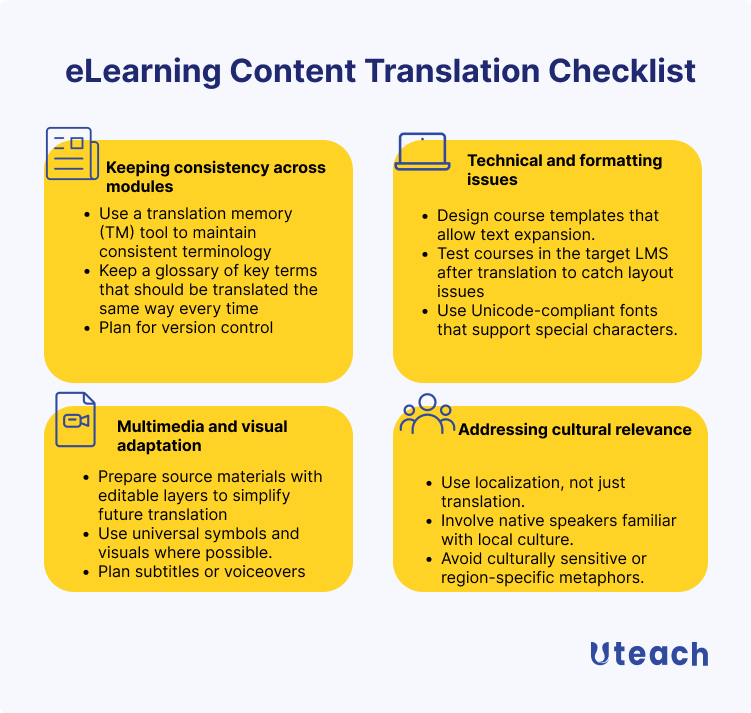
Keeping consistency across modules
This is one of the most common problems we see among our users and, to be honest, among many organizations in general. Consistency is important because it ensures your learners do not get lost in terminology or phrasing.
In an interview with me, instructional designer Mariana Peña highlighted how confusing it can become when language is not used consistently. And it applies when we are speaking about the original language, let alone the translated content. She pointed out:
“We have to be able to define the concepts inside your course in the same way every single time. Because we need to reduce the friction. And one way of reducing the friction is to not create confusion in their heads. So if they're confused, wait, hold on. In the previous video, you defined it like this, and now you're saying this. Which one is it for you as an expert is the same thing because you understand the scope of it, but for them it isn't”.
Mariana Peña
Instructional Designer
So how do you actually navigate this?
- Use a translation memory (TM) tool to maintain consistent terminology
One way is to use a translation memory (TM) tool. These tools store translated words, phrases, and even whole sentences, so that whenever the same text appears again, the tool suggests the previous translation.
This not only saves time but also makes sure you are not reinventing the wheel with each update. Popular options include SDL Trados, MemoQ, and Smartcat, which are widely used in the training industry.
So, before you translate, check if your LMS has any integrations with translation memory tools.
- Keep a glossary of key terms that should be translated the same way every time
Alongside TMs, having a glossary of key terms is essential. So to speak, it will become your course’s dictionary. A glossary should include all recurring terms, brand names, technical concepts, and also how you want to use a certain concept in different contexts.
“Create a glossary of the things that you're going to be repeating the most in your course, whether that is how you introduce yourself.”
Mariana Peña
Instructional Designer
- Plan for version control
When you offer translated versions of the same course, managing all these versions becomes challenging. As you may know, you should review your online course content every four months to keep it relevant and engaging. So, if you plan any updates in the original version, you should also plan in a way that you manage the translations as well.
If you translated using a translation management system (TMS), you will not have to worry. Because many TMS automatically detect changes in source content and notify relevant team members, this greatly simplifies the process of keeping translations in sync.
Technical and formatting issues
Another challenge that often comes up is technical and formatting issues. Even if your translation is perfect, the course can look broken if you do not prepare for how different languages behave inside your LMS.
For example, German text tends to be much longer than English, while Chinese characters can shrink your nicely spaced layout into something unreadable. These are the kinds of details that catch many people off guard.
- Design course templates that allow text expansion
One practical way to manage this is to design your course templates with text expansion in mind. So to speak, leave a bit of breathing room in your original materials. For example, if your English button says “Next,” be ready for it to turn into “Επόμενο” in Greek.
And I do not mean just the words. Because some languages will take up more space.
- Test courses in the target LMS after translation to catch layout issues
And also, never skip testing your translated course inside the target LMS. It might look fine in a preview window, but it behaves differently once uploaded. So, you want to do the final check and see how everything fits together and how the experience would be for your learners.
- Use Unicode-compliant fonts that support special characters
Using Unicode-compliant fonts is the only way to ensure your text displays properly across languages, especially for scripts like Arabic, Chinese, or Cyrillic. Many standard fonts fail to render special characters.
This might sound like a detail, but when your learner sees garbled text, it immediately reduces the credibility of the course.
Multimedia and visual adaptation
Words are only one part of a course. Probably, you have materials like images, diagrams, and videos that contain embedded text or culturally specific elements. And if you do not plan for these, you end up with visuals that either make no sense in another language or require expensive rework.
- Prepare source materials with editable layers to simplify future translation
For instance, if you create an infographic in Photoshop or Illustrator, keep the text as separate layers instead of flattening it into the image. The same goes for PowerPoint slides.
So, avoid embedding text into pictures. Place it in text boxes that can be edited later. It might feel like extra work upfront, but it saves hours of redesign once you move into translation.
And if you already have materials where the text is embedded into the visual, make sure you redesign them to adapt to the translated languages as well.
- Use universal symbols and visuals where possible
Numbers, charts, and process diagrams often work better with icons and arrows than long labels. Of course, you cannot always strip visuals down to symbols, but thinking about whether a concept can be expressed in a universally recognized way reduces the need for future adaptation.
- Plan subtitles or voiceovers
As you already know, the most challenging part of eLearning content to translate is the videos. Re-recording a full video for every target language is rarely realistic unless you have a large budget.
A more manageable approach is to use subtitles or voiceovers. Subtitles are cost-effective and give learners the option to read along while listening. Voiceovers add more immersion, but they work best when the video has a neutral visual style.
But a lot depends on whether your videos are with screen recordings or animations, or someone speaking directly to the camera. For example, if you have a talking-head style training, subtitling is often the better choice, because a dubbed voice will look mismatched.
Addressing cultural relevance
- Use localization, not just translation
Translation alone does not guarantee that your learners will connect with the material. For example, if you have a business course, and the case studies discuss scenarios in the UK, you would also need to adapt the content, not just translate.
So to speak, you need to adapt examples, names, and visuals so the content feels natural in the target culture.
- Involve native speakers familiar with local culture
It is also important to involve native speakers during the review process. Translators can handle the language, but reviewers who live in the target culture can flag details you may not have considered. For example, hand or face gestures have different meanings for different cultures.
- Avoid culturally sensitive or region-specific metaphors
An example: saying “hit a home run” makes sense to learners in the United States but will leave others puzzled if baseball is not part of their culture. This way, you respect the learner’s context.
How much does it cost to translate eLearning content
The cost to translate eLearning content typically ranges from $0.05 to $0.40 per word for professional services. Some examples of service providers:
- TheWordPoint: starts at $0.06/word
- GeniusTranslation: starts at ~$0.08/word
- LanguageScientific: starts at $29/word
But if you want an accurate price for your project, you will need to provide vendors with specific details, including:
- The total word count of your course.
- The source and target languages.
- The types of multimedia elements involved (voiceover, video, interactive quizzes).
- Your timeline and the authoring tool used
Conclusion
Translating eLearning content is not just about turning words from one language into another, as we often think.
So to speak, it is about making sure learners across different regions can access the same knowledge without confusion or barriers. Whether you choose translation or localization, rely on automation or professional services, the right approach depends on your goals, your learners, and the type of content you are delivering.
The key is to prepare for the challenges to ensure proper consistency, technical formatting, multimedia, and cultural relevance. With glossaries, translation memories, editable source files, and cultural reviews in place, you give your learners a smoother experience.
In the end, translation is an investment in reach and impact.



