
The following guide covers:
What should a new employee training checklist contain?
Employee training checklist downloadable template
What to consider when creating an employee training checklist?
Ready to put the employee training into practice?
The last thing you want for your new hires is to develop the onboarding training, only to end up with new employees being more confused. Most of the time, that happens not because your training program is not good enough, but because the training lacks structure.
Everyone is doing their part, just not in a coordinated way. A clear employee training checklist helps you connect the dots, align teams, and make sure training is intentional.
In this article, we will walk through what an effective employee training checklist should contain, how to structure it so it works across roles and industries, and what to consider when creating one for your own organization. You will also find a practical, downloadable checklist template you can adapt to your needs, whether you are onboarding one hire or scaling training across teams.
What should a new employee training checklist contain?
Before you download and use the checklist, you should know that every company operates differently. To be more exact, every industry has its own risks and priorities, and every role requires a different level of depth. For example, a remote-first tech company will structure its tools training very differently from a manufacturing company․
That said, if you want your training checklist to be effective, there are some points you should address. These categories help you organize training responsibilities, avoid gaps, and ensure that learning is intentional.
Employee information and role context
You do not want the new hire training to be generic. The key employee information you include will serve as your guiding point for the rest of the checklist.
Include basic employee details such as name, role, department, manager, and location. More importantly, document the purpose of the role and its core responsibilities. It allows you to design training paths that reflect real expectations, not job titles alone. When you revisit the checklist later, it also gives you context on why certain training decisions were made.
Training objectives and expected outcomes
The most common way is to just include the training type and name in the checklist. Instead of listing sessions only, define what competence looks like. For example, is the goal to understand internal processes, perform tasks independently, or collaborate effectively with other teams? These objectives help managers and trainers stay aligned.
Including this section also makes it easier to evaluate training effectiveness. If you cannot link training to an outcome, it becomes difficult to justify the time and resources spent on it.
Company orientation and ways of working
By company orientation, we do not mean just introducing policies and benefits. You should be able to explain how your organization actually functions.
For example, cover company values in practice, decision-making processes, communication norms, and how teams collaborate. It helps new employees understand not just what the company does, but how work gets done. It sets expectations clearly and helps new hires adapt faster, especially in distributed or cross-functional teams.
Job-specific and functional training
This is often the most complex and most critical part of the checklist. Job-specific training focuses on the tasks, workflows, and standards required for the role.
Here, you should identify core responsibilities, tools used within the function, standard operating procedures, and quality expectations. Consider whether the role requires hands-on practice, shadowing, simulations, or case-based learning.
Safety, compliance, and policy training
Not every organization has the same compliance requirements, but most have at least some level of risk management to address.
This section should include mandatory training related to workplace safety, data protection, information security, and industry-specific regulations. It is also the place to document required acknowledgments, certifications, or assessments.
Product, service, or domain knowledge
Whether you sell software, deliver services, or operate internally, employees need to understand what your company offers and why it matters.
This section covers product or service fundamentals, customer use cases, internal terminology, and common scenarios employees may encounter. The depth of this training will vary by role, but the category itself is broadly relevant.
Including it helps align employees with the business and improves decision-making, especially for roles that interact with customers, partners, or other departments.
Tools, technology, and systems training
Without structured training, employees often learn through trial and error, which slows productivity.
This category should list required tools, access requirements, internal systems, and best practices for usage. It is also useful to note where employees can find help or documentation later.
Soft skills and collaboration expectations
Technical skills alone are rarely enough. How employees communicate, give feedback, manage time, and work with others has a direct impact on performance and culture.
This section can include communication standards, collaboration practices, feedback culture, and expectations for internal or external interactions. Consider whether role-playing, discussions, or guided reflection are appropriate.
Training ownership, tracking, and validation
A checklist only works if someone owns it. This final category defines responsibility and accountability.
Document who delivers each training, how completion is tracked, and how readiness is validated. This could include assessments, observed tasks, or manager sign-off.
For HR and L&D, this section turns the checklist into a living process rather than a static document. It also makes it easier to improve training over time based on feedback and results.
Employee training checklist downloadable template
You will need to adjust this checklist based on your industry, company size, regulatory requirements, and role complexity. Some sections may feel too detailed for your context, while others may need to be expanded.
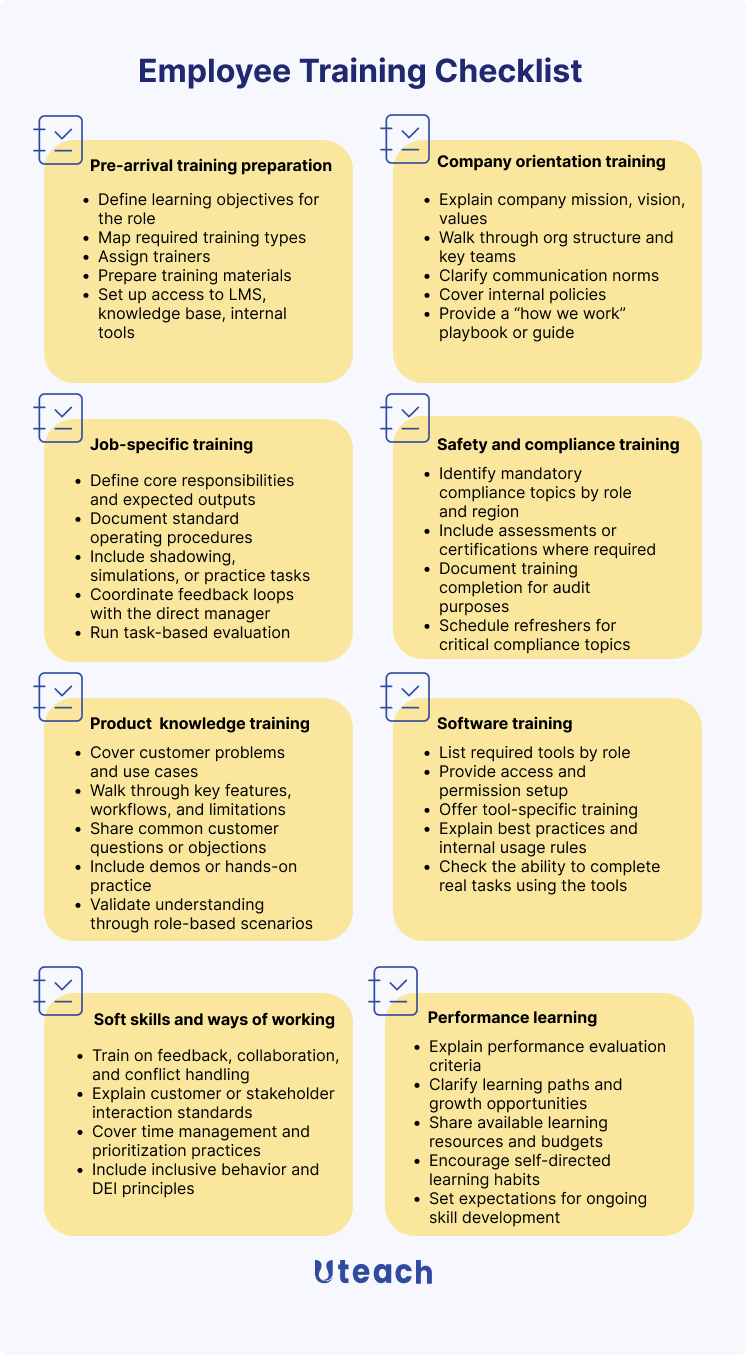
- Employee and Role Information
Use this section to define who the training is for and what the role requires.
- Employee name
- Job title and department
- Manager or team lead
- Employment type and location
- Role purpose and key responsibilities
- Core skills required for the role
1. Pre-arrival training preparation
Goal: Ensure training starts smoothly and feels intentional.
Key steps
- Define learning objectives for the role
- Map required training types (compliance, tools, product, role-specific, soft skills)
- Assign trainers / owners for each training module
- Prepare training materials (videos, guides, SOPs, demos, quizzes)
- Set up access to LMS, knowledge base, internal tools
- Create a training completion tracker (what “done” looks like)
- Align with the manager on expectations and success criteria
2. Company orientation training
Goal: Help the employee understand how the company works and how decisions are made.
Key steps
- Explain company mission, vision, values
- Walk through org structure and key teams (who does what)
- Clarify communication norms (meetings, async tools, response expectations)
- Explain decision-making and approval processes
- Cover internal policies (working hours, remote rules, PTO, expenses)
- Provide a “how we work” playbook or guide
- Validate understanding via short knowledge checks or scenarios
3. Job-specific training
Goal: Enable the employee to perform core job tasks more effectively.
Key steps
- Define core responsibilities and expected outputs
- Document standard operating procedures (SOPs)
- Provide real examples: past projects, tickets, cases, or deliverables
- Include shadowing, simulations, or practice tasks
- Clarify quality standards and success metrics
- Coordinate feedback loops with the direct manager
- Confirm readiness through task-based evaluation
4. Safety and compliance training
Goal: Reduce legal, operational, and security risk.
Key steps
- Identify mandatory compliance topics by role and region
- Cover workplace safety, data protection, and security policies
- Explain escalation and incident-reporting procedures
- Provide clear do’s and don’ts with realistic scenarios
- Include assessments or certifications where required
- Document training completion for audit purposes
- Schedule refreshers for critical compliance topics
5. Product or service knowledge training
Goal: Ensure employees can confidently explain, support, or work with the product.
Key steps
- Explain what the product/service is and who it’s for
- Cover customer problems and use cases
- Walk through key features, workflows, and limitations
- Explain pricing, packaging, and positioning (if relevant)
- Share common customer questions or objections
- Include demos or hands-on practice
- Validate understanding through role-based scenarios
6. Company technology and software training
Goal: Make employees productive in the company’s tech stack.
Key steps
- List required tools by role (communication, project, CRM, internal systems)
- Provide access and permission setup
- Offer tool-specific training
- Explain best practices and internal usage rules
- Share shortcuts, templates, and automation tips
- Define tool ownership and support channels
- Check the ability to complete real tasks using the tools
7. Soft skills and ways of working
Goal: Help employees collaborate effectively and fit into the company culture.
Key steps
- Set expectations for communication style and tone
- Train on feedback, collaboration, and conflict handling
- Explain customer or stakeholder interaction standards
- Cover time management and prioritization practices
- Include inclusive behavior and DEI principles (where applicable)
- Use role-plays or scenario-based discussions
- Align soft skill expectations with performance reviews
8. Performance and continuous learning
Goal: Connect training to long-term growth and performance.
Key steps
- Explain performance evaluation criteria
- Clarify learning paths and growth opportunities
- Share available learning resources and budgets
- Encourage self-directed learning habits
- Set expectations for ongoing skill development for employees
- Collect feedback on training effectiveness
- Continuously update training materials based on gaps
What to consider when creating an employee training checklist?
Up to this point, we have covered the core elements that usually appear in an employee training checklist. However, how effective your checklist becomes depends less on the sections themselves and more on how well they reflect the way your organization actually operates.
You shall consider the following:
- The type of training a specific employee needs. Even if you know you need to provide job-specific training for that role, the training will depend on the skills the particular employee needs. Meaning that the training goals and outcomes will differ from employee to employee.
- Departmental workflows. Think about which departments the employee will interact with, how handoffs work, and where misunderstandings typically occur. Your checklist should reflect these realities, especially for roles that rely on coordination across teams.
- Time and resources. Consider how much time trainers, managers, and new hires can realistically dedicate to training. Prioritize what is essential for early performance and defer what can be learned over time.
Once you pick the steps from the checklist that are applicable in your case, create the timeline and employee training plan. Based on the timeline, you and the employee will have a clear idea of what they are expected to do and achieve within the day, the first week, the first month, three months, etc.
Ready to put the employee training into practice?
For your employee training to be systematic, you need an LMS that helps you deliver it effectively.
If you are looking for a platform to automate your employee training and onboarding, consider Uteach. With Uteach, you can build structured training programs, create interactive training modules, track employee progress, and even attach quizzes and certificates to measure learning outcomes. You can host all your learning materials, live sessions, and internal knowledge hubs in one place, saving hours of manual coordination.
Book a demo with our team to see how Uteach automates your training and onboarding and turns them into smooth, measurable, and efficient experiences for both your HR team and employees.


