

If you are looking for a digital tool to create and organize your notes, just as well as with a notebook and pen, you would be surprised at how many options there are.
I have more note-taking tools installed than I have actual notes to manage. In this guide, I am sharing the ones that stood out, the ones that can make your coaching life easier. About 90 percent of the tools on this list offer a free plan, so you can try them without risk. And this is not just a list of simple apps for jotting down your thoughts. I focused on tools that also help with organizing content, creating personal wikis, managing tasks, automating notes, and more. Because managing notes well matters just as much as taking them.
Here is a quick overview of the best note-taking tools we will discuss in detail.
Note-taking tool | Best for | Pricing starts |
Notion | All-in-one workspace and organization | Free $10/month per user |
Amplenote | Task-focused note-taking with prioritization | Free |
Obisdian | Networked thinking and deep knowledge work | Free $5/month for synchronization $10/month for note-publishing |
UpNote | Clean, focused writing experience | Free for 50 notes $1.99/month Premium |
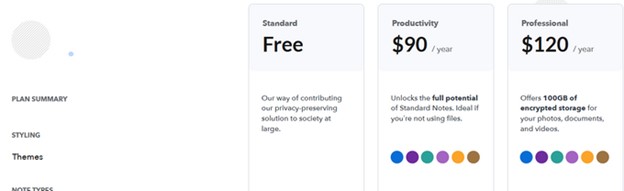
Standard Notes | Private, encrypted journaling and notes | Free $90/year |
Joplin | Open-source note-taking and to-do lists | Free 2.99€/month |
Nimbus Note | Documentation and multimedia capture | Free $39/month |
TagSpaces | Local file organization with tagging | Free $44/month per user |
Simplenote | Quick, distraction-free text notes | Free |
Fireflies AI | Automated meeting transcription and summaries | Free $10/month per user |
Notion
Notion is a flexible workspace where you can take notes, create pages, organize ideas, and manage information in one place. It lets you structure information in multiple ways, like lists, tables, Kanban boards, or wikis. You can link notes, create hierarchies, and even build your own knowledge base. You can create templates for repeatable tasks like intake forms or weekly check-ins.
What can you do with Notion?
- Create separate pages for each coaching client and log your session notes there
- Use databases to track client goals, habits, and progress over time
- Connect Notion Calendar to keep track of the coaching sessions as well
- Build reusable templates for coaching session outlines or onboarding new clients
- Link related notes together to keep your coaching materials connected
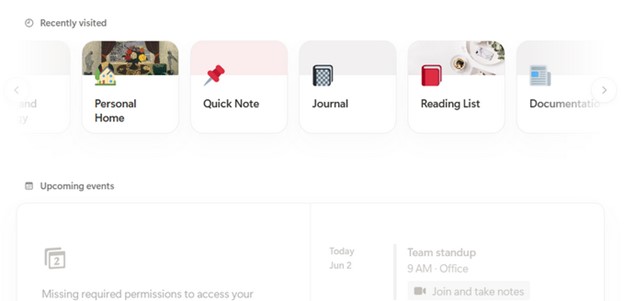
- Switch between different views like Kanban board, calendar, or gallery to organize your notes visually
- Collaborate with your assistant or team on shared documents if needed
What I like best about Notion?
Notion gives you a digital notebook combined with a lightweight database experience. If the way your notes look is equally important as how you organize them, Notion is for you. I especially like that you have ready-made templates for different purposes and can use them for repeatable tasks.
Embed files, videos, web links, and even live content like Google Docs or Figma work well with Notion. So if you have important documents in any other place, you can easily manage them from Notion.
Pricing
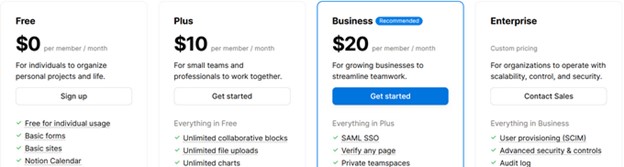
Notion currently offers 4 main pricing plans, including a Free plan. The free version does not have too many limitations, and for just taking notes and organizing them, it works more than fine. Yet, if you want to use it as a database and have an AI assistant, you need to consider the Plus and Business plans. But you can search for a Notion discount to save on your subscription
Amplenote
Availability: Web, Windows, macOS, iOS, Android
Amplenote is a note-taking app that focuses on helping you turn your notes into actions. You can write down ideas, plan tasks, and manage your schedule all in the same place. It combines note-taking with a to-do list and calendar so you can keep your thoughts and tasks together.
The interface is simple, but it is designed to help you stay focused and organized without adding too many distractions. You can also link notes to each other and sort tasks by priority or deadline.
What can you do with Amplenote?
- Write notes and instantly turn parts of them into tasks with deadlines
- Organize your tasks using a built-in calendar and task priority system
- Link related notes so you can move between connected ideas easily
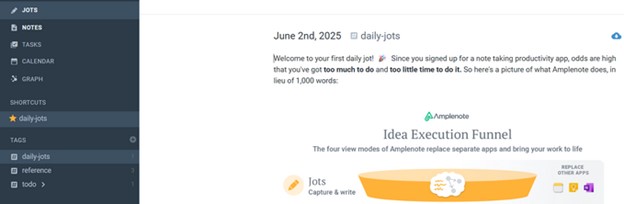
- Use “Jots” to quickly capture thoughts and revisit them later
- Create tags to group notes by topics like goals, clients, or content
- Access your notes offline and sync across all devices
- Protect sensitive notes with password locking for extra privacy
What I like best about Amplenote?
What proved to be really useful for me is that with Amplenote, you can organize notes, tasks, and calendars in one place. Which means that I could create automations and connect those tools. For example, when a client emails you and you forget to answer, you can set an automation so that the email becomes a task.
As for taking notes, the organization becomes easier with the Rich footnotes feature. You will not have to put everything out there on the notepage, but create small footnotes for every piece. The footnote can be a link, image, file, text, etc.
Pricing
The tool is completely free, and that is another thing I like about Amplenote.
Obsidian
Obsidian is a note-taking tool built around plain text and linking ideas through Markdown files. It stores all your notes locally on your device, which means you own your data and can use it offline anytime.
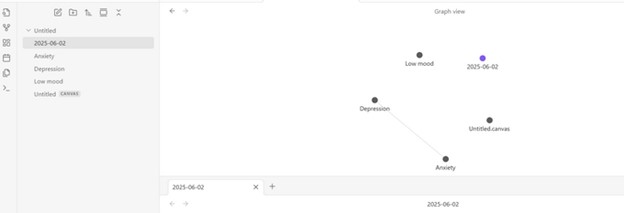
What I like about this tool is that, besides taking notes, the main idea is connecting notes like a network. So they are not just in folders like the other tools in this list. You can link any note to another and see how they are connected in a graph view.
This note-taking app is more for personal thoughts. But you can still use it for coaching notes to understand the causal relationship of the client’s behaviour when you link all the notes in a network.
What can you do with Obsidian?
- Write and organize your notes in plain text using Markdown
- Link ideas across different notes and build a personal knowledge map
- Use the graph view to visualize how your thoughts connect over time
- Group notes using folders, tags, and backlinks for easy navigation
- Extend the app with community plugins to add extra features like calendar, task management, or templates
- Keep everything offline and stored locally for full privacy and control
What I like best about Obisdian?
What I like most about organizing notes is that it goes beyond tags and folders. I mostly used the tool for personal knowledge and learning. The back-link feature also made brainstorming and getting to the bottom of any question easier.
So, if you need to keep track of the client’s progress, the note network will help you better understand what direction you want to take or where there is a need for improvement. The UI is simple and nothing too fancy.
Pricing
The tool itself is free and without any limits. All you need to do is install. Yet, if you need to synchronize notes across devices and make them collaborative, the monthly fee is $5. An additional option is being able to publish the notes, access themes; the pricing is $10.
UpNote
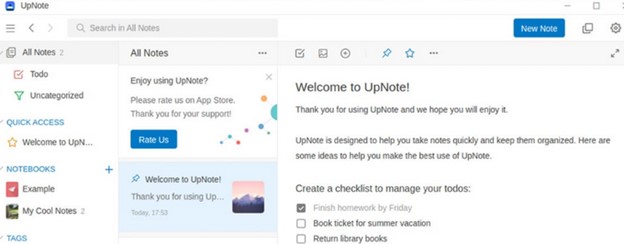
UpNote is a clean and minimal note-taking app designed to help you focus on writing without distractions. It is built for quick note capture, organizing ideas, and keeping everything neatly stored. You can create notebooks, pin important notes, and lock private ones. Everything stays synced across your devices automatically, and it works well offline too.
What can you do with UpNote?
- Write with rich formatting (headings, colors, highlights) or use Markdown for quick editing.
- Organize notes in a notebook hierarchy with unlimited nesting for deep categorization.
- Tag notes for cross-referencing and quick filtering across different notebooks.
- Pin important notes for instant access and use quick search to find anything instantly.
- Export notes to PDF, HTML, or plain text with clean formatting intact.
What I like best about UpNote?
If you do not need extensive tools like collaborations, tables, links, or anything of that nature, then Upnote is a simple solution. Sure, you can add links and create tables here, too. It is just that the tool is text-based.
It offers what they call “rich text” options, so you can have quote blocks, attachments, different fonts, highlighted texts, etc.
Pricing
This note-taking tool has 2 pricing options. You can use it completely for free, yet with a limit of 50 notes. But you can also get the premium version for either $1.99/month or $39.99 for a lifetime.
Standard Notes
Standard Notes is a secure, privacy-focused note-taking app designed for those who prioritize encryption and simplicity.
It encrypts all your notes end-to-end by default, ensuring only you can access them. It offers a distraction-free writing experience with markdown support, but you can extend functionality with optional plugins like spreadsheets, task management, and advanced editors.
What can you do with Standard Notes?
- Write and store encrypted notes that only you can read
- Organize notes using tags for easy retrieval
- Access your notes offline, with automatic syncing when online
- Customize the app with themes and different editor types, including Markdown and rich text
- Set up automated encrypted backups to your email
- Use advanced search features with Smart Views to filter notes by criteria like date or tags
What I like best about Standard Notes?
Standard Notes is a minimalist and secure note-taking system. It is also open source and puts great emphasis on end-to-end encryption.
Yet, without plugins, it would be a very simple not-taking app. When you integrate your sheets and tasks, organizing and managing processes become easier.
Pricing
The free version copes well with everyday note-taking tasks. But if you need themes for notes or advanced editing functionality (such as adding images, embeds, and other notes), you may want to get the paid versions. The spreadsheets are also only available for the paid options.
Joplin
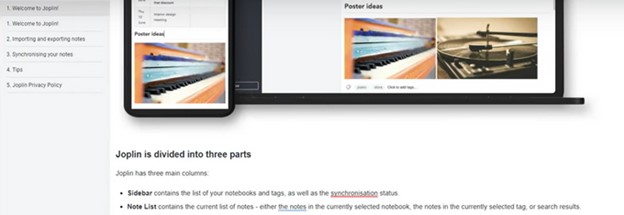
Joplin is an open-source note-taking app that stores your notes as plain text Markdown files on your device.
You have full control over your notes, including how they are stored, synced, and secured. You can organize notes into notebooks, tag them, and even manage to-do lists alongside your writing. It works offline by default and gives you the option to sync through services like Dropbox, OneDrive, or Joplin Cloud. And if you want more features, you can extend it with plugins.
What can you do with Joplin?
- Write and format notes using Markdown or switch to a rich text editor
- Organize notes into notebooks and sub-notebooks, and use tags for flexible categorization
- Attach images, PDFs, audio files, and other media directly into your notes
- Use the built-in web clipper for Chrome and Firefox to save web pages or screenshots as notes
- Create and manage to-do lists with checkboxes and due dates
- Insert diagrams directly within your notes
- Set up multiple profiles to separate different sets of notes and configurations
What I like best about Joplin?
The tool is open-source, lightweight, and works offline. In terms of formatting the notes. Joplin is more flexible than other tools we have already discussed. Because if you are not familiar with Markdown, you can switch to a rich text editor, and vice versa.
Pricing
If you use the app version, Joplin is free. Yet, it also offers a Cloud version with 3 pricing options.
- Basic: 2.99€/month
- Pro: 5.99€/month
- Teams: 7.99€/month
Nimbus Note
Nimbus Note is a versatile note-taking app that combines rich text editing, task management, and collaboration features.
It allows you to create structured notes with various content types, organize information into workspaces and folders, and collaborate with team members in real-time. The app supports embedding media, web clipping, and offers OCR capabilities for scanned documents.
What can you do with Nimbus Note?
- Create notes with rich text formatting, tables, checklists, and embedded media.
- Organize notes into nested folders and workspaces for different projects or clients.
- Collaborate with team members by sharing notes and assigning editing permissions.
- Use the web clipper to save web pages, articles, and screenshots directly into notes.
- Set reminders and create to-do lists within notes to manage tasks effectively.
- Access and edit notes offline, with automatic synchronization across devices when online.
What I like best about Nimbus Note?
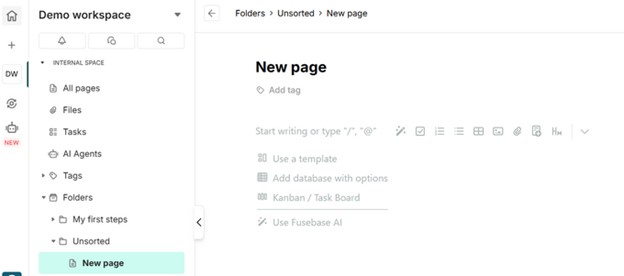
If you love working with wikis, you would love your experience with Nimbus Notes, too. In terms of organization, Nimbus Notes does a great job. You can organize the tags, folders, tasks, and everything else in separate bars, and accessing them becomes easier.
Another thing I like about Nimbus is the AI and automation tools. Besides using it to just manage notes, you can use it in your marketing campaigns. For example, the AI tools will help you in your LinkedIn search, generating leads, creating blog posts, managing your calendar, and so much more.
Pricing
Besides the free option, Nimbus Note offers 4 other pricing plans. However, they impose limits on almost everything, like the number of members, AI searches, automations, and portals. The pricing starts at $39/month to $399 month based on those limitations.
TagSpaces
TagSpaces is a local-first note-taking and file organization tool that works entirely offline. It lets you create notes in Markdown, HTML, or plain text, and manage them alongside your files using tags. Instead of storing data in a cloud or database, it saves everything directly on your device, so you have full control over your information.
You can tag files by renaming them or by using sidecar files. TagSpaces is great for organizing notes, as you can also create digital maps, mind maps, and keep voice notes.
What can you do with TagSpaces?
- Clip web pages and save them as local files using browser extensions
- Access and manage your notes and files offline without any cloud dependency
- Use generative AI tools and chatbots
- Preview various file types, including images, PDFs, audio, and video
- Customize the interface with themes and view modes to suit your preferences
- Screenshot and bookmark webpages
- Annotate and edit your files and notes, including images, music, documents, etc.
What I like best about TagSpaces?
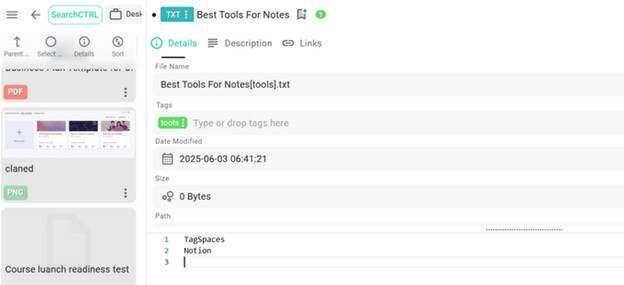
Though it takes some getting used to, TagSpaces allows you to create and organize all your important notes and files in one place. Plus, you can manage them in a visually pleasing way. It provides different view options, such as mind maps, circular maps, graphs, etc.
TagSpaces connects to Ollama, an external AI tool to help with a number of tasks, such as generating summaries, images, and tags.
Pricing
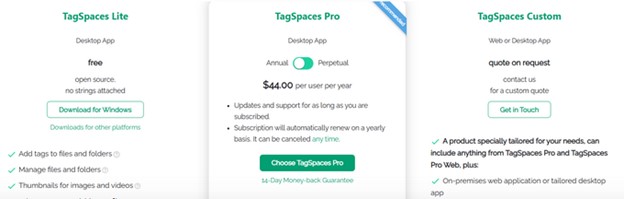
TagSpaces offers 3 pricing options, including a free plan. The pricing starts at $44/year per user. However, the free plan is more than enough to create and organize notes and files. The greatest thing about pricing is that you have no limits on any of the features.
Simplenote
This is one of the cases when the name tells everything, because Simplenote focuses on simplicity.
It is designed for quick text capture, with a clean interface that avoids distractions. Notes are synced automatically across devices, and you can organize them using tags instead of folders. It supports Markdown for basic formatting, and you can collaborate on notes by sharing them with others. The app is entirely free and works offline.
What can you do with Simplenote?
- Tag notes for easy filtering and instant search
- Collaborate on notes by sharing them with others for real-time editing
- Access version history to restore previous versions of a note
- Pin important notes to keep them at the top of your list
- Use checklist formatting for simple task tracking
- Lock the app with a PIN or fingerprint on mobile devices
What I like best about Simplenotes?
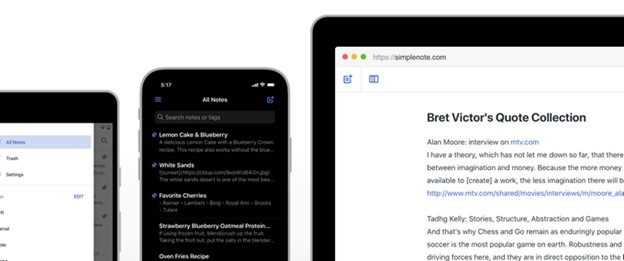
If you are looking for a tool just to keep your notes, Simplenote provides just that. It has a minimalist design, so you can focus only on writing. This combination of speed, simplicity, and efficient organization makes Simplenote a reliable tool for managing text-based information.
Pricing
Simplenote is completely free. It is available for all devices, including iOS, Android, Mac, Windows, Linux, and the browser.
Fireflies AI
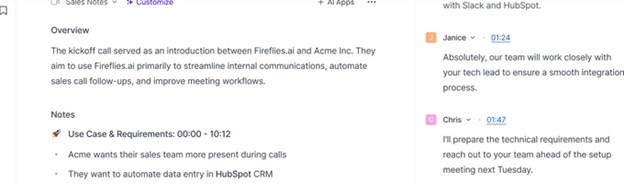
Fireflies.ai is an AI-powered meeting assistant that records, transcribes, and summarizes conversations during virtual meetings. Unlike the note-management tools we discussed above, Fireflies helps you capture notes.
By integrating with platforms like Zoom, Google Meet, and Microsoft Teams, Fireflies.ai can join meetings to capture and process audio in real-time. You can use it as your AI assistant to help with notes during client sessions. Of course, only when the client gives permission for recording your session.
What can you do with Fireflies AI?
- Automatically record and transcribe meetings across various video conferencing platforms.
- Generate concise summaries highlighting key points and action items post-meeting.
- Search through transcripts using keywords to quickly locate specific information.
- Integrate with tools like Slack, Asana, and Salesforce to streamline workflow.
- Access and manage meeting notes across devices, with offline capabilities.
What I like best about Fireflies AI?
The AI-generated summaries provide concise overviews of discussions, highlighting key points and action items. The tool has an integration with Notion, so you can outline the main points of the discussion with your clients, then use Notion to manage the notes.
Pricing
The tool has a free plan with unlimited transcriptions available. However, if you need more storage, AI apps, and integrations, you would need the paid options. The pricing starts from $10 to $39.
Krisp AI
Krisp is an AI meeting assistant designed for effortless note-taking. It automatically transcribes your coaching sessions, generates summaries, and cancels background noise without the need for bots or extra setup.
What can you do with Krisp?
- You can easily revisit key moments, check for progress, or share notes with clients afterward.
- Remove noise, echo, cross-talk from your sessions.
- Summarize the key points of the meeting and list the action steps automatically.
- Synchronize the notes with the CRM.
- Track tasks from your session.

Pricing
The tool has a free plan with unlimited transcriptions and recording. Other pricing plans include $16 Pro plan and $30 for the Business plan.
Did you find your favorite note-taking app yet?
Note-taking is personal. What works for one person might feel completely wrong for someone else.
Some tools are built for structure, others for flexibility. Some are better for tasks, others for journaling. Whether you like connecting your thoughts in a graph, highlighting text in five colors, or keeping it all in plain, simple notes, there is something on this list that probably fits your style.
And if none of them feel right? No one canceled the paper. Regardless of the dozens of apps I have installed, I still keep a stack of notebooks on my desk. Most importantly, see what feels natural, and do not force yourself into a system that adds more stress than clarity.



