
The following guide covers:
AI in L&D in numbers: 5 trends to know
How to automate your L&D work with AI use cases
Let me guess: you have been told to use AI to save time. You open ChatGPT, ask it to create a training outline, and get something that looks fine. Then you spend the next two hours fixing it. The examples do not fit your company, the quiz questions are too easy, and half of the recommendations are irrelevant to your team.
The problem is not necessarily the AI. It is how you use it.
Most advice on AI in learning and development focuses on individual tasks: generate a quiz, write a lesson, create a training video. But these tasks are connected. Your curriculum should follow your skill gap analysis, and your training content should follow your curriculum. If you automate each task separately without giving AI the right context, you can end up producing more content without solving the problem that made you create the training in the first place.
So, I tested a different approach. I built three AI workflows in Claude for a fictional 12-person customer support team, using realistic skill assessments, manager feedback and business goals. I used the output of each workflow as the input for the next, from identifying skill gaps to designing a training program and creating its content.
In this article, you will see the exact prompts I used, what Claude produced, where its recommendations surprised me, and what I still had to check or correct. Also you can
- See what the latest research says about how L&D teams actually use AI
- Understand why AI often creates more work before it saves any
- Learn where human judgment is still non-negotiable
AI in L&D in numbers: 5 trends to know
Before we get to the "how," let us look at what is happening inside L&D teams right now, I reviewed the latest research on AI use in learning and development, and five patterns kept coming up.
#1 AI has become an everyday L&D tool
Around 5 years ago, using AI in L&D was an experiment. Now, it is simply part of the job.
According to Synthesia's AI in Learning & Development Report, 87% of L&D professionals already use AI, and only 2% have no plans to adopt it. The tools are mostly the ones you already know: ChatGPT (74%), Copilot (54%), and Gemini (39%).
The same picture appears in Donald H Taylor and Eglė Vinauskaitė's AI in L&D 2026 research. More than two-thirds of the 531 practitioners they surveyed say their organizations use AI in L&D. Two years ago, it was about 40%.
"AI has crossed a threshold in L&D."
Dr Philippa Hardman, learning scientist, Co-Founder of Epiphany AI, Affiliated Scholar at the University of Cambridge
So, the question is no longer whether your L&D team uses AI. It is how well.
#2 Most L&D teams use AI for one thing: producing content faster
When I looked at what L&D teams actually "hire" AI for, the list was short.
Synthesia's survey shows the heaviest use sits in production tasks: voice generation (63%), quiz drafting (60%), video creation (52%), and translation (38%). 84% of respondents say speed is the biggest reason they use AI at all, and 88% report time saved on content creation as its main value so far.
Content development and learning design remain the center of AI use in L&D, and faster content creation is still the most expected benefit.
Nothing wrong with speed, right? But if AI only helps you produce more courses faster, you may end up with more courses nobody needed. The real gain comes earlier, when AI helps you decide what to build. We will get to that later in this article.
#3 AI often creates more work before it saves any
I think this one is the most relatable. Because we are told to use AI for productivity, but at the end of the day we spend more time correcting the AI outputs.
You save time on the first draft, then lose it on fact-checking, rewriting, and fixing. SHRM's 2026 research estimates that workers who use AI save about six hours a week, yet spend around four hours a week fixing AI-generated outputs. For L&D, accuracy is a big concern, too: 52% of L&D teams name it as a blocker to wider AI use, second only to security (58%).
The L&D community feels it. The 2026 L&D Global Sentiment Survey, with more than 3,500 votes from over 100 countries, found that for many practitioners, AI adds pressure instead of relieving it.
Why does it happen? In most cases, because AI is used as a one-off chatbot instead of a workflow. Only 9% of L&D teams have scaled AI across their organization, and just 6% describe it as fully integrated. Gallup sees the same pattern across the whole workforce: most organizations have not yet redesigned workflows, roles, or processes around AI.
#4 L&D teams are asking for workflows, not more tools
So, what do L&D professionals say they need?
Not another app. When Synthesia asked what would help them use AI more effectively, 67% chose AI skills and design training, 63% chose workflow guidance, and another 63% asked for help measuring impact.
In other words, L&D teams already have the tools. What they are missing is a clear answer to "Which of my tasks should AI do, and how exactly?" That is what we will find out in this article.
#5 AI is moving from content into analysis and evaluation
Here is the shift that interests me most.
In Taylor and Vinauskaitė's research, evaluation and analytics climbed from eighth to third place among ten categories of AI use between 2023 and 2026. 44.5% of respondents now expect data analysis to support decision-making to be one of AI's main benefits, up from 31.9% in 2024.
And the teams that are pulling ahead use AI differently. In the same research, a small "break-out" group of L&D teams more often put AI directly in front of learners through practice, coaching, and feedback (38% versus 17% of other teams). Only 37% of them ranked faster content creation among their top three expected benefits, compared to 63% of other teams.
So, the future of AI in L&D is less about producing more content and more about knowing what to train, building it on solid ground, and checking whether it worked.
How to automate your L&D work with AI use cases
Now, let us get practical.
Most AI advice treats each task in isolation: one prompt for a quiz, another for an outline. But L&D work does not happen in isolation. Your curriculum depends on your skill gap analysis, and your content depends on your curriculum. So, I tested AI the way the work actually flows, where the output of one task becomes the input for the next.
You can run all of these with files attached to the chat. In Claude, you can also connect tools like Google Drive or your LMS through connectors (built on MCP, the Model Context Protocol). That means Claude can open your skills framework or test results directly from your Drive and access your reports, instead of you copying and pasting everything into the chat.
I chose three workflows that follow the basic L&D cycle: find the skill gaps, design the program and build the content.
| L&D task | AI workflow | What AI does | Benefit | What it needs from you |
| Training needs analysis | Skill Gap Analyzer | Combines test scores and manager ratings, ranks skill gaps by business priority, explains why the gaps exist and builds an action plan | You train for the gaps that move your business goals, not the loudest ones | Clean data, company goals, constraints and the final call on priorities |
| Program design | Curriculum Builder | Turns the gaps into learner tracks, modules, a schedule, certification criteria and a budget | A structured, approvable program instead of a blank page | Your skill gap results, time limits, budget and a check of the facts |
| Content development | Content Converter | Turns curriculum modules and source materials into presentations and other training content | Ready-to-edit materials for every track in minutes | Source content, design edits and an expert review |
How I tested them
To keep it realistic, I created a test case for a fictional 12-person customer support team with two goals for the next 12 months:
- Improve customer retention by 20%
- Expand into Spanish-speaking retail markets
For the skill gap analysis, I prepared a roster, a skills framework with role tasks, skill test results and manager assessments with short comments. The curriculum was built from the gap analysis results, and the training content from the curriculum. So, each step depended on the one before it, just as it would in your real work.
I ran all three tests in Claude. One thing I recommend before we start: use anonymized or dummy data whenever you test AI with employee information. You do not want to put personal or sensitive employee data into AI tools, and for good reason.
# 1 Skill gap analyzer
What it automates: the training needs analysis you usually do across five spreadsheets. That means matching tasks to skills, scoring people, ranking gaps, and turning all of it into a plan.
What you need: Claude with your files attached, or connected through Google Drive. I tested it on a 12-person customer support team using these files:
| File | What it holds |
| Roster | Employee ID, role, level, tenure, manager |
| Skills framework | Role tasks with frequency, importance, difficulty, and required level (1–5) |
| Test results | Skill test scores per employee (0–100) |
| Manager assessments | Ratings (1–5) and a short comment per employee |
| Training history (optional) | Courses completed, hours, spend |
| Performance KPIs (optional) | CSAT, resolution time, save rate |
For the roster, you can use employee numbers instead of real names, because the names I used are fabricated and not real employee data.
What I tested
I mentioned our company goal was to improve customer retention and that we will be expanding into Spanish-speaking retail markets. I wanted Claude to give me the full action plan on what skills each employee should be trained on and the action plan it suggests.
The prompt I used:
I am an L&D specialist running a skill gap analysis for our [team name] team ([number] employees). ATTACHED FILES: [roster], [skills framework], [test results], [manager assessments], [training history] (optional), [performance KPIs] (optional) COMPANY GOALS (next 12 months): 1. [e.g. Improve customer retention by 20%] 2. [e.g. Expand into Spanish-speaking retail markets] CONSTRAINTS: L&D budget: [amount]. Time for training: [e.g. 2 hours per employee per week]. Internal experts: [names or “none”]. Hiring is / is not an option. WHAT I NEED: OUTPUT: a dashboard (headline numbers, priority ranking, priority matrix, people × skills heatmap, individual focus table with manager comments, action plan), a short summary for leadership, individual development plans for the top [3–5] people with the largest gaps. Keep the analysis files so I can rerun it after the next assessment. |
How AI helped me with gap analysis?
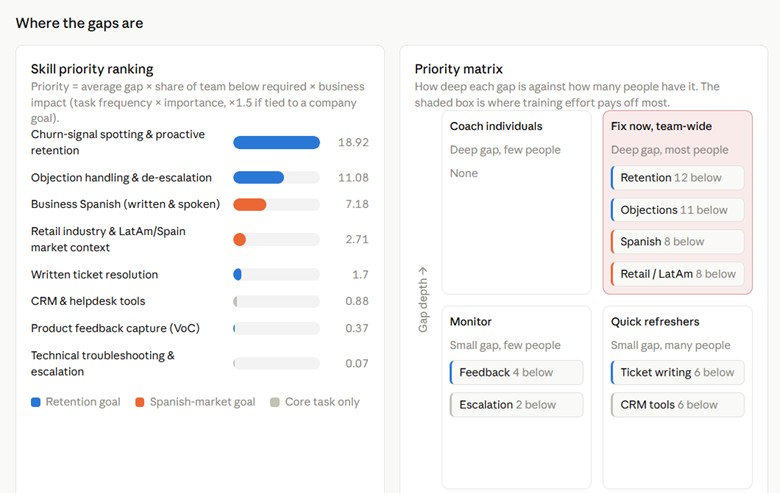
I got an interactive dashboard, not a wall of text. Three things stood out.
- It showed its math and how it calculated the results.
- It checked the data before trusting it.
- It connected skills to the business goals. My task list said nothing about retention or Spanish. It added three goal-driven skills on its own: proactive retention, Business Spanish, and retail market context.
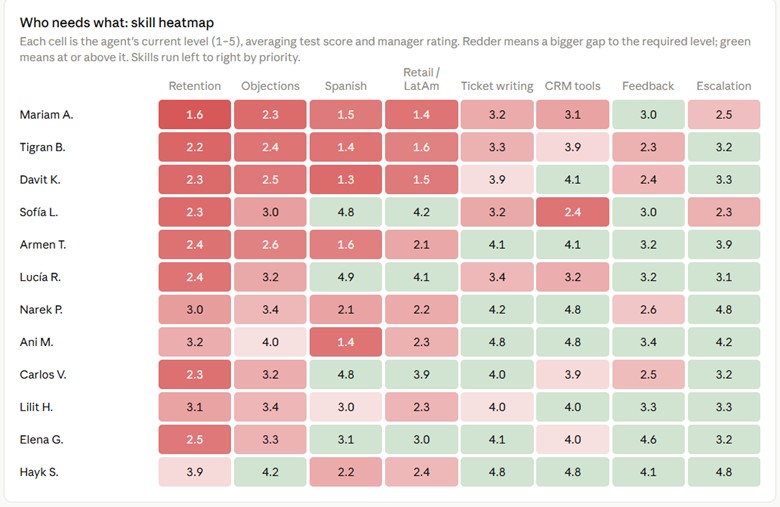
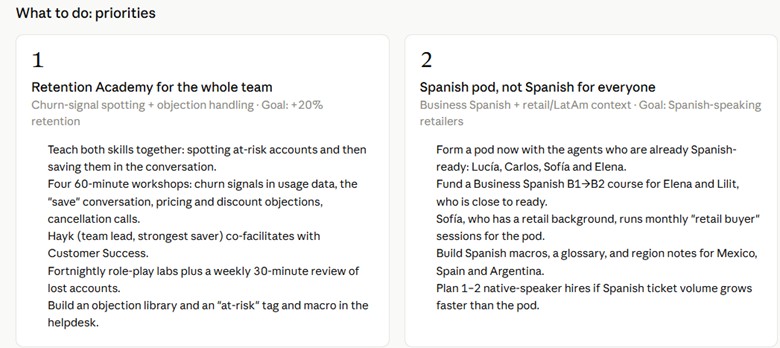
The recommendations read as if they came from a consultant
- A team-wide Retention Academy. Spotting churn signals and handling objections were the top gaps, so it suggested teaching them together.
- A Spanish pod instead of Spanish for everyone. Only a few support agents were Spanish-ready, so it recommended building a pod around them. It suggested funding a course for the two agents closest to ready, and considering 1–2 native-speaker hires if Spanish ticket volume grows.
- A peer buddy exchange for CRM and ticket writing. Agents strong in one area teach others in exchange for market context, so learning flows both ways and the cost stays low.
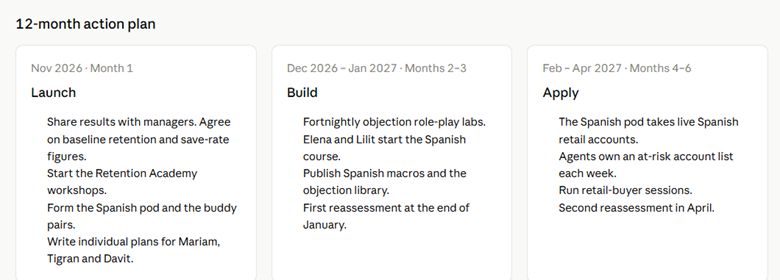
On top of that, it produced individual development plans for the three employees with the largest gaps. It also built a 12-month plan in four phases (Launch, Build, Apply, Sustain), with reassessments in January and April, and success metrics for business, skills, the Spanish market, and learning.
Where you still step in:
- Check the weighting. Averaging test scores and manager ratings equally may not suit your team.
- Validate the assumptions it flagged.
- Decide whether the hiring recommendation fits your budget. AI ranked gaps, but as a learning and development team member, you still need to choose what to implement and what not.
Once you make all the decisions and understand how exactly the gap analyzer can help you, you can refine it and turn it into scheduled tasks that run on their own and present you all the suggestions.
How will Uteach help as your LMS?
- Employee testing and skill evaluation give you the test scores this analysis runs on.
- Analytics and reporting dashboards track each skill after training, so the January and April reassessments take minutes.
- The AI report assistant pulls the reports you need for the next round of analysis.
- Live sessions, quizzes, and certificates let you run the Retention Academy and role-play labs in one branded academy.
#2 Curriculum builder for learning and development
With the skill gap analysis you already know which groups need upskilling and in which areas. Based on it, you can analysze what actually could be fixed with training, and where training would not help. After finalizing the results we will use the data from the training needs analysis results to create a curriculum based on it.
What you need: the output of your skill gap analysis (the dashboard, summary or files), plus the same constraints you used there. Yet, if you decide not feed AI the skill gap data, you will end up with just a regular online training outline.
The prompt I used:
I am building a training curriculum based on the attached skill gap analysis for our [team name] team. PROGRAM GOAL: [e.g. Get a Spanish-speaking support pod live on Spanish retail accounts by February 2027] CONSTRAINTS: Duration: [e.g. 12 weeks, starting November 2026]. Time for training: [hours per employee per week]. Budget: [amount]. Internal experts: [names or IDs from the TNA]. Target markets: [e.g. Mexico, Spain, Argentina]. WHAT I NEED: OUTPUT: a document I can share. |
How AI helped me with the curriculum
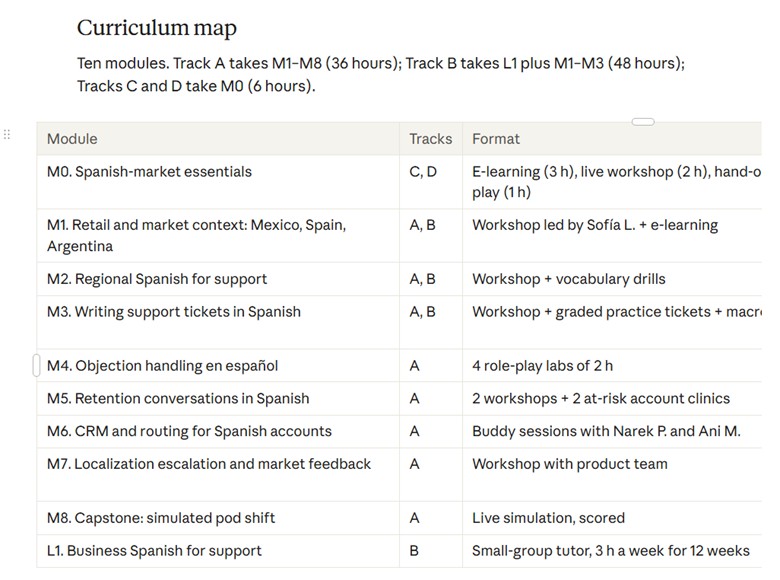
What I got back was a 12-week program document. And although I did not specify whether all the team members need training, it did not build the learning tracks for everyone.
Only 4 of my 12 team members were Spanish-ready, and one more was close. AI did the math: getting seven people with no working Spanish to business level within a year is not realistic. So it treated Spanish as a staffing question, not a training one, and split the team into four tracks.
It also helped me find the gap behind the gap.
The Spanish speakers already had the language. What they lacked was the playbook: proactive retention and objection handling were their weakest skills, and two of them were slow in the CRM. So every employee got their own track.
Where you still step in
Claude knew more about the markets than I expected, so it expected the peak seasons and adapted the training hours based on the availability of the support agents. Market facts are something you shall check with the specialists, so I would not trust AI blindly on this.
A few more things you stiil need to check include:
- Check the hours against your weekly limit.
- Watch for facilitator overload.
- Chekc how the curriculum supports your business goals.
Create your curriculum with your LMS
Most LMS tools, such as Uteach, help you with designing curriculum, the assessments, and other administrative tasks. Yet, with the AI tools LMS offer we have less opportunities to input the necessary data so that the curriculum is generated exactly for our business goals. The LLMs are more flexible in this regard. But for designing something in a short time, the AI tools learning management systems offer are still practical.
With Uteach, you can type the name of your training program. The AI suggests the course topics, modules and lessons for it. Then, you can rename modules, reorder lessons, delete what you do not need and add your own.
Related: Employee Training Plan | How to Create One With a Template
# 3 Content converter
What it automates: turning dense SOPs, policy documents, and SME notes into short lessons people will actually read or engage with.
Once you approve the curriculum and know what training programs you are going to run exactly, you can proceed with creating the materials. One of the basic things you can do with AI is creating the videos, presentation or quizzes.
What results AI provided me for the training program content?
For the next task, I created the presentations for all the tracks and all the process with editing took 30 minutes for doing the 5 presentations.
Where you still step in: getting answers from the SME and updating the SOP before the lesson goes live. AI found the holes, but it cannot decide policies. You also need to fix the design, edit the content and make sure it reflects your training objectives and goals.
Related: How to Use AI and Generate Courses in Less Than 3 Hours
What I learned after testing?
As you can see, I just tested the most basic, prompt-based L&D tasks for which you need no setup and no integrations.
Yet even at this level, the results changed how I think about the learning and development workload. A skill gap analysis that usually takes days of spreadsheet work came back as a full dashboard with a 12-month plan. A curriculum came back with four learner tracks, a budget and certification criteria.
So imagine how much more time you can actually save if you use the setups and intgerations.
When you connect AI to the tools you already use, through connectors like MCP in Claude or automations in your LMS, you stop running single prompts and start running workflows. The agents can pass work to each other and to your systems, without you copying and pasting in between. For example, you can test and set up things like:
- Reassessment on autopilot. Every quarter, AI pulls the latest test results, reruns the skill gap analysis and sends you only what changed.
- Weekly progress digests for managers. Instead of exporting reports, each manager gets a short summary of who is behind, who is ready for certification and who needs a conversation.
- Onboarding without the admin. A new hire appears in your HR system, and AI enrolls them in the right learning path, schedules their first live session and reminds their buddy.
- Compliance renewals that do not slip. AI tracks certificate expiry dates and nudges people 30 days before, not 3 days after.
- Feedback that gets read. AI groups hundreds of open-text survey answers into themes, with quotes, before your next program review.
- Content that stays current. When an SOP changes, AI flags every lesson and quiz built on the old version.
So instead of treating AI like a replacement for learning and development, you can treat it as your partner and assistant.
The best learning management systems that support AI
When companies reach out to us while researching a training platform, AI features are now one of the first things they ask about. Often, it is the very first.
Not so long ago, the checklist looked very different. For example, companies wanted SCORM support, a course catalog, completion tracking, certificates and detailed reporting. If a platform covered those, it made the shortlist.
Those features still matter. But they are now the baseline, not the reason to choose a platform. AI is no longer a nice-to-have addition to your LMS.
Here is what an LMS with built-in AI can give you:
- Faster course creation. Generate topics, outlines, lessons and quizzes from a program name or your own documents, then edit instead of writing from scratch.
- Less admin work. Ask for a report, a learner group or a list of who is falling behind, and get it without filters and exports.
- Skill insight. See where the gaps are and whether training is closing them.
- Practice and support for learners. Safe practice for real conversations, plus answers when learners need them.
So, how do the main platforms compare? I looked at what four of them currently offer.
| Uteach | Docebo | TalentLMS | 360Learning | |
| AI content creation | • Generates training topics, course outlines and lesson descriptions • AI curriculum builder: enter a program name and get suggested courses, modules and lessons to edit • AI quiz creation | • Creator, an AI content creation tool • Lessons and AI-powered experiences built from one entry point | • TalentCraft AI course creator: text, quizzes and images • Turns PDF, Word and PowerPoint files into courses • AI video with voiceover | • AI authoring turns documents into interactive courses • Automatic course translation into 67 languages |
| AI admin assistant and reporting | • Your own AI assistant inside the platform • Ask who is falling behind, or for a report of top results in a certification program • Create new learner groups and run dashboard tasks by request | • Harmony Copilot with suggested actions and an agent menu • AgentHub agents for platform tasks | _ | • AI Companion launched with a search mode • “Data insights” and “platform usage” modes announced as coming next |
| Skills and gap analysis | • Employee testing and skill evaluation • Analytics dashboards by learner, group and program | • Skills Intelligence infers skills and spots gaps | • AI skills-based training: map skills, find gaps, train to close them | • Skills-based learning; not a separately named AI feature |
FAQ
- Is AI replacing L&D professionals?
As for now, AI cannot fully replace the learning and development professionals. On the contrary, in Synthesia's survey, 58% say AI gives the learning and development more strategic influence. But what is changing is the job itself, as you spend less time producing content, more time deciding what to build and proving it worked.
When drafting and production become cheaper, simply producing more courses becomes a weaker way to demonstrate value. Diagnosing skill gaps, designing effective learning experiences, advising managers and evaluating results become more important differentiators.
There is a necessary qualification: automation can still reduce demand for some narrowly defined production roles.
- What is AI transforming in L&D right now?
AI Mostly content production, for now.
Transformation 1: Course development is becoming faster
AI can turn a subject-matter expert's notes, internal documentation or existing training material into a first draft of a course outline, lesson script, knowledge check or scenario.
Transformation 2: Training content is becoming easier to update and localize
Voice generation, AI video and translation tools can reduce the work involved in producing alternative versions of training. This is especially relevant for organizations operating across multiple countries or training employees who speak different languages.
Transformation 3: Learning is moving closer to the moment employees need help
AI knowledge assistants can answer questions based on approved company documents, training materials and procedures. Rather than requiring an employee to find and complete a full course, an assistant can help them locate the relevant information while working.
- Is it safe to upload employee data to ChatGPT or Claude?
Sometimes, but the answer depends on the product, account type, data involved and your organization's policies. It is incorrect to assume that every AI conversation is automatically used for training. It is equally incorrect to assume that a conversation is safe simply because the provider does not use it for model training.
OpenAI states that business data from ChatGPT Business, Enterprise, Edu and its API platform is not used to train models by default. For individual services, including Free, Plus and Pro, content may be used to improve models depending on the user's settings․
Anthropic states that inputs and outputs from commercial products such as Claude for Work and its API are not used to train its models by default. Its consumer services have different terms and controls, so the account type and applicable settings matter.
Security is one of the most common blocker to AI adoption in learning and development. So, instead of employee real names and information you can use dummy data to make decisions.
Conclusion
AI in learning and development is no longer a question of “if”. Most L&D teams already use it. The real question is whether it saves you time or quietly adds to your workload.
My tests showed that the difference comes down to how you use it. When AI gets a vague request, you get a generic draft and two hours of fixing. When it gets your data, your goals and a clear task, you get a skill gap analysis with a 12-month plan, a curriculum with learner tracks and a budget, and training materials for every track, all built on each other.
But in every test, the final decisions stayed with me: which gaps to fix, which market facts to trust, which hours were realistic and what the content should actually teach. AI did the heavy lifting. The judgment was still mine.
So, do not start by automating everything. Pick one task that eats your week, give AI the context it needs, and check what comes back. Once you trust the result, connect the next step. That is how one prompt becomes a workflow, and a workflow becomes hours you can spend on the work only you can do.
And when you are ready to bring that work into one place, from AI-generated courses and quizzes to skill evaluations and reports, Uteach is built for exactly that. Book a demo, and our specialist will help you map your training process with AI.