
The following guide covers:
6 Tips to build a remote team to expand internationally
Final checklist: building a remote team that supports international growth
Expanding internationally is a major step for any growing company. But success in new markets is not just about product fit or customer demand. It often comes down to whether your team can scale globally without losing alignment, speed, or clarity.
This guide walks through a step-by-step approach to building remote teams that do not just work, but drive your company’s global expansion.
Let’s start at the beginning: not with hiring, but with identifying what is really holding you back.
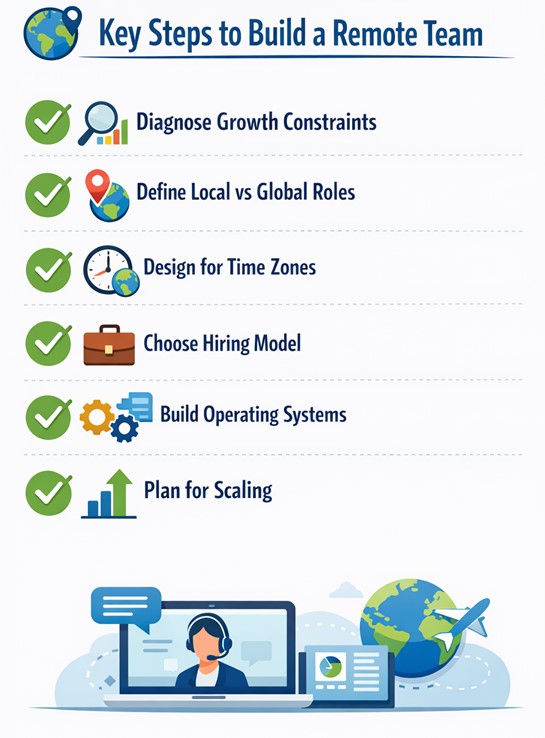
6 Tips to build a remote team to expand internationally
According to the State of Remote Work Report, 98% of employees would recommend remote work to their colleagues and friends. That would not be true if companies had not built remote teams that not only align with company goals but also with employee expectations.
A well-designed remote team allows you to find real global talent, move faster, reduce overhead, and stay agile across regions.
You would probably think building a nearshoring team that truly supports international growth is just hiring people in different countries. Yet, the process requires intentional decisions around roles, structure, time zones, systems, and hiring models.
Let’s get deeper into each step.
#1 Start with growth constraints, not headcount
Before thinking about the roles you need, pause and ask: What is actually preventing us from growing internationally right now?
As odd as it sounds, expanding the team does not mean immediate hiring. Having new people on board before solving core issues can create complexity without impact.
Instead, identify specific blockers in each target market.
- Are legal or compliance issues slowing entry?
- Is customer support lagging in key time zones?
- Does the product need localization to meet local expectations?
- Example
For instance, let’s say you are a SaaS company planning to enter the German market. But the regulations are different there. Your analysis would reveal that data privacy compliance and product localization are the real hurdles. So, you would need a product specialist familiar with GDPR who can help you tailor the product and messaging.
This example proves that one hire can unblock your go-to-market plan faster than any immediate sales push could have.
Meaning, when you tie roles directly to strategic outcomes, your remote hiring becomes a lever for international growth, not just an operational cost.
Once these growth constraints are clear, the next logical step to building a remote team is to decide where talent needs to be located to best solve those problems.
#2 Define which roles should be local and which can stay global
Now that you have the priorities in place, you can decide which roles you need and whether they require local presence.
As you know, not every function benefits from being in-market. Certain roles, like legal, compliance, and region-specific sales or customer success, require a deep understanding of local regulations or customer behavior.
Others (such as product, engineering, design, and finance) are typically more centralized and scalable across borders.
The decision is not just about location. It becomes your leverage.
Ask yourself: Will having this person in-market significantly accelerate results? If the answer is yes, localize. If not, centralize and optimize for scale.
A Reddit user who has been working remotely shared their experience and best practices on hiring remote employees.
“Not everyone is suitable for remote work. Hire with purpose. The best remote workers typically default to social and support networks that are built independently from work. If relationships are built at work, so much the better, but they don't naturally focus on them. Neither way is better, but one side of the scale is better suited for remote, the other for in-person.”
Reddit user
As soon as you have mapped out where roles should be based, a new question arises: How will all these remote workers collaborate effectively, across locations and time zones?
#3 Design the remote working experience around timezones, not availability
It is obvious that you cannot force everyone to work as if they were in the same office. By that, I mean the back-to-back meetings, real-time check-ins, and late-night pings. For distributed engineering organizations, this practical guide to managing a remote development team explains how to coordinate communication, tools, and collaboration across different time zones.
56% of employees who prefer remote work mention they are being more productive at home. To keep everything flexible and get the work done efficiently, keep in mind to
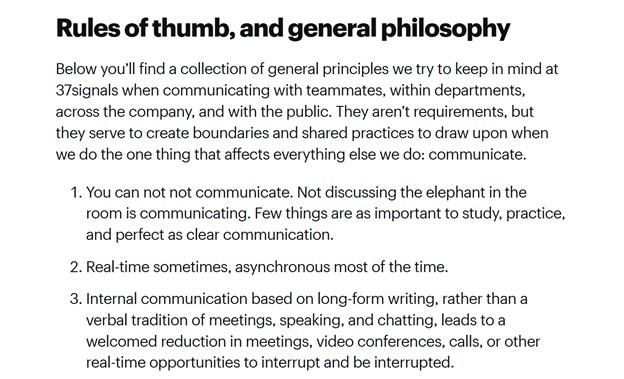
- Adopt an "asynchronous by default" communication style. Shift the burden of proof from "Why shouldn't this be a meeting?" to "Why can't this be a document?" When you document everything, work moves forward while the other half of the team sleeps.
“There is a reason we are really good at async, and that is because we make things smaller. Through iteration, you don’t have to coordinate with a ton of people. By taking smaller steps through iteration, we can ship faster. The only way this is possible is through asynchronous communication”.
Sid Sijbrandij,
GitLab co-founder
- Establish "Core Collaboration Hours." Rather than demanding 8 hours of overlap, identify a 2- to 3-hour window where time zones naturally intersect (e.g., 9:00 AM EST and 2:00 PM GMT). Use this strictly for high-bandwidth discussions or social bonding.
“The biggest challenge is overcoming time zones. If you are working during the day, even if everybody's working asynchronously very happily, it's nicer to work in an organization where there's activity, even if it's just on Slack. So if you are far away from your teammates in terms of time zone, you'll feel like there’s nobody to chat with or hang out with.”
Job van der Voort
CEO of Remote
- Normalize "Delayed Response" Expectations. Explicitly tell your team that an immediate reply is not required. This removes the "anxiety of the ping" and allows for deep, focused work.
You can check an example guide of how the Basecamp team communicates and the rules they have around team communication.
#4 Pick a hiring model that matches your expansion goals
Hiring across borders brings its own set of challenges. How you bring someone onto your team, legally and operationally, can affect everything from compliance and cost to improving learning retention.
There are three primary models for global hiring:
- Direct Employment (setting up a legal entity in-country): Ideal for long-term investment in a specific market. Offers full control and stability but comes with high setup costs and legal complexity.
- Contractors (independent freelancers or consultants): Fast and flexible, often good for short-term needs or testing new markets. But this model carries risks - misclassification, tax issues, and lack of long-term engagement. Employer of Record (EOR):
- A third-party service that hires employees on your behalf. This allows you to onboard full-time team members in new countries without setting up a local entity. It is a bit more expensive than direct hiring, but far faster and fully compliant.
For example, a startup expanding into South Africa needed a customer success manager immediately but was not ready to open an office. They partnered with Employer of Record South Africa and hired a local employee within weeks. This gave them a functioning local role quickly and allowed them to provide proper support to customers. Later, when the position proved essential, they moved the hire into their own structure.
#5 Build systems before focusing on culture
Strong culture is essential, but it cannot compensate for a missing structure. In distributed teams, clarity beats charisma. People need to know how decisions are made, who owns what, and where to find the information they need to do their jobs.
Without these foundations, even the best-intentioned team will struggle to stay aligned.
- Start by documenting your core workflows on onboarding, task management, communication channels, and decision-making processes.
- Create wikis (like Notion, or your employee training LMS) where team members can access what they need, whenever they need it.
- Centralize knowledge with an all-in-one LMS.
Onboarding should not be a series of repetitive Zoom calls. By using a platform like Uteach, you can transform your internal processes into structured, on-demand courses. This ensures that every hire, regardless of their time zone, receives the same high-quality training and "how-to" guides without needing a live supervisor present.
As your team grows, it is also important to recognize when systems and structures need to evolve. That brings us to the final step: scaling without breaking what already works.
#6 Scale without losing alignment
Adding more people to a remote team does not automatically increase productivity. In fact, as your headcount rises - especially across time zones and regions - things can start to slow down or break.
You will need to rethink decision-making structures, introduce middle management, and streamline collaboration tools and communication flows. What worked at 10 people probably will work at 100, and certainly not at 10.000.
- When you cannot see people working, you must align them through clear, measurable objectives. Objectives and Key Results (OKRs) ensure that a developer in Berlin and a marketer in Buenos Aires are both rowing toward the same goal.
- Ambiguity is the enemy of scale. For every project, meeting, or decision, there must be one person who is ultimately responsible for the outcome. This prevents the "bystander effect" common in large Slack channels.
FAQ - building a remote team
- How can you ensure productivity in a remote team?
You ensure productivity by setting clear expectations and using shared digital workspaces. Provide the team with the right tools to communicate and track their tasks. Regular short meetings help everyone stay focused on the same goals.
- How do you onboard a remote team member successfully?
Successful onboarding and training require a written guide that explains company processes and tools. Assign a specific partner to help the new hire during their first week. This ensures they have a direct contact for questions and feel welcome in the group.
- How do we know if our team is being productive?
You measure productivity by tracking the completion of tasks and the quality of the final work. Look at whether the team meets its deadlines and achieves the goals you set. Do not focus on the amount of time they spend logged into their computers.
- Should we try to force people to work certain hours to get more timezone overlap?
You should not force specific hours on your team. It is better to pick two or three core hours when everyone is available for meetings. Use written updates and recorded videos to share information outside of those shared hours.
Final checklist: building a remote team that supports international growth
Use this as a reference as you expand your distributed workforce:
- Diagnose before you hire: Identify the real growth constraints in each region.
- Place roles intentionally: Localize only when proximity adds real value.
- Build for time zones: Prioritize asynchronous communication and structure.
- Match hiring models to your stage: Use contractors, EORs, or direct employment based on speed, risk, and commitment.
- Document everything: Clear systems beat ad hoc culture in remote environments.
- Prepare for scale: Introduce structure, management, and rhythms as your team grows.
Onboard your remote employees effectively with Uteach LMS
New hires need effective onboarding training to be productive over time.
Uteach serves as a complete solution for remote onboarding by acting as a single home for all training materials. You can build a dedicated onboarding portal where new hires find their welcome videos, policy documents, and task lists in one place.
The system also improves remote engagement through a branded mobile app for iOS and Android, allowing staff to complete training on any device.
Managers can track performance using real-time analytics dashboards that show exactly who has finished their assignments and how they scored on assessments. To keep the team connected, the platform features built-in community forums and live session integration for hosting real-time workshops.
Book a demo to learn more about how Uteach can automate your onboarding workflow.


