How to create a custom bundle
Custom Bundles allow you to give students flexibility by letting them select a specific number of items from a predefined list of courses, products, live sessions, coaching programs, or quizzes.
This guide walks you through the full process step by step.
A Custom Bundle lets you:
- Combine different product types in one bundle
- Define minimum and maximum items a student must choose.
- Set one access duration that applies to all included items
- Sell or share the bundle publicly, privately, or via direct link
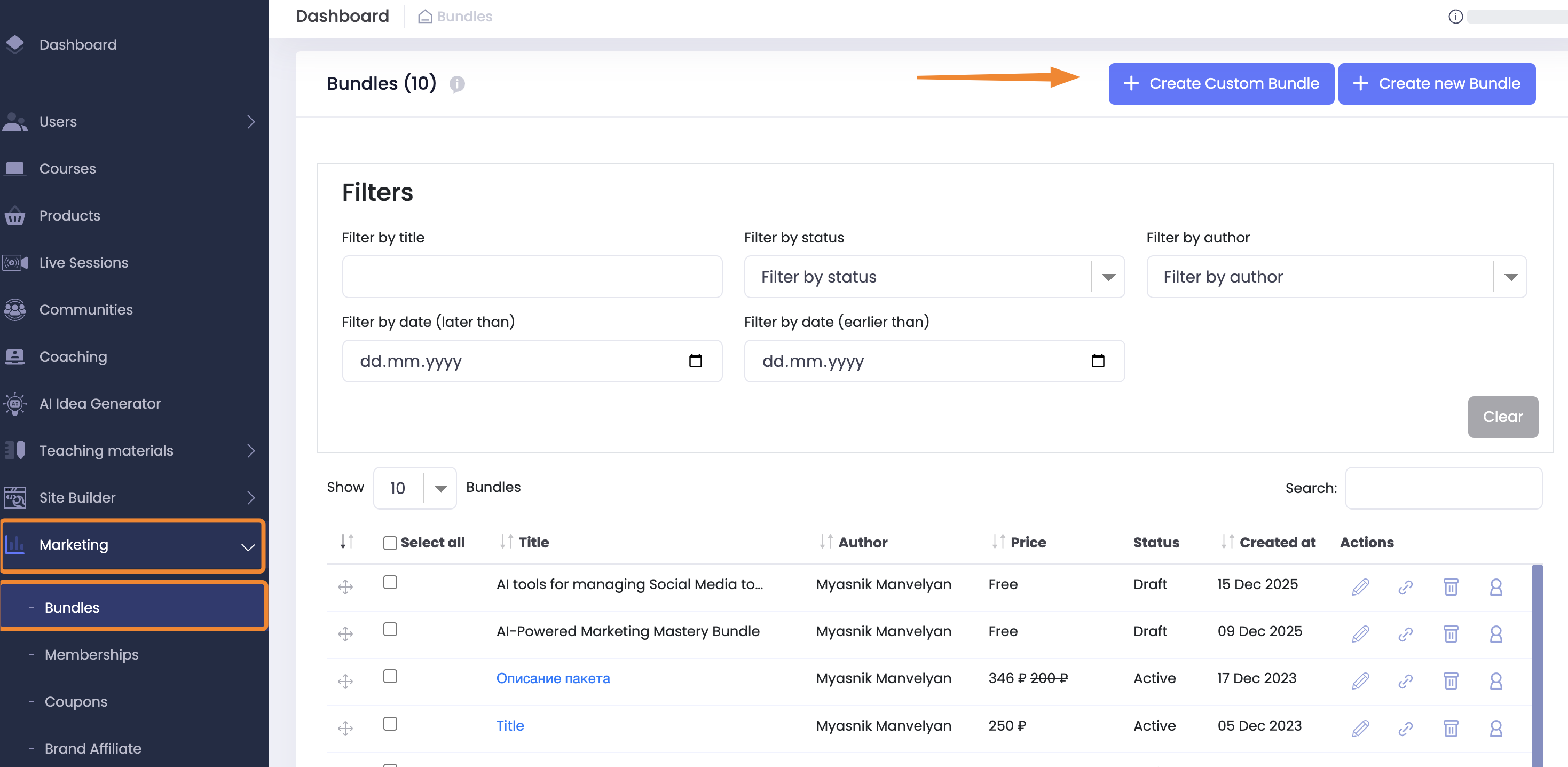
Step 1: Open the Bundles Section
- Go to Dashboard
- Navigate to Marketing → Bundles
- Click + Create Custom Bundle
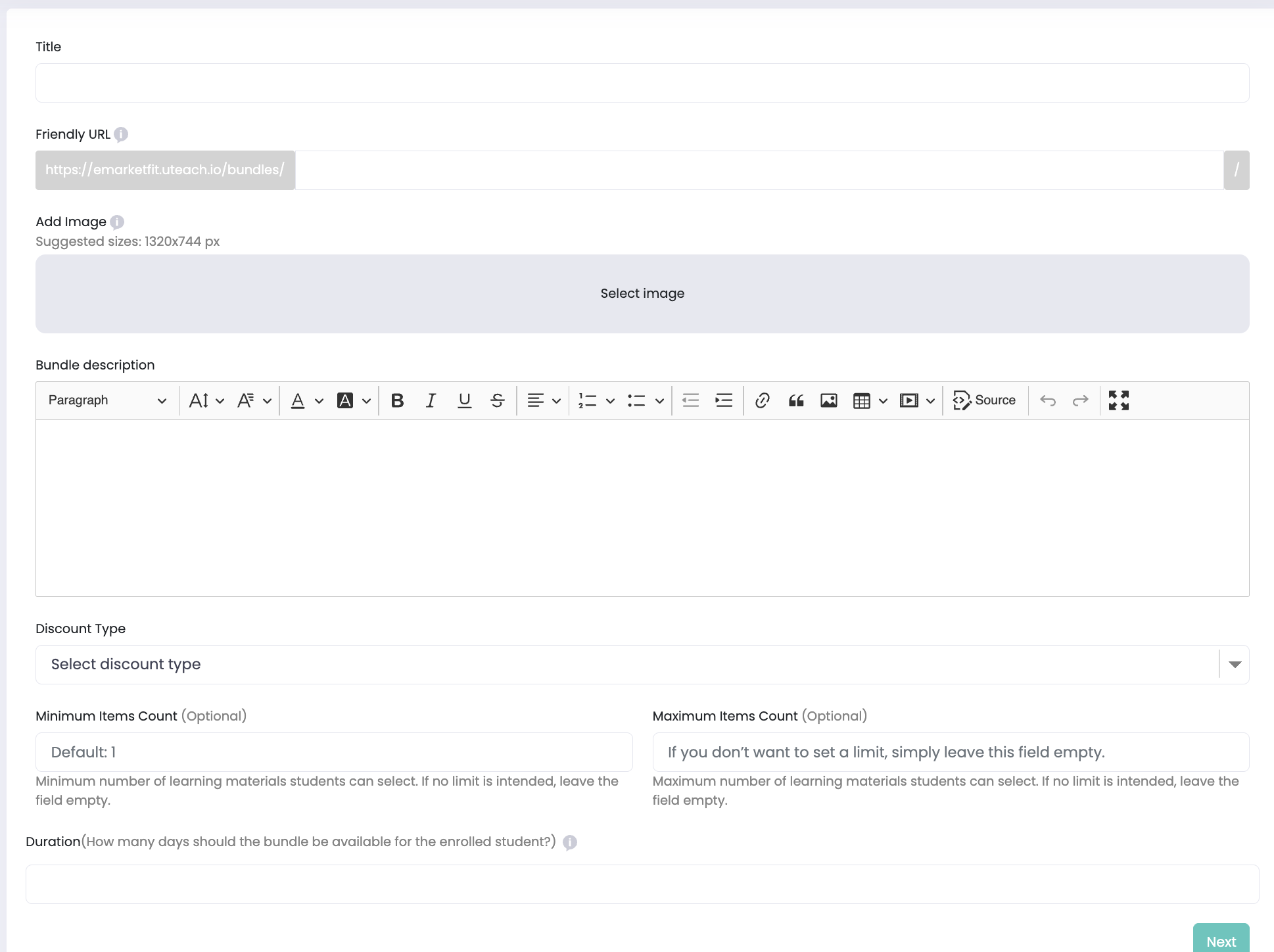
Fill in the basic bundle details:
Title – The name of your bundle
Friendly URL – Auto-generated, can be customized
Bundle Image – Recommended size: 1320 × 744 px
Bundle Description – Visible on the bundle landing page
Discount Type – Fixed amount or percentage
Minimum Items Count
Default: 1
Minimum number of items a student must select
Maximum Items Count
Leave empty for no limit
Duration (Important)
Set how many days the bundle will be available to the student
This duration overrides the duration of all included items
⚠️ Note:
Once the bundle duration expires, access is removed both from the bundle and all items inside it, even if individual products normally have longer access.
Step 2: Add Included Products
In the Included Products step, select which items can be part of the bundle.
You can include:
✅ Courses
✅ Products
✅ Live Sessions
✅ Coaching programs
✅ Quizzes
How it works
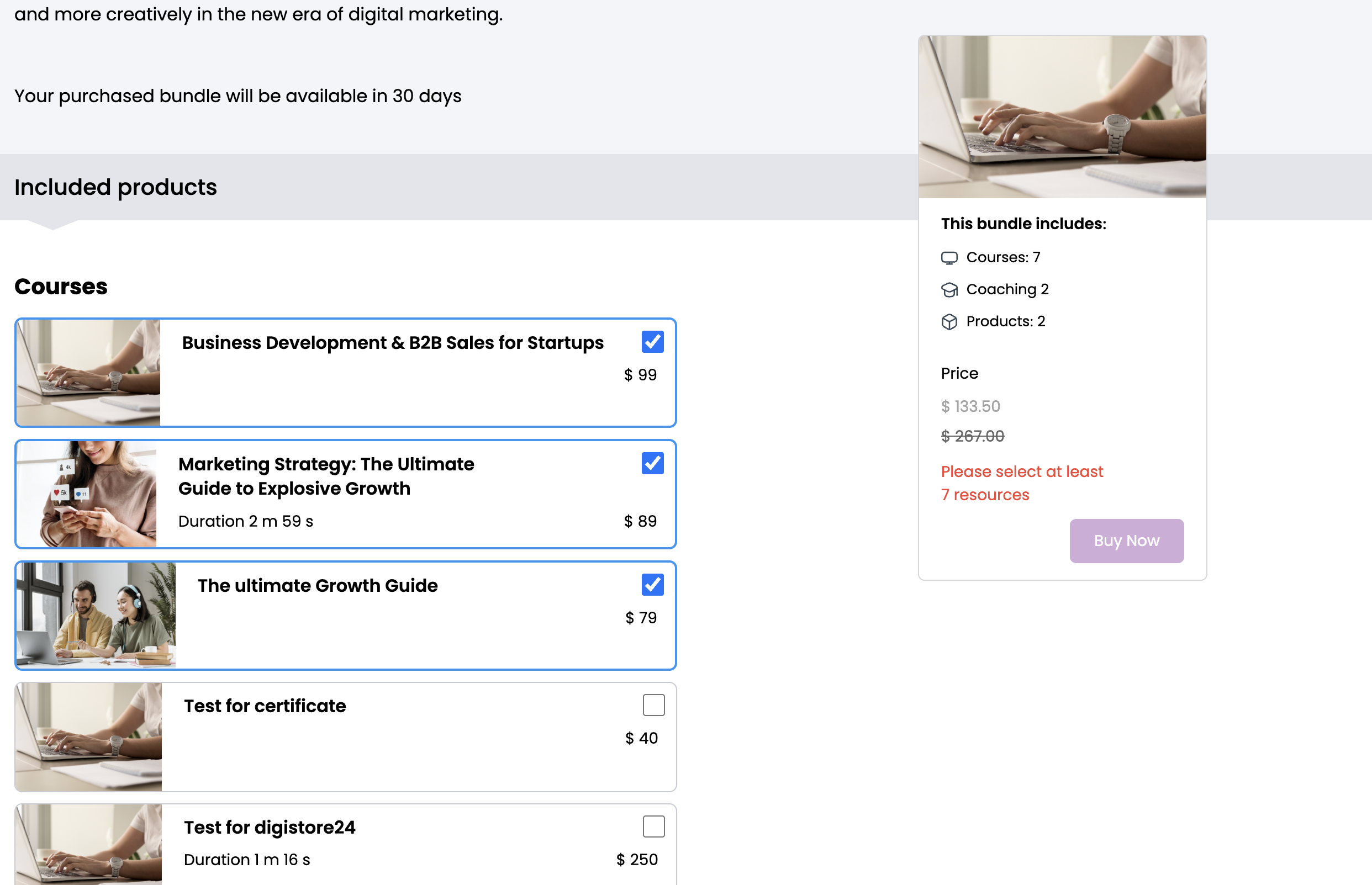
Students will see all selected items
They must choose the number of items you defined (min/max)
Prices are shown, but the bundle price rules apply
Example:
“Select minimum 5 and maximum 7 items from the list below.”
Step 3: Bundle Status & Visibility
Choose how your bundle is visible to students:
Draft
Not purchasable and visible only in admin dashboard
Published
Publicly available and purchasable
Unlisted
Accessible only via direct link, does not appear in the Bundles list.
Private
Visible only to students you manually grant access to
Step 4: SEO Settings
Improve search visibility by adding:
SEO Title (max 60 characters)
SEO Description (max 255 characters)
Bundle Keywords
JSON-LD (advanced use)
These settings affect how your bundle appears in search engines. Click Save / Next to finish setup. A bundle cannot be deleted if at least one student is enrolled
Key Notes & Best Practices
🎯 Use Custom Bundles when you want flexibility instead of fixed content
⏳ Always double-check bundle duration
📦 Combine multiple product types for higher perceived value
🔗 Use Unlisted bundles for promotions or corporate clients
🔒 Use Private bundles for internal training or VIP access
If you need help choosing the right bundle type or setting up advanced scenarios, feel free to contact Uteach Support Team
Reviewer![{"id":2,"user_id":25,"slug":"lusine-mkhitaryan","full_name":"Lusine Mkhitaryan","position":"Customer Support Specialist","tagline":"Customer Support Specialist","image":"uteach\/authors\/LxVlxPVHH6bKnNI51DR8-1743576946\/t02qfsy3cq2-u02u10sqk1q-727b0c81e36f-512.jpg","short_text":"I\u2019m a motivated Customer Support Specialist who thrives on making every customer experience smoother, more efficient, and more positive. \r\n\r\nI am dedicated to addressing customer needs with empathy, professionalism, and efficiency, always aiming to provide clear and effective solutions.\r\n\r\nMy approach emphasizes understanding the unique challenges customers face and finding creative ways to resolve them. I\u2019m passionate about streamlining support processes, optimizing workflows, and using innovative tools to deliver the best possible outcomes for customers.","education":"<ul><li>Bachelor's in English Language and Literature, Brusov State University\u00a0<\/li><li>Certified in Customer Service: Managing Customer Expectations<\/li><li>Certified in Innovative Customer Service Techniques<\/li><li>Certified in Working with Upset Customers<\/li><\/ul>","experience":"<ul><li>Customer Support Specialist at Uteach\u00a0<\/li><li>Digital Marketing Specialist at Munich Ventures\u00a0<\/li><li>Learning Platform Coordinator at WooChess\u00a0<\/li><li>E-commerce Administrator at Hafo.am\u00a0<\/li><li>Content Writer at Armenia Discovery<\/li><\/ul>","social_insta":null,"social_fb":null,"social_twitter":null,"social_linkedin":"https:\/\/www.linkedin.com\/in\/lusine-mkhitaryan","meta_title":"Lusine Mkhitaryan | Uteach Authors","meta_keywords":null,"meta_description":null,"json_ld":"{\r\n \"@context\": \"https:\/\/schema.org\",\r\n \"@type\": \"Person\",\r\n \"name\": \"Lusine Mkhitaryan\",\r\n \"jobTitle\": \"Customer Support Specialist\",\r\n \"worksFor\": {\r\n \"@type\": \"Organization\",\r\n \"name\": \"Uteach\",\r\n \"url\": \"https:\/\/uteach.io\"\r\n },\r\n \"alumniOf\": {\r\n \"@type\": \"EducationalOrganization\",\r\n \"name\": \"Brusov State University\"\r\n },\r\n \"hasCredential\": [\r\n {\r\n \"@type\": \"EducationalOccupationalCredential\",\r\n \"name\": \"Customer Service: Managing Customer Expectations\"\r\n },\r\n {\r\n \"@type\": \"EducationalOccupationalCredential\",\r\n \"name\": \"Innovative Customer Service Techniques\"\r\n },\r\n {\r\n \"@type\": \"EducationalOccupationalCredential\",\r\n \"name\": \"Working with Upset Customers\"\r\n }\r\n ],\r\n \"knowsAbout\": [\r\n \"Customer Support\",\r\n \"Workflow Optimization\",\r\n \"Support Automation\",\r\n \"Empathy in Service\",\r\n \"Conflict Resolution\"\r\n ],\r\n \"sameAs\": [\r\n \"https:\/\/www.linkedin.com\/in\/lusine-mkhitaryan\/\"\r\n ]\r\n}","created_at":"2025-01-24T16:10:14.000000Z","updated_at":"2025-04-24T22:38:45.000000Z"}](https://d35v9chtr4gec.cloudfront.net/uteach/authors/LxVlxPVHH6bKnNI51DR8-1743576946/t02qfsy3cq2-u02u10sqk1q-727b0c81e36f-512.jpg)